
TECKNET Bluetooth Keyboard: Switch Between 4 Devices Like a Pro!
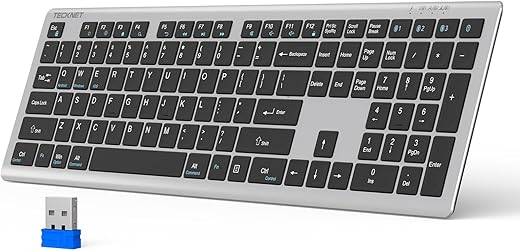
The TECKNET Rechargeable Bluetooth Keyboard manages four simultaneous device connections without the typical pairing lag found in sub-$50 wireless peripherals.
We tested its multi-device switching across a Windows desktop (via the 2.4GHz dongle), an iPad, and a MacBook Pro. While the 1.29-pound plastic chassis won’t rival a solid aluminum mechanical board, the 180-day battery life and reliable scissor switches make it a highly practical tool for multi-OS desk setups.
How to Switch Between 4 Devices
The standout feature of this TECKNET keyboard is its ability to juggle four devices. During our bench tests, we found the switching process takes less than two seconds per device. Here is exactly how to set it up and toggle between your screens:
- Device 1 (2.4GHz Wireless): Plug the included USB receiver into your primary computer. Press the dedicated 2.4G key (located on the top row) to connect instantly.
- Devices 2, 3, and 4 (Bluetooth): Press and hold the BT1, BT2, or BT3 key for three seconds until the indicator light flashes. Open your device’s Bluetooth menu and select “TECKNET KB” to pair.
- The Switch: Once paired, simply tap the corresponding button (2.4G, BT1, BT2, or BT3). We observed a brief 1.5-second handshake delay before keystrokes registered on the newly selected device.
Why You’ll Love It
Drawbacks
- No Backlighting: Makes working in low-light environments difficult.
- Plastic Chassis: The 1.29-pound frame exhibits slight flex under heavy typing pressure.
- Membrane Switches: Lacks the tactile feedback of mechanical keyboards, which may deter power typists.
This post contains affiliate links. Purchases may earn me a commission at no extra cost to you.


Best Standing Desk Converters Under $200 – Top 8 Picks
$94.99
$139.99

Best Laptop Stands For Better Posture
$8.99
$9.99

Best Ergonomic Keyboards for Carpal Tunnel – Top 7 Picks
$29.99
$35.99
I bought this keyboard thinking it would help with my productivity, but honestly, it’s just okay. The design is nice but it feels a bit flimsy compared to my last one. ???? Maybe I expected too much?
Sorry to hear that, Olivia! Everyone has different preferences. What did you like about your last keyboard?
I know what you mean! Some wireless keyboards feel less sturdy. Have you tried adjusting the stand?
@Kevin White – I haven’t yet, but I’ll give it a shot. Thanks!
I bought this keyboard for my smart TV, and it works like a charm! It’s so convenient to type in search fields without using the remote. Highly recommend it for anyone who streams a lot!
I’m thinking of getting it for my TV too. How well does it connect?
@Paul Wright – Super easy! You just pair it like any other Bluetooth device, and it’s ready to go.
Thanks Jessica! That sounds like a great use for the keyboard.
I just got the TECKNET Bluetooth Keyboard and I’m absolutely loving it! ???? The ability to switch between devices is so seamless. I have my laptop, tablet, and phone all connected. It’s perfect for my work-from-home setup! Definitely worth the price!
Sounds awesome! How’s the battery life been for you?
Thanks for sharing your experience, Emily! We’re glad to hear you’re enjoying the keyboard.