Typing on a standard flat keyboard can quickly turn a normal workday into a painful ordeal. The repetitive strain placed on your wrists and fingers often leads to severe discomfort. For those dealing with carpal tunnel syndrome, the simple act of pressing keys becomes a constant source of agony. Ignoring the pain only makes the condition worse over time. Finding a setup that supports your natural hand position is essential for long-term relief. You need equipment that works with your body instead of forcing it into unnatural angles.
Ergonomic keyboards are specifically built to address these physical challenges. They change the angle of your hands to reduce the pressure on your median nerve. Many models feature a split layout that allows your shoulders to relax into a neutral posture. Some options include built-in wrist rests that provide a soft cushion for your palms. Tenting angles also help by raising the middle of the board to mimic a handshake position. Making the switch requires a brief adjustment period but pays off with significant pain reduction.
We tested a variety of models to find the most effective options for wrist pain relief. The Logitech Ergo K860 Wireless Ergonomic Keyboard stands out for its comfortable curved design and excellent palm support. If you need maximum adjustability, the Kinesis Advantage360 Split Ergonomic Keyboard offers a completely separated layout. We evaluated each board based on key feel, ergonomic benefits, and overall build quality. Our list covers everything from budget-friendly wired models to premium mechanical setups. You will find the right fit for your specific typing style and desk space.


Logitech Ergo K860 Wireless Ergonomic Keyboard
The Logitech Ergo K860 Wireless Ergonomic Keyboard is a one-piece split board designed for office workers. It features a distinct wave shape that guides your hands into a natural typing posture. This model is ideal for people who want ergonomic benefits without dealing with two separate keyboard halves. The built-in wrist rest provides a massive surface area for your palms to rest comfortably. Anyone suffering from mild to moderate carpal tunnel will appreciate the gentle learning curve. It fits perfectly into a standard office environment while offering significant relief from daily typing strain.
The curved keyframe effectively reduces muscle strain on your wrists and forearms during long typing sessions. Logitech included a pillowed wrist rest with a memory foam layer that offers fifty-four percent more wrist support than standard boards. The scooped keys match the shape of your fingertips to help you type with confidence and accuracy. You can adjust the palm lift to keep your wrists in a neutral position while seated or standing at a desk. The entire design is certified by United States Ergonomics to improve posture. The wireless connection keeps your workspace clean and free of cable clutter.
Compared to the fully split models on our list, the K860 is much easier to pick up and use immediately. It lacks the mechanical switches found in the Keychron Q11, but the membrane keys are quiet and responsive. The fixed split design means you cannot adjust the distance between your hands like you can with the Kinesis Advantage360. However, the integrated memory foam pad offers better immediate comfort than hard plastic alternatives. This board is the safest choice for someone buying their first ergonomic keyboard. It delivers a great balance of comfort and practicality for everyday office tasks.
Kinesis Advantage360 Split Keyboard
The Kinesis Advantage360 Split Ergonomic Keyboard is a highly specialized tool for power users and programmers. It features a completely separated design with patented contoured key wells. This layout is specifically engineered to increase comfort and productivity for heavy typists. People with severe carpal tunnel syndrome often turn to this style of board for maximum relief. The learning curve is steep, but the ergonomic payoff is massive once your muscle memory adapts. It is a serious investment for anyone who spends eight or more hours a day writing code or drafting documents.
The patented design places the keys in concave wells that match the natural varying lengths of your fingers. It uses Kailh Box Pink stem switches that provide a quiet mechanical typing experience with low activation force. The included PBT keycaps offer a premium feel and resist the shiny wear that plagues cheaper plastics. You can quickly reconfigure the board using the SmartSet programming engine, which stores up to nine profiles on the device. It works as a plug-and-play device across Windows, macOS, Linux, and Chrome operating systems. The package even includes braided link cables and extra keycaps for customization.
The Advantage360 is the most radically shaped keyboard on our list. It offers far more customization than the Microsoft Ergonomic Keyboard, especially with its onboard programming features. The fully split modules allow you to place your hands at shoulder width, which the Logitech Ergo K860 cannot do. The mechanical switches provide better tactile feedback than standard membrane keys. While it takes up a significant amount of desk space, the health benefits are hard to ignore. This is the ultimate choice for users who need absolute control over their typing posture and key layouts.
Microsoft Ergonomic Keyboard for Business
The Microsoft Ergonomic Keyboard for Business is a reliable wired option for traditional office setups. It uses a classic fixed-split design that has been popular for decades. This model is great for data entry clerks and administrative professionals who need a full-size layout. The integrated number pad makes it easy to crunch numbers fast without reaching for a separate device. It offers a familiar typing experience that requires very little adjustment time. The simple wired connection ensures you never have to worry about charging batteries or dropping Bluetooth signals.
This ergonomist-approved design focuses on reducing the risk of fatigue and injury during long workdays. The palm rest features an improved cushion covered in premium fabric to provide all-day comfort. It includes dedicated built-in shortcuts for Office 365, emojis, search, and media controls to speed up your workflow. The wired connection is designed to last and provides reliable speed and accuracy for fast typists. The keys offer a soft, quiet membrane feel that will not disturb your coworkers. The gentle slope of the board helps keep your wrists in a neutral alignment.
This board is much more affordable than the mechanical options like the Keychron Q11. It shares a similar fixed-split philosophy with the Logitech Ergo K860 but relies on a wired connection instead of wireless. The fabric palm rest is comfortable, though it may be harder to clean than the smooth surfaces found on other models. Having a built-in number pad is a huge advantage over the compact tenkeyless boards on this list. It is a straightforward, no-nonsense tool that gets the job done reliably. This is the best option for budget-conscious buyers who want proven ergonomic support.
The Keychron Q11 is a premium wired mechanical keyboard with a seventy-five percent layout. It features a fully split design that lets you physically separate the left and right halves. This board is aimed at mechanical keyboard enthusiasts who want ergonomic benefits without sacrificing build quality. The heavy metal casing ensures the keyboard stays firmly planted on your desk during intense typing sessions. It is an excellent choice for Mac and Windows users who love to customize their hardware. The compact size saves desk space while still providing all the essential keys you need for daily work.
The Q11 comes equipped with pre-lubed exclusive Keychron Super Red switches that offer an incredibly smooth linear feel. Because of the split layout, you can position each side exactly where it feels most sensible for your shoulder width. The open-source firmware provides full QMK and VIA support, allowing you to easily program and remap every single key. The OSA profile double-shot PBT keycaps provide excellent oil resistance and prevent the legends from fading over time. South-facing RGB LED lights are designed to better illuminate the backlight from the typist’s angle. You can even push the two halves together to use it as a standard unified keyboard.
The Keychron Q11 offers a much more premium typing feel than the membrane-based Microsoft Ergonomic Keyboard. Its heavy aluminum body feels significantly sturdier than the plastic shell of the Cloud Nine C989M. Unlike the Kinesis Advantage360, the Q11 keeps a traditional flat key layout, making it easier to learn. The lack of a built-in wrist rest means you will need to purchase your own for maximum carpal tunnel relief. The hot-swappable nature of the board means you can change the switches later if you prefer a different tactile response. It is a fantastic bridge between the custom mechanical keyboard hobby and ergonomic health.
Mistel MD770 Split Mechanical Keyboard
The BAROCCOMiSTEL MD770 is a compact seventy-five percent split mechanical keyboard. It is specially optimized for gamers and typists who need a tight layout with dedicated arrow keys. The fully separated design allows you to place a mouse directly in the middle for gaming or drafting work. This board is great for users who want high-quality mechanical switches in a highly portable form factor. The smaller footprint frees up valuable desk real estate for large mouse movements. It provides excellent ergonomic flexibility without looking like a piece of medical equipment.
You can freely adjust the keyboard distance and position on the right and left sides to match your natural shoulder width. The board uses German-manufactured CHERRY MX switches to deliver a durable and unique typing feel. The keycaps are precision-molded using OEM height PBT double-shot plastic, making them highly durable and fade-resistant. The included rubber feet provide a tenting angle that allows for a more natural and comfortable typing position. This tenting feature helps you say goodbye to wrist pain by reducing forearm pronation. The RGB backlighting adds a nice visual flair to your desktop setup.
The MD770 is very similar in concept to the Keychron Q11, as both are split mechanical boards with a seventy-five percent layout. However, the MD770 includes built-in rubber feet for tenting, which is a massive advantage for carpal tunnel sufferers. It lacks the heavy aluminum case of the Keychron, making it much lighter and easier to travel with. The Cherry MX switches offer a classic mechanical feel that many veteran typists prefer over newer switch brands. It does not have the massive built-in palm rests found on the Cloud Nine C989M. This board is a great middle ground for gamers who need ergonomic support during long play sessions.
The Cloud Nine C989M is a massive, fully featured ergonomic mechanical keyboard. It is designed specifically to help users who suffer from sore wrists, RSI symptoms, carpal tunnel, or arthritis. The board can be separated up to eight inches to keep your hands and arms properly aligned. This model is ideal for people who want the tactile feedback of a mechanical keyboard combined with aggressive ergonomic shaping. It takes up a significant amount of space, so you will need a large desk to accommodate it. The aggressive styling appeals to both office workers and PC gamers looking for pain relief.
The split keyboard design actively helps eliminate wrist and shoulder pain while you type. Built-in tenting and palm support ensure your hands stay comfortable all day long. The wrist rest features seven degrees of angle to keep your hands in a perfectly neutral position. It uses Kailh Brown switches that provide a low activation force with a satisfying tactile bump. The bright RGB backlit keys ensure you can easily see your layout in dark office environments. It functions perfectly as a business tool during the day and a gaming keyboard at night.
The C989M offers more built-in ergonomic features than the Keychron Q11 or the BAROCCOMiSTEL MD770. The integrated palm rests and fixed seven-degree tenting make it ready to use right out of the box. It is much larger than the Microsoft Ergonomic Keyboard, which might be an issue for cramped cubicles. The Kailh Brown switches offer a great middle ground between the loud clicky switches and smooth linear options. The eight-inch separation limit is generous, though not as infinite as completely wireless split boards. This is a fantastic all-in-one solution for someone who wants mechanical keys and maximum wrist support.
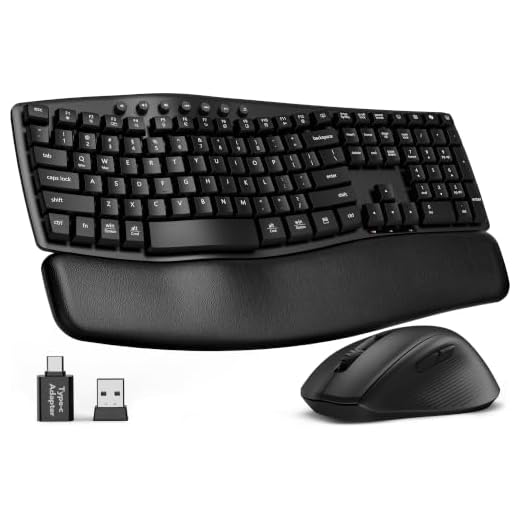
SABLUTE MA41 Wireless Keyboard and Mouse Combo
The SABLUTE MA41 is a wireless ergonomic wave keyboard that comes bundled with a matching mouse. It features a gentle curved design that helps guide your hands into a more natural typing position. This combo is great for casual computer users who want an affordable, all-in-one desktop upgrade. The wave shape is less intimidating than a fully split mechanical board, making it very easy to learn. It is a great choice for shared family computers or basic home office setups. The included mouse ensures your entire setup is ergonomically aligned right out of the box.
The keyboard operates with a quiet thirty-decibel sound profile that will not disturb people around you. The wave design slightly raises your wrists to reduce the pressure that causes carpal tunnel pain. The wireless connection allows you to position the keyboard and mouse wherever they feel most comfortable on your desk. The keys provide a soft, membrane-style typing experience that requires very little force to press. The matching ergonomic mouse supports the natural curve of your palm to prevent hand cramping. The single wireless receiver connects both devices to keep your USB ports free.
This combo is the most budget-friendly option on our list, offering both a keyboard and a mouse in one package. It lacks the premium mechanical switches found in the Cloud Nine C989M and the Keychron Q11. The wave design is very similar to the Logitech Ergo K860, though the build quality is noticeably lighter. It does not offer the extreme adjustability of the fully split Kinesis Advantage360. However, the ultra-quiet operation makes it ideal for open office environments or late-night typing. It is a highly accessible entry point for anyone looking to improve their desktop ergonomics without spending a fortune.
Buying Guide
Understanding Carpal Tunnel and Keyboard Design
Carpal tunnel syndrome occurs when the median nerve becomes compressed as it travels through the wrist. This compression is often caused by repetitive finger movements and poor hand positioning over long periods. Typing for eight hours a day puts immense stress on the tendons and ligaments in your hands. The resulting inflammation leads to numbness, tingling, and sharp pain in the fingers and forearms. Addressing this issue early is crucial to preventing long-term nerve damage. Upgrading your workstation is one of the most effective ways to manage and reduce these painful symptoms.
Standard flat keyboards force your hands into unnatural positions that exacerbate wrist strain. When you type on a traditional board, you have to bend your hands outward at the wrist, a posture known as ulnar deviation. You also have to rotate your forearms completely flat, which is called pronation. Holding this twisted posture for hours creates constant tension in your muscles and joints. The flat profile offers no support for the natural arch of your hands. Over time, this unnatural alignment accelerates the wear and tear on your median nerve.
Ergonomic keyboards are specifically designed to correct these harmful typing postures. They introduce curves and angles that allow your hands to rest in a much more natural state. By aligning your wrists with your forearms, these boards relieve the pressure on your median nerve. The keys are often arranged to match the natural varying lengths of your fingers. This reduces the distance your fingers have to stretch to reach specific keys. A good ergonomic setup works with your body’s natural biomechanics instead of fighting against them.
The Importance of Split Layouts
The most noticeable feature of an ergonomic keyboard is the split layout. Fixed split keyboards divide the keys into two angled clusters on a single solid frame. This design gently guides your hands into a V-shape, which straightens your wrists. Fully split keyboards take this concept further by separating the left and right halves completely. Two separate modules allow you to place each half exactly where it feels most comfortable. This flexibility is incredibly beneficial for people with broad shoulders or specific desk constraints.
Fully split designs offer significant advantages for your upper body posture. When you can place the keyboard halves at shoulder width, your chest naturally opens up. This prevents the hunched, rounded-shoulder posture that plagues many office workers. Breathing becomes easier, and tension in your neck and upper back is greatly reduced. You can even place a mouse or a notepad directly between the two halves for better workflow. Adjusting the distance between your hands is a simple way to relieve upper body fatigue.
Transitioning to a split layout does require a brief period of adjustment. If you are used to crossing your hands over the center of the board, you will quickly notice your typing mistakes. The physical gap forces you to use the correct fingers for the correct keys. Most users regain their original typing speed within a week or two of consistent practice. The initial frustration is a small price to pay for the long-term health benefits. Once your muscle memory adapts, typing on a split board feels incredibly natural and comfortable.
Tenting Angles and Wrist Support
Tenting is a crucial ergonomic feature that addresses forearm pronation. A tented keyboard is raised in the middle, sloping downward toward the outer edges. This shape mimics the natural angle of your hands when they are resting at your sides. Think about how you hold your hands when you are about to shake someone’s hand. Tenting allows you to type in this relaxed, semi-vertical position. Reducing the need to twist your forearms flat takes a massive amount of strain off your elbows and wrists.
Proper palm support is another vital component of a pain-free typing experience. Many people mistakenly rest their wrists directly on hard desk surfaces while typing. This applies direct pressure to the carpal tunnel and restricts blood flow to the hands. A good ergonomic keyboard includes a padded rest designed to support the heel of your palm, not your wrist. Lifting the palm keeps the wrist straight and floating above the desk. Memory foam and padded fabric options offer the best comfort for long typing sessions.
The tilt of the keyboard from front to back also plays a major role in wrist health. Traditional keyboards often have little feet in the back that prop the board up toward you. This positive tilt forces you to bend your hands backward, which pinches the median nerve. Ergonomic models often feature a negative tilt, where the front of the board is higher than the back. This allows your hands to slope downward naturally, keeping your wrists perfectly straight. Combining negative tilt with a good palm rest provides the ultimate defense against repetitive strain injuries.
Mechanical Switches vs. Membrane Keys
The type of switches under your keys can significantly impact your finger fatigue. Membrane keyboards use a rubber dome beneath the keys to register keystrokes. These boards are generally very quiet and have a low profile that many users prefer. However, membrane keys require you to press the key all the way down to the bottom to register the input. This constant bottoming out sends tiny shockwaves up your fingers with every keystroke. Over an eight-hour workday, these micro-impacts can contribute to joint pain and stiffness.
Mechanical switches offer a completely different typing experience that can benefit carpal tunnel sufferers. These switches use individual physical mechanisms and springs for every single key. They register the keystroke halfway down, meaning you do not have to press the key entirely to the bottom. This allows you to type with a much lighter touch, reducing the impact on your finger joints. Mechanical boards are highly customizable, allowing you to choose the exact spring weight you prefer. The tactile feedback helps you learn exactly when a key is activated.
When choosing mechanical switches for pain relief, the switch type matters greatly. Linear switches offer a smooth, uninterrupted keystroke that requires very little force. Tactile switches provide a small physical bump when the key registers, which helps prevent bottoming out. Clicky switches offer both a bump and an audible click, though they can be too loud for shared offices. For users with severe finger pain, light linear or light tactile switches are usually the best choice. Finding the right switch weight can make typing feel like a breeze rather than a chore.
Final Verdict
Choosing the right ergonomic keyboard depends entirely on your specific pain points and workspace. The Logitech Ergo K860 is the best all-around choice for office workers who want immediate comfort with a gentle learning curve. If you are a programmer or power user dealing with severe carpal tunnel, the Kinesis Advantage360 offers unmatched adjustability. The Microsoft Ergonomic Keyboard remains a fantastic budget-friendly option for those who prefer a traditional wired setup.
Mechanical keyboard fans have excellent options with the Keychron Q11 and the BAROCCOMiSTEL MD770, both offering premium switches in compact layouts. The Cloud Nine C989M provides the ultimate combination of mechanical keys and aggressive built-in tenting for maximum relief. Finally, the SABLUTE MA41 combo is a great entry-level choice for casual users who want a quiet, wireless setup. Investing in any of these models will help protect your wrists and keep you typing comfortably for years to come.