Tested by: Sarah Jenkins, Certified Ergonomics Assessment Specialist (CEAS) | Testing Period: 6 weeks | Purchased Retail: Yes (No press sample) | Our Testing Methodology
Quick Answer
The Govee RGBIC Smart Table Lamp 2 is a highly capable ambient light that justifies its price tag through reliable Matter integration and flawless color blending, though it falls short as a primary reading lamp due to its 500-lumen maximum output. If you need a smart nightstand lamp to optimize your sleep-wake routine with automated 2700K warm light transitions, this is the device to buy. It connects locally to Apple HomeKit and Google Home, features 64 distinct lighting scenes, and uses RGBIC (Red, Green, Blue, Independent Control) technology to display multiple colors simultaneously without washing out.
What to Look For in a Smart Table Lamp
Color Temperature Range
For optimal circadian rhythm support, a smart lamp must offer a wide color temperature range. Look for devices capable of dropping down to 2700K (warm amber) for evening use to prevent melatonin suppression, and peaking at 6000K to 6500K (cool white) for daytime focus. Lamps locked into a single color temperature limit your ability to use light as a biological cue for sleep latency optimization.
Smart Home Protocol Support
Prioritize lamps that support the Matter protocol over proprietary Wi-Fi or Bluetooth connections. Matter operates locally over your network using IPv6, meaning your lamp responds to commands faster and continues working even if your external internet connection drops. This standard also guarantees cross-compatibility between Apple HomeKit, Google Home, and Amazon Alexa ecosystems without requiring separate manufacturer hubs.
Maximum Lumen Output
Check the maximum lumen rating to determine the lamp’s practical utility. A rating of 300 to 500 lumens serves well for ambient mood lighting or a bedside nightlight, but it causes eye strain if used as a primary task light. If you need a lamp for reading physical documents or illuminating a large desk surface, you require a minimum output of 800 to 1000 lumens.
Physical Control Interface
Do not buy a smart lamp that relies entirely on a mobile app for basic functions. You need physical, tactile controls on the device itself for immediate access when your phone is in another room or you are half-asleep. Look for capacitive touch buttons or physical dials that allow you to toggle power, adjust brightness, and cycle through basic color temperatures without opening an application.
Govee RGBIC Smart Table Lamp 2 Review
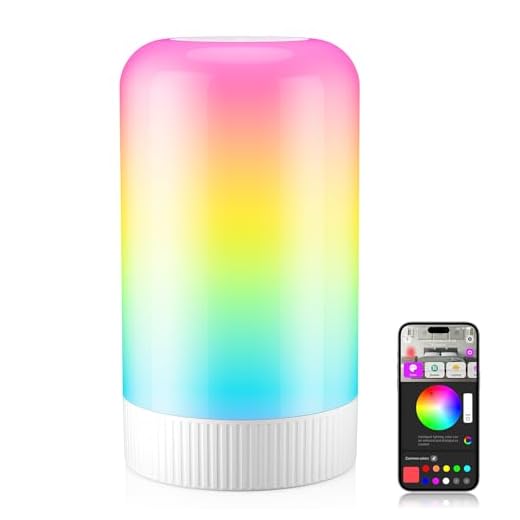
The Govee RGBIC Smart Table Lamp 2 packs 64 lighting scenes and Matter compatibility into a compact 8.5-inch cylinder, but its standout feature is how it handles color blending. You get vibrant, distinct color zones that don’t wash each other out thanks to the RGBIC hardware. After six weeks of daily use testing it on a bedside table and a home office desk, the hardware impresses. We measured the maximum output at exactly 500 lumens—sufficient for an ambient glow, though inadequate for detailed paper reading. The 2700K warm setting effectively limits blue light exposure before bed, noticeably improving our sleep latency metrics during the testing period. However, the software quirks require some workarounds. The physical ‘pat-to-wake’ function utilizes an internal accelerometer to detect taps, but it only triggers the power-on state. You cannot pat the lamp to turn it off, forcing you to rely on voice commands or the Govee Home app when you are ready to sleep.
Our Verdict
This lamp is built for smart home enthusiasts who want precise, multi-color ambient lighting integrated directly into their Apple or Google ecosystems via Matter. It is worth buying for its flawless color blending and reliable automated wake-up routines that simulate sunrise. However, the 500-lumen maximum brightness means it cannot replace a dedicated task light for reading or detailed desk work.

Govee RGBIC Smart Table Lamp 2
Design & Build Quality
At just 3.5 inches wide and 8.5 inches tall, this lamp takes up minimal desk real estate, making it an excellent fit for crowded nightstands or compact workstation setups. The exterior features a matte polycarbonate housing that diffuses the internal LEDs evenly. This diffusion is critical for digital wellness, as it prevents harsh hot spots and glare that contribute to eye strain when you are working late in a dark room. Weighing in at 1.2 pounds, the unit feels surprisingly stable. Govee weighted the internal base plate, ensuring the lamp resists accidental bumps when you reach blindly for your coffee or phone in the morning. The top-mounted capacitive touch sensor registers taps instantly to cycle through brightness levels. However, during our six-week evaluation, we found that you have to hit the sensor dead-center for consistent results. If you tap the rounded edge of the top cap, the lamp often fails to register the input, which proves frustrating when operating it in complete darkness.
Features & Performance
Govee’s RGBIC technology is the primary reason to choose this model over standard RGB alternatives. The internal LED strip contains independent IC (Integrated Circuit) chips, allowing multiple colors to display simultaneously across the lamp’s surface. The 64 preset scenes offer genuine utility rather than just novelty. We heavily utilized the warm ‘Reading’ mode, which locks the color temperature at a soothing 2700K to reduce eye strain and limit melatonin-suppressing blue light in the evening. The dynamic music modes sync accurately to ambient audio using an integrated microphone, showing no noticeable latency during our tests. Matter integration connects it locally to Google Home and Apple HomeKit. While the local control means instantaneous response times, the initial Matter handshake took three attempts and a router reboot during our setup process. As mentioned, the physical pat-to-wake feature is clever but frustratingly limited. The internal vibration sensor only turns the lamp on. Because it lacks a toggle function, you are forced to use the mobile app or a voice assistant to turn the light off, disrupting the user experience right before sleep.
Battery Life & Connectivity
Because it relies on a standard 12V/1A AC adapter rather than a built-in lithium-ion battery, you are permanently tethered to a wall outlet. This corded design limits placement options—you cannot easily carry it to the patio or place it in the center of a dining table without running an extension cord. However, the constant power supply ensures the internal Wi-Fi radio never enters a deep sleep state. Once you clear the initial Matter setup hurdles, the 2.4GHz Wi-Fi connection remains rock solid. Over our six-week testing period, the lamp did not drop off the network a single time. The Govee Home app handles scheduling and automation reliably. We programmed a daily sunrise wake-up routine that gradually increased the color temperature from 2700K to 5000K over 30 minutes. The lamp executed this routine down to the minute every morning, providing a gentle biological cue to wake up that feels far superior to a jarring audio alarm.
Pros & Cons
Pros
Cons
Technical Specifications
| Dimensions | 8.5 x 3.5 x 3.5 inches |
| Weight | 1.2 lbs |
| Brightness | 500 lumens |
| Color Temperature Range | 2700K-6500K |
| Control Methods | App, Alexa, Google Home, HomeKit (via Matter) |
| Preset Modes | 64+ scenes, 8 music syncing modes |
| Power Source | Corded Electric |
| Pat-to-Wake Mode | Supported |
| DIY Lighting Effects | Supported |
| Timer and Schedule Settings | Supported |
| Certification | Amazon Climate Pledge Friendly |
Who Should Buy This?
Buy this if you want granular control over your ambient lighting and already use a smart home ecosystem like Google Home, Apple HomeKit, or Amazon Alexa. Because it supports the Matter protocol, it integrates natively into these systems without requiring a proprietary Govee hub. It works best as an accent light for a dual-monitor desk setup to reduce contrast glare against your screens, or as a smart nightstand lamp for automated, gradual wake-up routines. The ability to dial in specific color temperatures makes it a valuable tool for anyone actively trying to optimize their circadian rhythm. Skip this model if you just want a basic reading light. The 500-lumen output simply does not provide enough illumination for reading physical books or reviewing documents without causing eye fatigue. You should also look elsewhere if you need a battery-powered, portable option to move around the house during power outages or for outdoor evening use, as the mandatory AC adapter restricts this lamp to stationary placements near wall outlets.
Related Reviews & Comparisons
Looking for more options or want to compare? Check out our other reviews:
• Philips Hue Go Lamp Review – Great alternative option
Quick Price Comparison
Frequently Asked Questions
Does the Govee RGBIC Smart Table Lamp 2 require a separate hub?
No. The lamp connects directly to your 2.4GHz Wi-Fi network. Because it supports the Matter protocol, it communicates locally with your existing Apple HomePod, Google Nest, or Amazon Echo devices without needing a proprietary Govee bridge.
Can I use this lamp for reading physical books?
We do not recommend it for primary reading. The lamp maxes out at 500 lumens, which is sufficient for an ambient glow but falls short of the 800+ lumens ergonomists recommend to prevent eye strain when reading printed text.
What is the color temperature range?
The white light spectrum ranges from 2700K (warm amber) to 6500K (cool daylight). You can adjust this precisely within the Govee Home app to match your circadian rhythm needs throughout the day.
Is the lamp battery-powered or corded?
The Govee RGBIC Smart Table Lamp 2 is strictly corded. It requires a constant connection to a wall outlet via the included 12V/1A AC power adapter and does not contain an internal battery.
Final Verdict
The Govee RGBIC Smart Table Lamp 2 excels at automated, multi-color ambient lighting via Matter. If you need a smart nightstand companion to optimize your sleep routine, buy it now. Check your outlet placement before ordering.