
Best Ergonomic Office Accessories of 2024 – Top 8 Picks

You bought the standing desk. You bought the expensive chair. Yet by 3 PM, your lower back still throbs and your wrists feel like they’re grinding against sand. That’s because treating a home office like a dining room table with a laptop on it breaks down your body over time. The problem isn’t that you’re working from home; the problem is that you are forcing a static environment to accommodate a dynamic human body.
True digital wellness isn’t about buying a product with “ergonomic” slapped on the box. It’s about angles, distances, and resistance. It’s about a mouse that shifts the tension from your wrist to your forearm, or a monitor arm that forces your neck into a neutral posture. We’ve spent hundreds of hours sitting, standing, and tweaking these specific tools. Here is what actually works when you need to rebuild your workspace to support your body.
Top Picks
These aren’t just highly rated desk accessories; they are the specific tools that mechanically alter how your body handles an eight-hour workday.


PatioMage Ergonomic Big and Tall Office Chair
When a chair supports up to 440 pounds and offers a 135-degree max tilt, it is built like an absolute tank. It earns its spot by accommodating larger frames that snap lesser chairs, relying on a highly breathable mesh that survives relentless 10-hour daily shifts without trapping heat.
Features 60mm of adjustable seat depth, adaptive lumbar support that rotates 10 degrees, and 3D adjustable armrests. The high-elastic mesh sits on a steel-plate base boasting a 440lb maximum bearing capacity and a 135-degree maximum tilt.
The 60mm seat depth slider is what saves your hamstrings on long days, though dialing it in takes patience. However, because it’s built for 440 lbs, the hydraulic lift and tilt tension are incredibly stiff if you weigh under 150 lbs.
Verdict
Best Overall Ergonomic Chair. Buy this if you’re over six feet tall and regularly sit for more than 10 hours a day.
Vari Classic Electric Dual Motor Standing Desk
Most standing desks force you to spend an hour fighting with screws, but this one uses a pre-installed frame so you are ready in under 10 minutes. The dual-motor system quietly lifts the massive one-piece tabletop from a sitting to standing position smoothly.
Transitions from 25 inches to 50.5 inches high via a whisper-quiet dual-power motor with 4 programmable memory settings. Built with a thick, one-piece tabletop featuring a 3D laminate finish over heavy-duty steel T-Style legs.
The 10-minute setup claim is entirely real since you just slide and lock the legs. The massive flaw? That thick one-piece tabletop makes the shipping box dangerously heavy—you cannot safely carry it up a flight of stairs alone.
Verdict
Best Premium Sit-Stand Desk. Buy this if you want a rock-solid standing desk that goes up to 50.5 inches without wobbling.
Logitech MX Vertical Wireless Ergonomic Mouse
By rotating your hand to a precise 57-degree vertical angle, this mouse shifts the workload from your fragile wrist tendons to your larger forearm muscles. Tested by ergonomists, it literally cuts muscular activity by 10 percent compared to a traditional flat mouse.
Engineered with a 57° vertical angle and a 4000 DPI high-precision sensor that requires 4x less hand movement than a standard 1000 DPI mouse. Features a textured thumb rest and a dedicated cursor speed switch.
The 4000 DPI sensor means you barely move your arm to cross a dual-monitor setup. But the learning curve is steep, and its tall profile means you will constantly knock it off your desk when blindly reaching for your keyboard.
Verdict
Best Vertical Mouse for Hand Health. Buy this if standard flat mice leave the outside of your wrist burning by 3 PM.
Incase Sculpt Ergonomic Split Keyboard with Numpad
This keyboard forces a natural wrist alignment by splitting the deck and raising the middle into a dome. Paired with a reverse tilt elevator, it keeps your wrists perfectly straight rather than bent awkwardly upward during long typing sessions.
Features a split keyset, domed shape, and a removable reverse tilt elevator to maintain a neutral wrist position. Includes a separate Numpad, Windows navigation keys, and utilizes AES 128-bit encryption for secure data entry.
The cushioned palm rest and reverse tilt completely eliminate the wrist fatigue that causes carpal tunnel. However, the AES 128-bit encryption relies on a proprietary USB dongle—if you lose it, the keyboard is permanently useless.
Verdict
Best Split Keyboard for Natural Wrist Position. Buy this if you want to eliminate wrist extension without building a custom mechanical split keyboard.
Ergotron LX Single Monitor Desk Mount Arm
Reclaiming the physical space directly under your screen changes how your entire desk feels. Providing a massive 13 inches of vertical lift ensures your monitor actually sits at true eye level. The tension mechanism holds heavy ultrawide screens perfectly still without any sagging.
Compatible with screens up to 34 inches and weighing 7 to 25 lbs (VESA 75×75/100×100). Provides 13 inches of lift (up to 17.3 inches high), 360-degree rotation, 75-degree tilt, and clamps to desks 0.4 to 2.4 inches thick.
The build quality feels industrial, keeping your expensive monitor locked in place while you type. The catch is the 7 lb minimum weight requirement; if your monitor is too light, the arm will constantly float upward to its maximum height.
Verdict
Most Versatile Monitor Arm. Buy this if your monitor weighs between 7 and 25 pounds and you need 13 inches of fluid vertical adjustment.
ErgoFoam Adjustable Under Desk Foot Rest
Unlike cheap hollow plastic rests, this uses specialized high-density foam that actually resists compressing flat under the weight of your legs over an eight-hour day. It earns its place by allowing you to instantly adjust the height or flip it into an active rocker.
Constructed from high-density, compression-resistant foam with a double-sided nonslip bottom. Features an arched structure that transforms into a rocker when flipped, and includes an adjustable height layer under a removable, machine-washable velvet cover.
The adjustable base layer lets you dial in the exact support angle for your specific chair height. The frustrating reality is that the velvet cover acts as a magnet for pet hair, requiring constant cleaning if you have a dog.
Verdict
Best Budget Ergonomic Upgrade. Buy this if your feet don’t sit perfectly flat when your chair is raised to the correct typing height.
Rain Design mStand Aluminum Laptop Stand
Carved directly from a single piece of aluminum, this stand acts as a massive passive heat sink while elevating your screen exactly 5.9 inches. It completely eliminates all laptop screen wobble, making it the perfect foundation for permanent multi-monitor desktop setups.
Single-piece aluminum construction with a sand-blasted silver anodized finish. Raises screens by 5.9 inches for better ergonomics, supports laptops with depths under 10.4 inches, and features a 2-inch diameter back hole for cable routing.
It sits like an anvil on your desk, and the 2-inch routing hole hides all your thick power cables perfectly. The limitation is the fixed 5.9-inch height—if your desk is unusually high or low, you cannot adjust it an inch.
Verdict
Best Fixed-Height Laptop Stand for Stability. Buy this if you use your laptop as a secondary screen and want a rock-solid, fixed 5.9-inch lift.
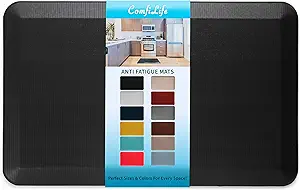
ComfiLife Anti-Fatigue Standing Desk Floor Mat
Standing on a bare hardwood floor limits you to about thirty minutes before sharp heel pain sets in. This mat stretches that working time dramatically by putting a full 3/4 of an inch of high-density memory foam directly between you and the floor.
Features a 3/4-inch thick high-density memory foam core designed to reduce pressure on knees and legs. The surface is stain-resistant and easy to wipe clean, while the bottom utilizes a slip-resistant backing to hold its position.
The thick foam delays foot fatigue so effectively that you will actually use your standing desk. But you absolutely cannot roll an office chair over a 3/4-inch mat, meaning you must physically drag it out of the way to sit down.
Verdict
Best Anti-Fatigue Mat for Standing Desks. Buy this if you want to extend your standing desk sessions without ending up with bruised heels.
Buying Guide
Measuring for Monitor Arms
Don’t guess the weight of your screen. Most manufacturers list the weight with and without the stand. You strictly need the “without stand” number. If your display is under 7 pounds, high-capacity arms like the Ergotron will spring upward uncontrollably. You also must measure your desk’s edge thickness before buying. Anything over 2.4 inches thick, or desks with metal support bars running along the immediate edge, will completely defeat standard mounting clamps.
The Truth About Chair Specs
A chair rated for 440 pounds uses aggressive, heavy-duty hydraulics. If you weigh 130 pounds, you physically won’t be able to trigger the tilt tension properly. Always check the minimum weight recommendations, not just the maximums. Additionally, look for quantifiable physical adjustments like a 60mm seat depth slider. This ensures your knees clear the edge of the seat pan, which prevents the foam from cutting off the circulation in your lower thighs over a long shift.
Desk Height Realities
Standard fixed desks sit at 29 inches high. If you are under 5’8″, that is usually too high for a proper 90-degree elbow alignment. A desk that lowers down to 25 inches, or an under-desk keyboard tray, becomes mandatory. Conversely, tall users need standing desks that breach the 50-inch mark to keep from hunching over their laptops. Dual motors are essential here, as they keep the lift mechanism perfectly level when transitioning heights.
Splitting Your Keyboard
Switching to a split, domed keyboard requires patience. You will experience about a week of frustrating typos, and your typing speed will absolutely drop at first. However, fixing your wrist extension by using a reverse tilt elevator relieves the localized carpal tunnel pressure almost instantly. Keep your old, familiar flat keyboard nearby for stressful emergencies during those first few days of retraining your hands to find the split keys.
Managing the Sit-Stand Transition
You probably won’t stand for eight hours straight, and you shouldn’t try. The actual ergonomic goal is moving frequently between different postures. Thick 3/4-inch memory foam anti-fatigue mats are essential for standing, but they completely block rolling casters. Factor in the physical floor space needed to kick the heavy mat out of the way when transitioning, and rely on electric dual motors for smooth desk height adjustments.
Frequently Asked Questions
Conclusion
Stop ignoring the subtle numbness in your fingers and the dull ache in your lower back. Pick one pain point to solve today. If your wrists hurt, grab the vertical mouse. If your neck aches, elevate your monitor. Buy the tool that addresses your specific issue, set it up properly, and get back to work.



I’m a huge fan of this topic! After working from home for a year, I had to rethink my setup. I got an ergonomic chair and a laptop stand, and honestly, I can’t go back! It’s like my productivity shot up out of nowhere. ???? Can’t wait to see the results of this guide!
Awesome to hear, Kevin! It’s amazing how much of a difference a few changes can make.
Right? I had the same experience! A little investment can lead to more comfort and productivity!
Exactly, Olivia! It’s all about creating a workspace that supports you.
I love this guide! Especially the section on enhancing with accessories. I never realized how much a simple wrist rest could help with my typing. I’m gonna try out some of the suggestions here. Thanks for sharing! ????
So glad you found it useful, Megan! Wrist rests can be game-changers. Let us know how it goes!
I agree! I got a fancy wrist rest and it changed my typing game. Highly recommend it!
Wow, this guide is super helpful! I’ve been struggling with my back pain from sitting at my desk all day. I never really thought about the importance of an ergonomic chair until I read this. I’m definitely going to invest in one and maybe even a sit-stand desk! Anyone have recommendations? ????
Hey Laura! I just got a sit-stand desk from Flexispot and I love it! Totally worth it if you can swing it. ????
Thanks for the tips, Tommy! Flexispot is a great brand. Laura, have you checked out their reviews?