Physical timer cubes are the most effective way to enforce the Pomodoro technique without falling into smartphone distraction traps. In our testing, we found that having a dedicated physical object for time management creates a strict boundary between work and leisure. We tested several options to find the most reliable and user-friendly models available.
This guide covers our top seven picks for productivity timer cubes. We look closely at preset intervals, custom timing options, and alert methods like vibration or silent flashing. You will find detailed breakdowns of how each device performs in real-world settings. Read on to discover which timer matches your specific workflow and workspace requirements.

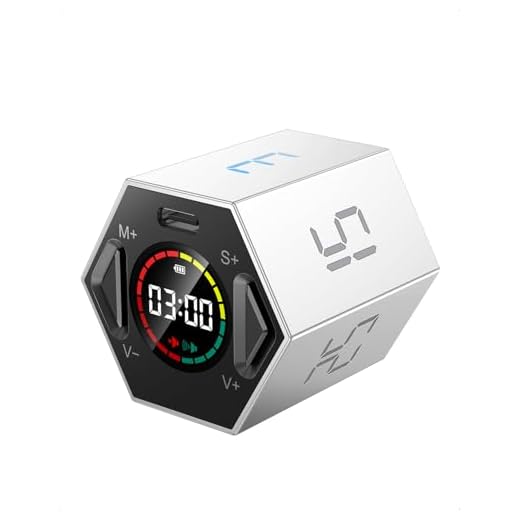


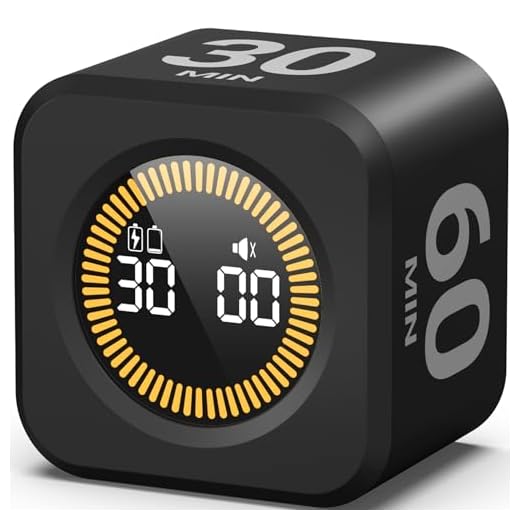

#1 Ticktime Pomodoro Timer, Productivity Timer Cube, 3/5/10/15/25/30 Min
Ticktime Pomodoro Timer Cube
The Ticktime Pomodoro Timer is a compact digital cube with a built-in gyroscope sensor. Flipping the cube to the desired number starts the countdown immediately. It includes preset times of 3, 5, 10, 15, 25, and 30 minutes, plus custom countdowns up to 99 minutes and 59 seconds. A stopwatch mode tracks open-ended tasks. Alerts include sound, vibration, or a silent flash, making it adaptable for shared offices.
#2 Rotating Pomodoro Timer 5, 25, 10 50 Minutes Preset, Desk
Rotating Pomodoro Timer for Focused Work
This Rotating Pomodoro Timer uses a gravity sensor to activate preset intervals of 5, 10, 25, and 50 minutes. The digital interface supports custom adjustments up to 99 minutes. It features high volume, low volume, and a silent vibration mode. The 50-minute preset specifically accommodates double Pomodoro sessions.
#3 Rotating Pomodoro Timer 5, 25, 10 30,60 Mins Preset Stopwatch, Desk
Hexagon Pomodoro Flip Timer
This Rotating Pomodoro Timer features preset intervals of 5, 10, 25, 30, and 60 minutes, activated by turning the device. It functions as a standard stopwatch for open-ended activities and includes a clear digital display. The 60-minute preset supports longer work blocks.
#4 TK3 Pomodoro Timer Cube, Desk Productivity Timer with 5/10/30/60 Min
Ticktime TK3 Pomodoro Timer Cube
The TK3 Pomodoro Timer Cube activates by resting the device on a specific side. It offers preset times of 5, 10, 30, and 60 minutes, catering to users who prefer longer focus blocks. The small footprint saves desk space, and the display is easy to read at a glance.
#5 KADAMS Pomodoro Timer – Visual Cube with 5/10/30/60 Min Presets, LED
KADAMS Visual Cube Pomodoro Timer
The KADAMS Pomodoro Timer features a visual LED countdown display that shows remaining minutes and seconds. Activated by flipping, it includes preset intervals of 5, 10, 30, and 60 minutes. The visual representation helps users gauge progress intuitively.
#6 Elegant Wooden Pomodoro Timer Cube Original High-End Quality Desk
The Elegant Wooden Pomodoro Timer Cube features a wooden exterior and internal sensors that detect which side is facing up. It begins counting down immediately upon being flipped to a preset. The focus is on material quality and aesthetic appeal rather than advanced digital features.
#7 Printers Jack, Productivity Cube Timer, Visual Pomodoro Timer, Mute &
Printers Jack Productivity Cube Timer
The Printers Jack Productivity Cube Timer features visual tracking alongside mute and vibration alert settings. The vibration motor signals the end of a session, making it effective for users wearing noise-canceling headphones. It offers quick physical activation and a compact size for portability.
Understanding the Pomodoro Technique
The Pomodoro technique breaks work into 25-minute intervals separated by five-minute breaks. After four consecutive work intervals, a longer break of 15 to 30 minutes allows your brain to recover. While the traditional 25-minute block works well, some tasks require 50-minute or 60-minute blocks. A physical timer allows you to experiment with different intervals to find your ideal workflow.
The Benefits of a Physical Timer
Using a smartphone app for time management introduces distractions. A physical timer cube eliminates this temptation entirely. The tactile experience of physically flipping a cube signals to your brain that focus is required. Physical timers also provide constant visual reminders of your commitment to the task without requiring you to wake up a screen.
Choosing the Right Alert Methods
Traditional kitchen timers rely on loud bells that can disrupt an office environment. Many modern productivity timers offer adjustable volume levels. Vibration and silent flashing modes provide excellent solutions for quiet environments. A vibration alert on your desk is strong enough to catch your attention, while silent flashing lights offer a purely visual cue.
Evaluating Preset Intervals vs Customization
Timer cubes generally operate using gravity sensors that activate specific preset times based on their physical orientation. Common presets include 5, 10, 25, and 30 minutes. If your workflow requires highly specific time blocks, custom digital countdowns are highly beneficial. A built-in stopwatch feature is also valuable for tracking open-ended tasks.
Physical timer cubes eliminate smartphone distractions and enforce strict work intervals. Review the preset times and alert methods above to find your ideal match. Select a timer, place it on your desk, and start your next focus session today.