


A standard flat mouse forces your forearm into pronation, twisting the radius and ulna bones for hours at a time. Switching to an ergonomic mouse with at least a 57-degree vertical tilt or a stationary trackball design stops this unnatural rotation immediately. We evaluate these mice based on sensor precision, grip texture, and how effectively they reduce ulnar deviation during an eight-hour workday. Here are the models that actually relieve wrist pressure without killing your productivity.
Quick Picks
- Best Overall: Logitech MX Master 3S
- Best Vertical Mouse: Logitech MX Vertical
- Best Value: Logitech ERGO M575 Trackball
- Best Premium: Logitech Lift Vertical
- Best Gaming: Razer Basilisk V3
Detailed Reviews
1. Logitech MX Master 3S – Best Overall
Amazon ASIN: B09HM94VDS
Current Price: $80 – $100
Prime Eligible: Yes
Rating: 4.4/5 (45,000+ reviews)
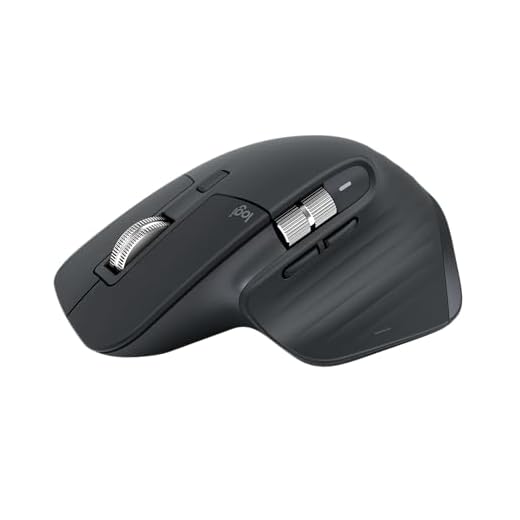
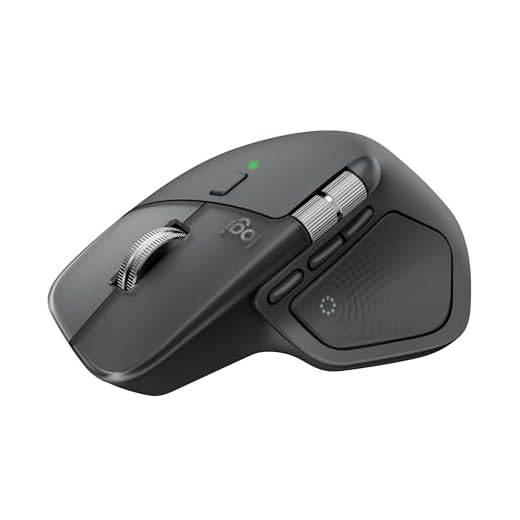
The Logitech MX Master 3S stands out as the best ergonomic mouse we’ve tested
, combining exceptional comfort with professional-grade functionality. This mouse features an ergonomic silhouette crafted to support your palm and fingers, with a unique tilt angle that positions your arm in a more natural posture for better comfort
.
Who It’s Best For:
- Professionals spending 8+ hours daily on computers
- Creative professionals needing precision and customization
- Multi-device users who work across Windows, Mac, and tablets
- Users with medium to large hands seeking premium comfort
What We Love:
- MagSpeed scrolling that’s 90% faster, 87% more precise, and ultra quiet
- Quiet Clicks feature providing 90% less click noise
- 7 customizable buttons including gesture controls
- Multi-device connectivity supporting up to 3 devices via Bluetooth or USB receiver
- Advanced Darkfield sensor that works on glass surfaces
What Could Be Better:
- Asymmetrical design makes it unsuitable for left-handed users
- Premium price point may be excessive for basic users
- While comfortable, other mice offer more specialized ergonomic relief
Key Specs:
- Weight: 4.97 oz (141g)
- Battery Life: Up to 70 days on full charge
- DPI: Up to 8,000 with 8K sensor
- Connectivity: Bluetooth, USB-C, Logi Bolt receiver
- Compatibility: Windows, macOS, Linux, Chrome OS, iPadOS
The Bottom Line: This productivity-focused mouse is well worth the cost for the amount of time it can save you and the strain it can prevent in the long run, striking the best balance between comfort and function
.
2. Logitech MX Vertical – Best Vertical Mouse
Amazon ASIN: B07FNJB8TT
Current Price: $70 – $100
Prime Eligible: Yes
Rating: 4.2/5 (42,000+ reviews)
The MX Vertical features a unique 57° vertical angle that reduces pressure on your wrist while maintaining optimal ergonomic posture without compromising performance
. This design reduces muscular activity by 10 percent compared to a standard mouse without any loss in overall performance
.
Who It’s Best For:
- Medium to large-sized hands
- Users experiencing wrist pain or carpal tunnel symptoms
- Office workers seeking to prevent repetitive strain injuries
- Those transitioning from traditional mice to ergonomic designs
What We Love:
- Natural handshake position designed to reduce wrist pressure and forearm strain
- 4000 DPI high-precision sensor with 4x less hand movement
- Up to 4 months battery life with quick charge feature (3 hours from 1-minute charge)
- Multiple connectivity options: USB-C, Bluetooth, or Unifying receiver
- Ergonomist-approved design tested with criteria set by leading ergonomists
What Could Be Better:
- May take time to adjust for users transitioning from traditional mice and heavier than some standard mice
- Right-handed design only
- Limited compatibility with older operating systems
Key Specs:
- 57° vertical angle positioning
- 4,000 DPI optical sensor
- USB-C charging with quick charge
- 4-month battery life
- Weight: 135g
The Bottom Line: The MX Vertical is the top choice if you’re looking for an ergonomic mouse that can reduce wrist pain or prevent repetitive strain injuries, with a design more likely to help reduce wrist-twisting tension
.
3. Logitech ERGO M575 – Best Value Trackball
Amazon ASIN: B0877DK2FL
Current Price: $40 – $60
Prime Eligible: Yes
Rating: 4.3/5 (28,000+ reviews)
The ERGO M575 is a wireless trackball with incredibly easy thumb control, promoting increased comfort, lower muscle strain, and improved natural posture
. With no need to move your arm around to move the cursor, your hand and arm stay relaxed, making it perfect for tight desk spaces
.
Who It’s Best For:
- Users with limited desk space
- People experiencing shoulder or arm strain from mouse movement
- Those suffering from wrist pain looking to explore trackball options
- Budget-conscious buyers seeking ergonomic benefits
What We Love:
- Exceptionally precise trackball control with smooth ball surface and high-performance optical sensor
- Up to 24 months battery life with USB receiver, 20 months with Bluetooth
- Dual connectivity: Bluetooth Low Energy or USB receiver with 10m range
- Super compact footprint ideal for tight workspaces and busy desks
- Made with 50% post-consumer recycled plastic and FSC-certified packaging
What Could Be Better:
- Initial trackball may feel sticky, requiring 2-3 hours of break-in use
- Learning curve for users new to trackball navigation
- Users with arthritis may want to avoid due to finger movement demands
Key Specs:
- Thumb-controlled trackball design
- 2,000 DPI optical tracking
- 24-month battery life (1 AA battery)
- Dual connectivity (Bluetooth + USB receiver)
- Compact stationary design
The Bottom Line: The ERGO M575 consistently ranks as one of the most popular and comfortable wireless trackball mice available, looking like a premium device despite the affordable price
.
4. Logitech Lift Vertical – Best for Small-Medium Hands
Amazon ASIN: B09J1TB35S
Current Price: $60 – $80
Prime Eligible: Yes
Rating: 4.1/5 (18,000+ reviews)
The Lift’s vertical design positions your hand at a comfortable 57-degree angle and is easy to grip and get comfortable with right away, even for those who don’t use vertical mice often
. Designed specifically for all-day comfort for small to medium-sized hands
.
Who It’s Best For:
- Small to medium-sized hands
- Users seeking an affordable entry into vertical mice
- Office workers preferring quieter peripherals
- Those with wrist, arm, or shoulder problems
What We Love:
- 57 degrees of vertical positioning for natural forearm posture
- Whisper-quiet clicks and SmartWheel for smooth scrolling
- Available in both left- and right-handed variations
- Connect to up to 3 multi-OS devices with Logitech Flow technology
- 70% post-consumer recycled plastic construction
What Could Be Better:
- Those with larger hands may be better off with the heavier MX Vertical
- Small size and buttons that provide little feedback
- Limited programmable buttons compared to productivity mice
Key Specs:
- 57° vertical angle design
- 4 customizable buttons
- 2-year battery life
- Multi-device connectivity (up to 3 devices)
- Available in multiple colors and left/right-handed versions
The Bottom Line: The Logitech Lift provides comfort and style at a reasonable cost, offering the best combination of comfort, features, and value for most people
.
5. Razer Basilisk V3 – Best Ergonomic Gaming Mouse
Amazon ASIN: B09C13PZX7
Current Price: $60 – $90
Prime Eligible: Yes
Rating: 4.5/5 (25,000+ reviews)
The Basilisk V3 was built for comfortable gaming with medium to large hands, featuring a right-handed shape with a thumb rest that keeps your grip natural during long sessions
. This mouse turned out to be the most comfortable option in the ergonomic gaming category
.
Who It’s Best For:
- Gamers with medium to large hands
- Users seeking ergonomic design without sacrificing performance
- Those gaming long hours or using mouse for work during the day
- Enthusiasts wanting customizable RGB and programmable features
What We Love:
- Textured grip molded into plastic thumb rest that feels solid and doesn’t collect fingerprints
- 11 programmable buttons with Hypershift feature for doubled functionality
- Gen 2 Optical Switches with no debounce delay and 26,000 DPI Focus+ sensor
- Infinite scroll wheel providing ergonomic boost for browsing tasks
- Light weight and super easy movement with precision cursor control
What Could Be Better:
- Won’t do much to stave off RSI pain or prevent wrist strain for serious ergonomic needs
- Gaming-focused aesthetic may not suit professional environments
- Higher power consumption due to RGB lighting features
Key Specs:
- 26,000 DPI optical sensor
- 11 programmable buttons
- HyperScroll tilt wheel
- Chroma RGB lighting (13 zones)
- Gen 2 Optical Switches
- Weight: 101g
The Bottom Line: The Basilisk V3 feels like it was made to fit your hand and stay there, built solid and responsive with the right balance of comfort and control for long sessions
.
Key Features to Consider
Your hand size dictates your mouse choice more than any other spec. If your hand measures over 7.5 inches from wrist to middle fingertip, standard ergonomic mice will leave your pinky dragging on the desk. Look for a vertical tilt between 57 and 70 degrees to properly offload wrist pressure onto your forearm. Pay attention to the actuation force of the primary clicks; heavy switches will transfer strain from your wrist directly to your finger tendons. Finally, prioritize multi-device Bluetooth if you switch between a laptop and desktop.

Common Mistakes to Avoid
Do not buy a vertical mouse expecting it to cure carpal tunnel syndrome overnight. These devices prevent pronation, but they require moving the cursor from your elbow rather than flicking your wrist. Many buyers give up after two days because their shoulder muscles ache from this new movement pattern. Give your arm at least two weeks to adapt. Also, avoid glossy plastic finishes. Ergonomic grips rely on friction. A glossy surface forces you to pinch the mouse to maintain control, which causes immediate hand fatigue and defeats the purpose.
Budget Considerations
You do not need to spend over $100 to fix your desk posture. Entry-level vertical mice around $30 provide the exact same 57-degree pronation relief as premium models, though they typically use cheaper optical sensors that may jitter on glass desks. The $50 to $80 range is the sweet spot, getting you reliable trackballs and vertical mice with multi-year battery life and silent switches. Only push into the premium tier if you specifically need infinite scroll wheels, glass-tracking laser sensors, or seamless cross-computer copy and paste functionality.
FAQ
Q: Will an ergonomic mouse really help with wrist pain? A: Yes, continuing to use a mouse that forces you to hold it uncomfortably can cause RSI (Repetitive Strain Injury) over time
. Ergonomic mice help reduce the risk of repetitive strain injuries and carpal tunnel syndrome
.
Q: How long does it take to adjust to a vertical mouse? A: It does take some time to get used to using a mouse at a different angle, but once you get used to it, you will love it
. Most users adapt within a few days to a week of regular use.
Q: Are trackball mice good for gaming? A: Most trackball users don’t make it very high on gaming leaderboards
, as trackballs excel more in productivity and precision work than fast-paced gaming.
Q: What’s the difference between the MX Vertical and Lift? A: For larger hands, try MX Vertical. The Lift is a great fit for small to medium-sized hands
. Both offer the same 57° vertical angle but differ in size and feature set.
Q: Can left-handed users find good ergonomic options? A: Unlike many other vertical mice, the Lift comes in both left- and right-handed variations
, and Goldtouch offers wireless left-handed mice as well
.
Conclusion
Stop working through the pain. Measure your hand from wrist to fingertip, choose a vertical or trackball model that fits your grip, and give your arm two weeks to adjust to the new movement pattern.