Gaming or working for eight straight hours must never become a physical endurance test. If you’re peeling yourself out of your chair with stiff shoulders and burning eyes, your setup is actively fighting against your body. You don’t need generic posture advice; you need hardware engineered to support human mechanics during prolonged focus.
I’ve spent hundreds of hours testing these specific peripherals and furniture pieces in real-world scenarios. We aren’t looking at RGB lighting or aggressive racing stripes here. We are looking at lifting capacities, actuation times, optical tracking, and vertical wrist angles. These are the tools that actually eliminate the micro-strains that compound into major pain by the end of your day.
Top Picks
Here is the exact hardware you need to build a workspace that sustains your body through marathon sessions.



Secretlab Titan Evo Gaming Chair
Forget the plush executive chairs you sink into. This seat earned its top spot through high-density cold-cure foam and a 4-way built-in lumbar support system. You aren’t lounging; you are being mechanically supported in an ideal posture for marathon stints without your lower back collapsing.
Features a 165-degree recline, full-metal 4D armrests with replaceable tops, and a magnetic memory foam head pillow. The XL size explicitly supports users from 5’11” to 6’9″ and 175 to 395 pounds. Backed by a 5-year extended warranty.
The magnetic head pillow snaps perfectly into place, offering instant, adjustable neck relief without clumsy straps. The flaw is the high-density cold-cure foam—it is aggressively firm out of the box and requires weeks of daily sitting to break in.
Verdict
Best Overall Gaming Throne. Buy this if you weigh over 175 pounds and need relentless, firm lower-back support for daily 8-hour shifts.
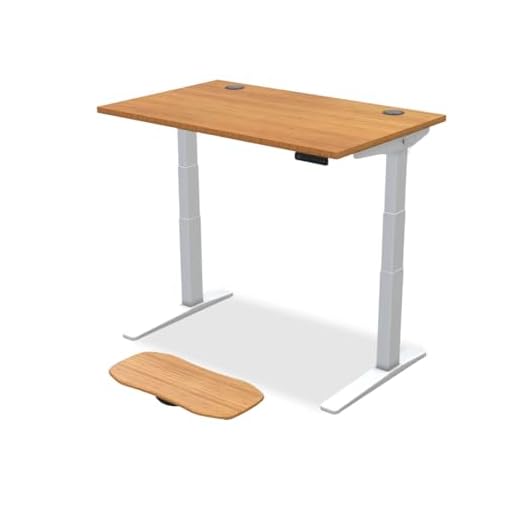
UPLIFTDESK V3 Bamboo Standing Desk
A standing desk is only as good as its stability at maximum height. This bamboo workhorse claims its spot because its 355-pound lifting capacity means you can load massive PC towers and multiple displays without hearing the dual German-made motors groan.
Equipped with a 355 lb lifting capacity and dual German-made motors. The 3-stage legs offer 33% faster movement and greater height range. Features a 1-inch thick solid bamboo top and a flush memory keypad holding 4 heights.
Tapping a single button smoothly fires the 3-stage legs, shifting you from sitting to standing in seconds without spilling your coffee. However, the anti-collision system is frustratingly sensitive; accidentally brushing the desk with your chair stops it dead in its tracks.
Verdict
Most Versatile Sit-Stand Battle Station. Buy this if you run a heavy multi-monitor setup and despise desks that wobble when you type standing up.
Razer DeathAdder V3 Pro Gaming Mouse
When you use a mouse all day, weight is the enemy of your wrist. At just 63g, this ultra-lightweight shell practically floats. It secures the performance award because the Focus Pro 30K optical sensor tracks flawlessly, entirely removing the friction of heavy drags.
Weighs 63g with a Focus Pro 30K optical sensor that tracks on glass. Features Gen-3 optical switches boasting a 90-million click lifecycle and 0.2ms actuation. Runs up to 90 hours via USB-C rechargeable HyperSpeed wireless.
You barely feel the 63g weight, and the 0.2ms actuation registers clicks before you even realize you’ve pressed down. The glaring flaw is connectivity: it relies entirely on the USB dongle, meaning you cannot quickly Bluetooth-pair it to a secondary laptop.
Verdict
Best Ergonomic Performance Gaming Mouse. Buy this if you suffer from wrist fatigue and need zero-latency wireless performance for competitive gaming or fast-paced design work.
Ergotron LX Single Monitor Arm
Monitor stands destroy your posture by forcing you to look down. This mechanical arm fixes the physics of your desk by offering 13 inches of lift. Aligning a 34-inch screen exactly with your eye line forces your shoulders back and instantly relieves cervical strain.
Fits screens up to 34 inches and 7 to 25 pounds using VESA 75x75mm or 100x100mm. Provides 13 inches of vertical lift, 360-degree rotation, and 75-degree tilt. Attaches via a two-piece clamp to desks 0.4 to 2.4 inches thick.
Pushing your heavy display out of the way or pulling it forward requires minimal physical force and leaves the joints perfectly tight. The flaw lies in the base: the desk clamp cannot open wider than 2.4 inches, making it useless on thick custom or antique desks.
Verdict
Best for Perfect Screen Positioning. Buy this if you use a heavy ultrawide monitor and need to instantly correct your slumping neck posture.
Logitech MX Vertical Wireless Mouse
Twisting your forearm flat to use a traditional mouse pinches the median nerve. This vertical mouse claims its spot by rotating your hand to a 57-degree angle. That exact handshake position drops muscular activity by 10 percent, preventing repetitive strain injuries over time.
Engineered with a 57-degree vertical angle to reduce wrist pressure. Features a 4000 DPI high-precision optical sensor that requires 4x less hand movement than standard 1000 DPI mice. Includes an instant cursor speed switch.
The 4000 DPI sensor requires microscopic thumb twitches rather than sweeping arm movements, preserving your shoulder. However, the 57-degree profile makes the mouse remarkably tall; you will constantly knock it over when moving your hand back from your keyboard.
Verdict
Best for Preventing Long-Term Wrist Strain. Buy this if you experience sharp pain on the underside of your wrist after a long day of clicking.
Govee Envisual T2 Dual Camera TV Backlight
Staring at a bright screen in a dark room creates intense contrast that fatigues your optic nerve. This bias lighting system solves that via dual cameras that read your screen and cast matching colors on the wall, smoothing the visual transition.
The system relies on Envisual dual cameras for real-time edge color matching. Features upgraded RGBIC lighting with 60 LEDs/m for denser light distribution. Connects via the Govee Home App to sync with DreamView, TV shows, sports, and gaming.
The 60 LEDs/m throw a dense, incredibly smooth ambient glow that genuinely relaxes your eyes during midnight gaming sessions. The glaring aesthetic flaw is the physical dual-camera unit, which must sit visibly perched on top center of your monitor.
Verdict
Best for Reducing Eye Fatigue. Buy this if you frequently game or work in a dark room and suffer from tension headaches.
Dangling feet cut off circulation to your lower legs and pull your lower back out of alignment. This solid wood rocker fixes the physiological chain reaction by providing an angled platform with ball bearing rollers, encouraging active movement while seated.
Constructed from solid wood and a durable steel frame. Features ball bearing rollers for a smooth gliding experience, non-skid pads, rubber floor protectors, and offers a 3-inch range of adjustable height settings.
The ball bearings provide a completely silent, weightless glide that keeps your calves active and blood flowing. The functional flaw is the height adjustment: changing that 3-inch range requires getting under the desk and manually unscrewing the side knobs.
Verdict
Best for Active Leg and Foot Support. Buy this if your feet don’t sit completely flat on the floor and your calves feel tight by 5 PM.
Aligning Your Cervical Spine
Your monitor dictates your posture. If you are looking down even a few degrees, your head’s weight pulls on your neck muscles, leading to tension headaches. You need a monitor arm that offers at least 13 inches of vertical lift to ensure the top third of your display sits exactly level with your eyes when sitting fully upright.
The Physics of Foam Density
A soft chair feels great for thirty minutes but offers zero structural support for eight hours. Look for cold-cure foam. It is incredibly dense and resists compression. While it feels stiff initially, it forcibly keeps your pelvis aligned and stops your lumbar curve from collapsing backward as the day drags on.
Eliminating Pronation Strain
Standard mice force your forearm to twist flat, pinching the median nerve in your wrist. Switching to a vertical mouse with a 50-to-60 degree tilt shifts your arm back into a neutral handshake position. This single geometric change drops muscular activity by roughly 10 percent, which is the difference between wrist pain and comfort.
Managing Visual Contrast
Eye fatigue in dark rooms isn’t just about blue light; it is about contrast. Staring at a bright monitor against a black wall forces your pupils to constantly adjust. Installing bias lighting with a high LED density behind your screen bridges this contrast gap, smoothing out the harsh visual edge and reducing optic nerve strain.
Dynamic Lower Body Support
Your legs aren’t meant to hang static for eight hours. If your feet aren’t planted firmly, the edge of your chair restricts blood flow to your calves. A rocking footrest not only grounds your posture but allows micro-movements that engage your calf muscles, acting as a secondary pump to return blood back up your body.
Frequently Asked Questions
Conclusion
Audit your workspace and identify exactly where your body hurts. If your neck aches, grab the Ergotron arm. If your lower back hurts, upgrade to the Titan Evo. Don’t buy everything at once—solve your primary point of failure first.
6 responses to “Best Ergonomic Gaming Setup for Long Hours – 7 Top Picks”
I just got the Logitech ERGO K860 and OMG, it’s a game changer! My wrists don’t hurt anymore. I wish I’d invested in this sooner. ???? Anyone else have experience with it?
I’ve been eyeing that keyboard! Does it take long to get used to the split design? Looks kinda weird at first glance.
Congrats on your new keyboard, Sarah! It does take a little getting used to, but many find it worth it for the comfort!
So, does anyone else feel like the desk height is super important? I’ve been using a coffee table and my back is killing me. ???? How do I even know what’s optimal?
Tommy, desk height is crucial! Ideally, your elbows should be at a 90-degree angle when you’re typing. Check out the section on desk setups in the article!
Yikes, a coffee table? That sounds rough! Maybe try adjusting your chair height to see if that helps. But a proper desk, like the AODK, would be way better! ????