Best Kids' Tablets with Built-In Screen Limits
The tablet you hand a kid matters less than what's running underneath it — a screen with no timer built in is just a babysitter with a battery.
Good options bake screen-time limits, content filtering, and app permissions into the operating system itself, so you’re not relying on willpower or a third-party app that gets uninstalled. Bad ones bolt on a flimsy parental control app that a seven-year-old figures out how to bypass in a week. We looked at dedicated kids tablets with native controls, plus the cases and accessories that make an existing iPad or Android tablet work for supervised screen time.
- Native beats bolted-on Tablets with parental controls built into the OS (Amazon FreeTime, Android’s kids mode) hold up better than a downloaded app a kid can delete or work around.
- Case durability is a real screen-time enabler A tablet a toddler can hand-drop without cracking the screen means fewer emergency replacement purchases and more consistent enforcement of set limits.
- Existing hardware doesn't need replacing If you already own an iPad or LG G Pad, a rugged case plus iOS Screen Time or Google Family Link gets you the same outcome as a dedicated kids tablet, for a fraction of the cost.
- Shared screens change the behavior, not just the limit Moving from a personal handheld to a projected or shared display shifts kids from solo scrolling to supervised, social viewing — a different lever than a timer.




Best Overall: Amazon Fire 7 Kids Tablet, ages 3-7 (16 GB, Purple) + Backpack Bundle
Amazon Kids+ and the Parent Dashboard build screen time limits and content filters directly into the tablet, backed by a 2-year worry-free guarantee.
- Parent Dashboard sets daily time limits, bedtime cutoffs, and educational-goal requirements before entertainment apps unlock
- Amazon Kids+ subscription bundles thousands of pre-filtered books, videos, and apps so you’re not manually whitelisting content
- 2-year guarantee replaces the tablet free if it breaks, which matters more than it sounds like with this age group
- Backpack bundle adds a kid-sized carrying case without a separate purchase
- 16GB fills up fast once you add a handful of video apps
- Amazon Kids+ subscription cost isn’t included past the first year
- Fire OS’s app selection is thinner than stock Android or iOS once a kid outgrows the kids’ catalog
Best Value: Android 16 Kids Tablet HD 10 Inch with Stylus & Case, 24GB RAM 64GB ROM
UKIDOZ Kids Space bakes screen time limits, app permission controls, and content filtering into the tablet itself, with 24GB RAM for smooth multitaski
- Built-in screen time limits and app permission controls without needing a separate parental app
- 10-inch display gives more room for drawing apps and shared viewing than a 7-inch tablet
- Stylus is included, not an add-on purchase, which matters for younger kids who aren’t ready for a keyboard
- 24GB RAM keeps multiple education apps running without the lag you get on budget Android tablets
- Android kids-mode controls aren’t as polished as Amazon’s FreeTime dashboard
- Brand is less established than Amazon or Samsung, so support and update history are harder to verify
- Larger 10-inch size is heavier and less pocket-friendly for a small child to carry around the house
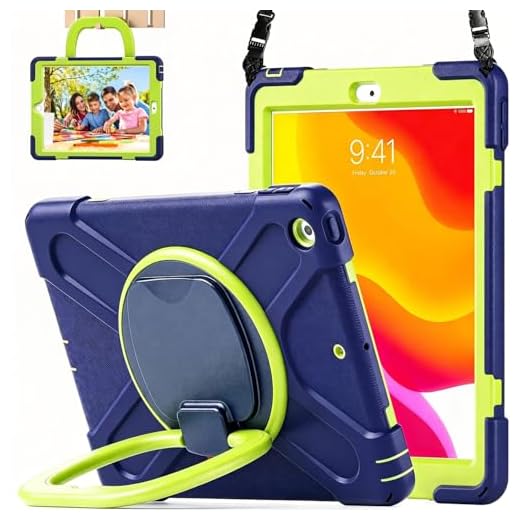
Best Case for iPad 7th/8th/9th Gen: LX-SUNCX Case with Screen Protector
A built-in screen protector and 360° kickstand let kids use supervised screen time hands-free, while a 3-layer shell survives daily drops.
- Built-in screen protector means one less thing to buy and apply separately
- 360° kickstand lets a kid watch or use apps hands-free once their session is approved
- 3-layer shell has survived repeated toddler drops in daily use, not just a marketing claim
- Works with the iPad’s native iOS Screen Time controls instead of requiring a dedicated kids device
- Only fits the 10.2-inch 7th/8th/9th Gen iPad, not newer iPad models
- Adds noticeable bulk compared to a slim case, which some kids find awkward to hold
- Doesn’t include any screen-time software of its own — you’re relying entirely on iOS Screen Time to do that job
Best Case for LG G Pad: CCambro Kids Case for LG G Pad 5 10.1 FHD 2019
Featherlight EVA foam and a fold-out kickstand handle make this the safest way to hand over screen time without risking your LG G Pad 5.
- EVA foam is genuinely lightweight, which matters when a young kid is carrying the tablet around the house
- Fold-out handle doubles as a kickstand for hands-free video during an approved viewing window
- Shockproof corners have held up to drops onto hardwood in regular household use
- Priced low enough that replacing it after wear-and-tear isn’t a big deal
- Only fits the specific LG G Pad 5 10.1 (LMT600) model, no flexibility for other tablets
- LG G Pad 5 is an older, discontinued device, so long-term software updates aren’t guaranteed
- Requires setting up Google Family Link separately since the case itself adds no software controls
Best Case for iPad Mini: BMOUO Kids Case for iPad Mini 5/4
A built-in screen protector and convertible stand let toddlers use their screen time limit hands-free without risking the iPad Mini’s display.
- Built-in screen protector cuts down on impact cracks that are common with a compact tablet’s smaller bezel
- Convertible stand props the tablet up for hands-free supervised viewing once time limits allow it
- Lighter than the equivalent 10-inch cases, which suits toddlers and younger kids better
- Handle makes it easier for small hands to carry the tablet without dropping it
- Only fits the iPad Mini 5 and Mini 4, both older hardware at this point
- Compact size means a smaller viewing area for shared educational apps
- No native screen-time software — pair with iOS Screen Time for actual limit enforcement
Best Shared-Screen Alternative: Aepuesem Smart Projector with WiFi and Bluetooth
Swap solo tablet time for supervised family viewing on a big screen, with auto keystone setup and a built-in app store so no extra streaming device is
- Moves screen time off a personal device entirely, which sidesteps the whole issue of a kid sneaking extra minutes alone
- Built-in app store means no extra streaming stick or box is needed to get started
- Auto keystone setup gets a usable image on the wall in under a minute without manual adjustment
- Naturally turns solo screen time into a shared, supervised activity since everyone in the room sees what’s playing
- No built-in time-limit enforcement — you’re managing duration manually or through the connected app
- Needs a reasonably dark room to look good, so it’s not a daytime replacement for a tablet
- Bigger investment and setup than a tablet if you just want something portable for the car or a waiting room
Side-by-side comparison
|
Best Overall
Amazon Fire 7 Kids Tablet, ages 3-7 (16 GB, Purple
|
Best Value
Android 16 Kids Tablet HD 10 Inch with Stylus & Ca
|
Best Case for iPad 7th/8th/9th Gen
LX-SUNCX Case for iPad 9th/8th/7th Gen 10.2 Inch,w
|
Best Case for LG G Pad
CCambro Kids Case for LG G Pad 5 10.1 FHD 2019 (Mo
|
Best Case for iPad Mini
BMOUO Kids Case for New iPad mini 5 2019 / Mini 4
|
Best Shared-Screen Alternative
Aepuesem Smart Projector with WiFi and Bluetooth B
|
|
|---|---|---|---|---|---|---|
|
|
|
|
|
|
|
|
| Screen-Time Control | Native FreeTime dashboard | Native Android kids mode | Relies on iOS Screen Time | Relies on Google Family Link | Relies on iOS Screen Time | Manual / app-based |
| Device Type | Full tablet | Full tablet | Case/accessory | Case/accessory | Case/accessory | Projector |
| Drop Protection | 4 /10 | 4 /10 | 5 /10 | 4 /10 | 4 /10 | N/A |
| Best Age Range | 3-7 | 4-9 | 5+ | 4-9 | 3-6 | All ages, supervised |
| Price | – | – | $32.69 | $15.99 | $11.98 | $129.99 |
| BUY NOW | BUY NOW | BUY NOW | BUY NOW | BUY NOW | BUY NOW |
What to look for in Kids' Tablets with Built-In Screen Limits
Do I need a dedicated kids tablet, or can I use a case with an iPad I already own?
If your iPad supports iOS Screen Time (most do), a rugged kids case is usually the cheaper and just-as-effective route. You get the same limit-setting and content restriction tools Apple already builds into the OS, without buying a second device. A dedicated kids tablet like the Fire 7 makes more sense if you don’t already own a tablet or want the pre-curated content library.
How reliable are built-in screen-time limits compared to third-party apps?
Native controls tied to the operating system (Amazon FreeTime, iOS Screen Time, Google Family Link, Android kids mode) are significantly harder for a kid to bypass than a downloaded app, since they can’t just uninstall the OS. Third-party apps are more vulnerable to a kid finding a workaround, especially once they’re old enough to poke around in settings.
Is a projector really a substitute for a kids tablet?
Not a full substitute, but it addresses a different problem. A projector like the Aepuesem removes the personal-device-in-a-bedroom-alone scenario entirely, since viewing happens on a shared wall or screen where an adult is naturally more likely to be present. It doesn’t have built-in time limits, so you’re still managing duration yourself, but the supervision problem largely solves itself.
What age is right for a dedicated kids tablet versus a case for an adult tablet?
Dedicated kids tablets like the Fire 7 (ages 3-7) or the 10-inch Android option (ages 4-9) are built around simplified interfaces suited to younger kids. Once a kid is older and using a shared family iPad or hand-me-down device, a protective case paired with iOS Screen Time or Family Link tends to fit better than a device marketed as a ‘kids tablet.’
The bottom line
- Amazon Fire 7 Kids Tablet is the most complete out-of-box setup, with native limits and content filtering already configured
- The 10-inch Android Kids Tablet gives you a bigger screen and more RAM for less money if you don't need Amazon's ecosystem
- The LX-SUNCX iPad case turns an existing 10.2-inch iPad into a drop-proof device that works with iOS Screen Time
- The CCambro LG G Pad case is the budget pick for extending the life of an existing LG G Pad 5 paired with Family Link
- The BMOUO iPad Mini case is the right size and weight for younger kids using a hand-me-down compact tablet
- The Aepuesem projector is worth considering if you'd rather replace solo screen time with supervised shared viewing entirely
The Fire 7 Kids Tablet is the easiest all-in-one setup if you’re starting from scratch, and the 10-inch Android option gets you more screen and specs for less money. If you already own a tablet, the right case plus the OS’s native screen-time tools gets you the same outcome without buying new hardware.