Screen Time Starts at the Router
App-based screen time limits fail the moment a kid figures out how to delete the app or hop on a friend's hotspot — the router doesn't have that problem.
Phone-level parental controls are easy to uninstall, factory-reset, or route around once a device leaves the house Wi-Fi. A mesh router with built-in family controls enforces limits at the network layer, so the rule applies to every device on that network without relying on a kid’s cooperation. The real differences between these two systems come down to coverage area and how deep the smart home integration goes.
- Network rules beat app rules Controls enforced at the router level survive app deletions and factory resets — a phone-based timer app doesn’t.
- Mesh coverage decides enforcement, not just Wi-Fi speed A single dead zone upstairs is a loophole; buy enough mesh coverage for the whole house or the schedule has a gap in it.
- Per-profile control matters more than per-device Kids get new devices constantly — a system tied to a family profile keeps working when the tablet gets swapped for a laptop.
- Smart home households should match their ecosystem A Nest-based router plugs straight into existing Google Assistant routines; a standalone system like Deco doesn’t care what smart home gear you already run.
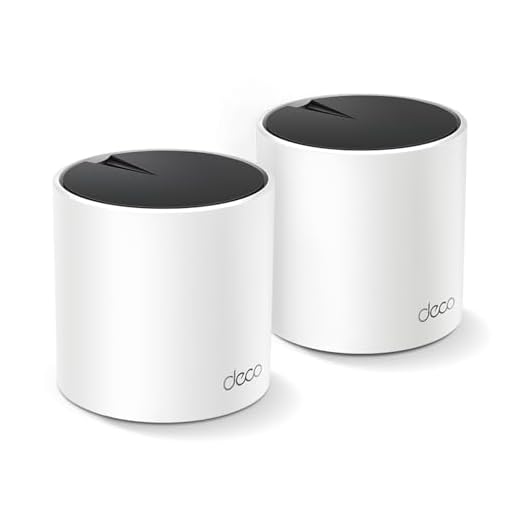
Best for Multi-Story Homes: TP-Link Deco X55 AX3000 WiFi 6 Mesh System, Deco X55(2-Pack)
HomeShield’s built-in Time Control sets per-child screen limits and pauses devices instantly, while AX3000 whole-home mesh closes signal gaps so kids
- HomeShield lets you set different screen time budgets per child profile, not just per device
- Instant pause button cuts a kid’s internet immediately without touching their device
- AX3000 mesh closes the upstairs/basement dead zones where limits usually get dodged
- Setup and profile management run through one straightforward app, no separate hub needed
- Full HomeShield feature set (advanced content filtering, detailed reports) requires a subscription after the trial
- Two units cover large homes but a third may be needed for sprawling layouts or thick walls
- No built-in smart home ecosystem tie-in like Nest or Alexa routines
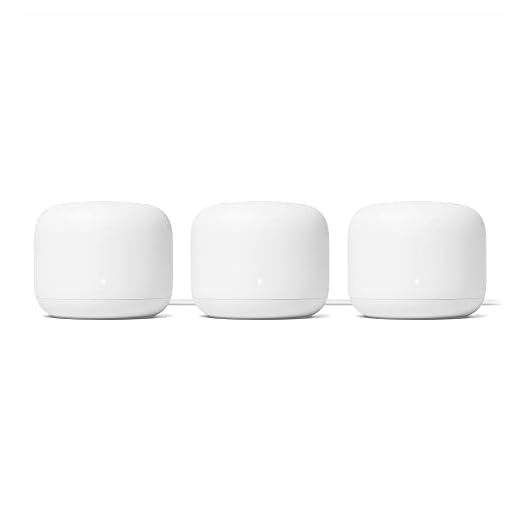
Best for Smart Home Integration: Google Nest WiFi Router 3 Pack (2nd Generation) – 4×4 AC2200 Mesh Wi-Fi Routers with 6600 Sq Ft Coverage
Family Wifi in the Google Home app lets you pause each kid’s internet or filter content by age group with one tap, while the 3-router mesh keeps every
- Family Wi-Fi pause and filtering sit inside the Google Home app most Nest households already have open
- One-tap pause by device or profile stops arguments over who’s still online after bedtime
- 3-router pack covers more square footage out of the box than most 2-packs
- Scheduling offline hours integrates with existing Nest routines and Assistant automations
- Highest price of the two, especially before factoring in any needed add-on points
- AC2200 spec is a generation behind WiFi 6, so top device throughput lags the Deco
- Family Wi-Fi controls are basic compared to dedicated parental control suites — no granular content categories
Side-by-side comparison
|
Best for Multi-Story Homes
TP-Link Deco X55 AX3000 WiFi 6 Mesh System, Deco X
|
Best for Smart Home Integration
Google Nest WiFi Router 3 Pack (2nd Generation) –
|
|
|---|---|---|
|
|
|
|
| WiFi Standard | WiFi 6 (AX3000) | WiFi 5 (AC2200) |
| Coverage Area | Up to 4,500 sq. ft. (2-pack) | Up to 6,600 sq. ft. (3-pack) |
| Per-Child Profiles | Yes | Yes |
| Instant Pause | Yes | Yes |
| Smart Home Integration | None built-in | Deep Google Home / Assistant integration |
| Price | $149.97 | $389.79 |
| BUY NOW | BUY NOW |
What to look for in Family Screen Time Management Apps and Routers
Can kids bypass router-based screen time controls?
Not easily, as long as the mesh covers the whole house and cellular data is separately restricted on the device. The main workaround is a kid using mobile data instead of Wi-Fi, which the router can’t touch — that still needs a phone-level control or a data plan limit.
Do I need both a router with parental controls and a separate app?
For most families, no. Both the Deco X55 and Nest WiFi Router handle scheduling, pausing, and per-profile limits through their own apps, which covers the basics without adding a third-party app. A dedicated app makes sense only if you need granular content category filtering beyond what the router provides.
How many mesh units do I actually need?
Match the pack size to square footage and floor count, not just square footage alone — a single-story 3,000 sq. ft. home and a three-story 3,000 sq. ft. home need different numbers of units. The 2-pack Deco X55 covers up to 4,500 sq. ft.; the 3-pack Nest WiFi Router covers up to 6,600 sq. ft., which fits larger or more complex layouts.
Will these routers slow down the rest of the household's internet?
No — screen time features run on the same mesh hardware handling normal traffic and don’t add meaningful overhead. Any slowdown comes from the WiFi standard and router placement, which is why the WiFi 6 Deco X55 outperforms the WiFi 5 Nest WiFi Router on raw device throughput despite the Nest’s larger rated coverage.
The bottom line
- TP-Link Deco X55 wins on raw coverage and WiFi 6 speed for multi-story homes at a lower price point.
- Google Nest WiFi Router wins for households already using Google Home, trading some throughput for deeper routine integration.
Pick based on the house, not the brand name. A multi-story or larger home needs the coverage and WiFi 6 speed of the Deco X55; a household already running Google smart home gear gets more day-to-day value from the Nest WiFi Router’s integrated controls.