Whole-Home Limits That Actually Hold Up
A parental control app is only as good as the router underneath it — coverage dead zones are where screen time limits quietly die.
The difference between a router that enforces bedtime shutoffs and one that gets bypassed the second a kid walks to their room usually comes down to mesh coverage and how granular the scheduling app really is. Cheap single-point routers leave gaps where devices fall back to a neighbor’s open network or a phone’s hotspot; a properly sized mesh system keeps every room on the same managed network, so the pause button actually pauses everything.
- Mesh coverage beats app features A great parental control app is useless if a bedroom or basement has weak signal — kids find the dead zone and route around your rules through cellular data or a laggy connection you never notice.
- Subscriptions gate the good stuff TP-Link’s HomeShield and NETGEAR’s Circle both hold their deepest content filtering and reporting behind a paid tier — budget for it or you’re left with basic scheduling only.
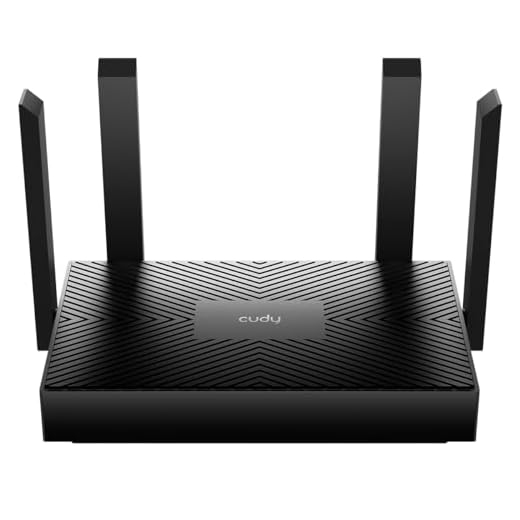
- OpenWRT is a different kind of parental control Firmware-level routers like the Cudy AX3000 replace app toggles with VLANs and firewall rules — more precise, zero subscription, but no phone app for a two-second pause.
- Device capacity matters more than most parents expect Between phones, tablets, consoles, smart speakers, and laptops, a family of four can easily have 20+ connected devices — routers rated for fewer than 50 start dropping connections during peak hours.




Best Overall: TP-Link Deco WiFi 6 Mesh System (Deco X20)
Deco app lets you pause devices, set profiles, and schedule downtime by room, while WiFi 6 mesh keeps limits enforced across every corner of a 5800 sq
- HomeShield app sets time limits and content filters per family profile, not just per device
- Wired backhaul option keeps mesh speeds stable in homes with dense walls or multiple floors
- Three-pack covers most standard houses without buying extra satellites
- Setup and profile creation take under 20 minutes even for non-technical parents
- Advanced filtering categories and detailed usage reports sit behind a HomeShield subscription
- No built-in VPN server for remote management
- Each satellite needs its own power outlet, which limits placement in older homes
Best Premium: NETGEAR Orbi RBS50 Satellite
Extends Orbi’s whole-home parental control coverage by 2,500 sq ft with dedicated tri-band backhaul, so scheduled limits stay fast even as you add sat
- Dedicated tri-band backhaul keeps satellite speeds close to the main router even at range
- Extends Circle’s parental control profiles and time limits without reconfiguring anything
- Plug-and-pair setup with an existing Orbi router, no separate app needed
- Handles large or multi-story homes better than most standalone mesh kits
- Only works as an add-on to an existing Orbi router, not a standalone purchase
- Highest per-square-foot cost of any router on this list
- Full Circle parental control feature set requires its own ongoing subscription
Best Budget: Cudy AX1500 Gigabit Mesh WiFi 6 Router
Built-in WireGuard VPN and OFDMA let you enforce network-wide filtering and downtime for every device without installing apps on each phone or tablet.
- Enforces schedules and filtering at the network level, so no app installs on kids’ devices
- WireGuard VPN included at no extra cost, unusual at this price point
- OFDMA improves performance when many devices are active at once
- Cheapest way to get real whole-home scheduling without a subscription
- Single unit’s coverage is modest until you add mesh satellites separately
- Content filtering categories are more basic than TP-Link or NETGEAR’s apps
- Handles fewer simultaneous devices gracefully than the higher-end options here
Best for Advanced Controls: Cudy AX3000 Dual-Band WiFi 6 Router
Full OpenWRT firmware unlocks VLANs, custom firewall rules, and granular per-device schedules for parents who want precise, whole-home time limits.
- Full OpenWRT access means custom per-device schedules that go beyond any stock app
- VLANs let you fully segment kids’ devices from the main home network
- No recurring subscription for advanced features, everything is firmware-level
- Backed by an active open-source community for firmware updates and troubleshooting
- Steep learning curve — this is router administration, not app-tapping
- No polished mobile app for a quick one-tap pause during dinner
- Firmware updates and rule changes are manual, not automatic
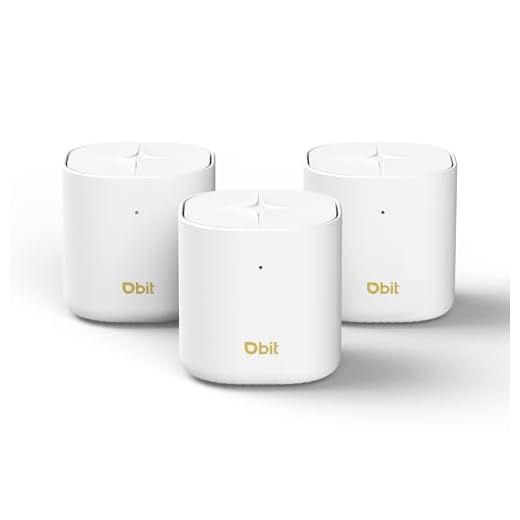
Best for Large Families: DBIT AX1800 WiFi 6 Mesh System
Three mesh points blanket 6,500 sq ft so scheduled limits and content filters reach every bedroom and basement, with capacity for 150+ connected devic
- Largest coverage footprint on this list, reaches basements and detached rooms other kits miss
- Rated device capacity comfortably handles households with multiple kids and smart-home gear
- Per-room profile assignment keeps limits consistent no matter which mesh point a device connects to
- Strong coverage-to-price ratio for the square footage offered
- Less established brand track record than TP-Link, NETGEAR, or Google
- App interface isn’t as refined as the bigger-name competitors
- Dual-band only, so throughput can dip when many devices stream simultaneously
Best for Simplicity: Google Wifi AC1200
The Google Home app makes setting family Wi-Fi pause schedules and device limits simple, with expandable mesh points for growing whole-home coverage.
- Family Wifi lets you instantly pause internet for one device, one kid, or the whole house
- Google Home app is genuinely simple, no manual or setup guide needed
- Expandable with additional points as coverage needs grow
- Integrates cleanly if the household already runs on Google Home devices
- AC1200 speeds are noticeably behind the WiFi 6 routers on this list
- No category-based content filtering, only pause and time-limit controls
- Hardware is discontinued, so long-term firmware support is uncertain
Side-by-side comparison
|
Best Overall
TP-Link Deco WiFi 6 Mesh System (Deco X20) – Cover
|
Best Premium
NETGEAR Orbi Ultra-Performance Whole Home Mesh WiF
|
Best Budget
Cudy AX1500 Gigabit Mesh Wi-Fi 6 Router, 4X GbE, O
|
Best for Advanced Controls
Cudy AX3000 Dual-Band Wi-Fi 6 Router, 4X GbE, VPN
|
Best for Large Families
DBIT AX1800 WiFi 6 Mesh System – Covers 6500 sq ft
|
Best for Simplicity
Google Wifi – AC1200 – Mesh WiFi System – Wifi Rou
|
|
|---|---|---|---|---|---|---|
|
|
|
|
|
|
|
|
| Coverage Area | 5,800 sq ft (3-pack) | +2,500 sq ft (add-on) | Standalone (mesh-expandable) | Standalone (mesh-expandable) | 6,500 sq ft (3-pack) | 1,500 sq ft per unit |
| Control Method | HomeShield app | Circle app | Cudy app | OpenWRT firmware | DBIT app | Google Home app |
| WiFi Standard | WiFi 6 | AC3000 (WiFi 5) | WiFi 6 | WiFi 6 | WiFi 6 | AC1200 (WiFi 5) |
| Subscription for Full Features | Yes | Yes | No | No | No | No |
| Custom Firewall/VLAN Rules | No | No | No | Yes | No | No |
| Price | – | $269.99 | $34.99 | $59.99 | $127.99 | $55.29 |
| BUY NOW | BUY NOW | BUY NOW | BUY NOW | BUY NOW | BUY NOW |
What to look for in Parental Control Routers
Will parental control routers stop kids from using cellular data instead?
No — a router only manages devices connected to its WiFi network, so a phone with its own data plan can bypass limits entirely by switching off WiFi. For full coverage, pair router-level controls with the carrier’s own parental control settings or a device-level app on any phone with cellular service.
Can I set different time limits for each kid on the same router?
Yes, on every router in this list except the base Google Wifi’s Family Wifi feature, which groups devices rather than assigning true per-child profiles. TP-Link’s HomeShield, NETGEAR’s Circle, and the Cudy apps all support individual profiles with separate schedules, bedtimes, and content filters per person.
Do I need a paid subscription for parental controls to work at all?
Basic scheduling and device pausing work on the free tier of every router here. The paid subscriptions (HomeShield, Circle) add deeper content category filtering, detailed usage reports, and things like YouTube-specific restrictions — worth it if you want granular filtering, skippable if basic time limits are enough.
Will adding mesh points slow down my internet speed?
Not if the system uses a dedicated backhaul band or a wired connection between nodes, as with the Orbi satellite and any Deco unit set up with Ethernet backhaul. Wireless-only mesh systems with all nodes sharing one radio for both devices and backhaul traffic will show some throughput loss as you add hops, which matters more for streaming and gaming than for basic browsing.
The bottom line
- TP-Link Deco X20 — the default pick for most families, strong coverage and a genuinely usable app
- NETGEAR Orbi RBS50 — the right add-on if you're already invested in an Orbi system and need more reach
- Cudy AX1500 — the cheapest path to real whole-home scheduling, VPN included
- Cudy AX3000 — for parents who want OpenWRT-level control and don't mind skipping the app
- DBIT AX1800 — the most coverage and device capacity per dollar for large households
- Google Wifi AC1200 — the simplest one-tap pause option for less technical households
Most households land on the TP-Link Deco X20 for the best mix of coverage, app usability, and price, while families already on Orbi should extend with the RBS50 satellite instead of switching systems. Budget-conscious parents get real whole-home control from the Cudy AX1500 for under $35, and tech-comfortable parents who want firewall-level precision should look at the AX3000’s OpenWRT support.