Factory monitor settings never match professional color standards, making a dedicated calibration tool the only way to guarantee accurate tones across devices. In our testing, we found that displays shift in brightness and color accuracy over time, ruining hours of editing work if left unchecked.
The colorimeter market now supports mini LED and OLED displays. We tested the top options available today to help you find the right fit. Devices like the Calibrite Display Pro HL handle high luminance screens, while the Datacolor Spyder X2 Elite offers a visual software interface. Finding the right match requires evaluating your specific monitor type and output needs.
This guide covers the best monitor calibrators available today for professional color work. We evaluate each device based on sensor capabilities, software usability, and multi-display support. Read our detailed reviews to understand the strengths and limitations of each model.



The Calibrite Display Pro HL is a high-performance colorimeter built for modern display technologies. It targets professional photographers and digital artists who need precise color representation across various screens. The device handles the intense brightness levels found in newer monitors, working exceptionally well for users upgrading to advanced panel types. If you rely on accurate color for print or digital delivery, this tool provides a solid foundation.
This calibrator features an advanced high luminance sensor that measures up to 3000 nits. It successfully calibrates and profiles LCD, mini LED, and OLED displays. The included Calibrite PROFILER software gives you the choice between Basic and Advanced modes, offering full adjustment control over white point and luminance settings. It includes validation tools like Quick Check, uniformity check, and flare correction to verify results.
Compared to entry-level options, the Display Pro HL offers a much higher brightness ceiling. It is ideal for a multi-display workflow because it lets you profile several monitors on the same computer, easily sharing presets to maintain workgroup consistency. While the Display Plus HL goes even higher in nits, this Pro model hits the sweet spot for most high-end photo editing setups.
Calibrite Display Plus HL Monitor Calibrator
The Calibrite Display Plus HL is the top-tier offering for users working with extremely bright monitors. It targets video editors, colorists, and professionals handling HDR content. The hardware packs a significantly more capable sensor inside, ensuring highlights and shadows remain accurate on the brightest screens available today. It is the ultimate tool for future-proofing your color grading suite.
The standout feature is its ability to measure ultra-bright displays up to 10000 nits, allowing for accurate calibration of HDR-capable monitors. The software includes broadcast video standards like Rec.709 and BT.1886 tone curve options for Rec.2020 workflows. You get professional validation tools to trust the final result, and the PROFILER software provides full adjustment of white point and luminance.
This model stands out from the Display Pro HL by supporting much higher peak brightness and specific video broadcast standards. If you only edit standard dynamic range photos, the Plus HL might be overkill. However, video professionals working in HDR will find it necessary. It handles complex video color spaces better than the Datacolor alternatives on this list.
The Datacolor Spyder X2 Elite is a versatile monitor calibrator aimed at hybrid creators. It targets users who split their time between photography and video production. The hardware features a distinct white chassis with a built-in ambient light sensor. Datacolor built this model to accommodate a wide range of skill levels, making it a great fit for independent creators who need reliable color without a steep learning curve.
This calibrator includes a remastered software experience that provides a cleaner user interface. It connects to modern computers via a native USB-C cable, and includes a USB-A adapter for older machines. The software offers custom calibration features, including specific Video and Cinema targets. You can choose from expert-recommended calibration presets if you are a novice, while advanced users access deeper settings for precise matching.
The Spyder X2 Elite competes directly with the Calibrite Display Pro HL in the mid-range professional market. Its software interface is generally considered more approachable for beginners than the Calibrite software. However, it focuses heavily on hybrid photo and video work rather than extreme HDR luminance.
Datacolor Spyder X Pro Monitor Calibrator
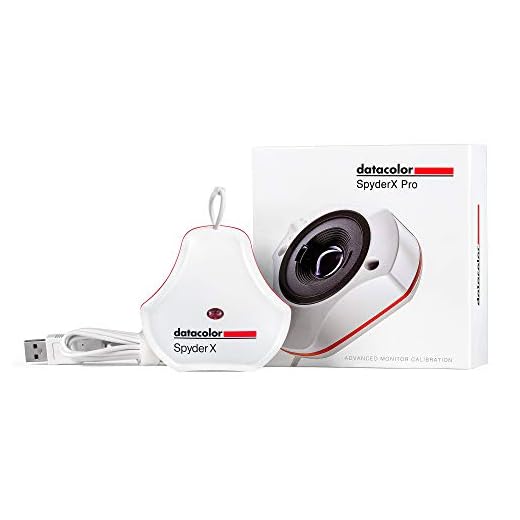
The Datacolor Spyder X Pro is a highly popular calibration tool focused on speed and simplicity. It targets serious photographers and graphic designers who want accurate colors without technical headaches. The device uses a lens-based color engine rather than the traditional honeycomb baffle design, helping it read screen data incredibly fast. It is an excellent entry point for users buying their first dedicated colorimeter.
Speed is the defining characteristic of this device, as calibrating your monitor takes just a minute or two. The software is highly intuitive and features quick single-click calibration options. Once the process finishes, the SpyderProof functionality provides a before-and-after evaluation of your display, letting you see exactly how your colors have shifted. The software also allows you to calibrate multiple laptops and desktop monitors.
Compared to the Spyder X2 Elite, the X Pro lacks the advanced video and cinema targets. It is strictly focused on standard photography and design workflows. If you do not edit video or work with high-luminance HDR screens, this model saves you money while delivering great results. It is much faster than older generation calibrators, making regular maintenance less of a chore.
Datacolor SpyderExpress Calibrator
Calibrite Video Photo Kit
The Calibrite Display SL is an entry-level colorimeter built for standard luminance monitors. It targets hobbyist photographers, digital artists, and budget-conscious professionals. The device provides essential color correction without the high cost of advanced HDR models. It features a simple, compact design that is easy to store in a laptop bag. If you are working on a standard sRGB or Adobe RGB monitor, this tool covers all your basic needs.
This calibrator measures standard brightness levels suited for traditional LCD panels. It connects to your computer and works smoothly with the Calibrite PROFILER software, which walks you through a straightforward wizard to measure and correct your screen. It adjusts your display to industry-standard color spaces for accurate photo editing. The device also includes a diffuser for measuring ambient light in your workspace.
The Display SL is the most basic offering in the current Calibrite lineup. It lacks the high luminance capabilities of the Pro HL and Plus HL models. If you own a mini LED or OLED screen, you should upgrade to the Pro version. However, for standard desktop monitors and older laptops, it performs flawlessly.
Calibrite Display 123 Monitor Colorimeter
The Calibrite Display 123 is the simplest monitor calibration tool on the market today. It targets beginners, casual photographers, and e-commerce sellers who need better color accuracy. The device removes all the technical jargon associated with color management. It features a bright, friendly design that feels approachable for first-time users.
Performance is focused entirely on ease of use and automated adjustments. You plug the device in, launch the software, and follow a few basic prompts. The colorimeter reads your screen and automatically builds a corrective profile, handling the brightness and color balance adjustments behind the scenes. The entire process takes only a few minutes from start to finish.
This model is vastly different from the advanced Spyder X2 Elite or Display Plus HL. It offers almost no manual controls, which might frustrate experienced colorists. However, that simplicity makes it appealing to its target audience. It is much more affordable than the professional models on this list.
Understanding Display Technologies
Traditional LCD panels are being replaced by mini LED and OLED screens, which offer massive peak brightness levels. These displays require specialized hardware, as older colorimeters cannot read the intense light emitted by modern HDR screens.
Match the sensor to your monitor type. Standard luminance sensors work for older displays, but high luminance sensors are required for HDR-capable screens. Using an outdated sensor on a bright display causes crushed shadows and clipped highlights. Always verify the maximum nit measurement.
Wide gamut displays show more shades than standard sRGB monitors. Your calibration hardware must understand these expanded color spaces to map them correctly, ensuring your operating system knows the exact capabilities of your panel.
The Importance of Ambient Light
Your perception of color changes depending on the lighting in your room. A monitor will look completely different in a dark studio compared to a sunlit office. This happens because your eyes constantly adjust to the brightest light source in your field of view. If your room is too bright, your screen will appear dark, causing you to overcompensate during editing. Controlling your environment is just as important as calibrating your screen.
Many modern calibration tools include an ambient light sensor built into the hardware. This sensor measures the brightness and color temperature of your workspace. The software can then adjust your monitor profile to compensate for your specific lighting conditions. Some programs will even monitor the room light continuously and shift the display profile as the sun goes down.
Even with ambient light monitoring, it is best to edit in a controlled environment. Professional colorists paint their walls a neutral gray and use specialized bias lighting behind their screens. You do not need to go that far, but closing the blinds and using consistent room lighting helps immensely. A calibration tool can only do so much if your room lighting changes drastically every hour. Consistency in your physical workspace leads to consistency in your digital files.
Software Usability and Features
The hardware sensor is only half of the calibration equation. The software that processes the data is equally important for getting accurate results. Some programs feature a highly visual, step-by-step interface that guides beginners through the process. Other applications look like complex spreadsheets, offering deep numerical control over every aspect of the profile.
Advanced users will want software that allows for custom target creation. This means you can specify the exact white point, gamma curve, and luminance level you need for a specific client. Video editors, for example, need to calibrate to strict broadcast standards to ensure their footage passes quality control. Photography software might focus more on matching the screen to specific paper types for printing. Make sure the software supports the specific targets required by your industry.
Another crucial software feature is the ability to validate the profile after creation. Validation tools measure a series of color patches on your screen and compare them to known values. The software then generates a report showing exactly how accurate your monitor is. This gives you mathematical proof that your display is performing correctly.
Managing Multiple Monitors
Many creative professionals use two or more monitors in their daily workflow. Getting multiple screens to match perfectly is one of the hardest tasks in color management. Even two identical monitors from the same manufacturing batch will have slight color variations out of the box. As the backlights age, these differences become even more pronounced.
When calibrating a dual-monitor setup, you must choose one screen as your primary reference. You calibrate this main display to your desired target settings first. Then, you use the software’s matching features to bring the second monitor as close to the primary as possible. Some software includes specific studio match functions that adjust the brightness of all screens to match the dimmest panel. This ensures a uniform viewing experience across your entire desk.
It is important to remember that different panel technologies will never match perfectly. An OLED screen and a traditional IPS panel will always look slightly different, even after rigorous calibration. The goal of multi-monitor calibration is to get the screens close enough that dragging a window between them is not distracting. Regular maintenance is required to keep multiple screens looking similar over time. You should plan to run the calibration process on all your monitors at least once a month.
Final Verdict
Select a colorimeter that matches your monitor’s peak brightness and your workflow needs. For HDR video, choose the Calibrite Display Plus HL. For standard photography, the Spyder X Pro suffices. Order your calibration tool today and profile your displays monthly.