Physical blue light filters are the only effective way to reduce digital eye strain without permanently washing out your MacBook’s display colors. In our testing, we found that relying solely on software settings makes text harder to read and distorts image accuracy. A dedicated screen protector blocks harsh wavelengths at the source, making long work sessions noticeably more comfortable.
Finding the right filter requires matching your specific laptop model and deciding between magnetic or adhesive attachments. Some options focus purely on filtering harsh light, while others add privacy features to keep wandering eyes away from your sensitive documents. You also need to consider how the protector affects screen clarity and whether it causes annoying reflections in bright rooms. Matte finishes help reduce glare from overhead lights, though they might slightly soften the crispness of a retina display. Choosing the correct fit ensures your laptop closes properly without damaging the delicate hinge mechanism.
We looked at several popular options to help you find the exact match for your daily routine. The Peslv 3-Pack Anti Blue Light Screen Protector offers a great starting point for standard MacBook Air users who want multiple backups. If you prefer something you can easily remove, the Targus Magnetic Privacy Screen Filter provides a quick snap-on design that doubles as a privacy shield. Each option on this list brings something different to the table, from multi-packs to specialized magnetic attachments. Read on to see how these protectors compare and which one fits your specific work setup.




Peslv 3-Pack Screen Protector for MacBook Air
The Peslv 3-Pack Anti Blue Light Screen Protector includes three separate adhesive films cut specifically for 13.6-inch and 13-inch MacBook Air models released around 2022. The thin material sits flush against the glass, preventing interference when closing the laptop lid, and filters harsh wavelengths causing visual fatigue. The clear finish maintains original color accuracy. Applying the film requires a steady hand to avoid trapping dust or air bubbles. Unlike magnetic options, this permanent setup stays in place during transport.
F FORITO 2-Pack Anti-Glare Screen Protector
The F FORITO 2-Pack fits MacBook Air 13.6 and 13-inch models, featuring a matte finish that diffuses overhead lighting and sunlight. This permanent adhesive layer filters blue light and adds a scratch-resistant physical barrier against keyboard marks. The anti-glare properties suit outdoor use or brightly lit offices, though it does not block side viewing angles like privacy screens.
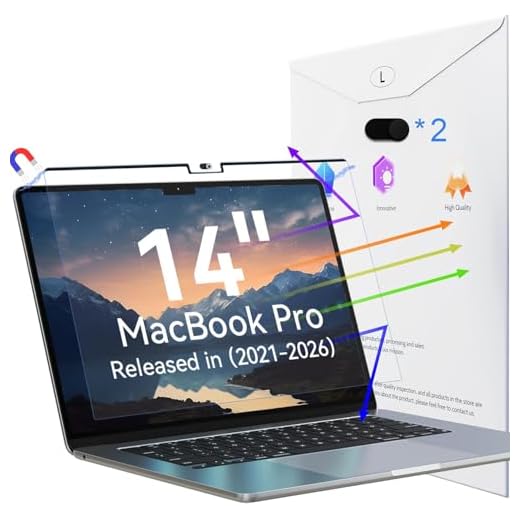
Peslv Magnetic Screen Protector for MacBook Pro 14-inch
Tailored for 14-inch MacBook Pro models from 2021 to today, this protector uses a magnetic border to attach to the laptop bezel. The snap-on design allows quick removal for color-accurate photo editing, avoiding messy adhesives and air bubbles. The top magnetic strip holds the filter securely, blocking wavelengths that cause eye strain. It lacks privacy blackout features, making it strictly a blue light and glare reduction tool.
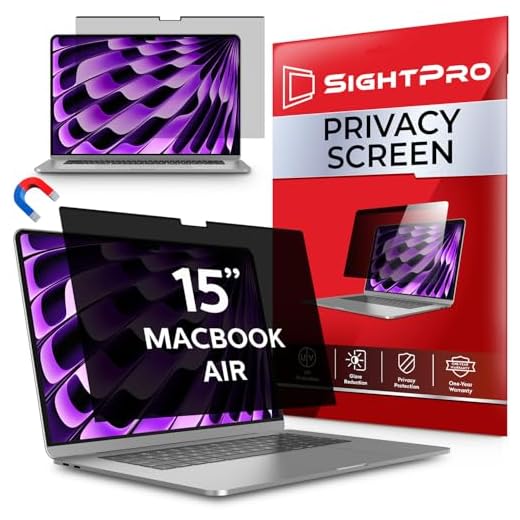
SightPro Magnetic Privacy Screen for MacBook Air 15-inch
Built for 15-inch MacBook Air models, the SightPro combines blue light reduction with a multi-layered privacy filter. The instant snap-on magnetic attachment fits the 15.3-inch Liquid Retina Display without blocking the webcam. It blacks out the screen from side angles to prevent visual hacking while maintaining a clear image straight on. The package includes a storage folder for safe keeping when removed.
Fitting older MacBook Air 13-inch models (2018–2021), this three-pack uses a traditional adhesive application to bond directly to the glass. The thin, clear film blocks light frequencies causing digital eye strain while acting as a physical shield against keyboard marks. The adhesive backing prevents shifting during transport but requires patience during setup to push out trapped air bubbles.
Peslv High-Blocking Screen Protector (3-Pack)
Targeting 13-inch MacBook Pro models from 2016 to 2022, this three-pack provides permanent adhesive films that sit tightly against the glass. The flush fit ensures the laptop closes completely without pressuring the hinge. It maintains a clear, glossy look rather than a matte finish, and lacks privacy blackout features. Installation requires careful alignment to match the screen’s exact dimensions.
Targus Magnetic Privacy Screen for MacBook 15-inch
The Targus Magnetic Privacy Screen Filter fits older 15-inch MacBook Pro and Air models with a 16:10 aspect ratio. The magnetic design attaches in seconds without sticky tabs, holding up well to frequent travel. It actively reduces screen glare, filters blue light, and restricts the display to a 60-degree viewing angle to block onlookers. The material is touchscreen compatible and leaves no adhesive residue.
Understanding Blue Light and Eye Strain
Digital screens emit a specific type of high-energy visible light that can cause significant discomfort over time. This short-wavelength light scatters easily, which forces your eyes to work harder to maintain focus on text and images. Prolonged exposure often leads to a condition known as digital eye strain, characterized by dry eyes, blurred vision, and frequent headaches. Many people do not realize that their daily computer habits are the root cause of their afternoon fatigue. Addressing this light exposure is a crucial step in creating a healthier workspace.
Beyond physical eye discomfort, excessive screen time can also interfere with your natural sleep patterns. The light from your laptop mimics daylight, which suppresses the production of melatonin in your brain. This makes it much harder to fall asleep if you work or browse the internet late into the evening. A physical filter helps block these specific wavelengths before they ever reach your eyes. By reducing this exposure, you can maintain better focus during the day and enjoy more restful sleep at night.
While software solutions exist to warm up your display colors, they often fall short for professional use. Changing the color profile of your monitor can make photo editing and graphic design nearly impossible. A physical screen protector offers a more balanced approach by filtering harmful light while attempting to preserve overall color accuracy. This allows you to work comfortably without completely distorting the visual quality of your laptop. Investing in a physical barrier is a smart choice for anyone who spends more than a few hours a day on a computer.
Magnetic vs. Adhesive Attachments
Choosing how your screen protector attaches to your laptop is one of the most important decisions you will make. Adhesive protectors use a mild silicone backing to stick directly to the glass of your display. This creates a permanent, flush fit that looks incredibly clean and natural once installed correctly. You never have to worry about leaving the filter behind or storing it in a separate folder. However, the installation process requires patience and a dust-free environment to avoid trapping annoying air bubbles.
Magnetic screens offer a completely different approach to display protection. These filters feature a magnetized strip along the top edge that snaps directly onto the metal bezel of your laptop. This allows you to apply or remove the filter in a matter of seconds depending on your current needs. If you want to show a presentation to a coworker, you can simply pull the screen off and set it aside. The trade-off is that magnetic screens can sometimes prevent the laptop lid from closing completely flush.
Your daily workflow should dictate which attachment style works best for you. If you want a set-it-and-forget-it solution, an adhesive film provides constant protection without any daily management. If you frequently switch between private work and collaborative tasks, a magnetic option offers unmatched flexibility. You also need to consider how often you travel with your laptop. Magnetic screens usually require a protective sleeve or folder to keep them safe when they are not attached to your computer.
The Importance of Privacy Features
Many screen protectors offer privacy features in addition to basic light filtering. These specialized filters use micro-louver technology to control exactly who can see your display. When you sit directly in front of the keyboard, the screen appears bright and clear. However, if someone tries to look at your laptop from an angle, the screen appears completely black. This creates a cone of vision that keeps your sensitive documents safe from wandering eyes.
Privacy screens are crucial for professionals who work in public spaces or open-concept offices. If you frequently answer emails in coffee shops or review financial data on airplanes, you are at risk of visual hacking. A privacy filter ensures that the person sitting next to you cannot read your confidential information. It provides peace of mind when you are working on proprietary projects or handling sensitive client data. Even in a standard office, it helps maintain boundaries between you and your coworkers.
Note that privacy filters do come with a few minor drawbacks. Because they restrict light output to a narrow angle, they can slightly reduce the overall brightness of your display. You might find yourself turning up your screen brightness to compensate, which can drain your laptop battery a bit faster. They also make it difficult to share your screen with someone sitting right next to you. If collaboration is a major part of your day, you might want to choose a standard clear filter instead.
Matte vs. Glossy Finishes
The finish of your screen protector plays a massive role in your daily viewing comfort. Matte finishes are specifically manufactured to diffuse light and reduce harsh reflections on your screen. If you work in an office with bright overhead fluorescent lights, a matte protector can be a lifesaver. It scatters the incoming light so you do not see a mirror image of the room behind you. This significantly reduces the amount of squinting you have to do to read text on your display.
Glossy finishes, on the other hand, aim to replicate the original look of your bare laptop screen. They provide a smooth, glass-like surface that allows colors to pop and text to remain incredibly sharp. If you are a creative professional who relies on crisp image quality, a glossy filter is usually the better choice. The downside is that glossy screens will still reflect light sources behind you. You have to be more mindful of where you sit in relation to windows and lamps.
Your choice between matte and glossy relies entirely on your specific environment and visual preferences. Matte screens are highly practical for outdoor use and brightly lit public spaces. Glossy screens are great for controlled lighting environments where image clarity is your top priority. Some users find that matte screens add a slight grainy texture to white backgrounds, which takes some getting used to. Take a moment to evaluate your primary workspace lighting before making your final decision.
Final Verdict
Protecting your eyes from harsh screen glare is a simple upgrade. Check your exact MacBook model number on the bottom of your device, choose between a permanent adhesive or removable magnetic filter, and install your new screen protector today.