Keeping focus at a desk often feels like an uphill battle. Many people rely on their smartphones to check the time during work sessions. This habit usually leads to checking notifications and scrolling through social media. A dedicated desk clock solves this problem by keeping the time visible without the digital temptations. You can stay grounded in your current task and maintain your concentration.
Finding the right timepiece depends heavily on your specific work habits. Some professionals need strict countdown timers to manage their workflow effectively. Others prefer a simple digital display that blends into the background of their home office. You might even want a smart device that connects to your existing home automation setup. The market offers a wide variety of options to match any aesthetic or functional requirement.
We examined several top contenders to help you find the right fit for your workspace. The LaMetric TIME Wi-Fi Clock brings smart connectivity to your desktop with a unique pixel display. If you prefer something minimal, the Braun Digital Travel Alarm Clock offers a compact footprint. Our list covers everything from basic digital displays to advanced productivity timers. Read on to discover which model will help you stay on track this year.




#1 LaMetric TIME Wi-Fi Clock for Smart Home – Social Media Counter –
LaMetric TIME Wi-Fi Smart Clock
The LaMetric TIME Wi-Fi Clock serves as a highly connected hub for your desk. This minimalist pixel clock fits easily into various interior styles. It appeals strongly to smart home enthusiasts who want information at a glance. Gamers and tech lovers will appreciate the retro aesthetic of the pixelated screen. You can express your mood with thousands of different clock faces.
This device connects to your Wi-Fi network to deliver a wide range of features. You can wake up to your favorite internet radio stations or listen to Spotify directly through the stereo speakers. The display tracks the time, weather, and custom timers. It also shows smartphone notifications when your phone is out of reach. You can even receive alerts from smart home appliances like Sonos, Netatmo, and Bosch.
This model stands out as the most connected option on our list. It offers far more functionality than a basic digital display like the Braun clock. The smart home integrations make it highly useful for people who want to monitor their entire house from their desk. You will need a stable Wi-Fi connection to get the most out of these features. It serves as a highly capable command center for a modern workspace.
#2 Braun Digital Travel Alarm Clock with Snooze, Compact Size, Negative
The Braun Digital Travel Alarm Clock provides a highly compact timekeeping solution. This small device measures just 5.8 centimeters wide and tall. It appeals to minimalists who want a basic clock without any distracting features. Frequent travelers will appreciate how easily it slips into a laptop bag or suitcase. The simple square design looks clean and unobtrusive on any desk.
This clock features a negative LCD display with options for 12-hour or 24-hour time formats. The crescendo beep alarm gets more frequent and louder if you do not turn it off. You can activate a five-minute snooze interval when you need a short break. Pressing the manual button illuminates the backlight for ten seconds. The device requires one AAA battery to operate, though the battery is not included in the package.
This unit takes up the least amount of desk space among all our picks. It lacks the advanced smart features found in the LaMetric model. The battery-powered operation means you do not have to worry about hiding power cables. The digital display contrast may vary depending on the lighting in your room. It remains a solid choice for anyone who values simplicity and portability.
#3 DreamSky Small Digital Alarm Clock for Bederoom, Large Big Numbers
DreamSky Small Digital Alarm Clock with USB Port
The DreamSky Small Digital Alarm Clock offers a highly visible time display. It features a compact, smooth design that still manages to fit large numbers on the screen. This clock works well for people who want to check the time from across the room. The simple interface makes it easy for kids, seniors, and busy professionals to operate. It provides a straightforward timekeeping experience without complicated menus.
The large electric display includes a brightness dimmer for comfortable viewing in any lighting. You can set a single alarm with a nine-minute snooze function. The beep alarm sound adjusts from 30 to 90 decibels based on your preference. A convenient USB port allows you to charge your smartphone directly from the clock. The device plugs into the wall with an included DC adapter and uses a battery for memory backup.
This clock provides much larger numbers than the compact Braun model. The built-in USB charging port adds practical value to your desk setup. You will need to keep it plugged into a wall outlet for main power. The intuitive setting buttons ensure you experience zero stress when adjusting the time. It serves as a highly reliable and easy-to-read desk companion.
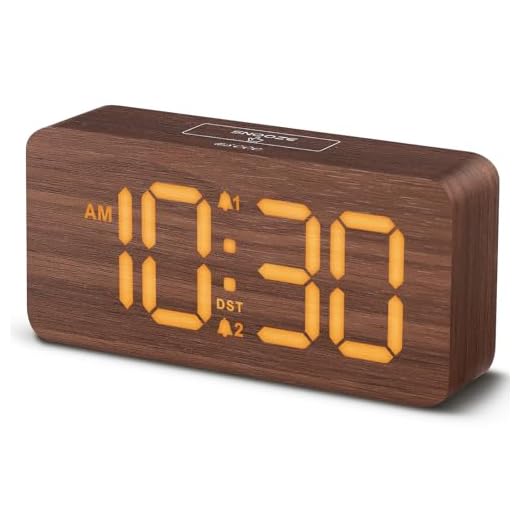
#4 uscce Wooden Digital Alarm Clocks for Bedrooms: Dimmable Dual Alarm
uscce Wooden Digital Alarm Clock
The uscce Wooden Digital Alarm Clock brings a warm aesthetic to your workspace. It features a wood grain finish that softens the look of a typical home office. This model appeals to users who prefer natural textures over glossy plastic or metal. The rectangular shape sits securely on a desk or bedside table. It blends nicely with wooden desks and bookshelves.
This clock provides a clear digital display that shines through the wooden surface. You can dim the display to match the lighting conditions in your room. The device includes dual alarm functionality to help you manage different schedules. You can set one alarm for starting your workday and another for taking a lunch break. The controls allow you to adjust the settings to your specific preferences.
The wooden exterior sets this model apart from the plastic DreamSky and Braun clocks. It offers a more decorative appearance while still providing essential timekeeping functions. The dual alarm feature gives you more flexibility than single-alarm models. You can easily read the illuminated numbers against the wood grain background. It adds a touch of style to any productivity setup.
#5 Home & Office Timer with Clock, 5,15, 30, 45, 60 Minute Preset
Home & Office Preset Timer Clock
The Home & Office Timer with Clock functions as a dedicated productivity tool. It features a unique geometric design that sits comfortably on any flat surface. This device appeals strongly to people who use time-blocking methods during their workday. Students and professionals can use it to manage study sessions or focused work sprints. The stylish appearance looks great in both corporate and home environments.
You simply turn the timer position to start and stop the countdown. The device includes preset countdown times of 5, 15, 30, 45, and 60 minutes. An LCD screen clearly displays the countdown time remaining. You can adjust the volume control across three levels, including high, low, and silent. The timer also features a flashing backlit visual alert when your time is up.
This model focuses heavily on task timing rather than just displaying the current hour. It offers a more tactile experience than setting an alarm on the DreamSky clock. The physical act of turning the timer helps build a mental boundary for focused work. The silent mode with a flashing alert works exceptionally well in quiet office settings. It provides a highly effective way to manage your daily tasks.
#6 NOKLEAD Digital Alarm Clock: Wood Grain, 5.9-inch Large LED Display,
NOKLEAD Wood Grain Digital Alarm Clock
The NOKLEAD Digital Alarm Clock combines a wood grain finish with a massive screen. It features a big 5.9-inch LED display with bold white numbers. This clock suits users who want maximum visibility without sacrificing style. The crisp 1.9-inch-tall digits make time reading incredibly easy from any angle. It serves as a highly functional centerpiece for a large desk.
You can finish all settings in minutes using the five intuitive buttons. The large top button allows you to adjust the time display across five levels of dimmable brightness. The single alarm features a beeping sound with two volume levels, including a soft 70-decibel setting and a loud 85-decibel setting. You can easily activate the snooze function when the alarm sounds. This electric clock is powered by USB only, and the screen goes dark if power is lost.
This model offers a much larger display than the uscce wooden clock. The five-level brightness control gives you precise command over the screen intensity. You must keep it plugged into a USB power source to maintain the display. The battery backup only saves your time and alarm settings during a power outage. It provides a highly readable and attractive timekeeping solution.
#7 VEWINGL Cube Productivity Timer, 5/10/25/DIY Min Presets + Count-Up
The VEWINGL Cube Productivity Timer acts as a highly capable time management system. It works as both a digital clock and a highly capable alarm. This cube appeals to professionals who need strict intervals for their work sessions. The compact shape fits easily on a crowded desk or a small shelf. It provides multiple ways to track your progress throughout the day.
This timer features 5, 10, and 25-minute presets alongside a custom DIY mode. You can choose between sound, vibration, or silent alert modes to suit different environments. The device supports both countdown and count-up timer functions. A dynamic LED progress bar keeps you visually informed of your remaining time. It also includes four light and animation alerts to signal the end of a session.
This cube offers more advanced timing features than the basic Home & Office Timer. The vibration and silent modes make it highly adaptable for shared workspaces. The visual progress bar provides a quick reference without requiring you to read specific numbers. You can easily switch between tracking a quick task and timing a long project. It serves as a highly versatile tool for maintaining concentration.
#8 Sukeen Digital Alarm Clock,6″ Large LED Display with Dual USB Charger
The Sukeen Digital Alarm Clock features a unique mirror large display design. The 6.1-inch ultra-large LED screen doubles as a mirror when the display is off. This clock appeals to users who want a sleek, modern aesthetic on their desk. The slim profile takes up very little depth on your work surface. It is made with lightweight PMMA material that resists breaking.
The digital alarm clock provides three levels of brightness. You can adjust the brightness manually or set it to auto-adjust for a comfortable view. A big snooze button helps you easily turn off the buzzer and get an extra five minutes of rest. The device comes equipped with two USB charging ports. You can charge your phone and tablet simultaneously while working.
This model offers dual USB ports, giving it an advantage over the single-port DreamSky clock. The mirror finish provides a highly reflective surface that adds a contemporary touch to your room. The auto-adjusting brightness feature saves you from manually changing settings as the sun goes down. You can rely on the battery backup to keep your settings safe during power interruptions. It combines striking looks with highly practical charging capabilities.
Buying Guide
Understanding Display Types and Visibility
Choosing the right display type greatly impacts your daily experience. LED screens typically offer bright, highly visible numbers that stand out in well-lit rooms. LCD screens often use less power and provide a more subdued appearance. Some displays feature negative LCD technology, which shows light numbers on a dark background. You should consider your room lighting when selecting a screen type.
Brightness controls play a major role in viewing comfort. A screen that looks great at noon might feel blindingly bright during an evening work session. Many modern clocks include manual dimmers with multiple intensity levels. Some advanced models feature auto-adjusting sensors that respond to ambient light changes. Having control over the brightness prevents eye strain during long hours at your desk.
Viewing angles also determine how useful a clock will be in your workspace. You want a display that remains clear whether you are sitting directly in front of it or standing across the room. Glare from windows or overhead lights can wash out certain screen materials. Matte finishes generally resist glare better than highly reflective surfaces. Testing the placement on your desk will help you find the optimal viewing angle.
The Importance of Dedicated Timers
Time management techniques often require strict intervals of focused work. The Pomodoro technique, for example, relies on twenty-five minutes of concentration followed by a short break. Using a dedicated physical timer helps enforce these boundaries much better than a mental note. A physical device sits in your line of sight as a constant reminder of your current task. This visual cue helps prevent your mind from wandering.
Physical interaction with a timer creates a psychological commitment to the work. Turning a dial or pressing a button signals to your brain that a focus session has begun. Digital apps on a computer or phone often fail because they exist in the same space as your distractions. A standalone device separates your timekeeping from your email and social media. This separation is crucial for maintaining deep concentration.
Different environments require different types of alerts when a timer finishes. A loud beeping alarm works well in a private home office. If you work in a shared space, you might need a silent visual alert or a vibration mode. Flashing lights or LED progress bars provide excellent feedback without disturbing your coworkers. Choosing the right alert style ensures your productivity tool fits your specific workplace.
Power Sources and Desk Cable Management
The power source of your clock dictates where you can place it on your desk. Battery-powered models offer the most flexibility since they do not require a nearby wall outlet. You can move them around freely as your workspace layout changes. Plug-in models provide a constant power supply without the need for frequent battery replacements. You must weigh the convenience of portability against the reliability of wall power.
Managing cord clutter is a common challenge for any desk setup. Adding another plugged-in device means routing another cable behind your monitor or down to a power strip. Some clocks help offset this by including built-in USB charging ports. These ports allow you to charge your phone directly from the clock, eliminating the need for a separate charging brick. Careful cable routing keeps your workspace looking clean and organized.
Power outages can disrupt your schedule if your clock resets. Many plug-in models include a battery backup feature to prevent this issue. The backup battery usually does not power the display, but it remembers your time and alarm settings. This ensures your alarms still go off even if the main power drops overnight. Checking for a memory backup function will save you the frustration of reprogramming your device.
Alarm Features for Productivity
Alarm features serve multiple purposes beyond just waking you up in the morning. You can use alarms to signal the end of a work sprint or remind you to attend a meeting. Volume control is highly important for these daily reminders. A crescendo alarm starts softly and gradually increases in volume, providing a gentle interruption. This prevents the jarring shock of a loud buzzer breaking your concentration.
Snooze functions offer a quick way to delay an alert, but they require careful use. A five-minute snooze can give you just enough time to wrap up an email before a meeting. However, relying too heavily on the snooze button can disrupt your intended schedule. Some clocks feature large, easy-to-hit snooze buttons on top of the device. You should use this feature sparingly to maintain your productivity momentum.
Dual alarms provide excellent flexibility for managing complex schedules. You can set one alarm for your daily start time and another for a recurring afternoon task. This eliminates the need to constantly change a single alarm setting throughout the day. Intuitive buttons make the process of adjusting these alarms quick and simple. A highly functional alarm system keeps your entire workday running smoothly.
Final Verdict
Adding a dedicated timepiece to your desk is a highly effective way to improve your daily focus. It removes the temptation to check your smartphone and keeps you grounded in your current tasks. The LaMetric TIME Wi-Fi Clock offers incredible smart features for highly connected users. If you prefer a minimalist approach, the Braun Digital Travel Alarm Clock provides a compact and simple solution. Both options help you manage your time without unnecessary digital distractions.
Your final choice should depend on your specific workflow and aesthetic preferences. The VEWINGL Cube Productivity Timer works exceptionally well for people who rely on strict time-blocking methods. The Sukeen Digital Alarm Clock adds a modern touch while providing convenient USB charging ports. Evaluate your desk space and your daily habits to determine which features matter most. A well-chosen clock will serve as a highly reliable companion for your workday.