Vari Electric Standing Desk (60×30, Walnut) Review
This is the desk for people who want Uplift-level lift performance without paying Uplift-level prices.
The Vari Electric Standing Desk goes after the exact buyer who’s been eyeing an Uplift V2 but can’t justify the markup: a 60×30 walnut desktop, dual-motor lift, and four programmable height presets, all in a frame you can build yourself in under 10 minutes. It’s built for home office and gaming setups where you want real sit-stand flexibility without the premium-brand tax.
- Dual Motor, No Struggle Both motors work together to move the 60×30 top from 25″ to 50.5″ smoothly, even fully loaded with a monitor arm and dock.
- Four Presets Beat Guessing The LED panel stores up to four heights, so switching between a seated 28″ and standing 42″ setting is a single button press, not trial and error.
- Assembly Is Actually Fast The pre-installed frame and slide-and-lock legs get this off the floor in under 10 minutes, no second person or power tools needed.
- The Uplift Comparison Holds Up Core specs – dual motor, memory presets, similar height range – track closely with Uplift’s V2, but Vari undercuts it meaningfully on price for a near-identical day-to-day experience.
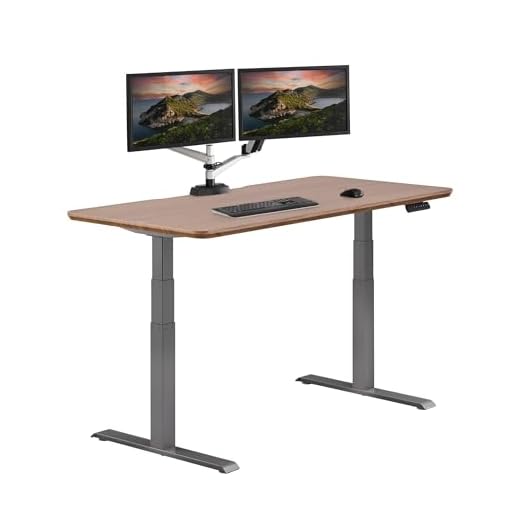
Dual motors glide between 25″ and 50.5″ in near silence, and 4 LED memory presets mean every height switch is a single touch, not a guess.
| Desktop Size | 60" W x 30" D |
| Height Range | 25" to 50.5" |
| Motor Type | Dual motor lift system |
| Height Presets | Up to 4 programmable memory settings |
| Control Panel | LED touch control panel |
| Leg Design | Heavy-duty steel T-style legs |
| Tabletop Construction | One-piece, thick 3D laminate finish |
| Assembly Time | Under 10 minutes (pre-installed frame, slide-and-lock legs) |
| Finish | Walnut |
| Operation Noise | Whisper-quiet dual-motor movement |
- Dual motor moves the full 60×30 top without the strain or lag you get on single-motor desks at this price
- Four memory presets make multi-user or sit/stand/collaborator-height switching effortless
- 25″ to 50.5″ range covers both genuinely low seated positions and standing heights for taller users
- Slide-and-lock legs and a pre-installed frame mean real sub-10-minute assembly, not marketing copy
- Noticeably quieter lift than other dual-motor desks in its price bracket – won’t interrupt calls
- Delivers the core Uplift V2 experience (motor feel, preset convenience) at a lower buy-in
- The 3D laminate top looks good but doesn’t have the premium feel of Uplift’s real wood veneer options
- At full 50.5″ extension, the T-style legs show a bit more flex under a heavy monitor arm than Uplift’s reinforced crossbar frame
- No app or Bluetooth control – presets are manual via the LED panel only
- Warranty coverage on the frame is shorter than Uplift’s industry-leading terms
Choosing the right Standing Desk
-
Motor ConfigurationHighSingle-motor desks lift the center of the frame and can feel less even under an offset load; dual-motor desks like this one lift both legs independently for steadier, more balanced travel.Look forDual motor with synchronized lift and a stated weight capacity that covers your full setup, monitor arms includedAvoidSingle-motor frames paired with wide desktops over 55", which tend to rack or tilt slightly during travel
-
Height Range and AdjustabilityHighYour minimum and maximum heights need to actually fit your body, not just the average range manufacturers advertise.Look forA minimum height near 24-25" for proper seated ergonomics and a max above 48" if you're over 6 feet tallAvoidDesks that only publish a standing-height max without listing the true minimum seated height
-
Frame and Leg StabilityMediumWobble at standing height under a loaded desktop is the single biggest complaint with budget standing desks.Look forSteel T-style or crossbar legs rated for your desktop size, plus real user reports on wobble with monitor arms attachedAvoidThin aluminum legs on any desktop wider than 55", especially paired with heavy dual-monitor arms
-
Memory Presets and ControlsMediumA control panel that actually saves and recalls heights reliably saves you from re-adjusting every single day.Look forAt least 3-4 programmable presets with a simple LED display, ideally with collision detectionAvoidPanels with only up/down toggle and no preset memory – you'll stop using the adjustability within weeks
-
Assembly and SetupLowStanding desks are heavy and awkward; how much pre-assembly the manufacturer does changes whether you need a second person.Look forPre-installed motor wiring and frame components, with legs that slide and lock rather than requiring full bolt assemblyAvoidDesks shipped as fully disassembled kits with dozens of loose hardware pieces and no pre-wired electronics
Common questions
Is this Vari desk actually worth it compared to an Uplift V2?
If what you want from Uplift is the dual-motor smoothness and memory presets, this desk delivers that core experience for less money. Where Uplift still pulls ahead is desktop material options and warranty length, so the decision comes down to whether those two things matter enough to you to pay the premium.
How stable is the desk at full standing height with a monitor arm attached?
It holds steady for normal typing and mouse use, but like most T-style leg frames, you’ll feel slight flex at 50.5″ if you push on the desk directly or tap the surface hard. Mount monitor arms toward the center of the desk rather than the far edges to minimize this.
How long does assembly really take?
With the frame pre-installed and legs that slide and lock into place rather than needing full bolting, one person can realistically have it standing and wired in under 10 minutes. The tabletop attachment adds a few extra minutes depending on how many cable grommets or accessories you’re installing.
Can multiple people share one desk using the presets?
Yes – the LED panel stores up to four height settings, so two or three people using the same desk at different times can each save their ideal seated or standing height and recall it with one press instead of manually adjusting every time.
This desk nails the two things that actually matter day to day – a quiet, even dual-motor lift and presets you’ll use constantly – while skipping the premium-material upcharge that pads Uplift’s pricing. The tradeoffs are real but minor: a laminate top instead of wood veneer, no app control, and slightly more flex at max height under a heavy monitor arm. For most home office and gaming setups, it closes the gap on Uplift enough that the price difference is hard to argue against.
- Dual motor and 25"-50.5" range cover sitting, standing, and tall-user needs without strain
- Four memory presets turn height adjustment into a one-touch habit instead of a chore
- Pre-installed frame and slide-and-lock legs make assembly a true sub-10-minute job
The Vari Electric Standing Desk delivers the dual-motor reliability and preset convenience people pay Uplift prices for, at a lower cost and with genuinely fast assembly. It’s the right call for anyone who wants real sit-stand functionality without chasing the premium-brand name.