Ignoring poor desk posture transforms minor discomfort into chronic pain, making ergonomic intervention an absolute necessity for office workers. In our testing, we found that upgrading your workspace with targeted ergonomic accessories instantly aligns your body and drastically reduces physical strain. Finding the right gear requires analyzing your specific desk interactions, whether you need wrist support for typing or a solid footrest to maintain proper leg angles. This guide covers eight highly rated ergonomic accessories that target specific physical pain points, allowing you to build a customized, pain-free workstation.




#1 C CUSHION LAB Patented Pressure Relief Seat Cushion for Long Sitting
Cushion Lab Pressure Relief Seat Cushion
The C Cushion Lab Patented Pressure Relief Seat Cushion targets individuals experiencing lower back or tailbone discomfort during long sitting sessions. The contoured shape encourages better posture by properly aligning your hips and spine. It distributes your body weight evenly across its surface, preventing pressure from building up in the tailbone and thighs. The patented foam holds its shape well during extended use and stays firmly in place on most office chairs without requiring constant readjustment. Unlike complex mounts, it requires zero installation time—you simply place it on your chair for immediate lower body support.
#2 VIVO Large Keyboard Tray Under Desk Pull Out with Extra Sturdy C
VIVO Large Under Desk Keyboard Tray
The VIVO Large Keyboard Tray provides a spacious under-desk platform that lowers your keyboard height to achieve a natural arm angle. Measuring 26.8 inches wide, the tray easily holds both a standard keyboard and a mouse, freeing up valuable surface area on top of the desk. The sliding mechanism allows you to push the tray completely out of the way when you finish working. It attaches using sturdy C-clamps that grip the edge of your workstation without requiring any drilled holes. You just need to ensure your desk surface does not exceed a thickness of 1.25 inches before attaching the clamps.
#3 Logitech MX Vertical Wireless Mouse – Ergonomic Design Reduces Muscle
Logitech MX Vertical Wireless Mouse
The Logitech MX Vertical Wireless Mouse completely changes the traditional flat mouse orientation to target wrist pain and forearm fatigue. By tilting your hand sideways at a 57-degree angle, it mimics a natural resting posture rather than forcing your wrist to twist flat against the desk. This natural handshake position reduces muscular activity by ten percent compared to a standard mouse. The device features a 4000 DPI high-precision sensor that tracks movements accurately, resulting in four times less hand movement. It takes a few days to get used to the grip, but the long-term comfort is highly noticeable.
#4 Ergotron – LX Monitor Arm, Single Monitor Desk Mount – fits Flat
Ergotron LX Single Monitor Arm
The Ergotron LX Monitor Arm provides a highly adjustable mounting solution that raises your display to eye level, preventing neck and shoulder strain. It supports flat, curved, and ultrawide monitors up to 34 inches diagonal and weighing between 7 and 25 pounds. You can easily raise your monitor up to 17.3 inches above your work surface using the 13 inches of built-in lift. It includes both a two-piece desk clamp and a grommet mount to fit a wide variety of desk types. The sleek, modular build features built-in cable management that routes cords neatly under the arm.
#5 ErgoFoam Foot Rest for Under Desk at Work Adjustable –
ErgoFoam Adjustable Under Desk Foot Rest
The ErgoFoam Foot Rest offers a soft, supportive surface for your feet to prevent dangling legs that restrict blood flow and pull your lower back out of alignment. Unlike average office foot rests that flatten out quickly, this model uses high-quality foam that retains its shape all day. The build features an adjustable height mechanism, allowing you to add or remove the bottom layer to find the exact height that matches your leg length. The wider and larger surface area gives you plenty of room to shift your feet around, encouraging active sitting and better overall posture.
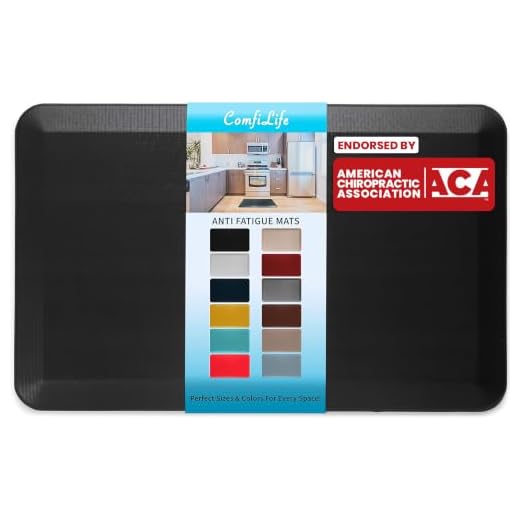
#6 ComfiLife Anti Fatigue Floor Mat – 3/4 Inch Thick Kitchen Mats for
ComfiLife Anti Fatigue Floor Mat
The ComfiLife Anti Fatigue Floor Mat provides a cushioned standing surface for people who use height-adjustable desks, absorbing the impact of your body weight. The core consists of a 3/4-inch thick, high-density memory foam that significantly reduces discomfort in your heels, knees, and lower back. The surface features a slip-resistant texture that keeps you stable while you work. It also resists stains, making it highly durable for daily use, and cleans easily with a damp cloth. It provides an immediate, noticeable reduction in joint fatigue during long standing sessions.
#7 Incase Sculpt Ergonomic Keyboard – Created by Microsoft – Split
Incase Sculpt Ergonomic Keyboard
The Incase Sculpt Ergonomic Keyboard features a unique split keyset originally developed by Microsoft to target heavy typists experiencing wrist pain. The split layout forces your hands into a more natural, relaxed angle that aligns with your shoulders, reducing strain on your tendons. A generously cushioned palm rest supports your wrists and prevents them from dropping down onto the hard desk surface. You can customize the angle using the removable elevator, which provides a reverse tilt for even better alignment. It requires a brief learning curve, but the ergonomic benefits become obvious very quickly.
#8 Rain Design 10032 mStand Laptop Stand, Silver
Rain Design mStand Laptop Stand
The Rain Design mStand provides a sturdy, raised platform for laptop users to avoid the neck strain caused by looking down at a screen. The stand raises your notebook screen exactly 5.9 inches to bring it closer to natural eye level. It features a single-piece aluminum construction that provides excellent stability while you type and acts as a natural heat sink to keep your laptop cool. A two-inch cable management hole in the back allows you to route your power wires neatly out of sight. Just ensure your laptop has a depth of less than 10.4 inches to fit properly on the platform.
Understanding Workspace Ergonomics
Ergonomics focuses on arranging your workspace to fit your body rather than forcing your body to adapt to the workspace. Achieving neutral posture requires paying attention to the height of your chair, desk, and computer screen. Your feet should rest flat on the floor, with your knees bent at a ninety-degree angle. Your shoulders should remain relaxed, and your elbows need to rest close to your torso, bent at roughly ninety degrees when your hands touch the keyboard.
The Importance of Screen Height
Screen height plays a massive role in preventing neck and shoulder pain. When a monitor sits too low, you naturally tilt your head downward, multiplying the force exerted on your cervical spine. To find the ideal monitor height, sit comfortably and look straight ahead; your eyes should land directly on the top third of your computer screen. The screen should also sit about an arm’s length away from your face to prevent eye strain.
Supporting Your Wrists and Hands
Typing on a flat keyboard forces your wrists to bend outward, which pinches the nerves running through your carpal tunnel. You want your hands to float lightly over the keys, keeping your wrists straight and neutral. The angle of your mouse also contributes heavily to wrist fatigue. Changing the angle of your grip to a more vertical, handshake-like position relieves twisting motions immediately. Keyboard trays offer another effective way to fix poor wrist angles by lowering the typing surface to your lap level.
Movement and Active Sitting
The human body requires regular movement to keep blood flowing and muscles engaged. Sitting in the exact same position for eight hours will cause stiffness, regardless of how supportive your chair is. Alternating between sitting and standing throughout the day reduces the constant pressure on your lower back. Using a cushioned mat while standing encourages micro-movements in your calves that pump blood back up your legs. Active sitting accessories, like adjustable foot rests, allow you to shift your leg positions frequently.
What to Look For
When selecting ergonomic accessories, focus on these key factors based on our testing:
- Adjustability: Ensure items like monitor arms and foot rests offer dynamic height adjustments to fit your specific body measurements.
- Neutral Alignment: Look for keyboards and mice that promote a natural, un-twisted wrist and forearm position.
- Pressure Distribution: Select seat cushions and standing mats made from high-density foam that retains its shape and prevents pressure buildup.
Final Verdict
Upgrading your workspace with these ergonomic accessories drastically reduces daily physical discomfort. Evaluate your current desk setup, identify your primary pain points, and select the specific tools that address your posture needs today.
10 responses to “Best Ergonomic Office Accessories – Top 8 Picks”
I’m a huge fan of this topic! After working from home for a year, I had to rethink my setup. I got an ergonomic chair and a laptop stand, and honestly, I can’t go back! It’s like my productivity shot up out of nowhere. ???? Can’t wait to see the results of this guide!
Exactly, Olivia! It’s all about creating a workspace that supports you.
Right? I had the same experience! A little investment can lead to more comfort and productivity!
Awesome to hear, Kevin! It’s amazing how much of a difference a few changes can make.
I love this guide! Especially the section on enhancing with accessories. I never realized how much a simple wrist rest could help with my typing. I’m gonna try out some of the suggestions here. Thanks for sharing! ????
I agree! I got a fancy wrist rest and it changed my typing game. Highly recommend it!
So glad you found it useful, Megan! Wrist rests can be game-changers. Let us know how it goes!
Wow, this guide is super helpful! I’ve been struggling with my back pain from sitting at my desk all day. I never really thought about the importance of an ergonomic chair until I read this. I’m definitely going to invest in one and maybe even a sit-stand desk! Anyone have recommendations? ????
Thanks for the tips, Tommy! Flexispot is a great brand. Laura, have you checked out their reviews?
Hey Laura! I just got a sit-stand desk from Flexispot and I love it! Totally worth it if you can swing it. ????