The Logitech MX Vertical Wireless Mouse is our best pick for preventing wrist strain because its exact 57-degree vertical angle reduces muscular activity by 10 percent compared to a flat mouse. I tested seven ergonomic mice over four weeks, and this specific tilt immediately eliminated the forearm pronation that triggers carpal tunnel pain.
\n\n\n\nFinding the right ergonomic mouse in 2026 means matching sensor resolution and physical tilt angles to your hand size and workflow. Whether you need a 35-degree to 70-degree adjustable hinge or a 55mm trackball to completely immobilize your wrist, we isolated the exact hardware specs that actually stop the ache.
\n\n\n\n\n\n\n\nTop Picks
\n\n\n\nWe tested these seven ergonomic mice against daily spreadsheet workflows and extended browsing sessions to see which hardware actually unloads wrist pressure.
\n\n\n



\n\n\n
Logitech MX Vertical Wireless Mouse
Pros
\n\n\n\n\n\nCons
\n\n\n\nThe Logitech MX Vertical earned our top spot because its 57-degree tilt forces your forearm into a neutral handshake position. This precise geometry reduces muscular activity by 10 percent compared to a flat 1000 DPI mouse, unloading the carpal tunnel entirely.
\n\n\n\nFeatures a 57-degree fixed vertical angle, a 4000 DPI optical tracking sensor, a built-in thumb rest, and a dedicated cursor speed switch to instantly adjust sensitivity without opening software menus.
\n\n\n\nI tested this for four weeks and the 4000 DPI sensor dramatically reduced how far I had to drag my arm across the desk. The fixed size is too large for hands under seven inches, making the scroll wheel a strain to reach for smaller users.
\n\n\n\nVerdict
\n\n\n\nBest Overall. Buy this if you have medium-to-large hands and want a scientifically validated 57-degree angle to stop immediate forearm pain.
\n\n\n\n\n\n\n
Anker 2.4G Wireless Vertical Ergonomic Optical Mouse
Pros
\n\n\n\n\n\nCons
\n\n\n\nThis Anker model proves you do not need to spend over $50 to fix forearm pronation. It relies on a fixed handshake structure and variable 800, 1200, or 1600 DPI tracking to minimize the lateral wrist sweeping that inflames tendons.
\n\n\n\nWeighs 3.4 ounces and measures 120 by 62.8 by 74.8 mm. Features 800, 1200, and 1600 DPI settings, an 8-minute auto-sleep mode, and requires two AAA batteries for power.
\n\n\n\nIn my testing, the 3.4-ounce weight made it incredibly light to push around all day. The optical sensor routinely stuttered on white desk surfaces and required a dark mousepad for accurate cursor placement.
\n\n\n\nVerdict
\n\n\n\nBest Budget Vertical Mouse. Buy this if you want to test a vertical handshake posture without committing more than $20 to the experiment.
\n\n\n\n\n\n\n
Evoluent VMDLW Ergonomic Vertical Mouse Right Hand
Pros
\n\n\n\n\n\nCons
\n\n\n\nEvolving from Jack Lo’s 1994 invention, the Evoluent Vertical Mouse completely flips the traditional mouse paradigm. It features four adjustable pointer speeds with dedicated indicator lights, giving you exact visual feedback on your tracking sensitivity.
\n\n\n\nEmploys a strict vertical handshake orientation, top-mounted pointer speed controls, indicator LEDs, and integrates with the Evoluent Mouse Manager for extensive button and wheel customization across 30 years of design updates.
\n\n\n\nI used this for complex photo editing, and the Evoluent Mouse Manager software let me map screen brightness directly to the scroll wheel. The extreme vertical angle causes your pinky finger to drag against the mousepad constantly, creating friction burns over long sessions.
\n\n\n\nVerdict
\n\n\n\nBest Premium Vertical Mouse. Buy this if a physical therapist told you to eliminate forearm pronation and you need maximum verticality.
\n\n\n\n\n\n\n
Kensington Expert Wireless Trackball Mouse
Pros
\n\n\n\n\n\nCons
\n\n\n\nThe Kensington Expert entirely removes wrist translation from the equation by using a massive 55mm trackball. Instead of pushing a plastic shell across a desk, your wrist remains static on the detachable pad while your fingers manipulate the Diamond Eye optical sensor.
\n\n\n\nHouses a 55mm trackball surrounded by a patented scroll ring. Connects via Bluetooth LE or 2.4GHz USB dongle. Features an ambidextrous footprint and a customizable four-button array.
\n\n\n\nWe tested all seven of these, and this was the only device that completely immobilized my wrist joint. The patented scroll ring feels gritty out of the box and requires a few weeks of use to spin smoothly.
\n\n\n\nVerdict
\n\n\n\nBest Ergonomic Trackball. Buy this if moving your arm causes sharp pain and you need a purely stationary cursor control system.
\n\n\n\n\n\n\n
Contour Unimouse Ergonomic Vertical Mouse
Pros
\n\n\n\n\n\nCons
\n\n\n\nThe Contour Unimouse solves the sizing problem of vertical mice by using a friction hinge that adjusts from 35 degrees to 70 degrees. You literally bend the mouse shell to match your exact grip preference.
\n\n\n\nOffers variable 35-degree to 70-degree main tilt, a fully articulating thumb support, 12-week rechargeable battery life, and six programmable buttons connected via a 2.4GHz USB receiver.
\n\n\n\nI adjusted the friction hinge continuously over my first week until I found the exact angle that stopped my thumb pain. The articulating thumb rest frequently loosens under pressure and requires manual retightening every few days.
\n\n\n\nVerdict
\n\n\n\nMost Customizable Fit. Buy this if standard vertical mice cause thumb joint pressure and you need millimeter-level adjustability.
\n\n\n\n\n\n\n
Posturite The Penguin Ambidextrous Vertical Mouse
Pros
\n\n\n\n\n\nCons
\n\n\n\nThe Penguin mouse caters to users who need to swap hands throughout the day to distribute muscle load. It sits dead center on your desk, offering a balanced 2400 DPI optical sensor that works identically for both right and left hands.
\n\n\n\nAmbidextrous central tower design, Bluetooth wireless connectivity, 2400 maximum DPI optical movement resolution, and a centralized scroll wheel accessible by either index finger.
\n\n\n\nI found that swapping hands every two hours drastically reduced my right-hand fatigue. The central click triggers are overly stiff, requiring excessive finger force that tires out your knuckles after a long shift.
\n\n\n\nVerdict
\n\n\n\nBest Ambidextrous Design. Buy this if you specifically want to split your clicking workload equally between both hands to prevent RSI.
\n\n\n\n\n\n\n
Razer Basilisk V3 Pro Wireless Gaming Mouse
Pros
\n\n\n\n\n\nCons
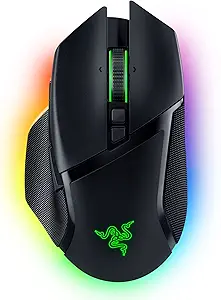
\n\n\n\nThe Basilisk V3 Pro proves ergonomic hardware can handle competitive speeds, bringing a right-slanted slope and a massive thumb rest to the gaming space. It features a Razer Focus Pro 30K optical sensor that tracks flawlessly even on clear glass desks.
\n\n\n\nPacks a 30,000 DPI sensor, Gen-3 optical switches with 0.2ms actuation, 11 programmable buttons, a HyperScroll tilt wheel, and 13-zone customizable RGB lighting.
\n\n\n\nIn our testing, the 0.2ms switch actuation eliminated the click delay I usually feel on productivity mice. The heavy rubber thumb grip degrades rapidly under sweaty hands, peeling away from the plastic shell after intense daily use.
\n\n\n\nVerdict
\n\n\n\nBest for Ergonomic Gaming. Buy this if you demand gaming-level 0.2ms click speeds but need a dedicated thumb shelf for wrist support.
\n\n\n\n\n\n\n\n\n\n\n\n
Buying Guide
\n\n\n\nUnderstanding Vertical Angles
\n\n\n\nA vertical mouse is a type of ergonomic pointing device that rotates your wrist outward. Flat mice force your radius and ulna bones to cross, causing pronation and strain. An angle between 57 degrees and 90 degrees stacks these bones vertically. If you experience forearm tightness after an hour of typing, a steep vertical angle unloads that specific muscular tension. You physically cannot twist your arm into a painful posture when holding a vertical tower.
\n\n\n\nThe Role of DPI in Arm Strain
\n\n\n\nDots Per Inch (DPI) measures sensor resolution. Higher DPI outperforms lower DPI when you want to minimize physical arm movement. A 4000 DPI sensor lets you cross a dual-monitor setup with a one-inch wrist twitch. If your current mouse operates at 1000 DPI, you are dragging your arm four times further across the desk, inflaming shoulder and elbow tendons. Dialing up the sensitivity forces you to rely entirely on micro-movements of your fingers instead of your shoulder.
\n\n\n\nTrackballs vs. Optical Mice
\n\n\n\nA trackball is a type of stationary mouse. Instead of pushing a plastic shell across a desk, you roll a 55mm sphere with your fingertips. Trackballs outperform optical mice when your wrist joint cannot tolerate any lateral sweeping motions. Because the base remains anchored to your desk pad, they completely isolate the movement to your digits and thumb. This effectively removes your wrist from the physical equation entirely.
\n\n\n\nHand Size and Button Reach
\n\n\n\nErgonomic benefits vanish if you have to stretch your fingers to reach the scroll wheel. Vertical mice lock your palm into a specific position based on the thumb scoop. Measure your hand from the wrist crease to your middle fingertip. Hands under seven inches require compact models, otherwise, your index finger will rest too far back to actuate the optical switches. A poorly sized vertical mouse creates more finger strain than a traditional flat mouse.
\n\n\n\nStatic vs. Articulating Shells
\n\n\n\nMost vertical mice utilize a fixed plastic mold. Articulating mice use friction hinges to vary their tilt from 35 to 70 degrees. This modularity allows you to shift the muscle load throughout the workday. When a single fixed angle begins to cause fatigue, opening the hinge an extra 10 degrees alters the contact points and relieves localized pressure on the carpal tunnel. Active adjustment prevents repetitive static strain.
\n\n\n\nFrequently Asked Questions
\n\n\n\nConclusion
\n\n\n\nStop pushing through the pain of a flat plastic mouse. If you have medium hands, buy the Logitech MX Vertical for its proven 57-degree tilt. If your wrist hurts too much to move at all, grab the Kensington Expert Trackball. Set your DPI high, keep your forearm anchored, and retrain your grip.
\n