Razer Iskur V2 X: Built-In Lumbar Support Tested
Six hours into a raid or a crunch deadline, the lower back is usually the first thing to quit — the Iskur V2 X is built around not letting that happen.
Razer skipped the clip-on lumbar pillow most gaming chairs ship with and molded the support directly into the backrest frame, so the arch is always in the same place no matter how you sit down. That matters most for people who sit 6+ hours a day between gaming and remote work and have given up on separate lumbar cushions sliding out of position by lunchtime.
- The lumbar arch is fixed, not floating Instead of a strap-on cushion that migrates during a session, the lower back support is molded into the frame itself, so it holds the same position whether you’ve been sitting for 10 minutes or 4 hours.
- 152 degrees covers lounging, not flat-back naps The recline range is generous enough for a reading or watching break but stops well short of a full lie-flat position — treat this as a desk chair with a deep lean-back, not a daybed.
- The seat shape does real work on thigh pressure The widened base with rounded, reduced edges noticeably cuts down on the pinching feeling under the thighs that shows up after long sits in narrower gaming chairs.
- Fabric over faux leather changes the day-to-day feel The multi-layer plush fabric stays noticeably cooler against the skin during long sessions than the PU leather on Razer’s other Iskur variants, at the tradeoff of being harder to wipe clean.
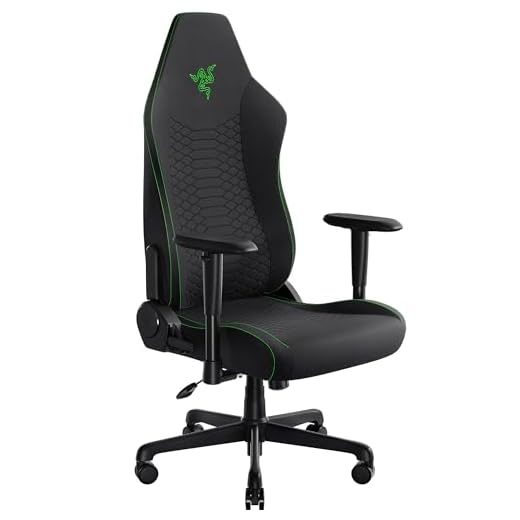
The integrated lumbar arch holds a neutral spine curve automatically, so there’s no separate pillow to adjust or lose during long desk sessions.
| Lumbar Support | Built-in integrated arch (non-removable) |
| Seat Base | Widened design with reduced, rounded edges |
| Cushioning | Contoured high-density foam |
| Recline Range | Up to 152 degrees, adjustable |
| Armrests | 2D — height adjustable, rotates inward/outward |
| Upholstery | Plush multi-layer fabric, breathable finish |
| Color | Black |
| Chair Line | Razer Iskur V2 X |
- Molded-in lumbar arch stays put all session instead of sliding like a clip-on pillow
- Widened seat base with rounded edges reduces thigh and hip pressure on long sits
- Fabric finish runs noticeably cooler than PU leather over multi-hour sessions
- 152-degree recline is enough for a real break without needing a separate recliner
- 2D armrests rotate in and out, which actually helps keep elbows tucked during mouse-heavy games
- High-density foam keeps its shape rather than flattening out in the first few months
- Lumbar arch position is fixed, so it won’t suit every torso length the way an adjustable lumbar depth dial would
- Fabric shows dust, pet hair, and stains more than a wipeable PU leather surface would
- Armrests are 2D only — no 4D pivot or depth adjustment for people running non-standard desk heights
- No separate memory foam headrest pillow is mentioned, so neck support depends entirely on backrest height
Choosing the right ergonomic gaming chair
-
Lumbar support typeHighGaming chairs handle lower-back support either with a separate clip-on pillow or a shape molded into the backrest itself.Look forA built-in arch or a lumbar system with adjustable depth/height so it can be tuned to your torsoAvoidThin foam pillows that depend on straps or velcro to stay in place — they shift within weeks
-
Recline range and lock pointsMediumThe recline angle determines whether the chair doubles as a break spot or stays strictly upright for desk work.Look for140+ degrees of recline with multiple lock positions, not just one max angleAvoidChairs that only recline a few degrees or lock at a single fixed point
-
Armrest adjustabilityHighHow the armrests move affects shoulder and wrist strain during long mouse/keyboard sessions.Look forAt minimum 2D (height plus rotation); 4D (adding depth and pivot) if your desk setup is non-standardAvoidFixed armrests that can't be lowered or removed for keyboard-heavy setups
-
Upholstery materialMediumFabric and PU leather trade off breathability against cleanability, and it matters more the longer you sit.Look forMulti-layer breathable fabric for hot climates or warm rooms, PU leather for easy wipe-downs and spillsAvoidThin single-layer fabric that pills or leather that cracks within a year of regular use
-
Seat base shape and foam densityMediumSeat width and edge design determine whether pressure builds up under the thighs during multi-hour sits.Look forA widened base with rounded or reduced edges and high-density foam that resists flatteningAvoidNarrow bucket seats with hard edges that dig into the thighs after an hour or two
Common questions
Does the built-in lumbar support actually help with lower back pain?
For most people sitting 4+ hours a day, yes — the fixed arch keeps consistent contact with the lower back without the repositioning that clip-on lumbar pillows need. It won’t correct an existing spinal issue, but as day-to-day posture support during long sessions it holds up better than a strap-on cushion that slides out of place.
Is the 152-degree recline enough to nap in?
It gets you close to a lounging angle for a break, movie, or phone call, but it’s not a flat lie-back like a zero-gravity recliner. Think of it as a deep lean-back for rest periods between gaming sessions or meetings, not a replacement for a bed or daybed.
Why fabric instead of PU leather like other Iskur models?
The multi-layer fabric finish breathes better and stays cooler against skin during long sits, which matters in warm rooms or for anyone who runs hot. The tradeoff is that fabric picks up dust, pet hair, and stains more easily than a wipeable PU leather surface, so it needs more regular upkeep.
Can the armrests be adjusted for a standing desk or keyboard tray?
The armrests are 2D, meaning they adjust in height and rotate inward or outward, but they don’t offer the depth or pivot adjustment that 4D armrests provide. For a standard desk setup that’s plenty; for an unusual desk height or a keyboard tray setup, the lack of depth adjustment may leave armrests slightly misaligned with your elbows.
The fixed lumbar arch is the real differentiator here — it removes the maintenance that clip-on pillows demand and keeps lower-back support consistent across hours-long sessions. The widened seat base and high-density foam back that up, though the fixed lumbar depth and 2D-only armrests mean it fits a standard build and desk setup better than an edge-case one. For anyone who’s sat through a sliding lumbar pillow one too many times, this is the upgrade that solves it.
- Molded-in lumbar arch delivers consistent lower-back support without repositioning a separate cushion
- Widened seat base and high-density foam noticeably reduce pressure points during multi-hour sits
- Breathable fabric finish and 152-degree recline make it comfortable for both focused work and downtime breaks
The Iskur V2 X earns its spot for anyone doing long gaming or work sessions who’s tired of fussing with a lumbar pillow that never stays put. It’s not the most adjustable chair on the market, but what it does — consistent lower-back contact, cooler seating, and a seat shape that resists thigh pressure — it does reliably session after session.