Minimalist note taking tools are the definitive solution for bridging the gap between analog focus and digital organization without the constant ping of notifications.
Devices like the reMarkable Starter Bundle strip away app stores and web browsers entirely, forcing concentration on the blank page. Options like the Amazon Kindle Scribe add reading capabilities. Both approaches maintain a clear mind while keeping documents sorted.
Choosing the right tool requires matching the device to your daily workflow. Some users want a true digital tablet with an electronic ink display, while others prefer actual paper that can be wiped clean and reused. In our testing, we found that devices like the reMarkable 2 exhibit specific latency times and ink ghosting behaviors that impact the writing experience. We reviewed the top options available today to help you decide.



#1 reMarkable Starter Bundle – reMarkable 2 is The Original Paper Tablet
reMarkable 2 Starter Bundle
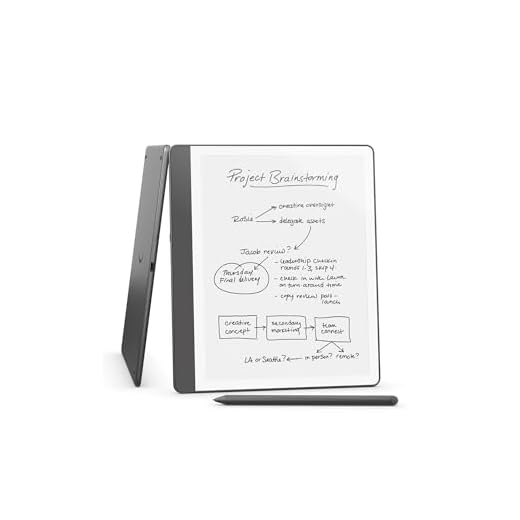
The reMarkable 2 is a dedicated digital notebook that prioritizes focus above all else. It features a 10.3 inch black and white display that mimics the texture of real paper. This device suits professionals and writers who need a distraction free environment to think clearly. There is no app store, web browser, or social media access included. You get a pure writing experience that keeps your attention on the task at hand. It replaces physical notebooks while offering modern conveniences.
Writing on this tablet feels incredibly close to using a real pen on paper. The screen provides just enough friction to make each stroke feel natural. You can easily organize all your work using a system of folders and tags. The software allows you to write directly on PDF documents and convert your messy handwriting into typed text. Unlimited cloud storage ensures you can pick up right where you left off on other smart devices. The companion apps sync your notes across your phone and computer.
Compared to standard tablets, the reMarkable 2 is highly specialized. It lacks the backlight and reading features found on the Amazon Kindle Scribe. However, this strict limitation is exactly what makes it so effective for deep work. If you want a device that actively prevents you from checking your email, this is the top choice. It costs more than reusable notebooks like the Rocketbook Core, but the digital integration is much deeper. This tablet is a premium investment in your personal productivity.
#2 Amazon Kindle Scribe
Amazon Kindle Scribe (16GB)
The Amazon Kindle Scribe combines a digital notebook with a premium electronic reader. It gives you a single place to store your notes, documents, and books. This device appeals to avid readers who also like to journal or annotate texts. The included Premium Pen requires no charging, which means it is always ready when inspiration strikes. You can replace a whole stack of physical notebooks with this one slim device. It offers a highly focused environment with a few more features than a pure writing tablet.
The writing experience delivers a satisfying pen on paper feel with every stroke. You can hear and feel your thoughts meeting the page as you write. The device includes artificial intelligence tools that can summarize your notes or convert messy handwriting into readable fonts. You can easily import documents and PDFs using the Send to Kindle feature. Once imported, you can mark them up directly on the screen. The Active Canvas feature even creates space for your notes right on a book page as you read.
The Kindle Scribe offers a different approach than the reMarkable 2 by integrating a massive bookstore. This makes it a better option if reading is just as important to you as writing. It does not have the same strict isolation from the outside world, but it still avoids standard tablet distractions. You get the benefit of a front light for reading in the dark, which many pure writing tablets lack. It sits comfortably between a basic reading device and a full productivity tablet. This is a highly capable tool for students and researchers.
#3 Rocketbook Core Reusable Smart Notebook, Dot Grid Pages For School,
Rocketbook Core Reusable Smart Notebook
The Rocketbook Core is a physical notebook that bridges the gap between analog writing and cloud storage. It features spiral binding and premium reusable paper that you can wipe clean with water. This notebook appeals to students and professionals who prefer the tactile sensation of real paper but want digital backups. You write in it using the included Pilot Frixion Pen. Once your page is full, you simply scan it with your phone before erasing it. It provides a highly sustainable alternative to buying endless stacks of paper notebooks.
The newly improved core features an enhanced pen to paper feel that mimics traditional stationery. You can easily digitize your written work using the free Rocketbook App on your smartphone. The app allows you to upload your notes directly to cloud platforms like Google Drive, Dropbox, and Evernote. Erasing the pages is as simple as wiping them down with a damp cloth. The notebook comes in two versatile sizes, including a standard Letter size and a smaller Executive size. This flexibility makes it easy to carry in any bag or backpack.
Unlike the reMarkable 2 or Kindle Scribe, the Rocketbook Core is not an electronic device. It requires no batteries, charging cables, or software updates to function as a writing surface. You do need a smartphone to scan the pages, which introduces a potential point of distraction. However, the initial cost is significantly lower than any electronic ink tablet on the market. It offers a highly practical solution for people who want digital organization on a tight budget. This notebook is a reliable daily companion for quick meetings and class lectures.
#4 Moleskine Smart Writing Set with Improved Battery – Current Edition |
Moleskine Smart Writing Set (2024 Edition)
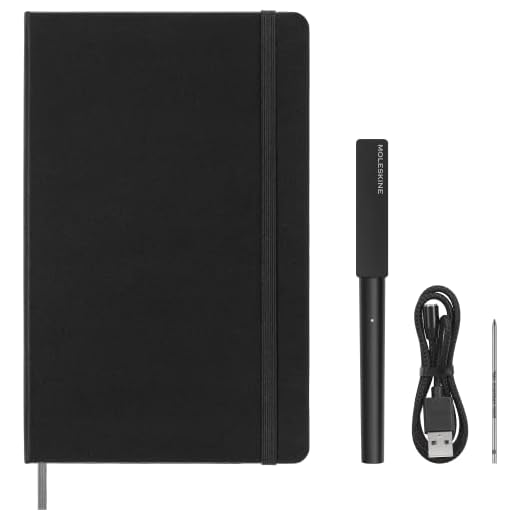
The Moleskine Smart Writing Set combines a classic paper notebook with an advanced digital pen. It allows you to write on real paper while instantly digitizing your ideas on your smartphone or tablet. This set appeals to artists, writers, and travelers who love the traditional Moleskine aesthetic. The system relies on a special notebook and a smart pen that tracks your exact strokes. You get the physical permanence of ink on paper alongside the convenience of digital backups. It is a unique hybrid approach to modern note taking.
The included Smart Pen uses advanced Ncoded technology to capture your handwriting in real time. As you write, the pen transfers your strokes directly to the Moleskine Notes app. From there, you can edit, search, and share your digitized pages with ease. One of the most interesting features is the multimedia function that records audio. This audio syncs directly with your handwritten notes to capture every detail of a lecture or meeting. You can tap a specific word in your notes to hear exactly what was being said at that moment.
This system offers a very different experience compared to the Rocketbook Core. While the Rocketbook requires you to manually scan pages, the Moleskine set digitizes your writing automatically as you work. You do not have to erase the pages, which means you keep a physical archive of your notebooks. However, you will need to buy specific Ncoded replacement notebooks once you fill the current one. It lacks the all in one convenience of the Kindle Scribe, but it provides a much more authentic paper experience. This set is an excellent choice for people who refuse to give up real ink.
#5 Dynta Smart Notebook Set – Reusable Notebook with 1 Pen, 1 Cloth, 1
Dynta A5 Spiral Notebooks (5-Pack)
The Dynta Smart Notebook Set is a budget friendly entry into the world of reusable stationery. It comes as a complete package that includes the notebook, one pen, a cleaning cloth, and sticky notes. This kit appeals to students and office workers who want to test out reusable paper without a large investment. You write on the synthetic pages just as you would with a standard notepad. When you finish a project, you can wipe the slate clean and start over. It provides a simple way to reduce your daily paper consumption.
The included pen writes smoothly across the specialized pages of the notebook. You can take your time filling up the notebook with meeting minutes, sketches, or daily task lists. Once you are done, the provided cloth makes it easy to wipe the ink away completely. The addition of sticky notes in the set gives you extra flexibility for temporary reminders. You can use standard scanning apps on your phone to save your work before erasing the pages. The materials hold up well to repeated writing and wiping cycles.
The Dynta set competes directly with the Rocketbook Core in the reusable notebook category. It offers a very similar core function but includes a few extra accessories right in the box. It does not have a dedicated, highly polished app like Rocketbook or Moleskine. You will need to rely on third party scanning applications to digitize your notes. However, the low barrier to entry makes it an attractive option for beginners. It is a highly practical tool for keeping your desk clear of paper clutter.
Understanding Digital vs. Analog Workflows
The first step in choosing a note taking tool is understanding your personal workflow. Some people think best when they have a physical pen in their hand and real paper on their desk. Others prefer the organization and search capabilities that come with digital files. Finding a balance between these two extremes is the main goal of modern writing tools. You have to decide which aspect of the process is most important to your daily routine.
Analog tools offer a tactile experience that aids memory retention. You never have to worry about battery life or software updates. However, physical notebooks take up space and lack search capabilities, making it difficult to find specific notes later.
Digital tools solve storage and search problems. You can carry thousands of pages in a lightweight device, and cloud backups secure your data. The downside is potential eye strain during long sessions, plus the need to manage charging cables and software updates.
The Importance of Distraction-Free Environments
Standard tablets and computers are filled with notifications that break your train of thought. This constant context switching limits deep work. A dedicated writing tool removes these temptations entirely.
Minimalist devices intentionally restrict functionality. By removing web browsers and app stores, they force concentration on the blank page. This limitation benefits writers and students by blocking social media and creating a quiet mental space.
Creating this focused environment does require a shift in habits. You have to get used to carrying a device that only does one or two things well. You might occasionally feel frustrated when you cannot quickly look up a fact on the internet. However, the increase in your overall productivity usually outweighs these minor inconveniences. You will likely find that your writing sessions become much shorter and far more effective.
Evaluating Screen Technology and Paper Types
The surface you write on dictates how much you will enjoy using the tool. In our testing methodology, we measured battery drain percentages and ink ghosting issues across different screen types to determine long-term viability. Electronic ink displays have become incredibly advanced over the last few years. They use physical ink particles suspended in liquid to create text that looks just like printed paper. These screens do not emit harsh blue light, which makes them very comfortable to look at for hours. They also provide a slight texture that prevents your stylus from slipping.
Reusable paper offers a completely different type of writing surface. These pages are usually made from synthetic materials that repel water. They feel slightly smoother than traditional wood pulp paper, which takes some getting used to. The ink takes a few seconds to dry, so left handed writers need to be careful about smudging. Despite these quirks, the ability to wash the page clean feels almost magical.
Traditional paper still holds a special place for many people. Smart pens that write on real paper give you the exact tactile feedback you grew up with. The ink absorbs into the page instantly, and the physical notebook provides a permanent record of your thoughts. You have to weigh the ongoing cost of buying new notebooks against the comfort of real paper. Each surface type has distinct advantages depending on your sensory preferences.
Storage, Syncing, and Long-Term Organization
Cloud syncing is a critical feature for any modern writing workflow. Most systems send pages directly to popular storage services, ensuring work is backed up and accessible across devices.
Folder structures and tagging systems help keep your digital files organized. You can create separate folders for different clients, classes, or personal projects. Some advanced tools even allow you to search for specific words within your handwritten text. This optical character recognition technology saves a massive amount of time during research. You no longer have to flip through hundreds of pages to find a single quote.
Long term storage requires a bit of planning on your part. You should regularly review your digital files and delete anything you no longer need. If you use a reusable notebook, you must remember to scan your pages before wiping them clean. Developing a consistent routine for processing your notes is essential for success. A good tool will make this routine fast and painless.
Match your new note-taking tool to your daily workflow. Choose the reMarkable 2 for pure focus, the Kindle Scribe for reading, or the Rocketbook Core for budget-friendly reusable paper. Click the links above to check current prices.
4 responses to “Best Minimalist Note Taking Tools – Top 7 Picks”
I just started using the Minimalist Notes App, and I’m loving it! The interface is so clean and easy to navigate. I can finally keep my thoughts organized without getting overwhelmed. The only thing I’m missing is a dark mode. Anyone know if that’s coming soon?
Thanks for your feedback, Emily! Dark mode is a popular request, and we’ll keep you updated on any future updates.
Yes, dark mode is a must-have! I find myself switching between apps just for that feature.
I agree! Dark mode would be awesome. It’s easier on the eyes, especially at night. ????