
The Best Webcams – Our Top 8 Picks Tested and Reviewed

A blurry, poorly lit video feed doesn’t just look unprofessional—it creates subconscious cognitive load for everyone on the call. When your colleagues have to actively squint to read your facial expressions, meeting fatigue sets in twice as fast. Upgrading your webcam is a direct investment in your digital presence and the visual wellness of whoever is staring back at you.
You don’t need to spend hours deciphering sensor sizes, aperture ratings, and autofocus mechanics. I’ve broken down exactly how these cameras perform when the desk lamp is too bright, the window is too dark, and your computer’s fan is spinning at maximum speed.
Top Picks
Here are the webcams that actually deliver on their spec sheets, tested under real-world desktop lighting conditions.




Razer Kiyo Pro Ultra 4K Webcam
It earns the top spot because raw hardware always beats software tricks. The custom F/1.7 aperture lens pulls in vast amounts of light that other desktop cameras simply cannot process, immediately elevating your digital presence and reducing visual noise during late-night calls.
Features a massive 1/1.2-inch Sony STARVIS 2 sensor with 2.9 μm pixels to capture deep image data. It shoots HDR video at 30 FPS, automatically correcting over and underexposed areas to make colors pop.
You get the authentic blurred background of a DSLR without the capture card nightmare. It locks focus beautifully, but the heavy lens housing is physically massive and will inevitably block browser tabs on thin-bezel monitors.
Verdict
Best Overall Image Quality. Buy this if you want Twitch-level production value and authentic optical blur without learning to operate a mirrorless camera.
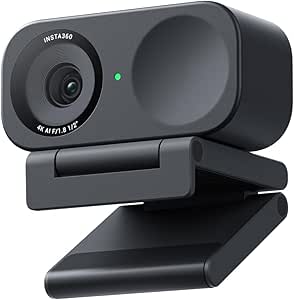
Insta360 Link 2C 4K Webcam
Phase Detection Auto Focus makes this the fastest-focusing unit on the list. It locks onto your face instantly, ensuring crisp video without the constant hunting and pulsating that causes viewer fatigue. This hardware alone delivers stunning, true-to-life visuals in demanding environments.
Houses a premium 1/2-inch sensor shooting 4K with HDR for stunning low-light video performance. It features advanced AI noise-canceling audio algorithms to filter background noise, plus automatic framing capabilities to keep everyone clearly in sight.
The depth of field looks incredibly natural straight from the Link Controller. It handles mixed desk lighting perfectly, but the auto-framing relies entirely on digital zoom, noticeably degrading the 4K image quality when it punches in.
Verdict
Best Premium with AI Tracking. Buy this if you frequently present physical objects and need focus to snap back to your face instantly.
Elgato Facecam 4K Studio Webcam
Built specifically for professional streamers and content creators, this is the only camera here offering truly uncompressed video. It captures stunningly sharp detail, completely eliminating the digital compression artifacts that make standard webcams look cheap on large monitors during live broadcasts.
Captures crystal-clear 4K resolution at 60 FPS using a Sony STARVIS 2 CMOS sensor. It saves your visual settings directly to built-in flash memory and supports standard 49mm lens filters for ultimate creative control.
Motion is flawlessly fluid at 60 FPS, and saving lighting settings to the hardware prevents software booting delays. However, it completely lacks a built-in microphone, rendering it useless for standard meetings unless you own dedicated audio gear.
Verdict
Best for Professional Streamers. Buy this if you already have a dedicated streaming mic and demand zero-latency uncompressed 60 FPS video.
Logitech C920x HD Pro PC Webcam
The undisputed workhorse of the internet remains a staple for digital wellness. It survives outliving multiple laptops while delivering exactly what you need for basic video calls, automatically fine-tuning your room lighting to produce razor-sharp, bright images in standard home offices.
Shoots full HD 1080p video calling at 30 fps utilizing dual stereo microphones for natural sound. It boasts advanced capture software and is officially compatible with the Nintendo Switch 2’s new GameChat mode.
It mounts securely on any screen and the auto-exposure works reliably for normal office tasks. The hard limitation is the 30 fps cap—move your hands quickly while speaking and your audience sees immediate, distracting motion blur.
Verdict
The Gold Standard for 1080p. Buy this if you need a bulletproof, affordable camera for daily huddles and console voice chat.
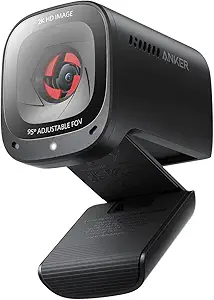
Anker PowerConf C200 2K Webcam
A masterclass in budget engineering that immediately enhances your daily PC setup. It delivers incredibly sharp, detailed video resolution and gives you hard physical control over your privacy, making it a perfect upgrade for hybrid workers battling visual fatigue.
Delivers 2K ultra-clear resolution with adjustable 65, 78, or 95-degree viewing angles via software. It features an integrated sliding privacy cover and dual microphones powered by advanced AI noise cancellation to ensure crystal clear voices.
The physical slider provides complete peace of mind, and the AI mics legitimately filter out loud keyboard clicks. The distinct flaw is that the 95-degree FOV setting introduces aggressive barrel distortion that heavily warps the edges of your room.
Verdict
Best Budget 2K Option. Buy this if you want sharp 2K resolution and refuse to trust digital privacy buttons.
OBSBOT Tiny 2 Lite 4K Webcam
AI tracking perfectly meets physical hardware. Leveraging cutting-edge AI camera tech from their EWC 2025 partnership, this PTZ camera mechanically follows you around the room, making it an incredible asset for active teachers and presenters who refuse to stay seated.
Uses a premium 1/2-inch CMOS sensor to capture uncompromised 4K resolution. It features customizable preset positions and utilizes distinct 🖐 and 👆 dynamic gesture controls for completely hands-free portrait tracking and zoom adjustments.
Walking around while presenting feels incredibly natural as the motors silently track your physical movement. To hit this lower price point, OBSBOT completely stripped out the whiteboard tracking mode and voice controls found on their flagship unit.
Verdict
Best for Low-Light Performance. Buy this if you teach, present on your feet, or constantly move around your home office.
Dell UltraSharp WB7022 4K UHD Webcam
The most professional-looking piece of hardware on the list. Designed to look completely unobtrusive and eye-catching, this textured metallic cylinder blends seamlessly into minimalist corporate setups while drastically reducing desktop visual clutter during incredibly long days of virtual meetings.
Features a 4K Sony STARVIS CMOS sensor with AI Auto Framing. Certified for Microsoft Teams and Zoom, it allows you to effortlessly tweak brightness and select your desired view with 65, 78, and 90-degree options.
The premium aluminum body feels fantastic, and Image Signal Processing guarantees superior picture quality in extreme backlight. However, Dell deliberately omitted a microphone entirely, meaning you cannot take a single call without connecting a separate headset.
Verdict
Best for Business Professionals. Buy this if you operate in a corporate environment with a dedicated headset and want pristine video.
Poly Studio P15 Personal Video Bar
An entire IT department compressed into a single personal video bar. It tackles both your audio and video needs simultaneously, creating a highly focused virtual workspace that effectively filters out the exhausting sensory chaos of working from a busy home.
Delivers sharp 4K resolution with automatic camera framing. It features a powerful integrated speaker with a passive radiator, advanced NoiseBlockAI technology, and dual USB ports to easily connect wireless headset adapters or other peripherals.
The integrated audio is shockingly rich; the passive radiator gives incoming voices real bass and presence. The major drawback is its massive footprint, which frequently forces lightweight, thin-bezel desktop monitors to physically tilt forward under the heavy load.
Verdict
Best All-in-One for Meetings. Buy this if you want to eliminate desktop speakers and a standalone mic in one swoop.
Buying Guide
Sensor Size Beats Resolution
You can have all the 4K pixels in the world, but if the internal sensor is tiny, the resulting image will look like moving sand in low light. Always look for 1/2-inch or 1/1.2-inch sensors over generic 4K labels. These larger components capture significantly more light per pixel, meaning your face stays perfectly bright, sharp, and professional even when the sun goes down and your desk lamp is the only available light source.
The Field of View Trap
Wider is rarely better for digital wellness. A 90-degree or 95-degree field of view shows off your entire home office—including the laundry basket in the corner and the messy bookshelves. Stick to 65 or 78 degrees if you want the frame to focus solely on your face and shoulders. This intentionally minimizes visual distractions, reducing the cognitive load on your colleagues who are trying to focus on what you are actually saying.
Framing: Digital vs. Mechanical
Auto-framing keeps you centered, but how it happens drastically impacts quality. Cameras that use digital cropping cost you heavy resolution the tighter they zoom in on your face. Conversely, PTZ cameras use tiny physical motors to smoothly move the actual lens. This mechanical approach keeps you flawlessly in frame without sacrificing a single pixel of 4K clarity, saving your viewers from a pixelated, degrading image.
The Audio Reality Check
Never assume a premium webcam has a premium microphone. Several high-end corporate models completely strip the mic out to save physical space. Even when dual AI mics are included, they sit two feet away from your mouth. If you stream, teach, or present for hours at a time, a dedicated USB microphone positioned close to your mouth is still completely mandatory for reducing vocal strain and listener fatigue.
Bandwidth and Port Planning
Pushing 4K video at 60 FPS requires a massive amount of data bandwidth. Uncompressed signals will immediately overwhelm older USB ports and cheap splitters. Check your motherboard before buying—you absolutely need dedicated, high-speed USB 3.0 or USB-C ports routed straight to the machine. Plugging a flagship camera into an unpowered hub will result in constant stuttering, freezing, and hardware disconnects during crucial meetings.
Frequently Asked Questions
Conclusion
Don’t buy a flagship 4K camera if you are just going to plug it into an unpowered USB hub. Check your monitor’s bezel depth, verify your motherboard’s USB-C port speeds, and match your purchase to your actual desk lighting. Your eyes—and everyone looking at you on a screen—will thank you for the upgrade.





Just got my Logitech C920x and I’m absolutely blown away by the video quality! ???? It’s like everyone can see my beauty in HD! ???? Seriously though, the auto light correction is a game changer for my dimly lit room. Anyone else using it for streaming? How’s your experience?
Thanks for sharing your experience, Sarah! The C920x is indeed popular among streamers. Let us know your favorite features!
I’ve been using it for a few months now and I agree, the video clarity is fantastic! What platform do you stream on?
So I’ve been looking to upgrade my webcam and the C920x keeps popping up everywhere. But is it really worth the $69.99? I mean, I’ve seen cheaper options. ???? What do you all think?
I had a cheaper one, and let me tell you, the difference is night and day. You won’t regret investing in the C920x!
In my opinion, yes! The quality is unmatched for the price point. Cheaper ones often compromise on clarity or audio.
Great question, Mike! While there are cheaper options, many users find that the C920x offers better long-term value due to its features.
I’ve had this webcam for about a year, and it’s still going strong! The auto light correction is a lifesaver when my room isn’t well-lit. But I did have a minor issue with the USB port, anyone else?
Thanks for sharing your long-term experience, Kevin! If you’re having USB port issues, it might help to try a different cable or port.
Yeah, I had a similar problem! A new cable fixed it for me. Just make sure to keep your drivers updated too!