Staying focused on a single task feels nearly impossible with constant digital distractions. Your phone buzzes with notifications, and suddenly a quick glance turns into an hour of scrolling. The Pomodoro technique offers a simple solution by breaking work into manageable intervals. A physical timer cube takes this a step further by removing the need to touch your phone at all. You just flip the cube to start your focus session and get straight to work.
We tested several options to find the most reliable and user-friendly models available. The Ticktime Pomodoro Timer stands out with its quick flip gyroscope sensor and multiple alert modes. If you prefer a slightly different aesthetic, the Rotating Pomodoro Timer offers similar gravity-sensing features with a sleek desk presence. Both models help you build a solid routine without relying on screen-based apps. Having a dedicated physical object for time management creates a clear boundary between work and leisure.
This guide covers our top seven picks for productivity timer cubes. We look closely at preset intervals, custom timing options, and alert methods like vibration or silent flashing. Some models feature premium materials like wood, while others focus on visual countdown displays. You will find detailed breakdowns of how each device performs in real-world settings. Read on to discover which timer matches your specific workflow and workspace requirements.


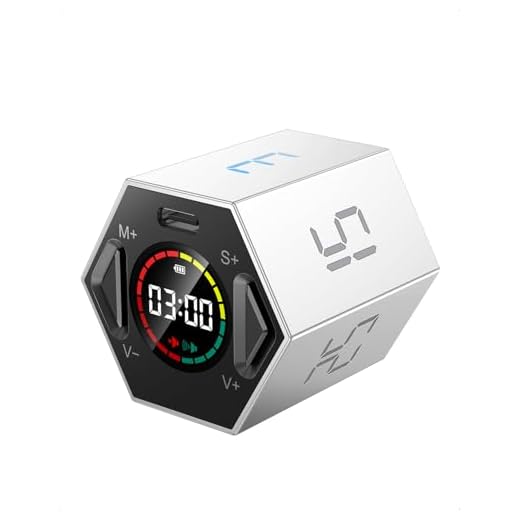
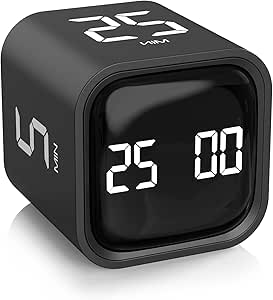
#1 Ticktime Pomodoro Timer, Productivity Timer Cube, 3/5/10/15/25/30 Min
Ticktime Advanced Pomodoro Productive Timer
The Ticktime Pomodoro Timer is a compact digital cube that brings physical interaction to your time management routine. It suits remote workers and students who need a quick way to start focus sessions without opening an app. The device relies on a built-in gyroscope sensor to activate preset intervals. You simply flip the cube to the side displaying your desired time, and the countdown begins immediately. This tactile approach helps build a physical habit around starting your work.
This model includes preset times of 3, 5, 10, 15, 25, and 30 minutes to cover standard Pomodoro cycles. You can also set custom countdown durations ranging from one second up to 99 minutes and 59 seconds. A dedicated stopwatch mode allows you to track open-ended tasks like meetings or workouts. When your time is up, you can choose between sound, vibration, or a silent flash alert. The silent and vibration modes work exceptionally well in shared offices or libraries where loud beeps would cause a disturbance.
Compared to traditional kitchen timers, the Ticktime offers a much faster setup process. It provides more preset options than the Rotating Pomodoro Timer, giving you greater flexibility for short breaks or long focus blocks. The inclusion of a silent flash mode makes it highly adaptable to different environments. If you frequently switch between quick tasks and deep work, this model handles the transitions smoothly. It remains a strong choice for anyone who values immediate activation and multiple alert styles.
#2 Rotating Pomodoro Timer 5, 25, 10 50 Minutes Preset, Desk
Rotating Pomodoro Timer for Focused Work
This Rotating Pomodoro Timer serves as a dedicated desk accessory for anyone practicing structured work intervals. It appeals to professionals and students who want a stylish, aesthetic device on their workspace. The timer uses a gravity sensor to activate specific time blocks based on how you position it. You just turn the cube to the desired number, and the tracking starts right away. The physical act of turning the timer helps signal the brain that a focus session has begun.
The gravity sensing mode comes with preset intervals of 5, 10, 25, and 50 minutes. These specific times align closely with standard Pomodoro work stretches and break periods. If you need a different duration, the digital interface supports custom adjustments from zero to 99 minutes. The device features three volume levels, including high volume, low volume, and a silent mode. In silent mode, the timer uses a noticeable vibration that alerts you at your desk without bothering people nearby.
This timer focuses heavily on the classic 25-minute work and 5-minute break structure. It offers fewer preset options than the Ticktime model but covers the most essential intervals for deep work. The 50-minute preset is particularly useful for double Pomodoro sessions. Its aesthetic design blends well into modern office setups better than basic plastic timers. It stands out as a practical gift for students or office workers who need a reliable, quiet time management tool.
#3 Rotating Pomodoro Timer 5, 25, 10 30,60 Mins Preset Stopwatch, Desk
Rotating Pomodoro Timer 5, 25, 10 30,60 Mins Preset Stopwatch,
The Rotating Pomodoro Timer with a stopwatch function provides a straightforward approach to managing your daily tasks. It targets individuals who need a simple desk flip timer to track their productivity. The cube format allows you to physically interact with your schedule by turning the device to start a session. This tactile engagement helps reduce the temptation to pick up a smartphone to set an alarm. It sits neatly on any desk and serves as a constant visual reminder to stay on track.
This model features preset intervals of 5, 10, 25, 30, and 60 minutes. You can easily switch between short breaks and extended focus periods by rotating the cube. The inclusion of a 60-minute option helps when you need to tackle larger projects that require sustained attention. It also functions as a standard stopwatch for open-ended activities. The digital display provides clear feedback on your remaining time without being overly distracting.
Having a 60-minute preset gives this model an edge for users who prefer longer work blocks. It differs from the previous Rotating Pomodoro Timer by swapping the 50-minute preset for a full hour. The flip mechanism works just as reliably as the other gravity-sensor models on our list. It lacks some of the highly specific custom countdown features found in the Ticktime version. However, the straightforward preset times make it incredibly easy to use right out of the box.
#4 TK3 Pomodoro Timer Cube, Desk Productivity Timer with 5/10/30/60 Min
TK3 Pomodoro Timer Cube, Desk Productivity Timer with 5/10/30/60
The TK3 Pomodoro Timer Cube is a compact productivity tool aimed at keeping your work sessions highly organized. It works well for writers, coders, and anyone who struggles with time blindness during long projects. The cube design allows for quick activation by simply resting the device on a specific side. This physical action creates a clear boundary between resting and working. Its small footprint ensures it will not clutter your workspace or get in the way of your keyboard.
You get access to standard preset times of 5, 10, 30, and 60 minutes with this cube. The 30-minute and 60-minute options cater to users who prefer slightly longer focus blocks than the traditional 25-minute Pomodoro. The device tracks your time accurately and alerts you when the interval concludes. The display is easy to read at a quick glance while you type or read. The simple interface means you spend less time fiddling with buttons and more time actually working.
The TK3 offers a slightly different preset configuration compared to the standard 25-minute models. If you find 25 minutes too short to get into a flow state, the 30-minute default provides a nice alternative. It shares the same basic flip-to-start functionality as the Ticktime and Rotating models. The lack of a 25-minute preset might deter strict Pomodoro purists. Still, it remains a highly effective tool for general timeboxing and daily task management.
#5 KADAMS Pomodoro Timer – Visual Cube with 5/10/30/60 Min Presets, LED
KADAMS Pomodoro Timer – Visual Cube with 5/10/30/60 Min Presets,
The KADAMS Pomodoro Timer introduces a visual countdown element to the standard cube format. It appeals to visual learners and individuals with ADHD who benefit from seeing time physically slip away. The device sits on your desk and provides an immediate sense of how much time remains in your current session. You activate the timer by flipping it, just like the other models in this category. The visual cue helps maintain a sense of urgency without causing unnecessary anxiety.
This timer includes preset intervals of 5, 10, 30, and 60 minutes. The LED countdown display clearly shows the remaining minutes and seconds. The visual representation of time helps you gauge your progress without having to read specific numbers. It alerts you promptly when your focus block or break period ends. The device operates reliably and handles daily use across various tasks like studying, reading, or answering emails.
The visual LED countdown sets the KADAMS timer apart from the purely digital text displays of the TK3 and Ticktime models. It provides a more intuitive grasp of passing time, which many users find helpful for staying on task. The preset times match the TK3, favoring 30-minute blocks over the traditional 25-minute Pomodoro. It might not have the extensive customizability of the Ticktime cube. However, the strong visual feedback makes it a highly practical choice for visual thinkers.
#6 Elegant Wooden Pomodoro Timer Cube Original High-End Quality Desk
Elegant Wooden Pomodoro Timer Cube Original High-End Quality
The Elegant Wooden Pomodoro Timer Cube brings a touch of high-end craftsmanship to your productivity setup. It targets professionals and executives who want a time management tool that matches their premium office decor. The wooden exterior provides a warm, natural aesthetic that stands in stark contrast to typical plastic electronics. You still get the convenience of a physical flip timer, but in a much more refined package. It serves as both a functional tool and a handsome desk accessory.
This original high-end quality desk timer tracks your work intervals with precision. The wooden casing houses reliable internal sensors that detect which side is facing up. It begins counting down immediately upon being flipped to a specific preset. The alert system notifies you when it is time to take a break or resume your tasks. The build quality feels substantial in the hand, offering a satisfying tactile experience every time you start a new session.
Most timer cubes on the market use plastic housings, making this wooden model a unique standout. It looks significantly more professional on a mahogany desk than the brightly colored Ticktime or KADAMS models. You might sacrifice some of the advanced digital displays found on the other options. The focus here is entirely on material quality and aesthetic appeal. If you care deeply about the visual harmony of your workspace, this wooden cube is the clear winner.
#7 Printers Jack, Productivity Cube Timer, Visual Pomodoro Timer, Mute &
Printers Jack, Productivity Cube Timer, Visual Pomodoro Timer,
The Printers Jack Productivity Cube Timer combines visual tracking with multiple alert options for a highly adaptable experience. It suits students and office workers who need to manage their time in quiet environments like libraries or shared cubicles. The cube design allows for quick physical activation to start your focus blocks. It helps you maintain a steady rhythm of work and rest throughout the day. The compact size makes it easy to toss into a backpack or laptop bag.
This visual Pomodoro timer features both mute and vibration alert settings. You can track your time visually while relying on the vibration motor to signal the end of a session. This ensures you never miss a break, even if you are wearing noise-canceling headphones. The timer accurately counts down your chosen intervals and resets easily for the next task. The interface remains simple and intuitive, requiring minimal setup before you can start working.
The combination of visual tracking and vibration alerts makes this model highly versatile. It competes closely with the KADAMS visual timer but adds the crucial vibration feature found in the Ticktime and Rotating models. This makes it a great hybrid option if you want visual cues without loud auditory alarms. It lacks the premium wooden finish of the Elegant cube, focusing instead on practical functionality. It serves as a highly capable daily driver for anyone serious about the Pomodoro method.
Buying Guide
Understanding the Pomodoro Technique
The Pomodoro technique is a time management method developed in the late 1980s. It traditionally involves breaking work into 25-minute intervals separated by short five-minute breaks. These intervals are called Pomodoros, named after the tomato-shaped kitchen timer originally used by the creator. The goal is to maintain intense focus for a short burst, knowing a break is coming soon. This structure helps prevent mental fatigue during long workdays.
After completing four consecutive work intervals, the technique suggests taking a longer break of 15 to 30 minutes. This extended rest period allows your brain to recover and process the information you just absorbed. Sticking to this rhythm can significantly increase your overall daily output. It forces you to step away from your desk, stretch your legs, and rest your eyes. Many people find that this structured approach makes daunting tasks feel much more manageable.
While the traditional 25-minute block works well for many, it is not a strict rule. Some tasks require longer periods of deep concentration, making 50-minute or 60-minute blocks more appropriate. Other quick chores might only need a 10-minute burst of energy. The key is finding a rhythm that matches your personal attention span and the nature of your work. A good physical timer allows you to experiment with different intervals until you find your ideal workflow.
The Benefits of a Physical Timer
Using a smartphone app for time management often introduces the very distractions you are trying to avoid. When you pick up your phone to start a timer, you immediately see text messages, emails, and social media notifications. A physical timer cube eliminates this temptation entirely. It sits on your desk as a single-purpose tool dedicated solely to your productivity. You can leave your phone in another room and still maintain strict control over your schedule.
The tactile experience of physically flipping or turning a cube also plays a psychological role in habit formation. The physical action signals to your brain that playtime is over and focus is required. This kinetic engagement creates a clear boundary between different states of mind. Over time, the simple act of touching the timer becomes a trigger for deep concentration. Digital apps simply cannot replicate this physical connection to your work routine.
Physical timers also provide constant visual reminders of your commitment to the task at hand. Seeing the device on your desk reinforces your intention to work in structured intervals. Many models offer visual countdowns that help you gauge remaining time without breaking your concentration. You do not have to wake up a screen or work through menus to check your progress. This immediate, passive feedback keeps you anchored to your current objective.
Choosing the Right Alert Methods
The way a timer notifies you at the end of a session is a crucial factor to consider. Traditional kitchen timers rely on loud, jarring bells or beeps that can disrupt your flow state. While a loud alarm works well in a busy kitchen, it is often inappropriate for an office environment. Sudden loud noises can startle you and cause unnecessary stress during a quiet workday. You need an alert system that gently pulls you out of your focus.
Many modern productivity timers offer adjustable volume levels to suit different settings. A low-volume beep might be ideal for a home office where you are working alone. However, if you work in a shared cubicle space or a public library, even a quiet beep can annoy those around you. In these situations, alternative alert methods become essential for maintaining a peaceful environment. You must evaluate your primary workspace before deciding on an alert style.
Vibration and silent flashing modes provide excellent solutions for quiet environments. A vibration alert on your desk is usually strong enough to catch your attention without broadcasting to the whole room. Silent flashing lights offer a purely visual cue that works well if the timer is in your direct line of sight. Some users even prefer vibration alerts because they can feel them through the desk while wearing noise-canceling headphones. Having multiple alert options ensures your timer remains useful regardless of where you are working.
Evaluating Preset Intervals vs Customization
Timer cubes generally operate using gravity sensors that activate specific preset times based on their physical orientation. These presets are incredibly convenient because they require zero programming or button mashing. You simply flip the device to the side labeled with your desired minutes, and the countdown begins. Common presets include 5, 10, 25, and 30 minutes, which cover the vast majority of standard productivity techniques. This simplicity is the primary draw of the cube format.
However, relying solely on presets can be limiting if your workflow requires highly specific time blocks. For example, you might want a 17-minute timer for a specific daily presentation rehearsal. In these cases, having a device that also allows for custom digital countdowns is highly beneficial. Custom modes let you dial in the exact minutes and seconds you need for specialized tasks. This flexibility ensures the device can adapt to unique schedules and unusual project requirements.
When evaluating your options, consider how often you actually deviate from standard time blocks. If you strictly follow the 25-minute work and 5-minute break routine, a simple preset-only model will serve you perfectly. If you frequently use your timer for cooking, workouts, or varied study sessions, customizability becomes much more important. A built-in stopwatch feature is also valuable for tracking how long open-ended tasks actually take. Balancing ease of use with necessary flexibility will lead you to the right tool.
Final Verdict
Finding the right productivity tool can significantly improve your daily focus and output. The Ticktime Pomodoro Timer offers incredible versatility with its custom countdowns and multiple alert modes, making it ideal for dynamic workflows. If you prefer a dedicated desk accessory with classic intervals, the Rotating Pomodoro Timer provides a stylish and quiet solution. Both of these options eliminate the need to rely on distracting smartphone apps.
For those who appreciate premium materials, the Elegant Wooden Pomodoro Timer Cube adds a sophisticated touch to any professional workspace. Visual learners will benefit greatly from the KADAMS or Printers Jack models, which provide clear visual cues of passing time. Ultimately, the best timer is the one that smoothly fits into your daily routine. Choose the model that matches your aesthetic preferences and specific time management needs.