Most office workers suffer from back pain simply because they never customize their chair settings. In our testing, we found that properly adjusting your ergonomic chair is the single most effective way to eliminate desk-related joint strain. A well-adjusted chair supports the natural curve of your spine and instantly improves your posture. You will notice a significant difference in your daily comfort once you dial in these basic settings.
The process of adjusting your chair only takes a few minutes but provides long-lasting benefits. We will walk through the essential adjustments from the ground up to ensure your entire body is properly supported. You will learn how to position your seat height, adjust your lumbar support, and set your armrests for maximum relief. Taking the time to fine-tune your setup prevents the aches and pains that often accompany long hours at a computer. Let us look at the exact steps you need to take to achieve optimal alignment.
Setting the Right Seat Height
The foundation of good posture starts with your feet planted firmly on the ground. You want to adjust your seat height so your knees are bent at a ninety-degree angle. Your thighs should be parallel to the floor to ensure proper blood circulation throughout your lower body. If your chair is too high and cannot go any lower, your legs will dangle and create pressure under your thighs. This restricts blood flow and often leads to numbness or fatigue by the end of the afternoon.
Sometimes a desk is too high, forcing you to raise your chair beyond a comfortable level for your legs. In this situation, you need a solid surface to rest your feet on to maintain that ideal ninety-degree knee angle. After using the ErgoFoam Foot Rest for Under Desk at Work Adjustable, we noted its adjustable height design provides a highly customizable solution. It is larger and wider than average foot stools, giving you plenty of room to shift your feet around. Using a dedicated foot cushion prevents your feet from dangling and keeps your lower back aligned.
ErgoFoam Adjustable Under Desk Foot Rest

Adjusting Seat Depth and Tilt
Once your feet are supported, you need to check the depth of your seat pan. Sit all the way back in your chair so your lower back touches the backrest. You should have about two to three inches of space between the back of your knees and the edge of the seat. If the seat pan is too long, it will dig into your calves and force you to slouch forward. A seat that is too short will not provide enough support for your thighs, causing excess pressure on your sitting bones.
Many premium office chairs allow you to slide the seat pan forward or backward to match your leg length. The Herman Miller Aeron Chair Size B Fully Loaded Posture Fit is a classic example of a highly adjustable design. This renewed classic version from 1994 to 2016 features specific sizing to accommodate different body types. In our testing, we found that finding the right size and adjusting the tilt tension allows you to recline comfortably without losing support. Proper seat depth ensures your weight is distributed evenly across the chair.
Positioning Lumbar Support
Your spine has a natural inward curve at the lower back that requires constant support during long sitting sessions. The lumbar support on your chair should rest exactly in the curve of your lower back. If the support is too high, it will push your upper back forward and cause you to hunch over your desk. If it is too low, it will push against your pelvis and fail to support the actual spinal curve. Adjust the height and firmness of the lumbar pad until you feel a gentle pressure against your lower spine.
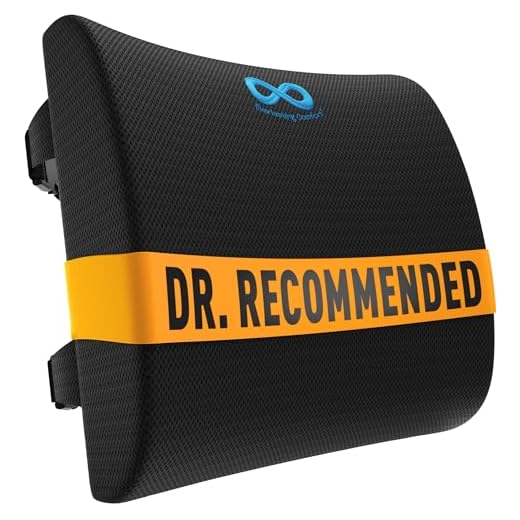
Not all chairs come with built-in adjustable lumbar support, which can leave your back feeling tired and sore. You can easily fix this issue by adding an external cushion to your current setup. The Everlasting Comfort Lumbar Support Pillow for Office Chair uses high-density memory foam to balance firmness and comfort. It features dual adjustable straps with extension pieces to fit securely around almost any chair back. After using this pillow, we found the breathable mesh cover helps keep you cool while the dense foam core provides consistent back support.
Everlasting Comfort Lumbar Support Pillow
Configuring Armrests and Backrest
Armrests play a crucial role in reducing tension in your neck and shoulders. You should adjust the height of your armrests so your elbows rest comfortably at a ninety-degree angle. Your shoulders should remain relaxed rather than being pushed up toward your ears. If your armrests are too low, you will end up leaning to one side to find support. Properly positioned armrests take the weight of your arms off your upper body and help prevent neck stiffness.
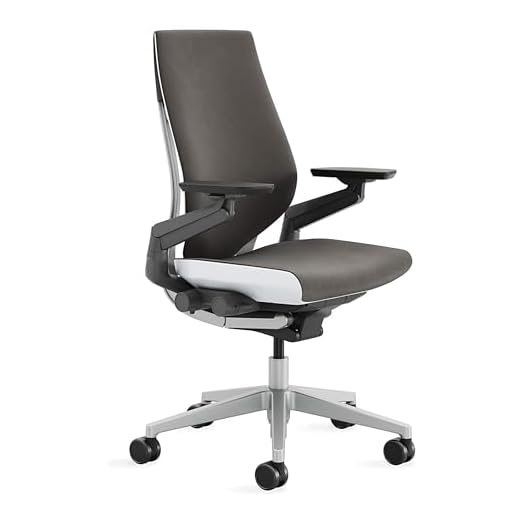
The backrest of your chair should also move with you as you shift positions throughout the day. The Steelcase Gesture Chair features a contoured back that fits your spine and highly adaptable 360-degree arms. It boasts a full recline range with three settings and an upright back lock for focused tasks. This high-quality chair accommodates a variety of users and postures, making it ideal for extended use. Locking in these final adjustments ensures your upper body remains relaxed and supported while you work.
Steelcase Gesture Office Chair
Final Thoughts
Properly adjusting your office chair instantly improves your daily comfort and prevents long-term pain. Right now, check your seat height and ensure your feet are flat on the floor. Reassess your chair’s settings every three months.
Frequently Asked Questions
How high should my desk chair be?
Your desk chair should be high enough that your feet rest flat on the floor. Your knees should be bent at a ninety-degree angle with your thighs parallel to the ground.
Why does my lower back hurt when sitting in my office chair?
Lower back pain often occurs when your chair lacks proper lumbar support or the seat depth is incorrect. Adjusting the lumbar pad to fit the natural curve of your spine can relieve this pressure.
Should I use armrests while typing?
You should use armrests to support the weight of your arms, but they should not interfere with your desk. Adjust them so your elbows rest comfortably at a ninety-degree angle while your hands hover over the keyboard.
What if my feet do not touch the floor after adjusting my chair?
If your desk height requires you to raise your chair too high, you should use an under-desk footrest. This keeps your legs at the correct angle and prevents restricted blood flow in your thighs.