Wrist pain is a common issue for office workers and gamers alike. Spending eight hours a day gripping a standard mouse puts unnatural strain on your forearm. Ergonomic mice offer a practical solution by changing the angle of your hand. These devices encourage a neutral handshake position that reduces tension in your muscles and tendons. Finding the right fit depends on your hand size and specific workflow needs.
The market for vertical mice has grown significantly over the past decade. Buyers now face a choice between pioneer brands and major tech manufacturers. Some users prioritize wired reliability and extensive button customization. Others prefer wireless freedom and multi-device connectivity. We tested two popular options to help you decide which model makes the most sense for your daily setup.
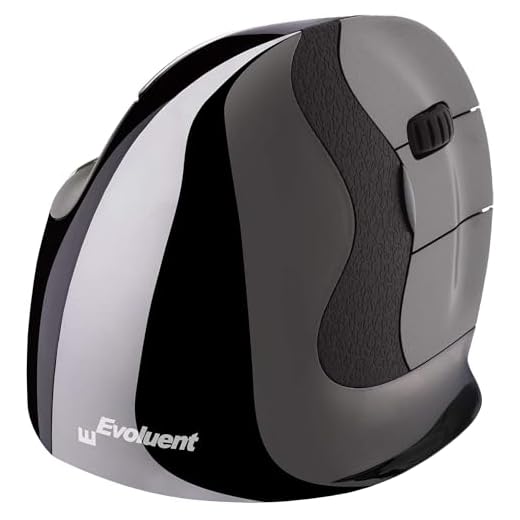

Evoluent VMDLW Wireless Vertical Mouse
Evoluent holds a unique place in the peripheral market as the original creator of the vertical mouse. Jack Lo invented this specific form factor back in 1994 to address his own discomfort at the computer. The VMDLW model continues that legacy with a shape that forces your hand into a neutral handshake position. This specific angle prevents the forearm twisting that often leads to repetitive strain injuries. The physical footprint is substantial, giving your entire palm a place to rest during long work sessions.
Performance relies on a reliable wired USB connection that requires no initial setup. You can plug it into any compatible port and start working immediately. The top of the mouse features dedicated buttons to cycle through four different pointer speeds. Indicator lights let you know exactly which sensitivity level is currently active. This hardware-level control helps when switching between detailed photo editing and general web browsing.
The real power of this device unlocks when you install the optional Evoluent Mouse Manager software on a Windows machine. This program allows you to assign custom functions to the buttons and scroll wheel. You can set up specific profiles for different applications to speed up your daily tasks. Compared to standard mice, the learning curve takes a few days of consistent use. Once your muscle memory adapts, the reduction in wrist fatigue becomes very noticeable.
Logitech MX Vertical Ergonomic Mouse (Renewed)
Logitech brings its massive hardware expertise to the ergonomic category with the MX Vertical. This advanced ergonomic mouse changes how your hand interacts with your computer on a daily basis. The shape encourages a natural resting posture that takes pressure off your wrist and forearm. Users with medium to large hands usually find the physical dimensions very accommodating. The textured surface provides a secure grip even during long hours of continuous clicking and scrolling.
Connectivity options give this model a distinct advantage for users with multiple computers. You can connect the mouse wirelessly via Bluetooth or use the included USB receiver. This flexibility means you can easily switch between a desktop PC and a travel laptop. The wireless connection remains stable without noticeable lag during regular office tasks. Battery life typically lasts for months on a single charge, reducing the annoyance of constant cable management.
Transitioning to this vertical orientation requires a brief adjustment period for your arm muscles. You move the cursor using your entire forearm rather than just pivoting at the wrist. This mechanical change is exactly what helps alleviate chronic pain over time. The sensor tracks accurately across most standard desk surfaces and mouse pads. It stands as a strong alternative to traditional flat mice for anyone experiencing daily discomfort.
Verdict
Choosing the right ergonomic mouse comes down to your specific connectivity needs and software preferences. The Evoluent model offers a fantastic wired experience with deep customization options for Windows users. Its hardware-level pointer speed adjustments make it highly adaptable for different tasks. People who want a plug-and-play solution with a proven track record will appreciate its classic shape. It remains a highly capable tool for reducing daily wrist strain.
The Logitech MX Vertical appeals to users who want a clean desk setup without cables. The ability to connect via Bluetooth makes it highly versatile for modern laptops that lack standard USB ports. Its shape provides immediate relief for tired forearms and encourages better overall posture. Buyers who split their time between multiple devices will find the wireless flexibility incredibly useful. Both options provide significant ergonomic benefits over standard flat mice.
Frequently Asked Questions
How long does it take to get used to a vertical mouse?
Most users need about three to five days to adjust to the new hand position. Your arm muscles have to learn how to move the cursor without pivoting at the wrist. Accuracy usually returns to normal after this brief transition period.
Can I use a vertical mouse for gaming?
You can play casual games with these devices without any issues. However, competitive gamers often find vertical mice too heavy and less precise for fast-paced shooters. They are primarily intended for office work and general computer use.
Do vertical mice cure carpal tunnel syndrome?
These devices are not medical treatments and cannot cure underlying conditions. They simply change your hand posture to reduce strain on specific tendons and nerves. You should always consult a doctor for severe or persistent wrist pain.