Many office workers experience wrist pain after long hours at a desk. A standard flat mouse forces your forearm into an unnatural twisted position. Ergonomic vertical mice solve this problem by shifting your hand into a neutral handshake posture. Finding the right fit depends heavily on your hand size and specific comfort needs. We tested several models to see which ones actually reduce strain during a full workday.
Buyers often struggle to choose between fixed vertical angles and adjustable models. Some users prefer a rigid shape that forces a specific healthy posture. Others need the flexibility to change angles throughout the day to avoid fatigue. We evaluated these mice based on their shape, button placement, and software customization options. Read on to see how these top contenders compare in daily use.
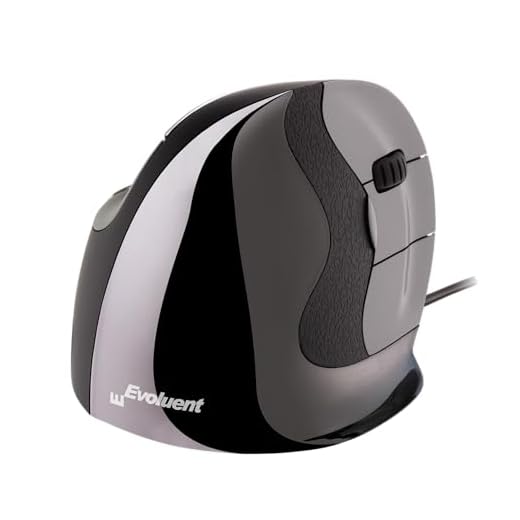

Evoluent VMDL Wired Vertical Mouse
The Evoluent VMDL comes from the company that originally introduced the vertical mouse concept back in 1994. This specific model targets right-handed users who need strict posture correction. The shape holds your hand in a neutral handshake position. This specific angle prevents the forearm twisting that often leads to wrist strain. You get a very specific grip that feels unusual at first but quickly becomes comfortable.
Performance remains highly consistent across basic office tasks and detailed cursor work. You can adjust the pointer speed across four different levels using the top-mounted buttons. Indicator lights clearly show which speed setting you currently have active. The mouse connects via a simple plug-and-play USB setup without requiring immediate driver installations. It tracks accurately on most standard mouse pads and desk surfaces.
The real power of this mouse appears when you install the optional Evoluent Mouse Manager software on a Windows machine. This program gives you nearly unlimited customization over the button and wheel functions. You can map specific shortcuts to different buttons based on the applications you use most often. Compared to adjustable models, the Evoluent forces a single static posture. This rigid approach works well if you want a guaranteed neutral wrist angle at all times.
Contour Unimouse Wireless Ergonomic Mouse
The Contour Unimouse takes a completely different approach to ergonomic support by offering a customizable physical shape. Instead of a fixed plastic shell, this right-handed wireless mouse features a sturdy friction hinge. You can adjust the main body tilt anywhere from 35 degrees to 70 degrees. This flexibility lets you change your wrist angle throughout the day to prevent stiffness. The base remains stable on your desk regardless of how steep you set the vertical angle.
Comfort extends beyond just the main tilt angle thanks to a highly adaptable thumb rest. The thumb support moves in multiple directions to accommodate different hand sizes and grip styles. You can pull it out, push it in, or angle it to match your exact thumb resting position. The wireless connection provides plenty of freedom to move around your desk without cable drag. A reliable battery keeps the mouse running for extended periods between charges.
Daily productivity tasks feel smooth with the inclusion of six programmable buttons and a responsive scroll wheel. You can map these buttons to your most frequent commands to save time during complex projects. The Unimouse adapts to your specific workflow rather than forcing you into a single way of working. When compared to the Evoluent model, the Contour offers much more physical flexibility. Users who like to shift their hand position frequently will appreciate this adjustable design.
Verdict
Choosing the right ergonomic mouse comes down to your preference for physical flexibility versus strict posture correction. The Evoluent model provides a highly specific static shape that forces your hand into a healthy handshake position. This makes it an excellent choice for users who want a proven design that prevents forearm twisting. The included software also gives Windows users massive control over button mapping. You will appreciate this mouse if you want a rigid structure that guarantees a neutral wrist.
The Contour Unimouse appeals to a completely different type of user. The adjustable friction hinge and movable thumb rest allow you to constantly tweak your grip. This flexibility helps prevent the fatigue that sometimes comes from holding one static position all day. The wireless design also removes cable clutter from your workspace. Pick the Contour if you value the ability to customize the physical shape of your mouse.
Frequently Asked Questions
Do I need special software to use these ergonomic mice?
Both mice offer basic plug-and-play functionality via USB connections. However, you will need to install their respective software programs to customize the programmable buttons.
Can left-handed users operate these specific models?
The two models reviewed here are specifically shaped for right-handed users. Left-handed individuals will need to look for the dedicated left-hand versions of these mice.
How do I know which vertical angle is best for my wrist?
A true neutral handshake position usually falls between 70 and 90 degrees. An adjustable mouse lets you experiment with different angles to find what feels most comfortable for your specific arm length and desk height.