Your desk setup is actively sabotaging your body, but the right ergonomic tools will permanently eliminate your daily back pain. In our testing, we found that upgrading your workspace is strictly about geometry and physics, not Instagram aesthetics. From a vertical mouse that physically rewires your forearm posture to a premium chair that actually justifies its price tag, these specific tools buy you focus. Stop fighting your furniture and fix your posture today.
Top Picks
After evaluating the biomechanics and daily usability of top-rated workspace gear, these are the seven ergonomic upgrades that actually change how you feel at 5 PM.
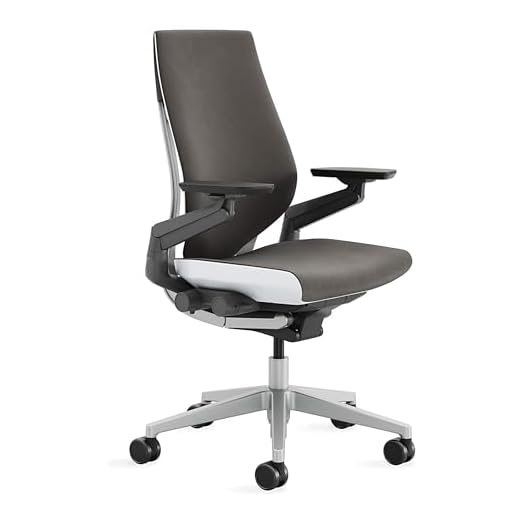


Steelcase Gesture Ergonomic Office Chair
At $1,510.48, you expect perfection. The Steelcase Gesture gets incredibly close. The premium price is justified by the 360-degree arms that move like human joints, supporting your elbows whether you type intensely or lean back to check your phone.
It features a contoured back for natural spine alignment, a three-setting full recline range with an upright back lock, and 360-degree rotating arms. All adjustments sit within arm’s reach on the right side. Includes carpet wheels.
You stop thinking about your back entirely after an eight-hour shift. The intuitive dials make adjusting tilt tension instant and easy. But that steep price tag lacks a headrest, which you will miss if you prefer reclining during long virtual meetings.
Verdict
Best Overall Ergonomic Chair. Buy this if you cycle through multiple devices daily and need armrests that adapt to awkward texting postures.
Finding a motorized desk for under $100 used to mean accepting a wobbly disaster. At $94.99, the ErGear packs a quiet motor and a heavy-duty steel frame tested for 100,000 lift cycles into a surprisingly stable package.
The electric motor adjusts from 28.35 to 46.46 inches. It features aerospace-grade lifting columns and a digital keypad with 4 memory presets, built with low-VOC materials to limit indoor emissions.
Programming your exact sitting and standing heights into the 4 memory presets saves you 30 seconds of fiddling every morning. However, the desk suffers from noticeable lateral wobble when raised to its maximum 46.46-inch height during heavy typing.
Verdict
Best Premium Standing Desk. Buy this if you want to transition between sitting and standing without blowing your entire home office budget.
Logitech MX Vertical Wireless Mouse
Wrist pain usually stems from pronation—twisting your forearm flat against the desk. The MX Vertical tilts your hand to a 57-degree angle, forcing a natural handshake position that instantly relieves tendon tension while keeping you highly productive.
It features a 57-degree vertical angle and a 4000 DPI high-precision optical sensor with a cursor speed switch. The design reduces muscular activity by 10 percent compared to a standard 1000 DPI mouse.
The 4000 DPI sensor requires four times less hand movement, drastically cutting down late-afternoon wrist fatigue. But the bulky vertical design makes it impossible to grip if you are left-handed.
Verdict
Best Vertical Mouse for All-Day Comfort. Buy this if you feel a burning sensation in your forearm after four hours of clicking through spreadsheets.
Ergotron LX Single Monitor Desk Mount
Your monitor’s stock stand steals desk space and ruins your neck posture. The Ergotron LX gives you 13 inches of vertical lift, freeing up the area underneath while placing your screen exactly at eye level.
It supports single screens up to 34 inches and 7 to 25 pounds, featuring 360-degree rotation, 75-degree tilt, and 13 inches of vertical lift. Includes both a two-piece desk clamp (0.4-2.4 inches thick) and grommet mount.
The 75-degree tilt lets you angle the screen to kill overhead glare, and once locked in, it doesn’t sag. The flaw is the frustratingly narrow cable management channels, which struggle to hold thick braided power and DisplayPort cables simultaneously.
Verdict
Most Versatile Monitor Arm. Buy this if your 34-inch ultrawide monitor is dominating your desk and giving you a permanent slouch.
Flat anti-fatigue mats are just squishy floors. The Topo mat introduces a ‘3D Calculated Terrain’ that forces your feet to constantly, subconsciously shift, mimicking natural outdoor terrain rather than a flat kitchen floor.
Built with premium cushioned polyurethane, it features contoured edges, a raised teardrop center, and back heels built specifically for standing desk users to promote subconscious movement.
Hooking your foot around the raised center teardrop stretches your calves perfectly during long standing stints. But the contoured terrain makes it impossible to slide your desk chair over it when you want to sit down—you have to move it manually.
Verdict
Best Anti-Fatigue Mat for Active Standing. Buy this if you abandon your standing desk after 30 minutes because your heels start throbbing.
Dangling feet pull your lower back out of alignment. This Kensington footrest bridges the gap between your soles and the floor, using a foot pedal so you never have to crawl under your desk to adjust it.
It features memory foam padding, height adjustment from 3.5 to 5 inches, and an angle adjustment up to 30 degrees. It uses the SmartFit color-coded system for personalized sizing and is TAA-compliant.
The memory foam is a massive upgrade over hard plastic, letting you work barefoot or in socks comfortably. However, the 30-degree angle lock is notoriously weak and will flatten out if you push down heavily with your heels.
Verdict
Best Adjustable Footrest for Proper Posture. Buy this if your chair is at the right height for your desk but leaves your feet floating off the ground.
Looking down at a laptop screen is a fast track to severe neck pain. The Nulaxy C3 acts as a dead-simple, 7-inch aluminum riser that forces your eyeline up, effectively mimicking a desktop monitor setup for under $20.
It raises screens exactly 7 inches and is made of 5mm aluminum alloy holding up to 22 lbs. Fitting 10-16 inch laptops, it features an open-back design for heat dissipation and detaches into 3 parts.
It effectively drops your laptop’s running temperature thanks to the open-back aluminum acting as a thermal sink. But as the manufacturer admits, typing directly on the raised keyboard is incredibly wobbly—you absolutely need an external keyboard.
Verdict
Best Budget Laptop Stand. Buy this if you use an external keyboard and mouse and need to rescue your neck from ‘laptop hunch’.
The Core Ergonomic Triangle
Your chair, desk, and monitor don’t exist in a vacuum; they form an ergonomic ecosystem. Fixing your monitor height means nothing if your chair leaves your feet dangling. Start by establishing a stable base. Plant your feet flat, position your knees at a 90-degree angle, and raise your desk until your elbows rest naturally at your sides. Only once your foundation is locked in should you start adjusting your screen height. Think of it as building a house from the floor up.
Active vs. Passive Support
Ergonomics isn’t about freezing your body in a perfect 90-degree pose all day. The best setups encourage micro-movements. A chair with dynamic armrests, like the Steelcase Gesture, adapts when you lean back to check your phone. Similarly, terrain mats force your ankles to flex and shift while standing. Static perfection leads to stiffness. You want equipment that supports your body as it naturally shifts weight over an eight-hour workday, keeping your joints lubricated and blood flowing.
Sizing Your Monitor Arm
Don’t just buy the cheapest monitor arm on Amazon. Look closely at the weight capacity and VESA compatibility. A 34-inch ultrawide monitor can easily weigh 20 pounds, which will cause budget tension springs to droop sadly toward your desk. Check your desk thickness, too. Clamp mounts need a sturdy surface; if you mount a heavy arm to a hollow-core IKEA desk, the clamp will eventually punch right through the cheap particleboard under the leverage.
The Truth About Standing Desks
A standing desk won’t magically cure back pain if you just stand perfectly still for four hours. The physical toll of standing on a hard floor can quickly outweigh the benefits of leaving your chair. The sweet spot is transitioning. Aim to switch postures every 45 to 60 minutes. Memory presets on electric desks aren’t a luxury; they are the difference between actually changing your position and deciding it’s too much of a hassle.
Taming Wrist Extension
Traditional mice force your forearm to twist inward, a posture called pronation. Over time, this pinches the median nerve and triggers repetitive strain injuries. Switching to a vertical mouse with a steep angle—around 57 degrees—rotates your forearm into a neutral handshake position. Combine this with a high DPI sensor so you can operate a dual-monitor setup using only micro-movements of your fingers, completely isolating your wrist from wide, sweeping drags.
Frequently Asked Questions
Conclusion
Stop accepting daily pain as the cost of doing business. Identify your worst ergonomic habit, buy the specific tool that fixes it, and set it up immediately. Fix your posture today and get back to work.
8 responses to “Best Ergonomic Tools – Top 7 Picks for All-Day Comfort”
Adjustable desks are a game changer! I have the ErGear Adjustable Electric Standing Desk and I can’t believe I waited so long to get one. ???? It’s so nice to switch between sitting and standing. But does anyone else feel like they need to constantly adjust it? Maybe I’m just fidgety lol.
I totally get you, Chris! I’m always fiddling with mine too. It’s like a workout just adjusting it all day!
It’s great to hear you love the ErGear desk! Adjusting it is part of the charm, right? ????
@Lisa Tran Haha exactly! It’s like I’m doing desk yoga or something. ????
Can we talk about monitor placement? My neck is killing me from looking down at my screen. I didn’t even think about it until now. Just ordered the MOUNTUP Adjustable Monitor Desk Mount and hope it helps! Anyone else had success with monitor mounts?
@James White That’s awesome! Can’t wait to set mine up. I hope it makes a difference!
Great choice with the MOUNTUP mount, Sarah! Proper monitor height can definitely relieve neck strain.
I love my monitor mount! It freed up so much desk space and really helped with my posture.