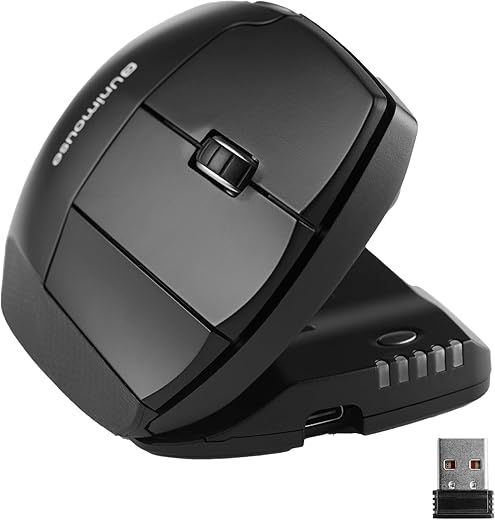
Choosing the right ergonomic mouse often comes down to wrist angle, and the Contour Unimouse and Logitech MX Vertical represent two distinct approaches. Logitech offers a fixed, heavily researched 57-degree vertical tilt designed to put your forearm in a natural handshake position. Contour takes a completely different route, offering a patented articulating hinge that lets you adjust the body angle anywhere from 35 to 70 degrees on the fly. This structural difference fundamentally changes how your hand interacts with each device throughout a long workday.
The Logitech MX Vertical is ideal for mainstream professionals and creatives who want a premium, plug-and-play solution with multi-device connectivity and an established ergonomic profile. It excels in modern office environments where seamless switching between a laptop and desktop is necessary. The Contour Unimouse, on the other hand, is built for users suffering from active RSI, carpal tunnel, or unpredictable wrist pain. Its articulating thumb support and adjustable chassis make it the superior choice for people who need to change their hand posture frequently to prevent localized fatigue.
The Logitech MX Vertical is the winner for multi-device power users and those seeking a premium, fixed-angle ergonomic design. Choose the Contour Unimouse if you have active repetitive strain injuries (RSI) or need to constantly adjust your wrist posture throughout the day. While Logitech offers better software and build quality, Contour’s unmatched physical adaptability makes it the ultimate therapeutic option.
Contour Unimouse
Contour Unimouse Ergonomic Vertical Mouse Adjustable 35°-70° Tilt Angle, 6 Programmable Buttons for Productivity,…
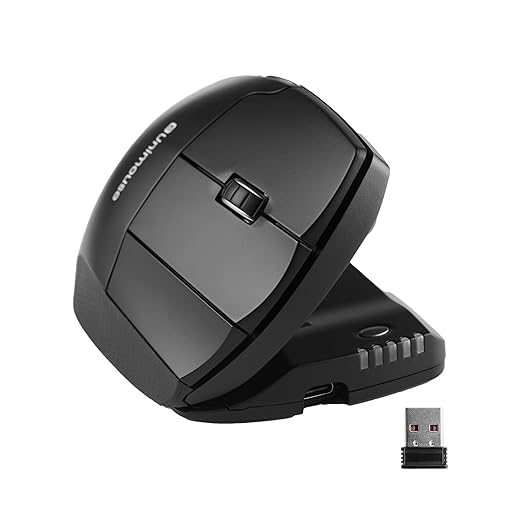
- Adjustable tilt angle (35 to 70 degrees)
- Articulating, adjustable thumb support
- 10 DPI levels (800 to 2800)
- Available in right and left-handed versions
Pros:
- Fully customizable physical angles relieve active joint pain
- Changeable thumb rest fits various hand sizes perfectly
- Dedicated middle click button enhances workflow
Cons:
- Build quality feels slightly plasticky for the price
- Lacks Bluetooth or multi-device switching capabilities
Logitech MX Vertical
Logitech MX Vertical Wireless Mouse – Ergonomic Design Reduces Muscle Strain, Move Content Between 3 Windows and…

- Fixed 57-degree vertical angle
- 4000 DPI high-precision optical sensor
- Connects via Bluetooth, Unifying Receiver, or USB-C
- Logi Options+ multi-device Flow support
Pros:
- Premium materials with an excellent textured rubber grip
- Seamlessly controls up to three devices simultaneously
- USB-C fast charging provides three hours of use in one minute
Cons:
- Fixed angle may not suit every hand shape or wrist condition
- No left-handed version currently available
Ergonomic Design and Angle Adjustability
Logitech uses a rigid 57-degree angle, which research shows reduces muscular strain by 10 percent compared to standard mice. It features a sculpted thumb rest and a textured rubber surface that feels incredibly premium. However, it is a one-size-fits-all solution. The Contour Unimouse dominates here with its friction-based hinge, allowing adjustments from a gentle 35-degree slope to a steep 70-degree vertical angle. Furthermore, its thumb support extends, retracts, and pivots. Verdict: Contour Unimouse wins for pure ergonomic adaptability, while Logitech wins for premium feel.
Sensor Performance and DPI Settings
The MX Vertical boasts a 4000 DPI high-precision sensor, which requires less hand movement to navigate large multi-monitor setups. It features a dedicated cursor speed switch to instantly toggle between two custom DPI settings. The Unimouse offers 10 distinct DPI steps, ranging from 800 up to 2800. You change speeds directly on the mouse via a physical button, with LED indicators showing your current level. Verdict: Logitech MX Vertical wins due to its superior 4000 DPI sensor, making it much better for multi-monitor workstations and precision tasks.
Connectivity and Multi-Device Workflows
Logitech clearly outclasses the competition in connectivity. The MX Vertical supports USB-C wired, Bluetooth, and the Logi Bolt/Unifying receiver. More importantly, it pairs with up to three devices simultaneously, allowing you to drag files across different computers using Logitech Flow software. The Unimouse is strictly a single-device peripheral. It relies entirely on a standard 2.4GHz USB Type-A dongle for its wireless connection and lacks Bluetooth functionality altogether. Verdict: Logitech MX Vertical is the undisputed winner for modern, multi-device workflows and overall connectivity options.
Build Quality and Battery Longevity
At around $100, both mice command a premium price. The Logitech MX Vertical justifies this with an aluminum scroll wheel, high-quality soft-touch plastics, and a built-in battery that lasts up to four months on a full charge. The Contour Unimouse feels notably more hollow and plastic-heavy, a necessary compromise to accommodate its moving hinges. Its battery life maxes out around one month per charge. Verdict: Logitech MX Vertical easily wins for material quality, battery longevity, and overall premium construction.
Left-Handed User Availability
A major factor in the ergonomic peripheral market is catering to all users, regardless of hand dominance. Unfortunately, Logitech has completely ignored the left-handed market with the MX Vertical; it is exclusively manufactured in a right-handed configuration. Contour Design excels in this department and recognizes that RSI affects everyone. The Unimouse is actively manufactured and sold in both dedicated right-handed and left-handed models, ensuring no user is forced to compromise. Verdict: The Contour Unimouse is the clear, undisputed winner for left-handed professionals seeking relief.
Frequently Asked Questions
Our Verdict
Buy the Logitech MX Vertical for premium build quality, seamless multi-device switching, and a proven 57-degree handshake grip. Choose the Contour Unimouse if you suffer from active wrist pain and require constant physical adjustability to relieve tension throughout your workday.