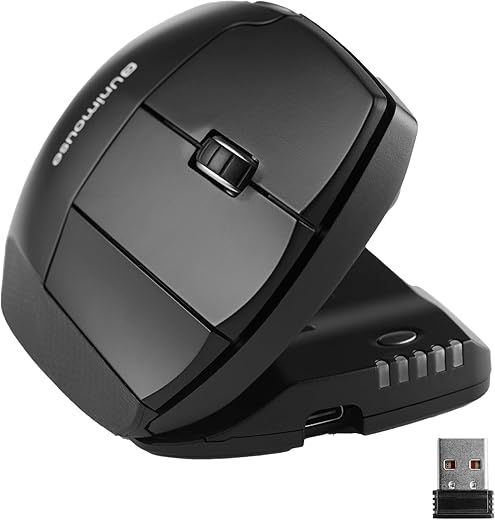
The battle between the Contour Unimouse and Evoluent VerticalMouse 4 represents a choice between dynamic adjustability and strict vertical alignment. While both aim to eliminate carpal tunnel syndrome and forearm pronation, their approaches differ entirely. Contour believes in shifting your hand posture throughout the day using a patented friction hinge, whereas Evoluent forces your hand into a static, true 90-degree handshake position. Choosing the right ergonomic mouse depends entirely on whether you need a locked-in grip or a flexible shape.
The Contour Unimouse is designed for users who experience varying levels of wrist fatigue and need to micro-adjust their mouse angle between 35 and 70 degrees during long work sessions. It features a highly articulated thumb support to eliminate pinch gripping. Conversely, the Evoluent VerticalMouse 4 targets severe repetitive strain injury sufferers who require a strict vertical orientation. Its deep thumb lip and extra-large chassis provide maximum support for larger hands, ensuring the forearm bones never cross while navigating spreadsheets.
The Contour Unimouse wins for flexibility, allowing users to shift angles to prevent static muscle fatigue throughout the day. The Evoluent VerticalMouse 4 is the clear winner for users with severe RSI who need a strict, uncompromising 90-degree handshake position. Buy the Contour for preventative ergonomics, and the Evoluent for acute wrist pain management.
Contour Design Unimouse
Contour Unimouse Ergonomic Vertical Mouse Adjustable 35°-70° Tilt Angle, 6 Programmable Buttons for Productivity,…
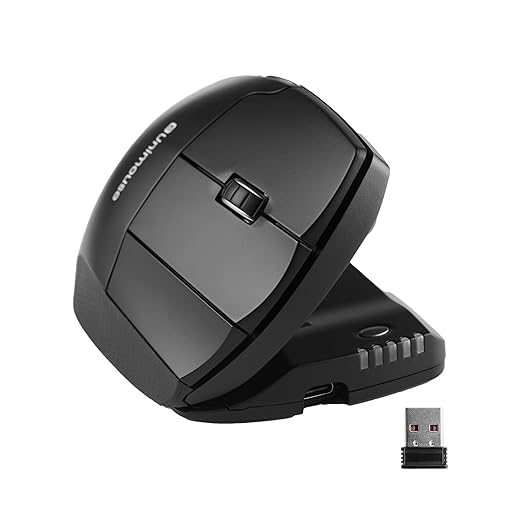
- Adjustable 35-70° tilt angle
- Articulating 3D thumb support
- Pixart PMW3330 optical sensor (2800 DPI)
- 141g total weight
Pros:
- Infinite angle adjustments prevent static fatigue
- Highly customizable thumb rest reduces pinching
- Crisp click mechanism across all primary buttons
Cons:
- Hinge mechanism can feel stiff initially
- Takes multiple days to find the perfect setting
Evoluent VerticalMouse 4
Evoluent – Inventor of the Vertical Mouse – VM4RW Ergonomic Vertical Mouse Right Hand Regular Size Wireless USB,…

- Fixed 90° true vertical angle
- 6 fully programmable buttons
- 2600 DPI laser sensor
- 135g total weight
Pros:
- True vertical orientation completely stops pronation
- Deep thumb lip supports heavy hands
- Powerful application-specific button mapping software
Cons:
- Bulky chassis is difficult to pack for travel
- Glossy plastic finish shows smudges quickly
Ergonomic Design and Adjustability
The Contour Unimouse leads in adjustability with its friction-based hinge, allowing you to tilt the chassis anywhere from 35 to 70 degrees. This prevents static muscle loading by letting you shift postures hourly. Its 3D thumb support also moves in three directions. The Evoluent VerticalMouse 4 takes a dictatorial approach, locking you into a strict 90-degree handshake position. While this eliminates forearm pronation entirely, you cannot alter the angle to relieve specific muscle groups. The Unimouse wins for dynamic ergonomics, while the Evoluent is better for enforced verticality.
Sensor Performance and DPI
Both mice use older but reliable sensors suited strictly for office work, not gaming. The Contour Unimouse features a Pixart PMW3330 sensor with ten dedicated DPI steps up to 2800, easily adjusted via a physical button. Tracking is smooth across most desk surfaces. The Evoluent utilizes a laser sensor reaching up to 2600 DPI, with hardware switches located directly behind the scroll wheel. While both perform admirably in Excel and Photoshop, the Contour’s Pixart sensor registers slightly less jitter during fine cursor movements. Contour wins by a narrow margin.
Software and Button Customization
Evoluent’s Mouse Manager software remains the gold standard for productivity mice. It allows you to assign complex macros or simple keystrokes to any of the six buttons on a per-application basis, meaning the thumb button can act as ‘Enter’ in Excel but ‘Undo’ in Word. Contour’s driver software is functional but much more basic, offering standard remapping without the deep application-specific layering found in Evoluent’s ecosystem. If your workflow relies heavily on customized shortcuts and macro execution, the Evoluent VerticalMouse 4 easily dominates this category.
Build Quality and Materials
Build quality differs dramatically between these two premium pointers. The Evoluent VerticalMouse 4 features a solid, tank-like construction with a glossy plastic finish that, unfortunately, attracts sweat and fingerprints over long sessions. There is absolutely no creak in its chassis. The Contour Unimouse utilizes matte plastics that grip better, but its moving parts—specifically the main friction hinge and the 3D thumb rest—introduce slight mechanical play. While neither mouse feels cheap, the Evoluent offers a more robust, unyielding feel, whereas the Contour compromises slight rigidity for its moving parts.
Hand Sizing and Grip Styles
Evoluent offers the VerticalMouse 4 in specifically molded Small, Regular, and Left-handed versions, ensuring an exact fit based on your hand measurements from wrist crease to middle finger tip. The Contour Unimouse takes a one-size-fits-all approach, relying on its adjustable thumb rest to accommodate different hand lengths. However, users with exceptionally small hands often find the Unimouse too lengthy, preventing their fingers from resting naturally on the main clicks. Evoluent takes the win here for offering dedicated sizing hardware rather than relying entirely on adjustable joints.
Frequently Asked Questions
Our Verdict
Choose the Contour Unimouse for its unmatched adjustability and ability to prevent static fatigue. Opt for the Evoluent VerticalMouse 4 if you suffer from severe RSI and need a strict 90-degree handshake posture with exceptional software customization for productivity.