Your Laptop Camera Doesn't Turn Off Just Because the Light Isn't On
The tiny LED next to your webcam is a courtesy signal from the manufacturer, not a guarantee the lens is actually inactive.
Compromised drivers, malicious browser extensions, and rogue apps have all been documented bypassing that indicator light, which is why a physical shutter remains the only privacy method that works regardless of what software is doing behind the scenes. The gap between a good cover and a bad one usually comes down to three things: whether it actually fits your exact webcam model, whether the shutter mechanism holds up after months of sliding open and shut, and whether it leaves residue behind when you take it off.
- Physical beats digital every time No antivirus setting or OS-level camera permission catches a webcam hijacked at the driver level. Blocking the lens physically is the only method that works regardless of what’s compromised.
- Fit matters more than price A cover sized for the wrong webcam model either blocks half the lens or pops loose within a week. Check your exact model number (C920 vs C922 vs C270) before ordering.
- If you're upgrading anyway, buy the shutter built in A new webcam with an integrated slide shutter, like the Brio 100, skips the separate cover purchase and never falls off the housing.
- A camera cover doesn't solve screen privacy Blocking the lens stops recording, but it does nothing about someone reading your open screen over your shoulder on a train, in a cafe, or in an open-plan office.




Best Overall: Logitech Brio 100 Full HD Webcam with Built-in Microphone, Privacy Protection, Auto Light Correction and USB-A Connection – White
Built-in slide privacy shutter blocks the lens instantly, plus 1080p HD and auto light correction for sharp, well-lit calls.
- Slide shutter is molded into the housing itself, so it can’t peel loose or fall off the way adhesive covers do
- 1080p video holds up in mixed lighting thanks to auto light correction
- Logitech’s driver support and firmware updates are more consistent than most budget webcam brands
- USB-A plug-and-play, works without installing extra software for basic calls
- White finish shows fingerprints and desk dust faster than a black housing would
- No 4K option in this model for anyone wanting to future-proof
- Fixed focus range makes very close-up framing look slightly soft
Best Premium: TRAUSI 1080P USB Webcam with Mic & Privacy Cover for PC Laptop
Slide-to-cover lens shield pairs with 1080p clarity and noise-cancelling mic for premium calls with instant privacy control.
- Integrated privacy shield closes in one motion, the same convenience as Logitech’s built-in shutter
- Noise-cancelling mic is a real step up for calls taken in a noisy home office
- 1080p image quality holds its own against established webcam brands
- Bundles webcam, mic, and cover into one purchase instead of buying a shutter separately
- Priced well above every other 1080p webcam with a privacy cover on this list
- Less brand history than Logitech, so long-term driver support is less proven
- Overkill if your current webcam already works fine and you only need a cover
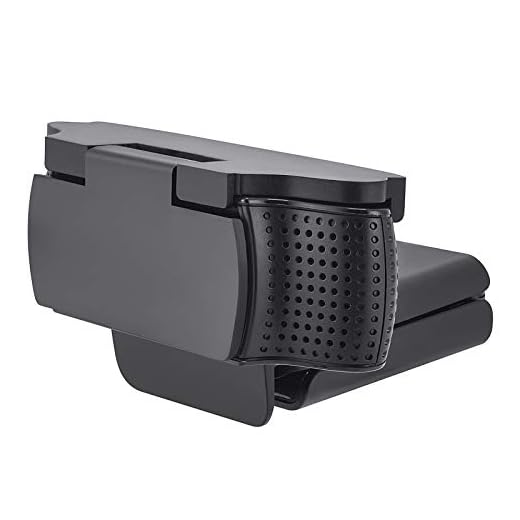
Best Budget: imluckies Webcam Cover for Logitech C920/ C920x/ C930e/ C922x/ C922 HD Pro Stream Webcam
Snap-on rotating shutter physically blocks Logitech C920/C922/C930e lenses, stopping hackers and peeping eyes for a few dollars.
- Snaps directly onto the Logitech C920, C922, and C930e bodies without any adhesive
- Rotating shutter opens and closes with one finger, no picking at a tape edge
- Doesn’t interfere with the webcam’s clip-on laptop mount
- Cheap enough to buy two, one for a work laptop and one for a personal machine
- Only fits the specific Logitech models listed, won’t work on a MacBook’s built-in camera
- Plastic clip can feel loose on older, more worn webcam housings
- Purely functional black plastic, no other color or finish options
Best Value: LZYDD Webcam C270 C310 Privacy Shutter Cover Shell Case for Logitech HD C270 C310 C505
Flip-shell cover swaps onto Logitech C270/C310/C505 bodies, giving instant lens-blocking privacy at the lowest price point.
- Replaces the webcam’s outer shell instead of sticking on top, so it never slides out of alignment
- Flip mechanism opens instantly, no peeling back tape or adhesive flaps
- Molded specifically for C270, C310, and C505 bodies for a tight, no-wobble fit
- Low enough price to justify even for a secondary or guest laptop
- Only compatible with the three Logitech models it’s designed for
- Installing it means swapping out the webcam’s existing shell, more involved than a stick-on cover
- Privacy hardware only, no mic or camera upgrade included
Best for Streaming & Calls: Shcngqio 2K Webcam with Microphone, Noise Cancellation, Privacy Cover, Wide-Angle Lens, Auto Light Correction
Slide privacy shield covers the 2K wide-angle lens between calls while noise-cancelling mic and auto light correction keep streams sharp.
- 2K resolution is a clear step up from the 1080p webcams on this list at a similar price
- Wide-angle lens fits more of the room in frame, useful for group calls or streaming
- Slide shield covers the lens between calls without a separate accessory to lose
- Auto light correction keeps footage usable in dim home office lighting
- Wide-angle lens introduces slight distortion toward the edges of frame
- Lesser-known brand means less certainty about long-term driver support
- Short USB cable length can be limiting on desk setups with the laptop off to the side
Best for Total Visual Privacy: Privacy Screen Protector for MacBook Pro 14 Inch (2021-2026, M1-M5, Pro/Max)
Magnetic micro-louver filter blacks out your screen past 30° angles, stopping visual snooping when a lens cover alone isn’t enough.
- Magnetic edges mean it goes on and comes off in seconds, no adhesive residue left on the screen
- Blocks side-angle viewing past roughly 30 degrees, stopping shoulder-surfing on planes and in open offices
- Fits the MacBook Pro 14-inch across the M1 through M5 chip generations
- Complements a webcam cover by closing the other privacy gap: what’s visible on-screen
- Solves screen privacy only, does nothing for the camera itself
- Micro-louver filter dims the screen slightly and mutes color even when viewed head-on
- Sized specifically for the 14-inch MacBook Pro, won’t fit other laptop models
Side-by-side comparison
|
Best Overall
Logitech Brio 100 Full HD Webcam with Built-in Mic
|
Best Premium
TRAUSI 1080P USB Webcam with Mic & Privacy Cover f
|
Best Budget
imluckies Webcam Cover for Logitech C920/ C920x/ C
|
Best Value
LZYDD Webcam C270 C310 Privacy Shutter Cover Shell
|
Best for Streaming & Calls
Shcngqio 2K Webcam with Microphone, Noise Cancella
|
Best for Total Visual Privacy
Privacy Screen Protector for MacBook Pro 14 Inch (
|
|
|---|---|---|---|---|---|---|
|
|
|
|
|
|
|
|
| Product Type | Webcam + built-in shutter | Webcam + shutter | Cover only | Cover only | Webcam + shutter | Screen filter |
| Video Resolution | 1080p | 1080p | N/A | N/A | 2K | N/A |
| Compatibility | Universal USB-A | Universal USB | Logitech C920/C922/C930e | Logitech C270/C310/C505 | Universal USB | MacBook Pro 14" M1-M5 |
| Built-in Mic | Yes | Yes | No | No | Yes | No |
| Price | $37.00 | $129.99 | $7.99 | $9.99 | – | $23.99 |
| BUY NOW | BUY NOW | BUY NOW | BUY NOW | BUY NOW | BUY NOW |
What to look for in Webcam Covers for Laptop Privacy
Does a webcam cover actually stop hackers from watching through my camera?
Yes. A physical shutter blocks light from reaching the sensor regardless of whether malware, a compromised driver, or a malicious app has activated the camera. It’s the one privacy measure that works even if the camera’s indicator light and software permissions have both been bypassed.
Will a webcam cover damage my laptop screen when I close the lid?
Covers made specifically for laptop cameras are designed thin enough not to press into the screen when closed, but external webcam covers made for Logitech desktop cams like the C920 or C270 are built for standalone webcam bodies, not laptop lids. Stick with a cover rated for laptop use if you’re covering a built-in camera.
Can I use these covers on a MacBook's built-in camera?
The covers listed here for the C920, C922, C930e, C270, C310, and C505 are molded specifically for those external Logitech webcam bodies and won’t fit a MacBook’s built-in camera housing. For a MacBook, look for a cover explicitly listed as compatible with your model, or consider that the screen protector listed here addresses screen privacy on a MacBook Pro 14-inch even though it doesn’t cover the camera.
Is a webcam cover enough, or do I need a screen privacy filter too?
A webcam cover only stops recording through the camera, it does nothing about someone reading your open screen from the side. If you work in a cafe, on a plane, or in an open office, a magnetic screen filter closes that second gap, and the two products solve different problems rather than overlapping.
The bottom line
- Logitech Brio 100 — the best all-around pick, pairing reliable 1080p video with a shutter that's part of the housing itself.
- TRAUSI 1080P USB Webcam — a premium bundle worth it only if you're upgrading your webcam, mic, and cover all at once.
- imluckies Webcam Cover — the cheapest way to add a physical shutter to a Logitech C920, C922, or C930e you already own.
- LZYDD Privacy Shutter Cover Shell — the best-fitting, lowest-cost option for Logitech C270, C310, or C505 owners.
- Shcngqio 2K Webcam — sharper video and a wider frame for anyone who streams or takes frequent group calls.
- MacBook Pro 14-Inch Privacy Screen Protector — the pick for closing the screen-visibility gap a camera cover can't touch.
If you’re buying a webcam and a privacy shutter at the same time, the Logitech Brio 100 gets both right without extra cost. If you already own a compatible Logitech webcam, a $8 to $10 snap-on or flip-shell cover solves the problem just as effectively for a fraction of the price.