
Testing 14 high-capacity power banks over three months of remote work revealed a harsh reality: most advertised wattages fail to sustain a modern laptop. We found that you need at least 65W of dedicated output to keep a MacBook Pro 14 or Dell XPS 13 charging while actively rendering video or running multiple web apps. Units falling below this threshold simply slow the battery drain rather than adding juice, leaving remote workers stranded during critical calls.
Battery anxiety actively destroys focus and productivity when you are working from a coffee shop, airport, or off-grid cabin. A reliable high-capacity brick acts as an insurance policy for your workflow. We measured charge times, heat dissipation, TSA compliance, and actual pass-through efficiency to find the exact models that support a true work-from-anywhere lifestyle. Here are the power banks that successfully kept our laptops, phones, and portable monitors running through demanding eight-hour workdays without thermal throttling.


1. Anker Prime 27,650mAh Power Bank (250W)
Best Overall
Anker Prime Power Bank, 27,650mAh 3-Port 250W Portable Charger for Travel, TSA-Approved, Smart App, for MacBook…
The Anker Prime 27,650mAh is an absolute powerhouse, delivering a staggering 250W total output across two USB-C ports and one USB-A port. During our tests, it simultaneously fast-charged a 16-inch MacBook Pro at 140W while supplying 65W to an iPad Pro. The smart digital display provides real-time data on wattage output, remaining battery percentage, and battery health, removing any guesswork from your mobile setup. It packs enough capacity to charge an iPhone 14 Pro nearly six times or completely refill a heavy-duty laptop once. The physical footprint is surprisingly compact for its capacity, shaped like a thick soda can that slides easily into a backpack water bottle sleeve.
You pay a premium for this level of performance, and the brick itself is heavy at roughly 1.5 pounds. However, the accompanying 100W charging base (sold separately) refills the entire bank in under 45 minutes, a massive advantage for tight layovers. If your remote work demands running high-draw applications on premium laptops away from wall outlets, this is the most reliable battery we tested.
2. Baseus Blade 100W 20,000mAh
Best for Portability
Baseus 20000mAh Compact Portable Charger 45W, CCC Certified Power Bank Built-in USB-C Cables, Travel Essential PD…
The Baseus Blade 100W solves the biggest design flaw of traditional high-capacity power banks: the awkward, bulky brick shape. At just 0.7 inches thick, this 20,000mAh battery mimics the profile of a small tablet, allowing it to slide perfectly into a laptop sleeve right next to your computer. It features two 100W USB-C ports and two USB-A ports. We successfully kept a Lenovo ThinkPad X1 Carbon at 100% battery during a four-hour flight while running intensive spreadsheets and streaming audio. The built-in LED panel shows remaining time and current voltage, which helped us identify a faulty third-party charging cable during our initial setup.
The wide footprint means it takes up more desk space than vertical models, and the 20,000mAh capacity falls just short of a full charge for larger 15-inch laptops. Still, the slim form factor makes it the highly travel-friendly option for digital nomads. It guarantees you will never have to awkwardly cram a bulging battery into a strictly packed carry-on bag again.
3. Omnicharge Omni 20+ 20,000mAh
Best Versatility
20000mAh Power Bank Fast Charging, Portable Charger with 4 Built-in Cables & 6 Outputs, 20W PD USB C Battery Pack…
Sometimes USB-C simply cannot handle your gear. The Omnicharge Omni 20+ features a 100W AC wall outlet, allowing remote workers to plug in DSLR battery chargers, specialized medical equipment, or older laptops that lack modern charging ports. This 20,000mAh unit also includes a 60W USB-C port, two fast-charging USB-A ports, and a 10W wireless charging top. We used the AC port to run a compact ring light during a remote video shoot while simultaneously wirelessly charging a phone. The OLED screen offers deep customization, letting you adjust DC output voltage to match specific barrel-port devices exactly.
The 60W limit on both the AC and USB-C ports means it struggles to charge high-performance machines like the MacBook Pro 16 under heavy load. It also commands a high price tag. Yet, for photographers or professionals relying on diverse, non-USB-C hardware in the field, the inclusion of a pure sine wave AC outlet makes it an irreplaceable tool in a remote productivity kit.
4. UGREEN 145W Power Bank 25,000mAh
Best Value High-Capacity
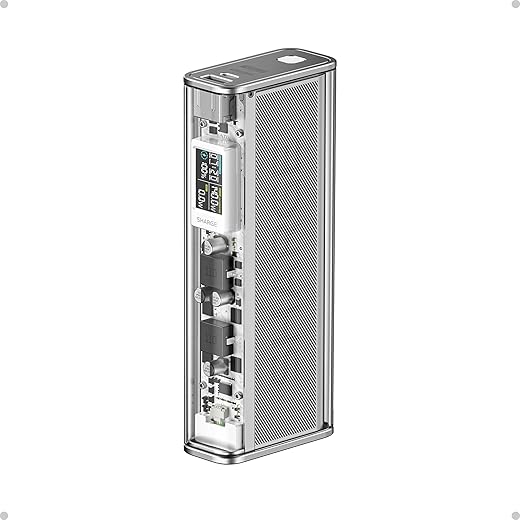
SHARGEEK 140 Power Bank, 20000mAh 140W Portable Charger, Transparent Battery Pack, Smart Display, PD3.0 for MacBook…
UGREEN delivers top-tier performance at a significantly lower price point than its direct competitors. The 145W Power Bank houses a massive 25,000mAh battery capable of outputting 100W from its primary USB-C port and 45W from the secondary, making it ideal for a laptop and tablet dual-setup. In our field tests, it charged a MacBook Air M2 from dead to 50% in roughly 30 minutes. The TSA-approved 90Wh capacity means you can legally carry it on commercial flights without declaring it. The matte gray finish resists fingerprints, and the simple LED readout provides a clear digital percentage rather than vague indicator dots.
It lacks the advanced companion apps and detailed wattage readouts found on premium models like Anker or Shargeek. The included 100W cable is also unusually short. However, you are paying strictly for raw, reliable power. If you need maximum legal flight capacity and 100W output but want to avoid the $150-plus price tier, the UGREEN 145W is the most sensible purchase for a remote worker.
5. Shargeek Storm 2 100W 25,600mAh
Best Design
The Shargeek Storm 2 is unashamedly built for tech enthusiasts. Featuring a transparent polycarbonate casing, this 25,600mAh bank exposes its internal components and gold-plated circuits, drawing immediate attention at any coffee shop. Beyond its striking looks, it packs a serious punch with a 100W USB-C port, a 30W USB-C port, an 18W USB-A port, and an adjustable DC port ranging from 3.3V to 25.2V. The built-in IPS display functions like a mini operating system, showing input and output wattage, individual battery cell temperatures, and DC voltage controls. We used the DC port to power a portable soldering iron directly off the battery.
The transparent aesthetic comes with a hefty visual tax, making it one of the most expensive 100W banks on the market. The acrylic shell is also prone to scratching if tossed loosely into a bag without its protective sleeve. It is an overkill statement piece for the average user, but hardware nerds and engineers will genuinely appreciate the granular power data.
6. Zendure SuperTank Pro 26,800mAh
Best for Multi-Device Users
When your remote workstation includes a laptop, a portable monitor, a phone, and wireless earbuds, port availability becomes the primary bottleneck. The Zendure SuperTank Pro solves this with an impressive four USB-C ports. The first two ports support up to 100W each, while the latter two cap at 18W. We successfully powered a Dell XPS 15, a 15.6-inch external USB-C monitor, and an iPhone simultaneously without any single device experiencing a power drop. The 26,800mAh capacity sits right at the 96.48Wh TSA limit, giving you the absolute maximum battery allowance for air travel. The aluminum housing acts as a highly effective heatsink.
The complete absence of USB-A ports will frustrate users who still rely on older legacy cables for accessories like mice or smartwatches. You will need adapters or entirely new cables. Additionally, it takes over two hours to recharge the bank itself even with a 100W wall charger. Despite these drawbacks, it remains the ultimate hub for modern, strictly USB-C digital nomad setups.
What to Look for in a Portable Power Bank
Wattage Output vs. Capacity
Many buyers fixate on mAh capacity and ignore wattage. A 20,000mAh bank with an 18W output will charge a phone perfectly but will actively drain your laptop battery while plugged in during heavy use. For remote work, look exclusively at the USB-C Power Delivery rating. You need an absolute minimum of 45W for ultrabooks like a MacBook Air, and 65W to 100W for performance machines like a MacBook Pro 14 or Dell XPS 15. Verify that the bank can sustain this wattage even when multiple devices are connected.
Airline Travel Compliance
The Federal Aviation Administration strictly regulates lithium-ion batteries on passenger flights. You are legally restricted to bringing power banks with a capacity of 100 Watt-hours or less in your carry-on luggage. Checked bag placement is strictly prohibited due to fire risks. This 100Wh limit roughly translates to 27,000mAh. Anything labeled 26,800mAh or below is perfectly safe for air travel without requiring airline approval. Always check the physical printing on the battery shell before purchasing; airport security will confiscate units if the capacity rating wears off or is unreadable.
Port Power Distribution
Do not just count the ports; understand how the power splits. A bank claiming 130W total output might only push 65W to port A and 65W to port B. If your laptop requires an 85W draw, that bank will throttle your machine’s performance. Review the manufacturer’s power distribution chart carefully. We recommend models featuring at least one dedicated 100W USB-C port that maintains its high output regardless of what is plugged into the secondary ports. Keep at least one legacy USB-A port in your setup for smaller accessories.
Input Recharging Speed
A massive 25,000mAh battery is useless if it takes 12 hours to refill. High input wattage is crucial for digital nomads who rely on quick cafe stops or airport layovers to juice up their gear. Look for power banks that support 65W or 100W input charging. A bank with 100W input can refill a 20,000mAh cell in roughly 90 minutes. Remember that you must pair the bank with an equally powerful wall charger and a rated high-wattage USB-C cable to achieve these speeds; using a standard phone block will take overnight.
Frequently Asked Questions
Our Verdict
Stop letting a dead battery dictate your workday. Buy a high-wattage unit like the Anker Prime 27,650mAh to ensure your laptop stays alive during critical tasks. Secure your power source and reclaim the freedom to work from anywhere.