Seeing your keys shouldn't be the hard part of typing
A keyboard with tiny gray-on-gray labels turns every email into a squinting exercise, and no amount of screen magnification fixes that.
The good large-print keyboards pair oversized, high-contrast lettering with real backlighting you can dial to your eyes, not a marketing bullet point. The bad ones just stretch the font slightly and call it a day, leaving the actual contrast problem — dark gray text on a dark gray key — untouched. We looked at build quality, backlight range, and how legible each layout actually is under normal room lighting, not just in product photos.
- 4X-larger print is the baseline, not a bonus Every keyboard worth considering here prints letters roughly four times the size of a standard keyboard — anything less barely helps someone with real low vision.
- Backlighting matters as much as font size Large letters printed in low-contrast gray still disappear in dim rooms; adjustable backlighting is what actually keeps keys readable at night or under glare.
- Wired beats wireless for this category Every keyboard in this guide is wired, which means no pairing issues, no battery dying mid-task, and no dropped input while someone is already working to locate a key.
- Match the layout to your operating system Windows-labeled keyboards use Ctrl/Alt/Win keycaps that don’t map cleanly to a Mac; Mac users are better served by a purpose-built layout like the Azio or Macally.


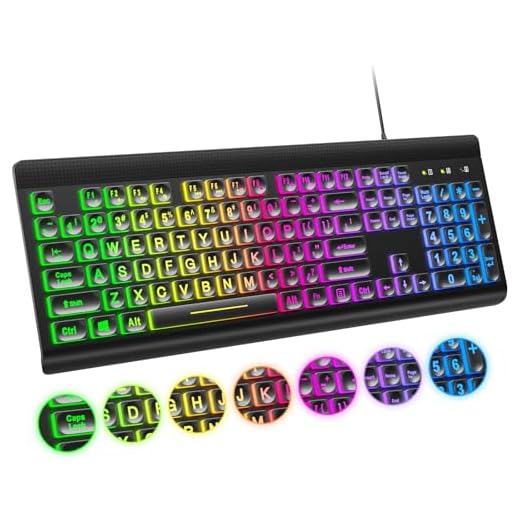


Best Overall: TECURS Large Print Backlit Keyboard, Wired Computer Keyboard
Oversized 4X-larger letters paired with 7-level adjustable backlighting make keys easy to spot day or night, while the spill-resistant, silent-key des
- Letters are genuinely 4x larger, not just slightly bolded
- 7 brightness levels let you dial in exactly how much glow you need
- Spill-resistant design tolerates the occasional coffee mishap
- Quiet keystrokes make it usable in shared spaces without complaints
- Single backlight color, so no color-contrast customization
- Wired-only USB-A connection needs an adapter on USB-C-only machines
- Full-size footprint takes up more desk space than compact boards
Best Budget: EDJO Large Print Backlit Wired Keyboard, 7-Colors Backlight
4X-larger high-contrast lettering stays affordable, with 7 backlight colors and 4 brightness levels so low-vision users can dial in the clearest contr
- Cheapest keyboard in this roundup without cutting corners on font size
- 7 backlight colors give more contrast options than single-color competitors
- 4 brightness levels cover everything from dim rooms to bright glare
- Standard wired USB connection works out of the box, no drivers needed
- Build feels noticeably lighter-duty than the pricier options
- No spill resistance called out, so keep liquids away
- Keycap legends can wash out slightly under the brightest backlight setting
Best for Gaming: Atelus Large Print Backlit Keyboard, Rainbow Illuminated LED
Rainbow LED backlighting behind 4X-larger letters keeps large-print keys legible during long gaming sessions, with a foldable stand for comfortable ex
- Rainbow LED backlighting adds vibrant contrast most low-vision users find easier to track
- Foldable stand lets you angle the deck for comfortable wrist position during long sessions
- Full-size layout keeps the number pad and function row intact for gaming shortcuts
- 4x-larger letters stay legible even with the lighting cycling through colors
- Cycling rainbow mode can be visually busy for some low-vision users — static color mode is better for daily typing
- Larger and heavier than the minimalist options, less desk-friendly
- Windows-only key layout, no Mac modifier keys
Best for Adjustable Viewing: KOPJIPPOM Large Print Keyboard, 7 Interchangeable Backlight Colors
Seven backlight colors and 3 brightness levels let low-vision users fine-tune contrast to their exact eyesight, pairing precise customization with 4X-
- 7 interchangeable backlight colors let users find the exact contrast their eyes respond to best
- Foldable stands adjust the typing angle to reduce glare from overhead lighting
- Plug-and-play USB setup with no software or drivers required
- 4x-larger letters remain sharp across all backlight colors, not just the default white
- Only 3 brightness levels versus EDJO’s 4, less fine-grained control
- Foldable stand feet feel less sturdy than the keyboard body itself
- Wired-only, no Bluetooth option for tablets
Best for Durability: Azio KB540, Large Print 3-Color LED Wired USB Keyboard
Backlighting shines directly through large-print letters for sharp contrast, while an IP66 waterproof, washable, antimicrobial build survives spills a
- IP66 waterproof rating means it survives full spills, not just splashes
- Fully washable design is genuinely useful for shared or medical-adjacent settings
- Antimicrobial coating matters for users who share equipment or sanitize frequently
- Backlighting shines directly through the letters for sharp, consistent contrast
- Noticeably more expensive than the standard wired options in this guide
- Only 3 LED colors versus the 7-color options elsewhere
- Labeled as a Mac version, so Windows key mapping is nonstandard
Best Premium: Macally Wired Keyboard for Mac (USB-C + A), Large Print and Backlit
Purpose-built for Mac with 4X-larger letters and 3-level LED backlighting, this premium keyboard adds native macOS shortcuts and dual USB-C/USB-A conn
- Native Mac shortcut keys and modifier labels, no relabeled Windows keycaps to decode
- Dual USB-C and USB-A cables cover both modern and older Mac hardware
- Full 107-key layout keeps the number pad and function row for power users
- 3-level backlighting stays sharp and even across the entire large-print legend
- The most expensive keyboard in this guide by a wide margin
- Mac-specific layout is a poor fit for Windows users
- Only 3 brightness levels, fewer options than the budget picks
Side-by-side comparison
|
Best Overall
TECURS Large Print Backlit Keyboard, Wired Compute
|
Best Budget
EDJO Large Print Backlit Wired Keyboard,7-Colors B
|
Best for Gaming
Atelus Large Print Backlit Keyboard, USB Wired Com
|
Best for Adjustable Viewing
KOPJIPPOM Large Print Keyboard – 7 Interchangeable
|
Best for Durability
Azio KB540 – Large Print 3-Color LED Wired USB Key
|
Best Premium
Macally Wired Keyboard for Mac (USB C + A) – Large
|
|
|---|---|---|---|---|---|---|
|
|
|
|
|
|
|
|
| Letter Size | 4X-larger | 4X-larger | 4X-larger | 4X-larger | Large print | 4X-larger |
| Backlight Options | 7 brightness levels | 7 colors / 4 levels | Rainbow (multi-color) | 7 colors / 3 levels | 3 colors | 3 brightness levels |
| Connection | Wired USB-A | Wired USB-A | Wired USB-A | Wired USB-A | Wired USB | Wired USB-C + USB-A |
| Waterproof/Washable | No | No | No | No | Yes | No |
| Platform | Windows/PC | Windows/PC | Windows/PC/Gaming | Windows/PC | Mac | Mac |
| Price | $29.99 | $23.89 | $26.99 | $25.99 | $45.90 | $59.99 |
| BUY NOW | BUY NOW | BUY NOW | BUY NOW | BUY NOW | BUY NOW |
What to look for in Large-Print and High-Contrast Keyboards for Low Vision
How much bigger are the letters on a large-print keyboard compared to a standard one?
Most of the keyboards in this guide advertise roughly 4x larger lettering than a standard keyboard. That’s a meaningful jump — enough to read keys from a normal seated distance without leaning in or using a magnifier.
Do I need backlighting if the letters are already large?
Yes, in most real-world conditions. Large letters printed in standard low-contrast gray still become hard to read in dim rooms, at night, or under glare from a monitor. Adjustable backlighting is what keeps that contrast usable across different lighting, not just in a bright, evenly-lit office.
Will a large-print Windows keyboard work with a Mac?
It will physically connect and type, but modifier keys like Ctrl, Alt, and Win won’t match macOS’s Command and Option layout, which adds confusion for exactly the kind of user who doesn’t need more friction. If you’re on a Mac, get a Mac-specific board like the Azio or Macally instead.
Are these keyboards worth it over just using screen magnification software?
They solve different problems. Screen magnification helps you see what’s on the display, but it doesn’t help you find the right key by touch or sight before you press it. A high-contrast, large-print keyboard removes the guesswork at the input stage, which magnification software can’t fix.
The bottom line
- TECURS is the best overall balance of size, backlighting, and price for most low-vision users.
- EDJO is the cheapest way into this category without sacrificing font size or backlight range.
- Atelus makes sense if you also want a gaming-capable layout alongside accessibility features.
- KOPJIPPOM is the pick for anyone who wants to experiment with color and viewing angle to find what works best.
- Azio KB540 justifies its price if spills, sanitizing, or heavy daily wear are real concerns.
- Macally is the right premium choice specifically for Mac users who want a native, purpose-built layout.
The TECURS is the safest all-around pick — big letters, real adjustable backlighting, and a low price. If budget is tight, the EDJO gets you nearly the same experience for less, and Mac users should skip straight to the Azio or Macally rather than fighting a Windows layout.