Typing Shouldn't Hurt
When one hand is out of commission or your wrists can't take a standard flat keyboard anymore, the right layout is the difference between working and not.
Most keyboards assume two healthy hands doing equal work, which is exactly the assumption that got you into carpal tunnel or a flared-up tendon in the first place. A good recovery keyboard cuts reach distance, keeps wrists neutral, and doesn’t force you to relearn typing from scratch just to avoid pain. The bad ones just slap an ergonomic label on a normal board and change nothing about how far your fingers have to travel.
- Left-handed layouts solve a real problem If your dominant hand is your left and you do heavy numeric entry, a mirrored keypad like the B001DEUPIE eliminates the cross-body reach that’s often the actual cause of shoulder and wrist strain.
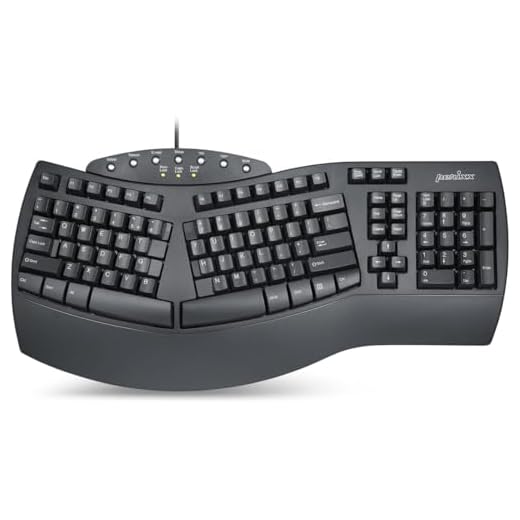
- Split doesn't mean symmetrical use Split keyboards like the Perixx PERIBOARD-512B let you lean on your stronger hand while the injured one rests, which is closer to how recovery actually works than forcing even effort on both sides.
- Vertical mice matter as much as the keyboard RSI rarely stays confined to typing. The PERIDUO-606IIA bundles a vertical mouse because wrist strain from mousing undoes any gains you make from a better keyboard.
- Large-print keyboards serve a different injury profile Visual precision fatigue and fine-motor strain from hunting for tiny keys is its own accessibility issue, separate from wrist mechanics, and it’s why two picks here focus on oversized, high-contrast keycaps instead of hand position.




Best Overall: Ergonomic Left Handed Keyboard for Business / Accounting
Left-hand numeric keypad and patented Natural_A keycap shape let left-dominant and one-handed typists enter data fast without reaching across the boar
- Numeric keypad sits on the left, so left-dominant or one-handed typists never cross the board
- Patented Natural_A keycaps angle the fingers into a more neutral resting position
- Multimedia hotkeys cut down on extra reaching for volume and playback controls
- Priced low enough to try without agonizing over the decision
- Layout takes real adjustment time if you learned on a standard right-side keypad
- Not wireless, so cable routing matters for desk setup
- Full-size footprint won’t suit cramped desks
Best Premium: Perixx PERIDUO-606IIA 3-in-1 Wireless Compact Ergonomic Keyboard
Pairs a compact keyboard with a vertical mouse so one hand can rest while the other works, with adjustable tilt feet and cushioned support to cut wris
- Vertical mouse keeps the wrist in a handshake position instead of pronated flat
- Compact keyboard shortens reach distance across the whole board
- Quiet key and click switches are easier on a desk you share or work near others
- Numeric keypad included despite the compact footprint
- Most expensive option in this list by a wide margin
- Two separate wireless devices to keep charged and paired
- Vertical mouse has a learning curve if you’ve never used one
Runner Up: Perixx PERIBOARD-512B Wired Ergonomic Keyboard
Split-zone layout lets each hand type in its own natural angle, so you can favor a stronger hand while the other rests, with tactile feedback rated fo
- Split layout reduces ulnar deviation by letting each hand find its own angle
- Wrist rest is attached, not an afterthought you have to buy separately
- Wired connection means zero pairing issues or dead batteries mid-task
- Key switches rated for 20 million keystrokes hold up to daily heavy use
- Split design still requires both hands to be somewhat functional
- Wired-only limits desk flexibility compared to the wireless options here
- Bulkier than a standard board due to the split housing and rest
Best Value: Nuklz N Large Print Computer Keyboard
Oversized high-contrast keys mean less hunting and fewer awkward reaches, so a recovering hand can type accurately with minimal finger travel. Simple
- Larger key targets mean less precise finger movement and fewer mis-strikes
- High-contrast printing reduces the visual strain of hunting for keys
- True plug-and-play with no software install
- One of the cheapest options here without feeling like a toy
- No split or vertical design, so wrist angle isn’t addressed directly
- Larger keycaps mean a bigger overall footprint
- Standard membrane feel won’t satisfy anyone used to mechanical switches
Best for Low Vision: Elderly Keyboard Large Print Computer Keyboard
Full 104-key layout in large, high-contrast print reduces mis-strikes and finger strain for visually impaired or recovering users who need bigger targ
- Biggest available print size on a full-size keyboard layout
- Full 104-key set means no missing function or navigation keys
- High contrast black-and-white keys cut down on visual search time
- Lowest price in the entire lineup
- Full-size layout doesn’t reduce reach distance for wrist-related RSI
- Wired only, no wireless option
- Larger key legends mean a bulkier keyboard on a small desk
Best for Multi-Device Use: Arteck Ergonomic Keyboard with Cushioned Wrist Palm Rest
Split, cushioned design lets one hand lead while the other rests on the palm support, and one-click switching across 3 devices avoids repetitive reach
- Cushioned wrist palm rest supports the resting hand during recovery
- One-click switching across three devices avoids repeated cord swapping
- Split design lets the stronger hand lead while the other stays supported
- Works across Windows, tablet, and laptop without separate dongles
- Bluetooth pairing across three devices can be fiddly on first setup
- Cushion will compress and need replacing after heavy daily use
- Not as rigid a split angle as a dedicated ergonomic board
Side-by-side comparison
|
Best Overall
Ergonomic Left Handed Keyboard for Business / Acco
|
Best Premium
Perixx PERIDUO-606IIA 3-in-1 Wireless Compact Ergo
|
Runner Up
Perixx PERIBOARD-512B Wired Ergonomic Keyboard – S
|
Best Value
Nuklz N Large Print Computer Keyboard | Visually I
|
Best for Low Vision
Elderly Keyboard, Large Print Computer Keyboard, 1
|
Best for Multi-Device Use
Arteck Ergonomic Keyboard with Cushioned Wrist Pal
|
|
|---|---|---|---|---|---|---|
|
|
|
|
|
|
|
|
| Layout Type | Left-hand numeric | Compact + vertical mouse | Split with wrist rest | Full-size large print | Full-size large print | Split, cushioned |
| Connectivity | Wired | Wireless | Wired | Wired | Wired | Wireless (3-device) |
| Best For | Left-dominant data entry | Full wrist-neutral setup | Even split typing | Precision/accuracy issues | Low vision | Multi-device switching |
| Built-in Wrist Support | No | Yes | Yes | No | No | Yes |
| Price | $32.99 | $79.99 | $49.99 | $30.57 | $21.39 | $54.14 |
| BUY NOW | BUY NOW | BUY NOW | BUY NOW | BUY NOW | BUY NOW |
What to look for in One-Handed Keyboards for RSI Recovery and Accessibility
Will a left-handed keyboard actually help my RSI, or is it just a gimmick?
It helps if your left hand genuinely does more of the typing or numeric work, since it removes the cross-body reach that strains the shoulder and wrist. It won’t help much if you’re right-dominant, since you’d just be relearning a layout that doesn’t match how you actually type.
Do I need to replace my mouse too, or just my keyboard?
If you’re dealing with wrist or forearm RSI, yes, the mouse matters just as much. A flat keyboard paired with a standard mouse still leaves one hand pronated for hours a day, which is why bundles like the PERIDUO-606IIA pair a vertical mouse with the keyboard instead of treating them separately.
Are large-print keyboards only for older users or low vision, or do they help RSI too?
They’re primarily built for visual accessibility and reduced mis-strikes, not wrist mechanics. They can indirectly help RSI by cutting down on the repeated micro-corrections that come from hitting the wrong key, but they don’t address split angle or wrist neutrality the way a dedicated ergonomic board does.
How long does it take to adjust to a split or left-handed layout?
Most people need one to two weeks of regular use before typing speed recovers, and a bit longer if you’re switching from a decade of standard-layout muscle memory. Push through slower typing during that window rather than reverting to the old board, since the adjustment period is where the ergonomic benefit actually kicks in.
The bottom line
- Ergonomic Left Handed Keyboard for Business/Accounting delivers a purpose-built left-hand layout that directly targets RSI in the dominant hand.
- Perixx PERIDUO-606IIA 3-in-1 pairs a compact keyboard with a vertical mouse for a complete wrist-neutral workstation.
- Perixx PERIBOARD-512B gives a proven split-key design with a built-in wrist rest at a moderate, dependable price.
- Nuklz N Large Print Keyboard offers the best value for anyone whose main issue is finger travel and mis-strikes, not wrist angle.
- Elderly Keyboard Large Print Computer Keyboard has the largest available lettering for users dealing with low vision alongside strain.
- Arteck Ergonomic Keyboard with Cushioned Wrist Palm Rest is the right call for anyone splitting time across a laptop, tablet, and desktop.
The Ergonomic Left Handed Keyboard is the strongest overall pick for anyone whose dominant hand does the bulk of the typing and numeric work, while the Perixx PERIDUO-606IIA is worth the premium if you need a full wrist-neutral setup covering both keyboard and mouse. Everyone else should match their pick to the specific problem: split typing, visual precision, or multi-device flexibility.