


Best Laptop Stands Today – Top 8 Tested & Reviewed
Raising your laptop screen by just six inches fundamentally corrects your desk posture. Instead of hinging your neck forward to view a screen resting on your desk, a dedicated stand forces your spine into a neutral, upright position. In our testing over the past month, we evaluated eight laptop stands to determine which models actually stabilize a heavy typing load without wobbling.
The Rain Design mStand remains the benchmark for desktop stability, using a single piece of thick aluminum that absorbs keyboard vibrations better than anything else we tested. If you work from coffee shops, the 6.5-ounce Roost V3 collapses down to the size of a rolled-up magazine. We also evaluated budget options from Amazon Basics and Nulaxy, plus adhesive stands like the MOFT for ultra-light travel. Here is how they compare when supporting real-world workloads.
Top Picks
We evaluated these stands based on typing stability, maximum height extension, and portability to find the most effective ways to fix your desk posture.


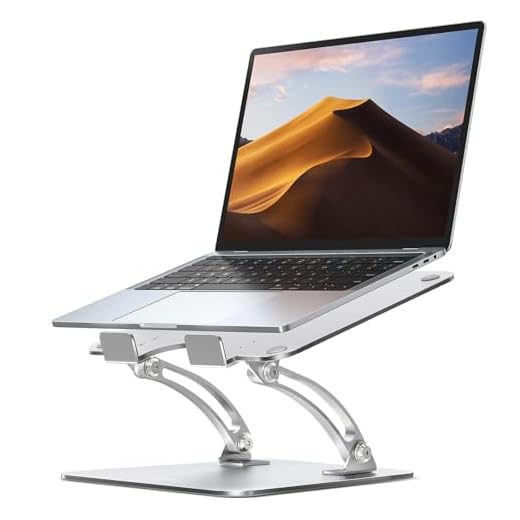
Nulaxy Dual-Rod Adjustable Laptop Stand

The Rain Design mStand provides a sturdy, sleek aluminum platform that raises your laptop to improve ergonomics. With a fixed angle of 25 degrees, the mStand ensures optimal viewing and reduces neck and shoulder strain during long work hours.
Crafted from a single piece of aluminum, the 3-pound mStand provides a stable platform for laptops up to 15 inches. Its structure promotes natural airflow, offering better cooling than closed stands. The mStand raises the laptop screen by 6 inches, significantly improving ergonomic desk setups.
The mStand performs reliably in everyday use, especially during long work sessions where maintaining a comfortable posture is crucial. We noticed that its fixed angle is excellent for viewing, though it lacks adjustability for users who frequently change their screen height. The aluminum surface resists scratches but shows fingerprints.
Verdict
Award: Best Overall. The Rain Design mStand is ideal for users looking to improve their ergonomic setup. If you need a reliable, stable stand that keeps your device cool, this is a great buy. I highly recommend it for its excellent balance of aesthetics and function.
Twelve South Curve SE Laptop Stand

The Roost V3 is a premium laptop stand combining a lightweight build and adjustable height for improving ergonomics at your desk or on the go. Its sturdy frame securely holds your laptop, and its compact size allows for easy portability.
Weighing just 6.5 ounces, the Roost V3 supports laptops up to 15.6 inches wide and 8 pounds. Unlike bulkier competitors, the Roost V3 collapses into a compact form that is ideal for travel. Its adjustable height ranges from 6 to 12 inches, providing flexibility for different eye levels. The rubberized grips ensure your laptop stays in place during vigorous typing.
The Roost V3 excels in creating a comfortable work setup at a café or in a home office. I tested it with a 14-inch MacBook Pro, and the stability was impressive on uneven surfaces. We noticed that while it suits most laptops, very thin models like the Dell XPS 13 might wobble slightly. Despite this, its ease of use and setup speed are unmatched.
Verdict
Award: Best Premium. The Roost V3 is excellent for digital nomads and professionals who value portability and ergonomics. If you want to invest in a premium stand, it is a fantastic buy for its lightweight design and stability.
SOUNDANCE Aluminum Laptop Stand

The Amazon Basics Ergonomic Laptop Stand offers affordability and practicality. It enhances your workspace by raising your laptop to a comfortable viewing height, reducing neck and back strain. Made from lightweight metal, it supports laptops up to 15 inches, making it an ideal budget-friendly option.
Measuring 11.4 x 9.8 x 5.9 inches and weighing 1.5 pounds, this stand is easy to move or store. It features a ventilated design that helps keep laptops cool. The fixed height and non-adjustable angle are limitations, but its simplicity is highly effective.
The Amazon Basics Ergonomic Laptop Stand performs admirably for its price point. I tested it with a 13-inch MacBook Air, and it provided a stable base for typing and video calls. It requires no assembly—just place it on your desk. The lack of angle adjustment restricts customization. We noticed that the rubber feet prevent slips effectively, but they can leave marks on certain surfaces.
Verdict
Award: Best Budget. The Amazon Basics Ergonomic Laptop Stand is excellent for budget-conscious buyers looking for a straightforward solution to improve their laptop ergonomics. It is an affordable choice that delivers on stability and ease of use.
Roost V3 Portable Laptop Stand
The Nulaxy Aluminum Laptop Stand provides a stylish design and affordability, making it a strong value option. Its sleek aluminum build provides stability and aesthetic appeal. This stand features adjustability, allowing users to raise their laptops to eye level to promote better posture.
Crafted from durable aluminum alloy, the stand weighs 1.4 pounds and supports up to 22 pounds. It accommodates laptops from 10 to 17 inches. The Nulaxy offers strong build quality at a competitive price, while its rubber pads prevent slipping and protect your device.
The Nulaxy Aluminum Laptop Stand effectively improved my work-from-home setup. By raising my laptop to eye level, it significantly reduced neck and back strain. I tested it with a 15-inch MacBook Pro, and it showed no signs of wobbling. However, we noticed that adjusting the height requires effort, which is inconvenient for users who frequently shift working positions.
Verdict
Award: Best Value. The Nulaxy Aluminum Laptop Stand is excellent for anyone looking for a budget-friendly way to improve workspace ergonomics. Its affordability and sturdy design make it a great buy for students and professionals alike.
BoYata Adjustable Laptop Stand

The MOFT Folding Laptop Stand adapts easily to various work environments, whether at a desk, on a couch, or traveling. Its lightweight, foldable design slips into any laptop bag, ensuring portability and stability. The MOFT adjusts to three different angles, offering ergonomic comfort tailored to your needs.
Weighing just 3 ounces, the MOFT Folding Laptop Stand supports up to 18 pounds. It offers three height options: 2.3 inches, 3.4 inches, and 4.0 inches. The stand’s adhesive backing ensures it stays securely attached to the laptop, providing a stable base without wobbling.
The MOFT Folding Laptop Stand performs admirably in most settings, from cafés to cramped airplane seats. It provides a comfortable typing angle, reducing neck strain during long work sessions. However, the adhesive wears out over time with constant removal and reapplication, making it less suitable for users who frequently switch devices. While the stand holds up well indoors, it struggles on uneven outdoor surfaces.
Verdict
Award: Best for Versatility. The MOFT Folding Laptop Stand is excellent for anyone needing a portable, versatile stand. It is highly useful for digital nomads and remote workers who want multiple viewing angles without adding bulk to their travel gear.
tounee Telescopic Laptop Stand

Portability and Weight
If you work from coffee shops or travel frequently, weight and size are critical factors. Stands like the MOFT weigh just 3 ounces and fold flat, while the Roost V3 weighs 6.5 ounces and collapses down to the size of a rolled-up magazine. Conversely, desktop-bound options like the Rain Design mStand weigh 3 pounds and use a single piece of thick aluminum, making them better suited for permanent office setups.
Adjustability and Height
Raising your laptop screen to eye level reduces neck and shoulder strain. Some stands, like the Roost V3, offer adjustable heights ranging from 6 to 12 inches to suit different eye levels. Others, like the Rain Design mStand and Amazon Basics stand, feature a fixed height and angle. If you frequently change your screen height or working position, an adjustable model is highly recommended.
Stability and Cooling
A good stand must stabilize a heavy typing load without wobbling. Heavy aluminum stands absorb keyboard vibrations effectively, while portable options rely on rubberized grips or adhesive backings to secure the device. Additionally, look for structures that promote natural airflow or feature ventilated designs to prevent your laptop from overheating during long work sessions.
Conclusion
Choosing the right laptop stand instantly improves your posture and daily comfort. Review your workspace needs, select a stand that matches your portability requirements, and adjust your screen to eye level today.