A dual monitor standing desk converter is the most effective way to transition between sitting and standing without replacing your entire workstation. Dual screens demand a wide surface area and a high weight capacity to prevent dangerous wobbling. In our testing methodology, we evaluated lifting mechanisms, keyboard tray stability, and overall build quality to determine which models safely support multiple displays.
Vari VariDesk Pro Plus 36
The VariDesk Pro Plus 36 is a two-tier converter featuring a spacious upper deck that accommodates two screens. The spring-assisted rowing lift mechanism raises and lowers equipment with minimal physical strain. The unit offers eleven different height settings to help you find the ideal ergonomic position.
This model arrives fully assembled out of the box. You place it on your existing desk and start working immediately. The heavy base ensures your monitors remain stable while you type on the lower keyboard tier.
VariDesk Pro Plus 36 Desk Converter

Ergotron WorkFit-TX Standing Desk Converter
The Ergotron WorkFit-TX offers a 32 by 27-inch work surface that supports two large monitors or a monitor and laptop combination. The lifting mechanism provides twenty inches of straight vertical movement without sway. The entire unit folds down to within two inches of your desk surface, keeping your keyboard at a comfortable typing height during seated work.
This workstation requires no assembly or clamping. The drop-down keyboard tray sits below the desktop level for better wrist placement, and the heavy-duty frame performs reliably under heavy loads.
Ergotron WorkFit-TX Standing Desk Converter

VIVO Height Adjustable 32 inch Standing Desk Converter
This VIVO 32-inch converter includes a dedicated dual monitor mount that frees up space on the top tier. You can attach two screens ranging from 13 to 30 inches directly to the included stand. This integrated mounting system keeps your displays aligned while transitioning between sitting and standing, leaving room on the main desktop for a notebook or accessories.
A pneumatic spring mechanism lifts the desk surface with minimal physical strain. The lower keyboard tray fits a standard keyboard and mouse, while the solid steel frame prevents shifting or bouncing during use.
VIVO Desk Converter with Dual Monitor Mount
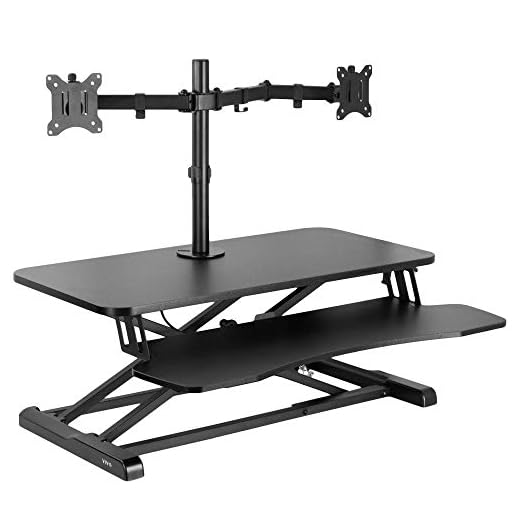
VIVO 36 inch Height Adjustable Stand Up Desk Converter
The VIVO 36-inch V Series desk riser features a 91 by 56-centimeter desktop that provides ample room for side-by-side dual monitors. The separate 64 by 27-centimeter keyboard tray holds your typing gear at a comfortable level. A dual pneumatic spring force system provides a 15-kilogram lift assist for smooth height adjustments throughout the workday.
Setting up this converter requires minimal assembly to attach the keyboard tray with the included hardware. The sturdy steel design keeps monitors secure, and VIVO backs the product with a three-year manufacturer warranty.
VIVO DESK-V000V Desk Converter

Surface Area and Weight Capacity
Dual monitor setups demand a wide surface area and strong weight capacity. Most high-quality converters support between 30 and 40 pounds of equipment. You must ensure the combined weight of your screens and any attached monitor arms does not exceed the lifting capacity of the desk.
Lifting Mechanisms
A smooth lifting mechanism is essential for adjusting height without physical strain. Look for models with pneumatic springs or spring-assisted rowing lifts that provide straight vertical movement without swaying.
Keyboard Tray Stability
You need a unit that will not wobble when you type. Drop-down keyboard trays that sit below the desktop level offer better wrist placement and keep your keyboard at a comfortable typing height during seated work.
Final Thoughts
A standing desk converter improves daily comfort and posture. Measure your current desk dimensions to ensure your chosen model fits properly, then select a converter with the right weight capacity for your dual monitors to upgrade your workspace today.
Frequently Asked Questions
How much weight can a dual monitor standing desk converter hold?
Most high quality converters can support between 30 and 40 pounds of equipment. You should always check the manufacturer specifications to ensure it can handle your specific monitors.
Do I need to bolt the converter to my desk?
The vast majority of standing desk converters sit directly on top of your existing desk without any mounting hardware. Their heavy bases provide enough stability to prevent tipping during normal use.
Will a standing desk converter scratch my tabletop?
Manufacturers typically include rubber pads or felt feet on the bottom of the converter base. These protective elements prevent the heavy steel frame from scratching or damaging your wooden desk surface.
Can I use a monitor arm with a standing desk converter?
Many converters feature grommet holes or clamp compatible edges that allow you to attach a monitor arm. You must ensure the combined weight of the arm and monitors does not exceed the lifting capacity of the desk.