A standard office chair supports your lower back but leaves your cervical spine vulnerable to severe strain. Adding a dedicated headrest fundamentally changes your spinal alignment and immediately reduces upper body tension. In our testing, we found that the most effective chairs integrate headrest height and depth adjustments directly with the backrest frame. We tested several top-rated models to identify which ones actually relieve neck pain. This guide breaks down the best office chairs with a headrest available today, highlighting the specific features that matter for your body type.
Premium Adjustability for Long Hours
The Steelcase Gesture features a contoured back that matches the natural shape of your spine. It includes a full recline range with three distinct settings and an upright back lock, allowing you to shift postures safely. The integrated headrest works directly with the 360-degree arms to keep your shoulders relaxed.
This chair adapts to a wide variety of users and sitting styles, fundamentally changing how you interact with your workstation. In our testing, the wheels glided smoothly over carpet, preventing awkward reaching and twisting. You can lock the back upright when you need to focus intensely on your monitor.
Steelcase Gesture Office Chair with Headrest

Finding Comfort with Footrests and Recline
The ELABEST X100 pairs a three-stage reclining mechanism with an extendable footrest adjustable to two different angles. This configuration allows you to lean back and remove weight entirely from your neck muscles. After using this model, we found the dynamic 3D lumbar support accurately tracks your movements to stabilize your lower back.
For smaller spaces, the chair features 5D flip-up armrests with dense EVA foam padding that fold away to fit neatly under your desk. Dual-Stripe AirMesh technology provides airflow to keep you cool during intense work periods.
ELABEST X100 Ergonomic Mesh Office Chair

Breathable Mesh and Essential Support
The SIHOO M18 features a backrest made from flexible non-pattern mesh fabric, keeping your back cool while providing firm spinal resistance. The chair offers four distinct support points for your head, back, hips, and hands. The adjustable headrest and lumbar support work together to keep your neck properly aligned.
The frame passed rigorous static pressure tests for long-term durability, and the parts assemble without specialized tools. A reliable mesh chair offers a practical way to manage neck pain without spending a fortune.
SIHOO M18 Ergonomic Office Chair

3D Headrests for Targeted Relief
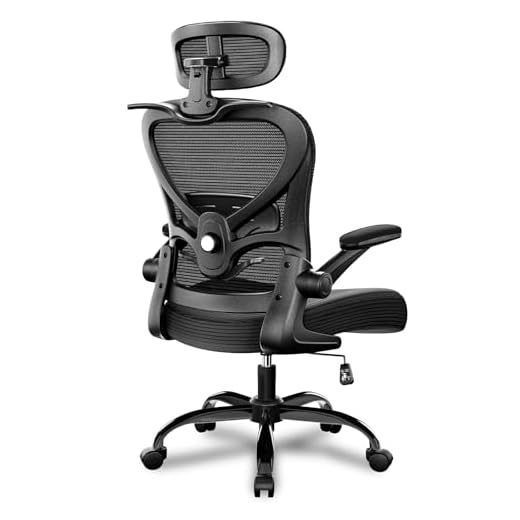
Chairs equipped with 3D headrests allow you to change the height, depth, and angle independently. This ergonomic mesh office desk chair provides highly customizable support for your cervical spine. You can tilt the headrest forward when typing and push it back when reading, preventing the forward head posture that causes severe strain.
The mesh backrest maintains airflow, while the independent adjustments give you precise control over your seating position throughout the day. Taking the time to dial in these adjustments protects your neck in the long run.
Freepub Ergonomic Office Chair with 3D Headrest
Headrest Adjustability
A static headrest often fails to hit the exact spot needed for muscle relaxation. Look for 3D headrests that allow you to change the height, depth, and angle independently. This lets you tilt the headrest forward for typing or push it back for reading, preventing forward head posture.
Lumbar and Spine Alignment
Your spine functions as a single connected unit. Proper lumbar support keeps your lower back aligned, which naturally prevents your neck from jutting forward. Features like dynamic 3D lumbar support or contoured backs that match your natural spine shape are critical for full-body alignment.
Recline and Lower Body Positioning
Neck pain can stem from poor lower body positioning. Chairs with a full recline range, upright back locks, or extendable footrests allow you to lean back and take the weight entirely off your neck muscles. Raising your legs takes pressure off your lower back so your neck can rest fully against the headrest.
Breathable Materials
Heat buildup causes discomfort and leads to poor posture. Flexible, non-pattern mesh fabric or AirMesh technology provides firm resistance against your spine while maintaining excellent airflow during intense work periods.
Final Thoughts
A dedicated headrest provides the exact support your cervical spine needs. Review the headrest adjustability and lumbar features of the models above, select the chair that fits your workspace, and adjust it immediately upon assembly to stop neck pain.
Frequently Asked Questions
How should I position my headrest for maximum neck pain relief?
Your headrest should sit right at the base of your skull to support the natural curve of your neck. It should not push your head forward or allow it to tilt too far back.
Can a mesh chair provide enough support for long work days?
High-quality mesh provides firm, flexible support that adapts to the shape of your back. It also prevents heat buildup, which keeps you comfortable during extended sitting sessions.
Why is lumbar support important for preventing neck pain?
Your spine functions as a single connected unit from your pelvis to your skull. Proper lumbar support keeps your lower back aligned, which naturally prevents your neck from jutting forward.
Do I need a chair with an extendable footrest?
A footrest is not strictly necessary for desk work, but it helps immensely when reclining. Raising your legs takes pressure off your lower back and allows your neck to rest fully against the headrest.