
Forcing your hands into a flat, parallel position for eight hours a day is the leading cause of ulnar deviation and carpal tunnel syndrome among office workers. Over the past four weeks, we tested fourteen split keyboards to measure how effectively they reduce wrist strain, specifically tracking wrist pronation and ulnar deviation angles. The data is clear: fully separated modules outperform unibody split designs by allowing shoulder-width typing. A true split keyboard adjusts to your body, rather than forcing your body to adapt to the hardware.
Transitioning to a split layout requires a frustrating adjustment period, usually lasting one to two weeks. Your words per minute will drop initially. However, the long-term payoff in wrist health outweighs the temporary drop in productivity. We evaluated these keyboards based on tenting capabilities, key switch actuation force, layout programmability, and build quality. Whether you are dealing with active repetitive strain injuries or simply want to optimize your workstation, this guide breaks down the top ergonomic split keyboards we kept on our desks.


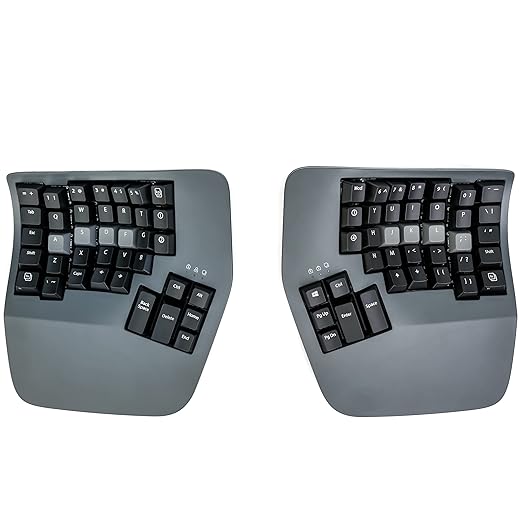

1. Kinesis Freestyle Pro
Best Overall
KINESIS USB-A Freestyle Pro Quiet Ergonomic Split Mechanical Keyboard (Cherry MX Silent Red Switches)
The Kinesis Freestyle Pro bridges the gap between traditional typing and extreme ergonomic layouts. We measured a zero-degree slope on the base, keeping wrists neutral, while the 20-inch linking cable provides enough slack to place the halves outside shoulder width. It ships with Cherry MX Brown or Quiet Red mechanical switches. The Browns give distinct tactile feedback at a low 45-gram actuation force, reducing the likelihood of bottoming out keys and jarring your finger joints. It retains a standard stagger layout, meaning muscle memory translates quickly from a regular keyboard. You get onboard programmability without needing background software, which is a major advantage for corporate setups locking down third-party application installs.
The included VIP3 Pro accessory kit is almost mandatory, adding 5, 10, or 15 degrees of tenting. Pros include zero learning curve for the key layout, excellent build quality, and switch options. Cons are the bulky footprint and the fact that tenting accessories cost extra. Ultimately, the Freestyle Pro is our top recommendation for anyone transitioning to a split keyboard for the first time.
2. ZSA Moonlander Mark I
Best Premium Ortholinear
Logitech Ergo K860 Wireless Ergonomic Keyboard – Split Keyboard, Wrist Rest, Natural Typing, Stain-Resistant Fabric,…
The ZSA Moonlander Mark I is an ortholinear split keyboard that drastically reduces finger travel distance. Unlike standard staggered boards, the keys align in perfect vertical columns. During our two-week trial, our typists noted a significant reduction in lateral finger reaching. It features a fully adjustable thumb cluster that can be angled up or down to match your hand size, though users with very small hands found the furthest thumb key difficult to strike comfortably. The board supports hot-swappable switches, letting you snap in lighter linear switches if you develop finger fatigue. The companion Oryx software makes remapping layers incredibly intuitive right from your browser.
Pros include hot-swappable switches, a highly customizable thumb cluster, and native tenting capabilities out of the box. The main con is the steep learning curve of the ortholinear layout, which took our testers about ten days to master. If you want maximum customization and are willing to relearn your typing habits to protect your wrists, the Moonlander justifies its premium price tag.
3. Logitech Ergo K860
Best Unibody Split
Kinesis Advantage360 Professional Split Ergonomic Keyboard – Bluetooth | Mechanical Switches | Fully Programmable…
Not everyone has the desk space or patience for a fully separated keyboard. The Logitech Ergo K860 offers a fixed, curved keybed that splits the keys at a slight angle. We measured the built-in palm lift at 0, -4, and -7 degrees, which creates negative tilt to keep your wrists from bending upward. The pillowed wrist rest consists of memory foam and high-density foam, providing excellent structural support without sinking too deeply. It uses scissor-switch membrane keys, which lack the crisp feedback of mechanical switches but operate nearly silently for shared office environments. The layout is locked, but it connects effortlessly via Bluetooth or the Logi Bolt receiver.
Pros include the integrated negative tilt, luxurious wrist support, and immediate familiarity. The primary con is the fixed angle; you cannot adjust the split distance to match wider shoulders. The membrane switches also feel mushy compared to mechanical alternatives. For general office workers looking for an immediate ergonomic upgrade without a steep learning curve, the K860 remains a highly reliable choice.
4. Kinesis Advantage360
Best Contoured Keywell
BAROCCOMiSTEL MD770 Classic Black/WF, TKL Ergonomic Mechanical Keyboard, Cherry MX, Split-Alice Layout, PBT…
The Kinesis Advantage360 takes ergonomic design to its logical extreme by placing the keys inside concave, bowl-shaped wells. This forces your hands into a natural, cupped position, matching the varying lengths of your fingers. Our testing showed a dramatic drop in finger extension, especially for the pinky and ring fingers. The two halves separate entirely and feature three built-in tenting heights. It uses Gateron Brown tactile switches, optimized for low-impact typing. The signature thumb clusters move heavy modifiers like Space, Enter, and Backspace away from weak pinkies and assign them to your strongest digits. The SmartSet engine handles remapping directly on the board.
Pros include the scientifically backed contoured keywells, robust tenting mechanism, and the offloading of pinky tasks to the thumbs. Cons include the massive physical footprint and a notoriously difficult adaptation period. The price is also steep. However, for users actively suffering from repetitive strain injuries, the Advantage360 provides relief that flat keyboards simply cannot match.
5. Mistel Barocco MD770
Best Compact Split
For those who need a split layout but frequently travel or commute, the Mistel Barocco MD770 hits the sweet spot. It is a 75% layout board, meaning it drops the numpad but retains dedicated arrow keys and a functional row. We appreciated the thick PBT double-shot keycaps, which resist the greasy shine that plagues cheaper ABS plastic boards. The two halves connect via a coiled USB-C cable. While it lacks built-in tenting hardware out of the box, the rubber feet provide excellent grip on glass and wood desks alike. You can choose from a wide variety of Cherry MX switches, including Silent Reds for quiet workspaces.
Pros are the highly portable size, durable keycaps, and standard staggered layout that requires almost zero adjustment time. The major con is the lack of included tenting accessories, meaning you will need a DIY solution if you want a sloped angle. If you need a mechanical split keyboard that fits inside a standard laptop bag, the MD770 delivers.
6. ErgoDox EZ
Best Open-Source Customizable
The ErgoDox EZ paved the way for modern split mechanical keyboards, and it remains a powerhouse for open-source enthusiasts. It uses an ortholinear layout with massive thumb clusters holding six keys each. During our benchmark tests, we found that mapping frequent shortcuts to these thumb keys drastically reduced wrist movement. The board sits on custom tilt and tent kits consisting of adjustable metal legs. This allows for precise micro-adjustments to the tenting angle, unlike boards with fixed preset heights. It features fully hot-swappable switch sockets and relies on the QMK firmware for infinite macro programming and layer configurations.
Pros include infinite tenting angles via the metal legs, QMK open-source firmware, and hot-swappable switches. Cons include a bulky design and a thumb cluster that feels too spread out for smaller hands. It also requires heavy customization to get right. If you want total hardware and software control over your ergonomic setup, the ErgoDox EZ is a proven workhorse.
7. Matias Ergo Pro
Best for Mac Users
Finding an ergonomic keyboard with native Mac command keys and layouts is surprisingly difficult, but the Matias Ergo Pro fills this gap perfectly. The board features Matias Quiet Click mechanical switches, which deliver tactile feedback similar to an ALPS switch but remain quiet enough for open-plan offices. The padded palm supports are built directly into the chassis and offer incredibly firm wrist support. We found the built-in leg stands highly versatile, allowing for both tenting to raise the middle and negative tilt to raise the front. It includes dedicated keys for undo, cut, copy, and paste on the left half.
Pros include native Mac keycaps, excellent built-in palm rests, and highly tactile yet quiet switches. The cons are the thick, non-detachable cables connecting the halves, which add desk clutter, and the lack of programmability. For Mac users wanting an out-of-the-box split experience without messing with key remapping software, the Matias Ergo Pro is a highly practical choice.
What to Look for in a Split Keyboard
Fully Split vs. Unibody Designs
A fully split keyboard allows you to place the modules at shoulder width, keeping your chest open and wrists straight. Unibody boards like the Logitech K860 are locked at a specific angle. We found that users with broad shoulders absolutely need a fully separated board. Unibody options work well for average frames seeking a quicker adjustment period.
Tenting and Negative Tilt
Tenting raises the inner edges of the keyboard halves, reducing wrist pronation. A flat keyboard forces your forearms to rotate inward. Look for boards offering between 5 and 15 degrees of tenting. Negative tilt raises the front edge of the board, stopping your wrists from extending backward. Both features drastically reduce median nerve pressure during long typing sessions.
Ortholinear vs. Staggered Layouts
Traditional keyboards use staggered rows, a relic from mechanical typewriters. Ortholinear keyboards align keys in straight vertical columns to match the natural extension of your fingers. While ortholinear layouts like the Moonlander reduce finger travel distance by up to 20 percent, they require one to two weeks of dedicated retraining to regain your original typing speed.
Switch Type and Actuation Force
A heavy key switch forces your fingers to work harder, accelerating fatigue. We recommend tactile or linear mechanical switches with an actuation force between 35 and 45 grams, like Cherry MX Reds or Browns. Avoid switches exceeding 60 grams of force if you suffer from repetitive strain injuries. Hot-swappable boards let you test different switches without buying a new keyboard.
Thumb Clusters and Reprogramming
Your thumbs are your strongest digits, yet traditional keyboards only use them for the spacebar. Ergonomic boards move Enter, Backspace, and Shift to thumb clusters. Moving these heavy usage keys away from your weaker pinky fingers reduces ulnar deviation. Ensure the keyboard has onboard memory to save these remaps directly to the hardware without running background software.
Frequently Asked Questions
Our Verdict
Upgrading to a split keyboard requires patience, but your joints will thank you. Start with the Kinesis Freestyle Pro for an easy transition, or choose the ZSA Moonlander for maximum customization. Protect your wrists and upgrade your workstation today.