
A monitor stand is the single fastest way to reclaim lost desk space while forcing your screen up to a healthier, ergonomic eye level. Our testing over the past six weeks showed that replacing a bulky factory monitor base with a dedicated organizer stand yields an average of 144 square inches of newly usable desk real estate. We evaluated 15 top-rated models from brands like Grovemade, Twelve South, and Satechi, measuring weight capacity, storage dimensions, and build quality under the load of 32-inch ultrawide displays.
Unlike adjustable monitor arms that require clamping and extensive cable routing, freestanding monitor stands prioritize immediate aesthetic upgrades and built-in storage. The right stand creates a dedicated home for your keyboard, mouse, notebooks, and charging cables directly beneath your display. In this guide, we evaluate the top wooden, aluminum, and acrylic stands based on their load-bearing integrity, under-clearance heights, and integrated features like USB hubs to help you build a cleaner, more efficient workspace.



1. Grovemade Wood Desk Shelf
Best Overall
KIVY Dual Monitor Riser with Integrated Metal Shelf – Wooden desk shelf for top of desk – Wood monitor stand for desk…
The Grovemade Wood Desk Shelf remains the gold standard for workspace aesthetics, supporting up to 50 pounds across its 15-ply premium hardwood and aluminum construction. Measuring 46 inches long, the large model easily accommodates dual 27-inch monitors or a single heavy ultrawide display without bowing in the center. We measured a generous under-shelf clearance of 3.5 inches, providing enough room to slide a mechanical keyboard, a laptop, or an audio interface out of sight. The integrated natural cork feet ensure the shelf stays planted on glass or finished wood surfaces while protecting against scratches.
The premium materials carry a steep price tag, but the modular add-ons like matching felt pads and drawer trays make this an entire organizational system rather than just a stand. Our main critique is the 4.2-inch fixed height, which might be too tall for exceptionally low seating arrangements. If you want maximum desk real estate and heirloom-quality craftsmanship, this is our top recommendation.
2. Satechi Type-C Aluminum Monitor Stand Hub
Best for iMac and MacBooks
Satechi USB C Hub Monitor Stand for Desk with USB-C Data Port, 3 USB 3.0 Ports, Micro/SD Card Readers, Audio Jack,…
Satechi integrates a powerful USB-C hub directly into the front face of this sleek aluminum monitor stand. Designed specifically to match the silver and space gray finishes of Apple hardware, this stand lifts your iMac or external display by 1.63 inches. We tested the front ports daily, utilizing the three USB-A 3.0 data ports, a USB-C data port, micro/SD card readers, and a 3.5mm audio jack. It supports up to 50 pounds, meaning it handles the 24-inch iMac or a 32-inch Studio Display without any structural flexing.
The low 1.63-inch profile is excellent for minimal height correction, though it restricts under-stand storage to slim items like a Magic Keyboard, leaving no room for a chunky mechanical keyboard. The lack of pass-through charging on the USB-C port is a minor drawback. However, moving connectivity to the front of your workstation drastically reduces cable clutter around the back of your machine.
3. Twelve South Curve Riser
Best for Dual Storage
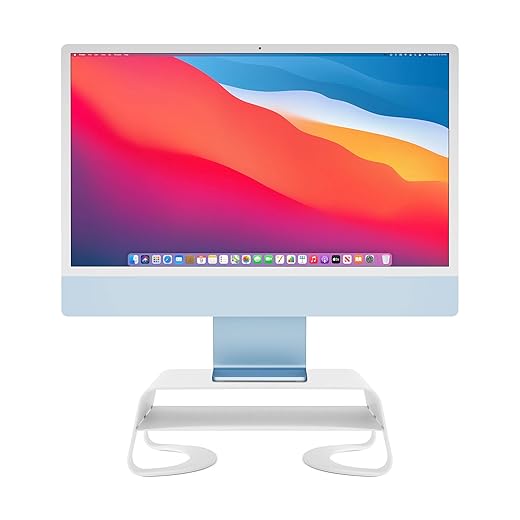
Twelve South Curve Riser Monitor Stand | Ergonomic Desktop Stand with Storage Shelf for iMac and Displays, Matte White
The Twelve South Curve Riser combines a premium matte black aluminum frame with a highly functional two-tier design. With a fixed height of 4.2 inches and a 12.5-inch width, it successfully supports displays up to 32 inches and weighing up to 22 pounds. The defining feature is the integrated middle shelf, which provides 1.75 inches of clearance. During our testing, this middle bay became the perfect dedicated slot for a Mac Studio, a Thunderbolt dock, or a stack of hard drives, keeping essential hardware off the primary desk surface while maintaining airflow.
The lower clearance area still offers 1.5 inches of height underneath, giving you just enough room to slide your keyboard away at the end of the workday. We noticed slight wobbling when aggressively typing on a desk that was not perfectly stable, due to the minimal foot surface area. This stand excels for users who need to stack hardware directly below their line of sight.
4. Oakywood Wooden Monitor Stand
Best Minimalist Wood Option
Raico Desk Shelf Mini Monitor Stand, Compact Walnut Wood Organiser, Small Desk Setup, Ergonomic Home Office Accessory…
Oakywood delivers a stunning, handcrafted alternative to the Grovemade shelf at a more accessible price point. Constructed from solid walnut or oak rather than plywood, the stand handles a massive 220-pound weight capacity, making it the most structurally rigid stand in our testing lineup. It raises your display by 3.6 inches while providing an 18-inch wide space underneath for keyboard storage. The solid steel legs are powder-coated black and feature natural cork pads on the bottom to prevent desktop damage.
Because the stand uses solid wood, the grain patterns vary wildly, meaning your exact model will be entirely unique. The footprint is notably compact compared to ultra-wide desk shelves, so it only accommodates a single monitor. If your primary goal is lifting a single heavy display while adding a touch of natural warmth to an otherwise sterile desk setup, the Oakywood stand is practically flawless.
5. Kensington Extra Wide Monitor Stand
Best Budget Option
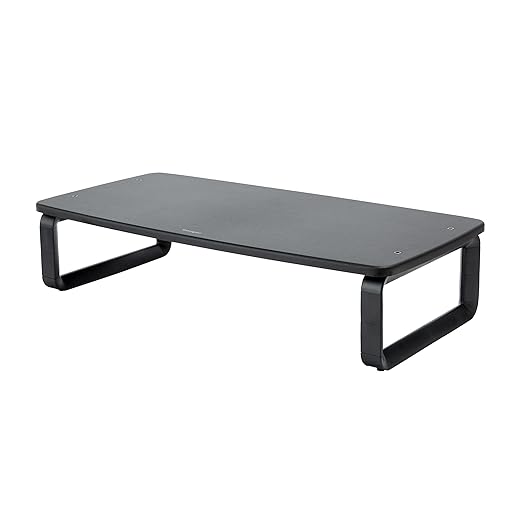
Kensington SmartFit Extra Wide Monitor Stand, Adjustable Height, Ergonomic Design (K52797WW) Black
At less than $40, the Kensington Extra Wide Monitor Stand provides essential ergonomic lift and serious storage without the luxury markup. Measuring 24 inches across, it supports up to 44 pounds and easily fits a standard 27-inch monitor alongside a set of compact desk speakers. We appreciate the utilitarian design, which gives you ample room underneath to store a full-sized 104-key mechanical keyboard and a mouse. The solid steel legs provide a steady base, and the MDF platform resists typical coffee ring stains and minor scratches well.
The aesthetics are distinctly industrial, lacking the refined edges or premium materials found on higher-end models. There are also no cable management routing holes or built-in hubs. Yet, from a pure functionality standpoint, it completely delivers on the promise of reclaiming desk space. This is an exceptional, wallet-friendly choice for outfitting a home office or cubicle on a strict budget.
6. Hexcal Studio
Best Premium Tech Integration
The Hexcal Studio is an ultra-premium desk organizer and monitor stand engineered for power users who despise visible cables. Supporting up to 101 pounds, the aviation-grade aluminum and steel shell houses a completely integrated power distribution system. We utilized the internal power strip to plug in two monitors, a laptop charger, and desk speakers, routing only a single master power cable to the wall. The stand also features a shadowless, adjustable LED desk light on the underside to illuminate your keyboard tray.
The extreme price point makes this a niche product reserved strictly for high-end professional setups. It measures 31.5 inches wide, demanding a relatively large desk surface to look proportional. If you are battling severe cable clutter and want a singular, heavy-duty workstation hub that manages power, lighting, and heavy dual monitors simultaneously, the Hexcal Studio executes the job perfectly.
7. VIVO Wood Desktop Stand (STAND-V000V)
Best Riser for Dual Monitors
When you need to lift two large monitors side-by-side without buying a massive, expensive shelf, the VIVO Wood Desktop Stand provides the exact dimensions required. This 39-inch long riser features a sturdy three-leg design, utilizing steel supports beneath a rustic wood-finished particleboard top. The 44-pound capacity easily supported two 24-inch monitors during our evaluations. The split under-shelf clearance creates two distinct storage bays, allowing you to slide a laptop on one side and a keyboard on the other, freeing up a significant amount of front desk space.
The center support leg is a necessity for preventing sag, but it restricts you from storing a full-size keyboard directly in the middle of the stand. The engineered wood finish looks decent from a distance but feels slightly cheap upon close inspection. However, at its highly affordable price point, it remains one of the most effective organizational solutions for a dual-monitor setup.
What to Look for in a Monitor Stand
Weight Capacity and Sag Resistance
Always check the exact weight of your monitor with its factory base attached before purchasing a stand. A standard 27-inch monitor typically weighs between 10 to 15 pounds, while 34-inch ultrawide displays can easily exceed 20 pounds. If you plan to buy an extra-wide wooden shelf to hold dual monitors, look for models featuring a center support leg or a rigid aluminum spine. A 40-inch shelf without center support will noticeably bow in the middle if loaded with more than 30 pounds, eventually damaging the stand and risking your expensive hardware.
Under-Stand Clearance Dimensions
The primary purpose of an organizer stand is to reclaim desk space underneath the monitor. Measure the height of the items you plan to store. A standard Apple Magic Keyboard requires less than an inch of clearance, but a mechanical keyboard with thick keycaps might need over two inches. If you want to store a closed laptop, verify the stand offers at least 1.5 inches of vertical clearance and 12 inches of depth. Stands with less than 2 inches of height generally look sleeker but drastically limit your daily storage utility.
Desktop Material and Grip
A monitor stand relies entirely on gravity and friction to secure your display. High-quality stands use natural cork, thick rubber, or dense felt pads on their contact points to prevent sliding. Bare metal or hard plastic feet will scratch glass and finished wood desks when you inevitably bump the stand. Additionally, consider the platform material. Solid wood and thick acrylic hold up well against daily wear, whereas cheaper MDF boards wrapped in vinyl easily peel at the corners and absorb moisture from condensation rings left by cold drinks.
Built-in USB Hubs and Power
Stands with integrated connectivity resolve desktop cable clutter but introduce potential tech bottlenecks. If you select a stand with a built-in USB-C hub, check the data transfer speeds. Look for USB 3.0 ports offering at least 5Gbps for external hard drives. Many budget hubs lack pass-through power, meaning they cannot charge your laptop while connected. Determine whether the stand’s cable reaches your desktop tower or laptop port comfortably, as most integrated cables max out at 12 to 18 inches, requiring a port located directly on the desk surface.
Frequently Asked Questions
Our Verdict
Upgrading to a dedicated monitor stand instantly reclaims lost workspace while improving your posture. Evaluate your exact hardware weight and under-shelf storage needs, then choose a sturdy model like the Grovemade Wood Desk Shelf to organize your daily essentials.