Do You Actually Need a Full Standing Desk, or Just This?
Before you drop $500+ on an Uplift V2 or Fully Jarvis frame, the $150-ish E3 converter answers the question of whether standing while you work even sticks.
The E3 is Uplift’s answer for anyone comparing full electric standing desks but not ready to commit a four-figure budget or give up their existing desk, kitchen island, or craft table. It’s built for people who want the height-adjustable experience without rewiring their workspace, and it’s a reasonable gut check before buying a $1,000+ dual-motor frame like the V2 or Jarvis.
- Closes to under 1 inch When fully lowered, the E3 sits at less than 1″ tall, so it disappears on a desk instead of looking like a permanent fixture bolted to your workspace.
- 11 lb capacity is laptop-and-books territory This isn’t rated for dual monitors or a desktop tower — it’s sized for a laptop, a notebook, maybe a small lamp, not a full command center setup.
- Gas spring beats hand-crank or electric motor for this use case Slide the tab, lift to height, done in seconds — no cables, no motor hum, no waiting on a 10-second electric lift cycle like you’d get on a Jarvis.
- 15-year warranty signals Uplift isn't treating this as a throwaway accessory That coverage length matches what Uplift puts behind its full-size V2 frames, which is unusual for a sub-$200 converter category where 1-2 year warranties are the norm.
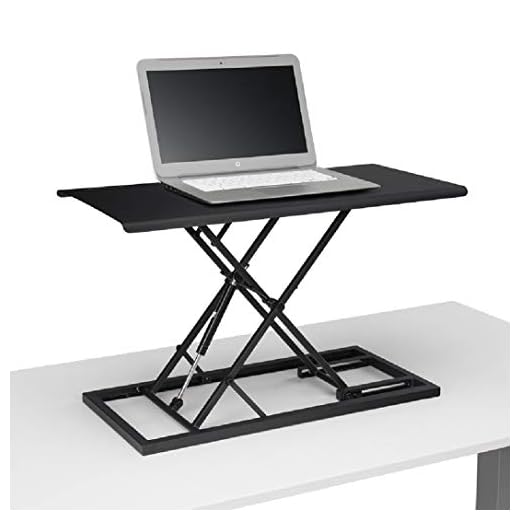
Clamps onto any desk and rises via internal gas spring in seconds, matching Uplift V2’s lift feel at a fraction of Fully’s full-desk cost.
| Brand | Uplift Desk |
| Model | E3 Compact Stand Up Desk Converter |
| Color | Black |
| Lift Mechanism | Internal gas spring (slide-tab unlock) |
| Weight Capacity | 11 lbs |
| Closed Height | Less than 1 inch |
| Assembly Required | None — ships fully assembled |
| Warranty | 15 years |
| Best Surface Match | Spare tables, kitchen islands, craft tables, existing desks |
| ASIN | B0799RVHLN |
- Unlocks and lifts in seconds via gas spring — no motor wait, no crank arm
- Closes to under 1″ so it’s genuinely a grab-and-go unit, not a permanent desk topper
- Zero assembly out of the box — unbox and it’s ready to use immediately
- 15-year warranty is unusually long for a sub-$200 converter
- Works on surfaces a full standing desk frame never could — kitchen islands, craft tables, shared spare tables
- 11 lb capacity rules out dual-monitor setups or a desktop tower, so it’s laptop-only for most people
- Gas spring height is adjusted by lifting against resistance, not a precise digital height readout like you’d get on a Jarvis
- No keyboard tray included at this price point, so typing angle depends entirely on your laptop’s native height
Choosing the right standing desk converter
-
Weight capacity vs. your actual setupHighConverters range from laptop-only (10-15 lbs) to full dual-monitor rigs (35+ lbs). Match the rating to what you're actually putting on it, not what you might add later.Look forA capacity rating that covers your heaviest realistic load with some marginAvoidBuying a laptop-rated converter and planning to add monitors later
-
Lift mechanism typeHighGas spring, hand-crank, and electric motor converters all adjust height differently. Gas spring is fastest and simplest but less precise; electric is slowest to react but offers repeatable preset heights.Look forGas spring for quick daily transitions, electric if you want saved height presetsAvoidHand-crank models if you plan to switch positions multiple times a day — the crank time adds up
-
Closed/folded footprintMediumSome converters stay bulky even when lowered, eating desk space and blocking your sightline when you're sitting. A slim closed profile matters more than people expect until they live with it.Look forClosed height under 1-2 inches so the unit disappears when not in useAvoidConverters that stay several inches tall even collapsed — they dominate the desk visually
-
Assembly and portabilityMediumA converter's whole value proposition is flexibility — moving it between rooms or surfaces. Assembly requirements and overall weight affect how often you'll actually relocate it.Look forFully assembled out of the box, lightweight enough to carry one-handedAvoidMulti-piece assembly or units heavy enough that moving them becomes its own chore
-
Warranty length as a durability signalLowGas springs and lift mechanisms wear with repeated use. Warranty length is a decent proxy for how confident the manufacturer is in long-term mechanical durability.Look forMulti-year coverage on the lift mechanism specifically, not just the frameAvoidVague or 90-day warranties on the moving parts that matter most
Common questions
Should I buy the E3 converter instead of a full Uplift V2 or Fully Jarvis desk?
If you’re genuinely unsure whether you’ll use a standing desk daily, yes — the E3 lets you test the habit on your existing furniture for a fraction of what either full frame costs. If you already know you want dual monitors, a keyboard tray, and digital height presets, skip straight to the V2 or Jarvis, since the E3’s 11 lb capacity and gas-spring adjustment won’t match that setup.
Can the E3 handle a monitor in addition to a laptop?
It’s rated for 11 lbs, which is tight once you add a monitor on top of a laptop — most monitors alone run 10-15+ lbs. Stick to laptop-only use, or size up to a higher-capacity converter if a monitor is non-negotiable.
How does the gas spring lift compare to the electric lift on a Jarvis or Uplift V2?
The gas spring is faster for the basic sit-stand transition — slide the tab and lift, done in seconds, no motor cycle to wait through. What you lose is precision and memory presets; a Jarvis or V2 will return to an exact saved height every time, while the E3’s height depends on where you stop lifting against the spring.
Will this work on a kitchen island or craft table, or does it need a dedicated desk?
That’s the point of this category — it clamps nothing and bolts to nothing, so it sits on any flat surface with enough depth, including kitchen islands and craft tables. Just confirm the surface is stable enough to support lifting weight on one end without tipping.
The E3 does exactly one job well: it turns any flat surface into a standing workstation in seconds, with a warranty that outlasts most converters in this price bracket. It’s not a replacement for a dual-motor Uplift V2 or Fully Jarvis if your setup includes monitors or a keyboard tray, but as the low-risk way to find out if standing desk life is worth the bigger investment, it earns its spot.
- Slim under-1" closed profile keeps it from dominating the desk when not in use
- Gas spring lift is faster day-to-day than waiting on an electric motor cycle
- 15-year warranty outpaces most converters in its price range, including pricier electric models
The E3 makes the most sense as a decision tool, not a permanent endpoint — use it to figure out whether you’re actually a stand-to-work person before spending V2 or Jarvis money on a full frame. For laptop-based work on a kitchen island, spare table, or craft corner, it does the job with zero setup friction.