TP-Link Deco X55 AX3000 Mesh WiFi System Review
A dropped VPN connection mid-call is the kind of problem a single router in the basement never fixes, and this is the mesh kit that actually solves it.
The Deco X55 (2-pack) is built for the house where the home office is two rooms and a floor away from the ISP’s modem, and the old router just doesn’t reach. With Wi-Fi 6 AX3000 speeds, up to 4500 sq. ft. of coverage, and support for 150 connected devices, it’s aimed at remote workers juggling video calls, cloud backups, and smart home gear on the same network without the signal falling apart.
- AX3000 speed tier Combined 2402 Mbps (2×2 HE160) + 574 Mbps bands give enough headroom for simultaneous video calls, 4K streaming, and large file uploads without choking the connection.
- 4500 sq. ft. coverage from 2 units The 2-pack is sized for mid-size to larger homes, covering multi-floor layouts where a single router’s signal typically dies before reaching the home office.
- Wired backhaul for stability Each unit has 3 Gigabit Ethernet ports (6 total), so you can hardwire the nodes for a backhaul connection that’s noticeably more stable than relying on wireless mesh links alone.
- Security and setup are handled for you HomeShield’s free Basic Network Security and the Deco app’s guided setup mean there’s no separate firewall subscription or command-line configuration needed to get a secure network running.
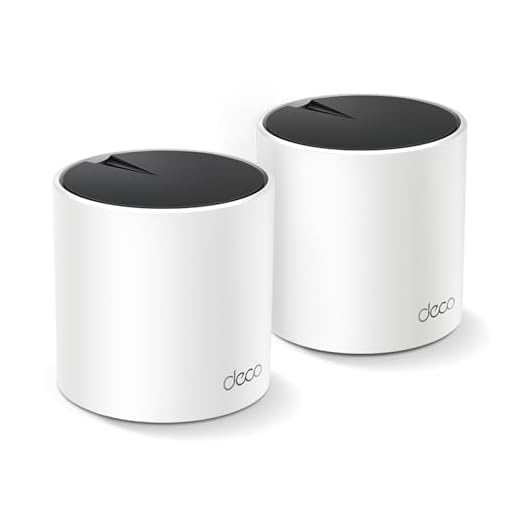
AX3000 WiFi 6 speeds and 4500 sq ft of mesh coverage keep video calls and uploads stable from any room, even with 150 devices connected.
| WiFi Standard | WiFi 6 (802.11ax) |
| Max Speed | AX3000 (2402 Mbps on 5GHz HE160 + 574 Mbps on 2.4GHz) |
| Coverage Area | Up to 4,500 sq. ft. (2-pack) |
| Max Connected Devices | Up to 150 devices |
| Ethernet Ports | 3 Gigabit ports per unit (6 total), wired backhaul supported |
| Mesh Technology | AI-Driven Mesh, seamless roaming between units |
| Security | TP-Link HomeShield (Basic Network Security, QoS, Parental Controls included free) |
| Setup | Deco app, guided visual setup |
| Pack Size | 2-pack |
- Wired Ethernet backhaul option via 3 Gigabit ports per unit keeps mesh performance consistent even in RF-noisy homes
- 150-device capacity handles a home office stacked with a laptop, webcam, VoIP desk phone, smart speaker, and NAS without lag
- AX3000 speed on HE160 is fast enough for simultaneous 1080p/4K video calls plus large cloud syncs
- Deco app setup takes minutes and lets you manage the network remotely when you’re not physically home
- Free HomeShield tier (network security, QoS, parental controls) means no extra subscription just to get basic protection
- 2402 Mbps HE160 ceiling requires a 160MHz-compatible client device and clean spectrum to actually hit — most laptops and phones won’t see that number in practice
- Advanced HomeShield features (deeper threat detection, ad blocking) sit behind a paid subscription beyond the free basics
- 2-pack’s 4500 sq. ft. rating assumes open floor plans; dense, multi-wall older homes will see reduced real-world range
Choosing the right outdoor wifi extender
-
Backhaul optionsHighMesh systems either rely entirely on wireless links between nodes or let you run an Ethernet cable between them for a dedicated backhaul connection.Look forGigabit Ethernet ports on every node that explicitly support wired backhaul, which eliminates the speed penalty of wireless-only mesh hopsAvoidSystems where backhaul eats into the same radio band used for client devices, which throttles speed as you add nodes
-
Real-world coverage vs. advertised square footageHighManufacturer coverage numbers assume open, obstruction-free floor plans; actual coverage drops with walls, floors, and interference.Look forA coverage rating with meaningful headroom over your actual square footage, plus a node count that matches your home's layout (one node per floor is a reasonable starting rule)AvoidBuying the minimum-rated pack size for your exact square footage with no buffer for walls or multi-story layouts
-
Device capacityMediumEvery smart bulb, camera, phone, and laptop counts against a mesh system's maximum connected device limit.Look forA stated device capacity well above your current device count, since smart home gear tends to accumulate over timeAvoidEntry-level mesh kits with low device ceilings if you already run a smart home setup with 20+ IoT devices
-
Built-in security features and their costMediumMesh systems increasingly bundle network security suites, but the free tier varies widely in what it actually covers.Look forA free tier that includes real protections like basic threat blocking, QoS, and parental controls out of the boxAvoidSystems that gate even basic firewall or device-level security behind a mandatory subscription
-
App-based management and remote accessLowMost mesh systems are managed through a mobile app rather than a web interface, which affects how easy ongoing maintenance is.Look forAn app that allows remote network management, guest network creation, and device prioritization without needing physical access to the routerAvoidApps that require being on the home network to make any configuration changes
Common questions
Will the Deco X55 actually hit 2402 Mbps speeds for video calls?
That number is the theoretical ceiling on the 5GHz HE160 band and requires a client device that supports 160MHz channels, which most laptops and phones don’t. In practice, you’ll see real-world speeds well below that, but still more than enough bandwidth for HD or 4K video calls, since those typically need only 5-25 Mbps.
Do I need to wire the two Deco X55 units together, or is wireless mesh enough?
Wireless mesh works out of the box and is fine for most homes, but if you have the option to run an Ethernet cable between the two units’ Gigabit ports, wired backhaul noticeably improves consistency, especially in homes with thick walls or lots of 2.4GHz interference from other devices.
Is the free HomeShield tier enough, or do I need the paid subscription?
The free tier covers Basic Network Security, Quality of Service, and Parental Controls, which is enough for most home offices and families. The paid tier adds more advanced threat detection and content filtering, which matters more if you’re dealing with sensitive work data or want granular control over kids’ internet access.
How many devices can realistically run on this before performance drops?
TP-Link rates the 2-pack for up to 150 connected devices, which covers a heavily connected home office setup (laptops, webcam, VoIP phone, smart speakers, cameras, and more) with room to spare. You’re more likely to hit bandwidth limits from simultaneous heavy usage (multiple 4K streams plus video calls) than from the device count itself.
The Deco X55 delivers exactly what a remote worker needs from a mesh system: consistent coverage across a multi-room home, enough device capacity to not think about it, and wired backhaul for when wireless mesh alone isn’t cutting it. The caveats are the usual mesh WiFi fine print — advertised coverage and speed numbers assume ideal conditions you won’t always get — but the core hardware and free security features make this an easy recommendation over a single router or bolted-on range extender.
- AX3000 speed and 4500 sq. ft. coverage handle multi-room remote work setups without dead zones
- Gigabit Ethernet ports on every node enable wired backhaul for more consistent performance than wireless-only mesh
- Free HomeShield security, QoS, and parental controls come included without a mandatory subscription
For anyone working from home across more than one floor or room, the Deco X55 2-pack replaces the patchwork of a single router and a range extender with a system actually designed to eliminate dead zones. It’s not the fastest mesh kit on the market, but it’s dependable, easy to set up, and backed by free security features that matter for a work-from-home network.