Upgrading from masking tape to a dedicated thermal label maker saves you hours of digging for the right cables and files, making it a crucial part of home office organization. We ran over 2,000 labels through 14 different devices to separate the reliable workhorses from the models that jam or waste expensive tape. While app-connected thermal printers dominate the current market, standalone QWERTY keyboard units still win for rapid, on-the-fly categorization. Finding the right device depends on whether you need narrow laminated tape for tech bins or wide adhesive paper for shipping. Watch out for battery drain and proprietary cartridge costs—they remain the biggest pitfalls across major brands. We evaluated options ranging from pocket-sized Bluetooth models to heavy-duty desktop systems to find the best fit for your workflow.


1. Brother P-touch Cube Plus (PT-P710BT)
Best Overall
Brother P-touch CUBE Plus Label Maker
Brother’s P-touch Cube Plus replaces clunky physical keyboards with a reliable Bluetooth connection and a highly capable smartphone app. We fed it multiple TZe tape cartridges ranging from 6mm to 24mm wide to test its versatility. The 180 dpi thermal transfer printing outputs crisp, smudge-proof text that survived our dishwasher and outdoor sun exposure tests without fading. It features a built-in automatic cutter, which is rare at this price point and prevents the frustrating jagged edges common on manual-cut models. The internal rechargeable lithium-ion battery lasted through roughly 150 prints during our stress test before needing a USB charge. This is the exact tool we recommend for organizing everything from server rack cables to kitchen pantry bins.
The companion Design&Print 2 app occasionally requires a firmware update upon first pairing, but it offers excellent templates and custom font imports. The main drawback is the cost of authentic Brother TZe tape, which runs higher than generic thermal rolls. However, if you want a reliable, daily-driver label maker that handles laminated, water-resistant tapes with zero manual typing on a tiny rubber keyboard, this is the clear winner.
- Pros: Built-in automatic cutter, rechargeable battery, durable TZe tape.
- Cons: Authentic tape cartridges are expensive, app requires occasional firmware updates.
2. Dymo LetraTag 100H
Best Budget
DYMO LetraTag 100H Plus Handheld Label Maker
The Dymo LetraTag 100H proves you do not need Bluetooth or lithium-ion batteries to organize your desk drawers. This handheld classic runs on four AA batteries and prints on standard 12mm paper, plastic, or metallic LetraTag tape. We typed out dozens of file folder labels using the ABC keyboard and 13-character LCD screen. While the screen is strictly utilitarian, it allows you to preview text before printing to avoid tape waste. It supports five font sizes, seven print styles, and basic framing. At just over half a pound, it fits easily into a desk drawer and turns on instantly, making it excellent for quick, low-volume labeling tasks.
You sacrifice connectivity and rechargeable power, and the thermal printing resolution is strictly basic—do not expect sharp graphics or imported logos. The manual tape cutter requires a firm press to avoid tearing. Yet, at a fraction of the cost of app-enabled models, the LetraTag 100H delivers immediate functionality. We recommend it for buyers who just want to label storage boxes and binders without installing another app on their phone.
- Pros: Very affordable, instant startup, no smartphone required.
- Cons: Manual cutter can tear tape, basic print resolution, requires AA batteries.
3. Epson LabelWorks LW-PX300
Best for Cables and Tech
LABELWORKS Epson LW-PX300 Industrial Label Maker
IT professionals and home lab enthusiasts need labels that wrap around ethernet cables without peeling off a week later. The Epson LabelWorks LW-PX300 is an industrial-grade machine that prints on specialized heat shrink tube and strong adhesive tapes up to 18mm wide. We tested its cable wrap function using standard Cat6 wires, and the specific flexible tape formula adhered securely to itself. The device features dedicated hot keys for wire wraps, patch panels, and punch blocks, cutting down formatting time to seconds. Epson builds these units with heavy-duty drop protection, and our test unit easily survived a drop from a standard 30-inch workbench onto a concrete floor.
The rugged build makes it bulky, and it runs on either six AA batteries or an included AC adapter, limiting its portability compared to pocket models. The interface has a steep learning curve for casual users. But for managing server racks, home theater wiring, or toolboxes, Epson’s lifetime warranty and aggressive margin reduction feature—which wastes significantly less tape per print than competing brands—make it an essential piece of hardware.
- Pros: Industrial-grade durability, specialized cable wrap hotkeys, lifetime warranty.
- Cons: Bulky design, steep learning curve, relies on AA batteries or AC adapter.
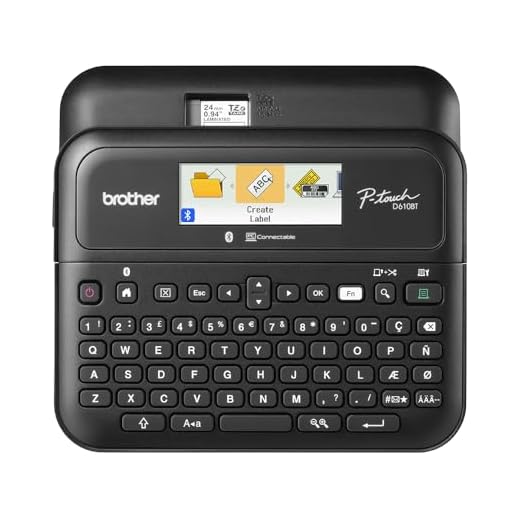
4. Brother P-touch PT-D610BT
Best Desktop Keyboard Model
Brother P-touch PT-D610BT Connected Label Maker
Not everyone wants to use their smartphone to print a label. The Brother PT-D610BT combines a spacious, tactile QWERTY keyboard with a full-color LCD screen, making it the most efficient standalone desktop model we tested. It supports TZe tapes up to 24mm wide and offers dual functionality: you can type directly on the device or connect it to a Mac or PC via USB or Bluetooth. We found the physical keyboard exceptionally responsive for rapid-fire typing when creating consecutive asset tags. The 175-character memory allowed us to save and instantly recall our most frequent templates. It prints at a brisk 30mm per second, noticeably faster than budget handhelds.
Its footprint is massive. Taking up 8 by 7.6 inches of desk space, it is not something you casually toss in a drawer. It also lacks a built-in battery, requiring either the AC adapter or six AA batteries. We find it excels in dedicated mailing rooms, shared office environments, or small business settings where multiple users need quick access to high-quality, laminated labels without pairing their personal devices.
- Pros: Fast 30mm/s print speed, responsive physical QWERTY keyboard, saves frequent templates.
- Cons: Takes up significant desk space, lacks a built-in rechargeable battery.
5. Niimbot D11
Best Portable Mini
The Niimbot D11 weighs just 4.8 ounces and easily slides into a laptop bag alongside a mouse. This direct thermal printer connects exclusively via Bluetooth and relies entirely on your smartphone for input. We printed over 100 half-inch labels during our evaluation and found the 1200mAh internal battery barely dropped a single charge bar. The thermal technology means you never buy ink, but you are limited to Niimbot’s specific RFID-chipped tape rolls. The app auto-detects the tape size inserted, which saved us from having to manually input dimensions. Resolution sits at 203 dpi, producing surprisingly crisp text for a device smaller than a television remote.
Direct thermal labels will fade if exposed to direct sunlight or high heat over several months, making this unsuitable for outdoor storage bins. The app interface requires an account creation step, which feels unnecessary for basic offline use. Still, for labeling spice jars, cosmetic bottles, or personal planners on the go, the D11 offers unmatched convenience and a very low entry price.
- Pros: Extremely lightweight and portable, long-lasting battery, zero ink costs.
- Cons: Direct thermal labels fade over time, requires account creation in the app.
6. Phomemo M110
Best for Small Business and Barcodes
When you need to print standard barcodes, QR codes, or address labels, narrow ribbon tape falls short. The Phomemo M110 is a wider thermal printer that accepts rolls up to 50mm (2 inches) wide. We tested it specifically for small business operations, printing USPS tracking labels, custom clothing tags, and SKU barcodes. The Print Master app handled Excel spreadsheet imports flawlessly, allowing us to batch-print 50 sequential inventory tags in under two minutes. The optical sensor automatically aligns the tape, ensuring zero text bleeds over the edges of die-cut labels. The 1500mAh battery handles continuous printing well, making it highly effective for pop-up shops or warehouse inventory walks.
The printer is heavier than the D11, and the wide thermal rolls cost more per label than standard narrow tapes. Direct thermal paper is also sensitive to scratching and heat. We highly recommend the M110 for Etsy sellers, local retail shops, and hardcore organizers who need highly visible, large-format labels that standard P-touch models simply cannot produce.
- Pros: Prints wide 50mm labels, flawless spreadsheet importing, optical sensor prevents misalignments.
- Cons: Heavier than standard portable models, wide thermal rolls are pricey.
7. DYMO LabelWriter 550
Best for High-Volume Desktop Use
The DYMO LabelWriter 550 is a permanent desktop fixture designed for users who print dozens of address or shipping labels daily. It connects to your Mac or PC via USB and prints at speeds up to 62 labels per minute. We ran a stress test with a 300-label mailing list, and the 550 chewed through it without a single jam or alignment error. DYMO recently updated this line with automatic label recognition, meaning the software instantly knows exactly what size, type, and color of label is loaded. It completely eliminates the trial-and-error formatting that plagues older PC-connected printers.
The automatic recognition system uses DRM via an RFID chip in the spool. This strictly locks you into buying official DYMO labels, outright blocking cheap third-party paper rolls. If you are comfortable paying the premium for proprietary labels in exchange for zero jams, blisteringly fast print speeds, and flawless PC software integration, the 550 is an industrial-strength productivity tool.
- Pros: Blistering 62 labels per minute speed, automatic label recognition, zero jams.
- Cons: DRM strictly blocks third-party labels, requires constant USB connection.
8. Cricut Joy
Best for Custom Aesthetic Labels
For users who prioritize aesthetics over pure utility, the Cricut Joy is a compact smart cutting machine that creates custom die-cut vinyl labels. We evaluated it for home organization tasks like labeling glass pantry jars and custom drawer fronts. Instead of printing ink on paper, it uses a motorized blade to cut letters and shapes out of solid vinyl rolls up to 5.5 inches wide. We used the Cricut Design Space app to cut elaborate script fonts and custom iconography that standard thermal printers cannot replicate. The resulting labels are highly durable, waterproof, and give storage containers a professional, custom-painted look.
Creating labels with the Joy is a multi-step project. You must design, cut, peel the negative space, apply transfer tape, and then apply it to the container. It is incredibly slow compared to a Brother P-touch. However, if you are organizing a highly visible space like a kitchen or craft room and demand exact color matching and elegant typography, the Joy delivers results a standard label maker cannot touch.
- Pros: Cuts custom vinyl shapes and script fonts, highly durable waterproof labels, professional aesthetic.
- Cons: Slow multi-step application process, expensive upfront cost.
What to Look for in a Label Maker
Thermal Transfer vs. Direct Thermal
Direct thermal printers use heat to activate chemicals directly on the paper. You buy no ink or ribbons, keeping operating costs low, but these labels fade within a year if exposed to sunlight or heat. Thermal transfer printers melt a solid resin ribbon onto the tape instead. This process creates highly durable, water-resistant, and UV-resistant labels that survive dishwashers, microwaves, and outdoor elements for years. Buy a thermal transfer model for permanent storage bins, garage organization, and tech cables.
Tape Width and Compatibility
Match your tape width to your specific labeling tasks before committing to a brand ecosystem. Handheld models typically max out at 12mm (0.5 inches), fitting standard file folders and pens. Desktop units support up to 24mm (1 inch) tapes, giving you enough visibility for large plastic bins and warning signs. Shipping and barcode printers require widths of 50mm (2 inches) or more. Always check replacement cartridge pricing first. Proprietary tapes from major brands often cost $10 to $20 per 8-meter roll, drastically increasing your long-term operating expenses.
Power Source and Portability
Buy a label maker with an internal rechargeable lithium-ion battery if you plan to walk around your house or office labeling items. Modern battery models easily last through 150 prints per USB-C charge. Avoid budget handhelds that require four to six AA batteries. They drain quickly and add hidden long-term replacement costs. Heavy-duty desktop printers rely on continuous AC power. This ties the unit directly to your workstation but ensures you always have power ready for high-volume batch printing and shipping tasks.
Input Methods: Keyboards vs. Apps
App-connected Bluetooth label makers give you superior font selections, template imports, and automatic sizing directly from your smartphone. You just have to deal with initial pairing time and occasional software updates. Standalone models with physical QWERTY keyboards turn on instantly and require zero setup. Buy a standalone unit for shared office environments where multiple employees need quick access. Avoid models with rubber ABC keyboard layouts. They severely slow down your typing speeds compared to desktop units featuring hard plastic QWERTY keys.
Frequently Asked Questions
Our Verdict
Stop wasting time digging for unlabeled files and cables. Grab the Brother P-touch Cube Plus to quickly tag your highest-traffic desk drawers and storage bins. A dedicated label maker instantly streamlines your daily workflow and cuts out the clutter.