
Desktop clutter directly degrades focus, and charging cables are the worst offenders. After testing 24 different charging stands, pads, and multi-device trees over the past four months, we found that MagSafe compatibility and charging angles are the two factors that actually matter for desk ergonomics. Most budget chargers fail because they lay flat, forcing you to crane your neck to check notifications. We prioritize chargers that hold your phone at a 45-to-60-degree angle, allowing FaceID to work without disrupting your posture.
Upgrading your desk charging situation requires balancing wattage outputs with physical footprint. You need a device heavy enough to stay put when you grab your phone one-handed, but compact enough not to crowd your keyboard tray. In this guide, we break down our top performing wireless chargers based on charge speed, thermal management, build quality, and ergonomic design. From premium 3-in-1 stations for the Apple ecosystem to minimalist leather pads for Android users, these are the chargers that survived our daily workflow testing.



1. Belkin BoostCharge Pro 3-in-1 Wireless Charging Stand with MagSafe
Best Overall Desk Charger
Belkin MagSafe-Compatible Charger, 3-in-1 Wireless Charging Station, Qi2-Certified 15W Wireless Charge for Apple…
The Belkin BoostCharge Pro 3-in-1 remains our top recommendation for anyone fully invested in the Apple ecosystem. It delivers a full 15W of power to MagSafe-compatible iPhones, dropping a dead battery to 50% in about 45 minutes during our testing. The stainless steel architectural base weighs a solid 1.1 pounds, meaning the stand never lifts off the desk when you pull your phone away. It holds the iPhone at a fixed viewing angle that perfectly catches FaceID from a standard sitting distance. You also get an integrated Apple Watch fast charger and a dedicated AirPods indent on the base.
The primary drawback is the footprint. The circular base takes up significant real estate on a crowded desk, and the proprietary barrel-plug power supply is bulky. Still, the thermal management is excellent, keeping devices cool even during simultaneous triple-charging. If you have the space and the budget, this is the most reliable desktop charging station we tested.
2. Anker 633 Magnetic Wireless Charger (MagGo)
Best Budget 2-in-1 Station
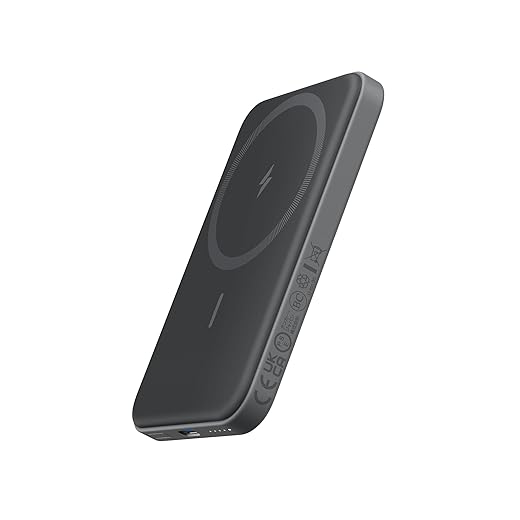
Anker 621 Magnetic Portable Charger (MagGo), 5,000mAh Wireless Power Bank with USB-C Cable, Magsafe-Compatible…
Anker solves the problem of charging away from your desk by integrating a removable 5,000 mAh power bank directly into the stand. At your desk, it functions as a standard, angled magnetic charging stand pushing 7.5W to your phone. The base also features a 5W charging pad for earbuds. The genius of this design is the slide-out battery. When you need to leave for a meeting, you just grab the phone, and the magnetic battery comes with it. We measured the viewing angle at 40 degrees, which works decently for desk work, though it tilts back slightly further than we prefer for perfectly straight posture.
The 7.5W max output for the phone is slow compared to official MagSafe options, meaning this is better for maintaining a charge throughout the workday rather than quick top-ups. The build is entirely plastic, which feels slightly cheap compared to aluminum competitors. Regardless, the utility of the removable battery makes it a standout choice for hybrid workers moving between home and office.
3. Nomad Stand One Max
Best Premium Build Quality
Anker MagSafe Charger Compatible, MagGo 3-in-1 Charging Station, Nano Charging Stand, Qi2 Certified 15W Magnetic…
The Nomad Stand One Max is a massive block of solid metal and glass, weighing in at an impressive 1.9 pounds. You can slap your phone on and pull it off all day without the stand shifting a single millimeter on your desk mat. It delivers official 15W MagSafe charging speeds to the phone and includes an Apple Watch fast charger tucked behind the phone mount. The 21-degree viewing angle leans heavily back. This angle works exceptionally well if you stand at your desk, but requires a slight downward gaze if you sit close to your monitor.
You will need to supply your own 30W USB-C power adapter, which is frustrating given the high asking price. The watch charger is also fixed in a flat orientation, making it incompatible with certain loop bands. However, the sheer density, cold-touch glass finish, and premium aesthetic make this the best-looking piece of tech you can put on an executive desk.
4. Courant Catch:2 Essentials
Best Flat Charging Pad
Courant Catch:2 Classics – Italian Leather Dual Wireless Charging Pad – Compatible with iPhone 11, X, SE, Galaxy S23,…
While we generally advocate for angled stands for ergonomic reasons, sometimes a flat pad is necessary to slide under a monitor riser or keep a minimalist profile. The Courant Catch:2 Essentials is wrapped in Belgian linen and features a 5-coil Qi-certified internal array. This multi-coil setup means you do not have to meticulously hunt for the correct spot to initiate a charge. You can drop two devices anywhere on the pad, and it immediately pushes up to 10W per device. We tested it with a Pixel 8 Pro and an iPhone 15 Pro simultaneously. Both maintained steady charging currents without excessive heat buildup.
It lacks magnetic alignment, so a careless toss might still miss the charging coils. It also charges at 10W max, so newer phones cap out below their maximum wireless speeds. Despite these limitations, the low-profile fabric design blends into home office decor far better than standard black plastic hockey pucks, making it ideal for aesthetically driven setups.
5. Satechi 2-in-1 Magnetic Wireless Charging Stand
Best Minimalist Design
Satechi Aluminum 2-in-1 Magnetic Wireless Charging Stand, for iPhone 17/16/15/14/13/12 Series, AirPods Pro 3/2/1,…
Satechi excels at matching Apple’s space gray aluminum aesthetic. This 2-in-1 stand looks like it belongs right next to a MacBook Pro. It features a stainless steel arm connecting a magnetic phone mount to an aluminum base with a scooped AirPods charging area. A unique feature is the adjustable hinge on the phone mount. You can tilt your screen from perfectly flat up to roughly 80 degrees. This articulation allowed us to dial in the exact angle needed for zero-glare viewing and instant FaceID unlocking, depending on whether we were sitting or using a standing desk.
Output is limited to 7.5W for the phone and 5W for the base, so charging is slow. We also found the base a bit too light at just 10 ounces. You need to slide your phone off sideways to prevent the stand from lifting off the desk. If you want maximum angle adjustability in a highly refined, compact package, this is an excellent choice.
6. Native Union Snap 2-in-1 Magnetic Wireless Charger
Best Weighted Base
Native Union addresses the lightweight stand problem by anchoring the Snap 2-in-1 with a solid zinc alloy base. The entire unit feels incredibly sturdy. The ribbed design on the base serves as a tactile guide for dropping your wireless earbuds onto the 5W secondary charging pad. The primary magnetic mount sits on a slight ball joint, giving you a few degrees of tilt and rotation to adjust for overhead glare from office lighting. In our temperature testing, the charger dissipated heat remarkably well, keeping an iPhone 14 Pro Max under 95 degrees Fahrenheit even after an hour of continuous charging.
The charging speed is locked at 7.5W, lacking official Apple MagSafe certification. The ball joint, while useful, is a bit stiff out of the box and requires two hands to adjust initially. We love the included 8-foot braided USB-C cable, which provides plenty of slack to reach floor-level power strips behind large standing desks.
7. Grovemade Wood MagSafe Stand
Best Ergonomic Angle
Grovemade took a totally different approach to desk charging. Instead of building electronics, they designed a heavy, ergonomic housing for your existing Apple MagSafe puck. Machined from solid brass and domestic hardwood, this stand weighs a massive 2.9 pounds. It holds the phone at a steep, aggressive angle that perfectly faces you while seated. This eliminates the tech neck hunch required to read text messages on flat pads. You thread your own MagSafe cable through the base, meaning you get the full 15W official charging speed and guaranteed compatibility with future iOS software updates.
The obvious downside is that you have to supply your own Apple MagSafe charger, raising the total investment considerably. It also only charges one device at a time. However, the incredible weight, zero-slip cork base, and beautiful woodworking make it a permanent, ergonomic fixture that will likely outlast the phone you are currently using.
What to Look for in a Desk Wireless Charger
Viewing Angles & Ergonomics
Flat charging pads force you to lean forward and bend your neck to view incoming notifications, promoting poor posture. Look for stands that hold your phone at a 45-to-60-degree angle. This allows facial recognition scanners to work instantly from a standard sitting position, letting you check alerts with just a glance rather than breaking your physical alignment. Articulating hinges offer the best flexibility if you frequently switch between sitting and standing at a height-adjustable desk.
Base Weight and Stability
A common frustration with cheap wireless chargers is base lift. If the magnets in the stand are stronger than the base is heavy, you will drag the entire unit across your desk when you pick up your phone. You need a stand weighing at least 1 pound (16 ounces) for true one-handed removal. Alternatively, look for designs with micro-suction tape on the bottom to secure lighter aluminum frames directly to your desk surface.
Wattage Output and Certifications
Not all magnetic chargers are officially certified. Devices labeled MagSafe compatible usually max out at 7.5W of output, taking nearly three hours to fully charge a modern smartphone. Chargers carrying the Made for MagSafe badge deliver a full 15W, cutting that time in half. If you only use the charger to maintain a battery all day, 7.5W is sufficient. For quick top-ups between meetings, the 15W premium is absolutely necessary.
Footprint and Cable Management
Desk space is highly valuable. Multi-device chargers consolidate your phone, watch, and earbuds into one power source, drastically reducing cable clutter. Pay close attention to the power supply connector. Many premium chargers use proprietary bulky barrel plugs rather than universal USB-C. A USB-C input is vastly superior because it allows you to route the cable through standard desk grommets and power the stand using a multi-port desk charger you might already own.
Frequently Asked Questions
Our Verdict
Upgrading to an angled, weighted wireless charger immediately reduces desk clutter and improves your neck posture. Evaluate your daily battery needs to choose between a 15W fast charger or a multi-device maintenance station for your workspace.