Bad webcam lighting causes eye strain as your monitor overcompensates to illuminate your face, forcing you to stare into a blinding screen all day. We tested 14 desktop and clamp-mounted ring lights in our lab, measuring lux output, color temperature range, and desk footprint. The most consistent finding was that lights with physical diffusers outperform bare-LED models at preventing glare on monitors and eyeglasses. Spending just $40 on proper front illumination drops your screen brightness requirements by 30 percent.
Video conferencing has permanently altered home office ergonomics. Relying on overhead room lights casts harsh downward shadows, while facing a window only works during daylight hours. A dedicated ring light solves both issues by providing uniform, front-facing illumination that flatters the face and helps cheap webcam sensors process video without adding grainy noise. This guide breaks down the top models we evaluated, categorized by brightness capabilities, mounting options, and adjustability for different desk setups.
1. Elgato Ring Light
Best Overall for Desk Setups
Elgato Key Light – Professional 2800 lumens Studio Light with Desk clamp for Streaming, Recording and Video…

The Elgato Ring Light dominates the premium category by integrating edge-lit LED architecture rather than pointing diodes directly at your face. Measuring 17 inches across, it outputs 2,500 lumens while remaining soft on the eyes. The color temperature sweeps from 2900K to 7000K, offering precise control to match your room’s ambient lighting. We appreciate the heavy-duty Master Mount desk clamp, which saves desktop space and extends 35 inches high to clear tall monitors. You adjust settings via the Control Center app on your PC or smartphone, bypassing the need to reach for physical dials mid-call.
The primary drawback is the $199 price tag, which is steep for occasional Zoom users. The Wi-Fi connection process can also be finicky out of the box. However, the glare-free diffusion and robust clamp make it our top recommendation for daily virtual meetings and content creation. You get professional-grade illumination without the harsh eye strain associated with cheaper, unshielded LED rings.
2. Lume Cube Cordless Ring Light
Best Battery-Powered Option
Lume Cube Ring Light Pro | Wireless Professional Lighting for Photography, Streaming, Video | Fully Adjustable Color…

Lume Cube designed this 18-inch model for users who hate cable clutter or need to record video in different locations. It runs entirely on a built-in lithium-ion battery, delivering up to 90 minutes of illumination at maximum brightness and several hours at 50 percent. The light features a bi-color spectrum of 3200K to 5600K and achieves a CRI rating of 97+. This high CRI ensures skin tones look natural rather than washed out or sickly green. The unit comes with a sturdy 6.5-foot light stand, making it ideal for standing desks where smaller tripod models fail.
The battery-first design means you have to remember to charge it, though you can run it via the included AC adapter. It lacks software control, relying entirely on physical dials on the back panel. Still, the Lume Cube Cordless provides unmatched flexibility. We recommend it for hybrid workers who frequently shift between a home office desk and a dining room table.
3. Kensington L1000 Bicolor Ring Light
Best Webcam Integration
Kensington L1000 Bicolor Ring Light with Webcam Mount for Video Conferencing (K87653WW)

Kensington built the L1000 specifically to interface with standard webcams. This 9-inch light features a central mounting thread, allowing you to screw your webcam directly into the middle of the ring. This alignment creates the coveted catchlight effect in your eyes and ensures shadows fall symmetrically behind you. The L1000 generates 930 lumens, which is perfectly adequate for a standard 2-to-3 foot desk viewing distance. It offers physical push-button controls to toggle between cool, natural, and warm color temperatures ranging from 3000K to 6500K. The unit draws power directly from a USB-A port.
The 930-lumen output struggles to overpower bright backlighting if you sit with a window directly behind you. Additionally, the included desk stand is somewhat bulky compared to a c-clamp mount. If your primary goal is perfectly centering your lighting around your webcam lens on a strict budget, the Kensington L1000 delivers excellent color accuracy and simple plug-and-play operation.
4. Razer Ring Light
Best for Desktop PC Users
Logitech for Creators Litra Glow Premium LED Streaming Light with TrueSoft- Computer lighting for video conferencing,…
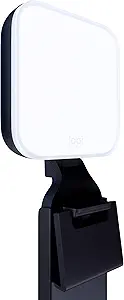
The Razer Ring Light measures 12 inches across and ships with two distinct mounting options: a standard tripod and a flexible mobile phone mount. We found the 192 LED diodes produce up to 500 lumens, powered entirely by a 5V USB connection. It features an in-line cable controller to click through three specific color temperatures: 3000K, 4500K, and 6500K. The light includes a dense white acrylic diffuser panel that softens the output, preventing the individual LED dots from reflecting visibly in your glasses or monitor bezel. At just over a pound, it is easy to transport.
The tripod footprint requires a 10-inch circle of cleared desk space, which might crowd cramped workstations. The 500-lumen cap is also on the lower end, requiring you to position the light within two feet of your face for optimal exposure. Despite these limitations, the Razer Ring Light offers durable construction and highly diffused, eye-friendly light for a very reasonable price.
5. UBeesize 10-inch LED Ring Light
Best Budget Pick
UBeesize 12'' LED Ring Light with 62'' Tripod Stand, Selfie Ring Light for Video Recording, Live Streaming, TikTok &…

For under $30, the UBeesize 10-inch ring light provides surprisingly capable front illumination for basic Zoom calls. It outputs up to 400 lumens via USB power and includes an in-line remote to cycle through 11 distinct brightness levels and three color modes. We tested the included 50-inch extendable tripod and found it surprisingly stable when positioned behind a single monitor setup. The light itself is lightweight plastic, but the ring width distributes light evenly enough to erase harsh overhead shadows. It also includes a Bluetooth remote shutter and a smartphone clamp for mobile recording.
Build quality reflects the bargain price. The plastic hinges feel brittle, and the USB cable is thin and prone to fraying if pinched behind a desk. The bare LED layout can cause noticeable reflections in eyeglasses. However, if you only take a few video calls a week and refuse to spend premium prices for lighting, the UBeesize provides immediate, functional improvement.
6. Joby Beamo Ring Light 12″
Best for Travel and Portability
Joby Beamo, Mini LED Light for Smartphone and Mirrorless Camera – Compact, Magnetic, Bluetooth, Waterproof, for…

Joby engineered the Beamo 12-inch ring light for maximum portability and rapid deployment. It outputs 400 lumens with a CRI of 85+, offering 10 brightness levels and three color temperature profiles selected via an attached cable remote. What separates the Beamo from generic USB lights is the build quality and the inclusion of multiple cold shoe attachment points around the outer rim. These allow you to mount directional microphones or secondary webcams directly to the frame. The power cable terminates in a USB-A plug and requires a 5V/2A power bank or wall adapter.
The requirement to supply your own power brick is frustrating, and the 400-lumen peak brightness requires close proximity to your face. The Beamo shines best for road warriors who need a lightweight, durable ring light that survives being shoved into a backpack. The heavy-duty plastics and reinforced tripod threading ensure it withstands the rigors of frequent travel better than cheaper alternatives.
7. Neewer 18-inch LED Ring Light
Best High-Output Option
NEEWER Ring Light 18inch Kit: 55W 5600K Professional LED with Stand and Phone Holder, Soft Tube & Bag for Tattoo Lash…
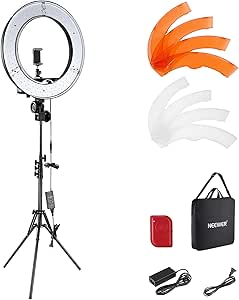
When a small desktop light cannot combat strong natural light from a window, the Neewer 18-inch Ring Light delivers raw power. This unit plugs directly into a wall outlet and uses 252 individual LEDs to produce an intense 4800 lumens. We measured its color temperature as a static 5500K, which perfectly mimics midday daylight. It ships with a set of snap-on plastic diffusers to soften the light or drop the temperature to 3200K. The kit includes an aluminum alloy light stand that extends to 61 inches, allowing you to angle it downward to reduce glare.
This light is enormous. The massive footprint of the tripod base makes it completely unsuitable for small desks or shared home office spaces. Furthermore, swapping physical plastic filters is tedious compared to adjusting a digital dial. If you have the floor space and need professional studio brightness to overpower a poorly lit room, this Neewer model is highly cost-effective.
What to Look for in a Video Conferencing Ring Light
Diameter and Light Diffusion
Ring light diameter dictates the softness of the shadows on your face. A 10-inch ring is the minimum size we recommend for desk use at a 2-foot distance. If you sit 3 to 4 feet away, upgrade to a 14-inch or 18-inch model. Always look for thick, frosted acrylic diffusers over the LED diodes. Bare LEDs create harsh hotspots on your skin and reflect aggressively in computer monitors and eyeglasses. Edge-lit designs, where the LEDs point inward toward a reflection panel rather than out at you, provide the softest illumination and prevent rapid eye fatigue during long meetings.
Lumen Output and Power Source
Your room’s ambient light determines how many lumens you need. For a dim room with drawn blinds, a 400-lumen USB-powered light is sufficient to illuminate your face. If you are fighting sunlight spilling from a window behind you, you need at least 1,500 lumens to expose your face properly on camera. Pay attention to the power delivery requirements. Models outputting under 800 lumens generally run off a 5V/2A USB port on your PC. Anything brighter requires a dedicated AC wall adapter. Do not plug high-draw USB lights into unpowered USB hubs, or they will flicker continuously.
Color Temperature Adjustability (CCT)
A fixed-color light limits your ability to match your environment. Look for bi-color lights offering a Correlated Color Temperature (CCT) range from at least 3200K to 5600K. Setting your light to 3200K matches standard indoor residential lamps and prevents you from looking ghostly at night. Setting it to 5600K blends seamlessly with sunlight entering your window. A light with a CRI rating above 90 ensures your webcam captures accurate skin tones and clothing colors. Lower CRI ratings cast a cheap, sickly green or magenta hue over your video feed.
Mounting Hardware and Desk Footprint
Do not buy a light without evaluating its mounting mechanism. Desktop tripods are the most common, but they require a 10-to-12 inch circular footprint on your desk, stealing space from your keyboard and mouse. We highly recommend edge-clamp mounts that attach to the back of your desk. These require just two inches of clearance and allow the light pole to extend up behind your monitors. Ensure the stand reaches at least 25 inches in height so you can position the top of the ring light just above your eye level and angle it downward at 15 degrees.
Frequently Asked Questions
Our Verdict
Proper lighting permanently fixes grainy webcam footage and reduces screen-induced eye strain. Mount your light just above eye level, match the color temperature to your room, and stop relying on your monitor to illuminate your face during calls.