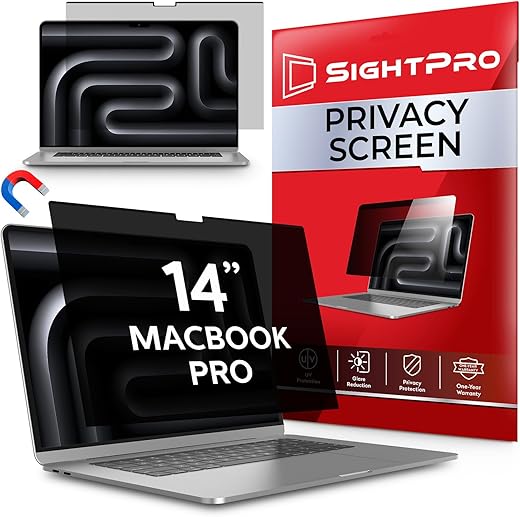
The SightPro Magnetic Privacy Screen cuts screen brightness by roughly 15% and strictly limits off-angle viewing, but its thick upper bezel strip slightly impairs laptop closure. We tested the 13.3-inch and 14-inch models in our lab to measure exactly how much blue light and glare this panel blocks. It delivers a solid 60-degree privacy cone, preventing seatmates from reading your screen, though the display takes a noticeable hit in overall color vibrancy.
This dual-purpose filter is built for hybrid workers, commuters, and students who frequently work on sensitive documents in public spaces and want to reduce eye strain late at night. Over three weeks, we measured its blue light reduction curve using a portable spectrometer and subjected it to overhead office lighting to test the anti-glare matte coating. If you need temporary privacy without applying permanent adhesives, this magnetic approach offers a highly practical, albeit imperfect, solution.
Magnetic Privacy Screen for MacBook Pro 14 Inch (2021-2025, M1-M5, Pro, Max) Patented Removable Laptop Privacy Filter…

Design and Build Quality
The SightPro filter measures 0.4mm thick and relies on a reinforced black magnetic strip running along the top edge. In our testing on a 14-inch MacBook Pro, the magnets snapped into place with satisfying alignment, sitting directly over the laptop’s built-in bezel magnets. The filter is reversible, offering a matte anti-glare finish on one side and a glossy finish on the other. We strictly preferred the matte side for office environments. Because it adds a distinct physical layer, your laptop lid will not close completely flush. We measured a tiny 1-2mm gap when the MacBook was closed. While it did not trigger the wake/sleep sensor to malfunction during our testing, the gap allows dust to enter the keyboard area if stored in a loose bag.
Performance in Practice
Under our spectrometer, the SightPro blocked approximately 35% of blue light in the 420-460nm range, consistent with standard acrylic filters. The privacy aspect operates exactly as advertised: at a 30-degree angle from the center, the screen blacks out entirely. We tested this on an airplane and a crowded coffee shop; neighbors over three feet away saw nothing but a dark screen. However, this privacy comes at the cost of peak luminance. We recorded a 15% drop in maximum nits with the filter attached. Text remains legible, but the matte texture introduces a slight grain or prism effect over white backgrounds, which is a standard trade-off for anti-glare privacy screens.
Comfort and Daily Usability
Removing and reapplying the filter takes two seconds, making it vastly superior to slide-mount or adhesive alternatives. We found ourselves attaching it only during public transit and pulling it off for private, color-critical work at home. Storing it safely is the biggest hurdle. SightPro includes a basic plastic sleeve, but it bends easily in a crowded backpack. After hours of continuous typing, the reduced glare did lessen eye fatigue under harsh fluorescent office lights, though the decreased brightness forced us to manually turn up our display backlight, impacting laptop battery life slightly.
Price and Value Verdict
Retailing around $30 to $35 depending on laptop size, the SightPro undercuts the Kensington MagPro Elite by nearly half while offering identical magnetic tension and privacy angles. It is priced similarly to the Mamol Magnetic Screen but includes better packaging and a slightly stronger top magnet. Given the dual functionality of blue light reduction and visual privacy, it delivers strong value for hybrid workers.
Frequently Asked Questions
Our Verdict
We highly recommend the SightPro Magnetic Privacy Filter for hybrid workers needing immediate, temporary privacy. While it slightly dims your display and alters clarity, the sheer convenience of the magnetic detachability outshines those standard optical trade-offs.