Finding a comfortable typing setup can be a frustrating process for heavy typers. The Ergoguys Llc FK403Q-P Matias Programmable Ergo Pro Keyboard offers a solution for those experiencing wrist strain during long work sessions. This split mechanical keyboard allows you to adjust the typing angle to match your natural posture. It brings the quiet tactile feel of Matias switches to an ergonomic layout. You get the benefits of a split layout without sacrificing the mechanical typing experience.
Matias Ergo Pro Programmable Keyboard
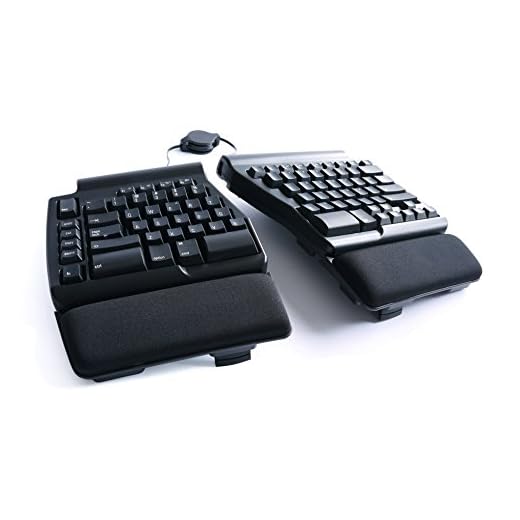
Overview
The core appeal of the Matias Programmable Ergo Pro Keyboard is its split physical layout. You can separate the two halves to align with your shoulder width. This prevents the inward hunching that often causes back and neck pain over time. The keyboard includes built-in tenting and tilting options. You can adjust the angle to keep your wrists in a neutral position. Finding the right angle takes a little trial and error at first. Once you lock in your preferred setup, typing feels much more natural.
Customization is a major factor for power users. This model includes programmable features that let you remap keys to fit your specific workflow. You can set up macros for repetitive tasks to save time during your workday. The programming process happens directly on the hardware. You do not need to install bulky background software to make your custom layouts work. This is especially helpful if you use a work computer with strict software installation policies. Your custom layouts stay saved on the keyboard itself.
Mechanical keyboards are notorious for being loud in office environments. Matias addresses this by using their signature quiet click switches in this ergo pro model. You get the tactile bump of a mechanical switch without the high-pitched clack that annoys coworkers. The keys have a satisfying travel distance that helps prevent bottoming out hard against the backplate. The keycaps feature a sculpted profile that guides your fingers to the center of each key. This reduces typos as you adjust to the split layout. It provides a premium typing experience that rivals traditional flat mechanical boards.
Who It’s For
This keyboard appeals directly to software developers and writers who spend eight or more hours a day typing. It is a great match for Mac users who want a split mechanical layout with quiet switches. People dealing with repetitive strain injuries will appreciate the adjustable tenting and split layout. If you need hardware-level programmability without extra software, this model fits the bill.
Verdict
The Ergoguys Llc FK403Q-P Matias Programmable Ergo Pro Keyboard delivers a highly customizable typing experience. The split layout effectively addresses wrist and shoulder strain during long workdays. Its quiet mechanical switches provide excellent tactile feedback without disrupting shared workspaces. The hardware-based programming adds significant value for power users. It is a solid investment for anyone serious about their daily typing comfort.
Frequently Asked Questions
Is this keyboard fully programmable?
Yes, the Matias Ergo Pro features a programmable layout. You can remap keys and create macros directly on the hardware.
Does this keyboard use mechanical switches?
This model uses Matias quiet mechanical switches. They provide tactile feedback while keeping typing noise to a minimum.
Can I adjust the angle of the keyboard halves?
The keyboard includes built-in supports for tenting and tilting. You can adjust each half independently to find a comfortable typing angle.