
Comparing the Logitech Wave Keys and the MoErgo Glove80 is a study in ergonomic extremes. The Wave Keys represents the entry point to typing comfort, utilizing a gentle wave design to reduce wrist strain without forcing you to relearn how to type. On the opposite end of the spectrum, the MoErgo Glove80 is an uncompromising, fully split, contoured keywell board designed to address severe RSI. This matchup pits mainstream accessibility against enthusiast-grade physiological alignment to help you decide how far you need to go for pain-free typing.
The Logitech Wave Keys is built for everyday office workers who experience mild discomfort and want a budget-friendly upgrade that works right out of the box. Its membrane switches and unibody design offer immediate familiarity. Conversely, the MoErgo Glove80 targets programmers, data entry professionals, and severe RSI sufferers willing to invest time and money into their health. Its $400 price tag and steep learning curve are justified by its low-profile mechanical switches, ZMK programmability, and a design that practically eliminates ulnar deviation and forearm pronation.
The Logitech Wave Keys wins for beginners wanting an immediate, affordable comfort upgrade without a learning curve. The MoErgo Glove80 is the undisputed champion for power users and RSI sufferers who need maximum adjustability, mechanical switches, and zero ulnar deviation.
Logitech Wave Keys
Logitech Wave Keys Wireless Ergonomic Keyboard with Cushioned Palm Rest, Comfortable Natural Typing, Easy-Switch,…

- Membrane switches with tactile bump
- Bluetooth and Logi Bolt USB connectivity
- Up to 36 months battery life (2x AAA)
- Integrated multi-layer foam palm rest
Pros:
- Zero learning curve for standard typists
- Highly affordable at under $60
- Excellent 3-year battery life
Cons:
- Unibody design doesn’t fix ulnar deviation
- Membrane switches lack premium feel
MoErgo Glove80
Kinesis Advantage360 Professional Split Ergonomic Keyboard – Bluetooth | Mechanical Switches | Fully Programmable…
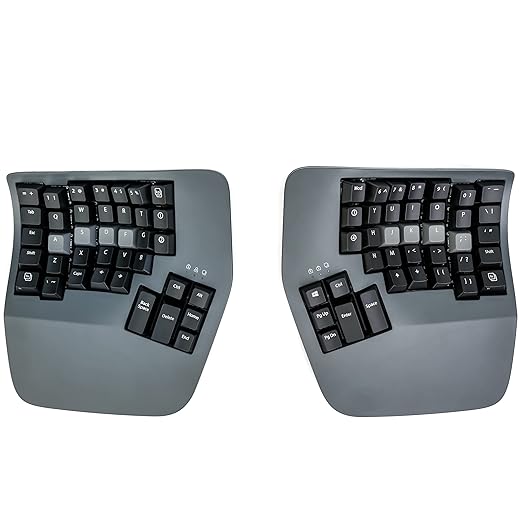
- Fully split contoured keywell design
- Kailh Choc v1 low-profile mechanical switches
- ZMK open-source fully programmable firmware
- Bluetooth LE and USB-C wired connectivity
Pros:
- Perfect wrist alignment eliminates strain
- Deeply customizable keymaps via ZMK
- Mechanical switches offer precise feedback
Cons:
- Extremely high $399 price tag
- Requires weeks to relearn typing muscle memory
Ergonomic Design and Overall Posture Alignment
The MoErgo Glove80 dominates in pure ergonomic intervention. Its fully split design allows you to position the halves shoulder-width apart, completely eliminating the chest constriction and ulnar deviation caused by standard boards. The contoured keywells map perfectly to the natural varying lengths of your fingers. The Logitech Wave Keys merely raises the middle of a traditional layout to reduce forearm pronation. While the Wave’s integrated palm rest provides decent support, the fixed unibody design still forces your wrists to angle inward. For serious RSI relief, MoErgo is the only real choice here.
Typing Experience and Switch Quality Options
Typing on these two boards feels entirely different. The Logitech Wave Keys uses standard laptop-style membrane switches. They are incredibly quiet and suitable for shared offices, but they feel slightly mushy and lack the precise actuation point that prevents bottoming out. The MoErgo Glove80 uses low-profile Kailh Choc mechanical switches, available in tactile, linear, or clicky variants. These mechanical switches offer crisp, responsive feedback that prevents finger fatigue during long coding sessions. The Glove80 thumb clusters also offload heavy work from your weaker pinky fingers, making it the clear winner for heavy typists.
Learning Curve and Daily Workflow Integration
The Logitech Wave Keys shines when it comes to immediate productivity. Because the staggered layout is nearly identical to a standard flat keyboard, you will type at your normal speed within minutes of unboxing it. The MoErgo Glove80 requires serious commitment. Transitioning to a split, ortholinear-style keywell with complex thumb clusters can drop your typing speed to 15 words per minute for the first two weeks. However, once your muscle memory adapts to the MoErgo, the efficiency gains and lack of finger travel make it far superior for long-term daily workflow.
Software Customization and Key Mapping Capabilities
Logitech relies on the Logi Options+ software, which is incredibly user-friendly but functionally limited. You can remap a top row of function keys and set up basic app-specific profiles, but the core layout remains locked. The MoErgo Glove80 runs on ZMK open-source firmware. It offers infinite customization, allowing you to create complex macros, home row mods, and multiple toggleable layers right on the hardware itself. The Glove80 does not require background software running on your PC, making it the definitive winner for developers and users needing advanced programmable key mapping.
Connectivity, Battery Life, and Desk Setup
For wireless convenience, the Logitech Wave Keys is tough to beat. Powered by two standard AAA batteries, it lasts up to 36 months and connects flawlessly via Bluetooth or the included Logi Bolt receiver. The MoErgo Glove80 uses built-in rechargeable batteries that last a few weeks depending on usage and RGB lighting. While both support multi-device Bluetooth switching, the Glove80 separate halves take up significant desk real estate and require careful cable management if used in wired mode. Logitech wins for a clean, maintenance-free wireless desk setup.
Frequently Asked Questions
Our Verdict
Buy the Logitech Wave Keys for an affordable, immediate upgrade to reduce mild wrist strain. Invest in the MoErgo Glove80 if you are a power user or RSI sufferer requiring maximum adjustability, mechanical switches, and advanced programmability for total typing comfort.