Kinesis Freestyle Edge RGB: Split Design Meets Real Mechanical Performance
Shoulder-width typing and a mouse hand that doesn't have to cross your body — that's the entire pitch, and it works.
The Freestyle Edge RGB splits into two independent halves connected by a 20-inch cable, so you set the angle and distance your shoulders actually want instead of the one Logitech or Razer decided on. It’s built on genuine Cherry MX Blue switches, so you’re not sacrificing tactile feel or gaming response time to get the ergonomics. This is for people dealing with wrist, forearm, or shoulder strain from a standard keyboard who still want a keyboard that performs — not a mushy ergonomic compromise.
- The split is the whole point Separating the halves to shoulder width (and beyond, up to 20 inches) lets your arms hang naturally instead of angling inward, which is where a lot of forearm and wrist strain actually comes from.
- Real mechanical switches, not a gimmick Genuine Cherry MX Blue switches rated for 50 million clicks give consistent tactile/clicky feedback — this isn’t a membrane board wearing an ergonomic costume.
- Programmability goes deep All 95 keys remap on the fly via the SmartSet key or app, with 9 onboard profiles and dual layers stored in 4MB of onboard memory, so your layout travels with the keyboard, not just one PC.
- The lift kit matters more than the RGB The tenting accessory (sold separately as the Lift Kit) is what actually reduces forearm pronation strain — the 16.8M-color RGB is nice but the tenting angle is the ergonomic feature that does the work.
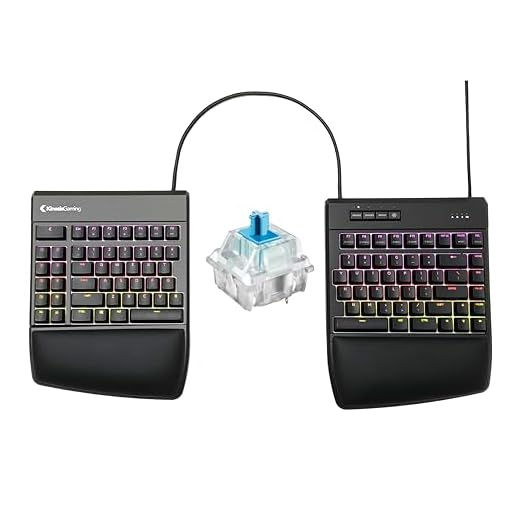
Fully separable halves and genuine Cherry MX Blue switches let you match shoulder-width posture and tenting that reduce forearm strain the way the Moonlander does.
| Switch Type | Genuine Cherry MX Blue (clicky, tactile) |
| Switch Lifespan | 50 million keystrokes rated |
| Key Count | 95 fully programmable keys |
| Split Range | Up to 20 inches apart via detachable cable |
| Onboard Memory | 4MB, 9 storable profiles with dual layers |
| Lighting | 16.8M-color per-key RGB, 10 effects (wave, spectrum, rebound, pulse, rain, etc.) |
| Response Time | 1ms with NKRO (N-key rollover) |
| Connectivity | Wired, 1 full-size USB port, plug-and-play |
| OS Compatibility | Windows, Mac, Linux, Chrome OS |
| Software | SmartSet app (Windows/Mac) + onboard SmartSet key for remaps |
- Genuine Cherry MX Blue switches feel identical to a standard mechanical board — no ergonomic trade-off in typing feel
- Splitting the modules to shoulder width, or rotating the left half, lets you find the exact angle that stops wrist deviation
- 4MB onboard memory with 9 profiles means your macros and remaps work on any computer you plug into, not just one machine
- Detachable palm supports with the updated thick cushioned pads genuinely reduce desk-edge pressure on the wrists during long sessions
- 1ms response time and NKRO hold up fine for competitive gaming, not just office typing
- Dedicated SmartSet key lets you remap or build macros without opening software, useful for quick on-the-fly adjustments
- The Lift Kit tenting accessory — arguably the single most important ergonomic upgrade — is sold separately, not included
- Cherry MX Blue’s audible click is genuinely loud; it’s a hard no for shared offices or thin-walled apartments
- There’s a real relearning curve for the first 1-2 weeks as your hands adjust to the split layout and key stagger
- No built-in wrist rest angle adjustment beyond the palm supports — you’re relying on the Lift Kit for true tenting
Choosing the right ergonomic split mechanical keyboard
-
Switch type and feelHighSplit keyboards vary widely in whether they use genuine mechanical switches or cheaper membrane/optical alternatives marketed as mechanical.Look forNamed switch brand (Cherry, Kailh, Gateron) with a published actuation force and lifespan ratingAvoidVague 'mechanical-style' or 'mechanical feel' language that doesn't name an actual switch manufacturer
-
Tenting and split-angle adjustabilityHighThe ergonomic benefit of a split board comes almost entirely from being able to angle and separate the halves — a fixed-angle split board barely outperforms a standard keyboard.Look forIndependent tenting legs or an add-on kit that lets each half angle upward toward the centerAvoidSplit boards with a fixed, flat resting angle and no tenting option at all
-
Onboard memory and profile storageMediumIf you use the keyboard across multiple machines (work laptop, gaming PC, personal laptop), software-only remapping is a dealbreaker.Look forOnboard memory that stores profiles directly on the keyboard, independent of installed softwareAvoidBoards that require a running background app on each PC to apply your custom layout
-
Cable length and management between halvesMediumA short connector cable defeats the purpose of a split board if you can't actually separate the halves to shoulder width or beyond.Look forA connector cable rated for at least shoulder-width separation (ideally 12+ inches)AvoidProprietary short cables under 6 inches that limit how far apart you can realistically place the halves
-
Noise level if switch is clickyLowTactile clicky switches (like MX Blue) are louder than tactile-only or linear switches, which matters a lot in shared spaces.Look forSwitch options in linear (red) or tactile-silent variants if noise is a concernAvoidCommitting to a clicky switch board without testing the noise level in your actual workspace first
Common questions
Will the Kinesis Freestyle Edge RGB actually help with RSI or wrist pain?
For most users, yes, but only if you use the split and tenting features as intended. Separating the halves to shoulder width removes the inward wrist angle a standard keyboard forces, and adding the Lift Kit tenting accessory reduces forearm pronation further. The keyboard alone without any splitting or tenting won’t do much — the ergonomic benefit comes from how you configure it.
Do I need to buy the Lift Kit separately, or does it come with the keyboard?
The Lift Kit tenting accessory is sold separately from the Freestyle Edge RGB. The keyboard ships with the split modules, 20-inch connector cable, and detachable palm supports, but true tenting angle adjustment requires the add-on kit, which is worth budgeting for from day one.
Is Cherry MX Blue a good choice for gaming, or just typing?
MX Blue works fine for most gaming genres thanks to the 1ms response time and full NKRO support, and Kinesis specifically markets the split-and-separate layout as eSports-proven for bringing the mouse hand in closer. The one caveat is competitive FPS players sometimes prefer a linear switch (like MX Red) for faster double-taps, since the Blue’s tactile bump and click add a hair of travel before reset.
How long does it take to adjust to typing on a split keyboard?
Most new owners report 1 to 2 weeks before typing speed returns to normal, since the split layout changes which hand hits which center-column keys (B, 6, Y, etc. move sides). Using the SmartSet key to remap any keys that trip you up during this period speeds up the adjustment.
The Freestyle Edge RGB delivers on both halves of its promise: genuine mechanical switch performance with a split design that measurably reduces wrist and shoulder strain when configured correctly. The main caveat is that the real ergonomic payoff requires the separately-sold Lift Kit, and the MX Blue click is loud enough to matter in shared spaces. For anyone fighting RSI symptoms who refuses to give up tactile feedback and competitive-grade responsiveness, this is the board to buy.
- Genuine Cherry MX Blue switches with 50-million-click durability mean no compromise on mechanical feel or longevity
- Up to 20 inches of split range plus rotating modules let you dial in the exact shoulder-width posture that reduces strain
- 9 onboard profiles with 4MB memory and full 95-key programmability make this a keyboard that travels with you across machines
The Kinesis Freestyle Edge RGB is the rare ergonomic keyboard that doesn’t ask you to sacrifice typing or gaming performance to fix your wrists. Pair it with the Lift Kit tenting accessory from the start, and budget two weeks for your hands to adjust to the split layout.