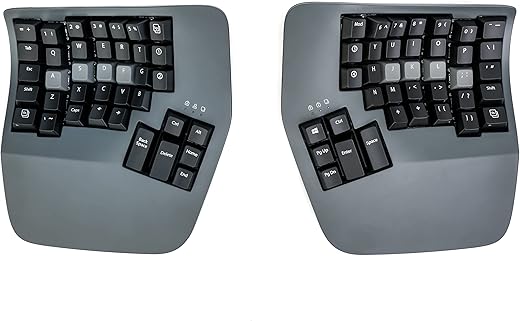
The search for the ultimate split ergonomic keyboard inevitably leads to two heavyweights: the Kinesis Advantage360 and the ErgoDox EZ. Both command premium price tags well over $300 and require a significant learning curve to master. However, their approaches to typing ergonomics diverge fundamentally. While Kinesis relies on decades of research to lock your hands into a fixed, contoured keywell designed to minimize finger travel, ErgoDox champions absolute customization, allowing you to tweak the angle, tenting, and switch type to match your exact desktop setup and personal preferences.
The Kinesis Advantage360 is engineered for severe RSI sufferers and high-volume typists who want a scientifically validated, ready-to-use ergonomic solution. Its concave wells force proper posture immediately. Conversely, the ErgoDox EZ is built for tinkerers, mechanical keyboard enthusiasts, and developers who demand total control over their hardware. If you want hot-swappable switches, infinite tenting angles, and open-source QMK firmware customization out of the box, the ErgoDox EZ provides the ultimate blank canvas to build your perfect typing experience.
Buy the Kinesis Advantage360 if you are actively combating RSI and need a scientifically contoured keywell that immediately reduces finger strain. Choose the ErgoDox EZ if you are a mechanical keyboard enthusiast who requires hot-swappable switches, open-source firmware, and highly adjustable tenting angles. Kinesis wins for pure out-of-the-box ergonomic relief, while ErgoDox takes the crown for infinite customization.
Kinesis Advantage360 Professional
Kinesis Advantage360 Professional Split Ergonomic Keyboard – Bluetooth | Mechanical Switches | Fully Programmable…
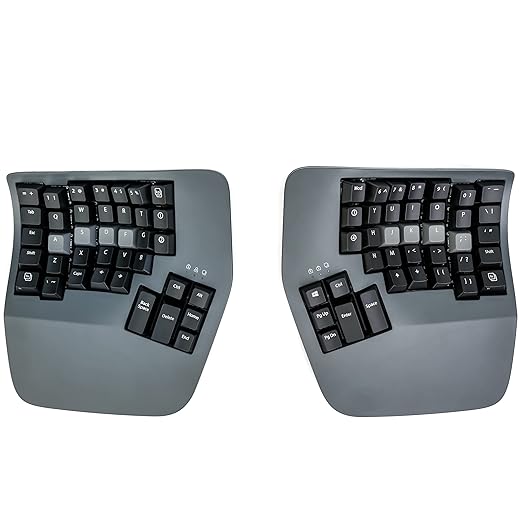
- Concave keywell design
- Gateron Brown tactile switches (fixed)
- 3 fixed tenting angles (Low, Medium, High)
- ZMK open-source wireless firmware
Pros:
- Concave wells drastically reduce finger travel
- Integrated palm rests promote neutral wrist posture
- Premium structural rigidity and build quality
Cons:
- Switches are soldered and not hot-swappable
- Steep learning curve for the ortholinear contoured layout
ErgoDox EZ
GRIFITI Fat Wrist Pad Ergodox 2 Piece Set 6.5" x 4.2" x 0.75" Mirror Wrists Rests Support Accessories for Gaming…

- Flat ortholinear split layout
- Hot-swappable mechanical switches
- Infinite angle adjustments via custom tenting legs
- QMK firmware with Oryx visual configurator
Pros:
- Fully hot-swappable PCB for easy switch changes
- Infinite tenting and tilting angles via custom legs
- Highly intuitive Oryx visual configurator for mapping keys
Cons:
- Flat profile lacks the finger-saving contour of keywells
- Outer thumb cluster keys are difficult for smaller hands to reach
Ergonomic Design and Posture Control
The Advantage360 uses a patented contoured keywell that physically cups your hands, minimizing the distance your fingers must stretch to reach peripheral keys. This is a massive advantage for reducing repetitive strain. The ErgoDox EZ relies on a flat, ortholinear layout. While you can adjust its position, your fingers still travel further across a flat plane. However, the ErgoDox EZ’s tenting kit offers infinitely variable angles, whereas the Advantage360 locks you into three fixed heights. Ultimately, the Kinesis Advantage360 wins for true ergonomic relief because the concave wells fundamentally reduce tendon workload better than a flat split board.
Switch Options and Customizability
This is where the ErgoDox EZ dominates. It features a hot-swappable PCB, meaning you can pull out the mechanical switches and replace them with any MX-style switch on the market without soldering. Whether you want silent linear switches for the office or heavy clicky ones for coding, you have total freedom. The base Kinesis Advantage360 solders its Gateron Brown switches directly to the board. While Browns are decent tactile options, you are permanently stuck with them unless you possess advanced desoldering skills. For hardware tinkerers and switch enthusiasts, the ErgoDox EZ is the undisputed winner here.
Thumb Cluster Layout and Reach
Both keyboards offload heavy modifiers like Enter, Space, and Backspace to thumb clusters to save your pinky fingers. The Advantage360 groups six keys per thumb in an angled, highly accessible arrangement that feels natural for hands of most sizes. The ErgoDox EZ features a larger thumb cluster with six keys, but the outer keys require a significant thumb stretch, rendering them nearly unusable for typists with smaller hands. Because the Kinesis places its thumb keys much closer to the natural resting position of the thumb, it takes the win for cluster usability and comfort.
Firmware and Key Mapping Software
The ErgoDox EZ uses QMK firmware combined with the Oryx visual configurator. Oryx is incredibly user-friendly, allowing you to compile custom layouts, macros, and layers directly in your browser without writing code. The base Advantage360 uses the proprietary SmartSet engine, which is functional but clunky, requiring onboard programming or a dated desktop app. If you upgrade to the Advantage360 Professional, you get ZMK firmware via GitHub, which is powerful but requires more technical know-how than Oryx. The ErgoDox EZ easily wins this category for providing the most accessible, intuitive programming experience for all users.
Build Quality and Desktop Footprint
The Advantage360 is a massive piece of hardware. Its bulky, sculpted plastic housing demands significant desk space, making it difficult to travel with. However, the build is incredibly rigid, and the integrated magnetic palm rests offer excellent support. The ErgoDox EZ is much flatter and easier to slide into a backpack, though its plastic housing feels slightly hollower and less premium than the Kinesis. The ErgoDox also relies on external, detached wrist rests that can shift around during intense typing sessions. Due to its superior structural rigidity and integrated support, the Kinesis Advantage360 wins this round.
Frequently Asked Questions
Our Verdict
For severe RSI and wrist pain, the Kinesis Advantage360 is the undisputed champion due to its fatigue-reducing contoured keywell. However, if you demand hot-swappable switches, limitless tenting, and intuitive programming, the ErgoDox EZ is the ultimate enthusiast split keyboard.