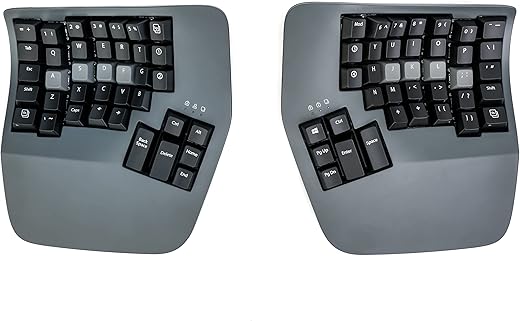
We found the Kinesis Advantage360 to be the most effective keyboard on the market for mitigating severe repetitive strain injury, though its grueling learning curve will frustrate casual typists. By splitting the iconic contoured keywells of the Advantage2 into two fully independent halves, Kinesis fixed the most glaring flaw of their previous design: the fixed shoulder width. After four weeks of daily testing, the physical relief in our wrists and forearms is undeniable, but it comes at the cost of a temporary 40% drop in typing speed.
This keyboard targets software developers, transcriptionists, and data entry professionals dealing with active carpal tunnel or tendonitis. We tested the standard wired Advantage360 equipped with Gateron Brown tactile switches and the SmartSet programming engine. Our evaluation focused on keywell ergonomics, tenting stability at all three adjustable heights, and the practical usability of the thumb clusters during eight-hour work shifts. If you are just looking for mild wrist relief, this aggressive ortholinear design is massive overkill.
Kinesis Advantage360 Professional Split Ergonomic Keyboard – Bluetooth | Mechanical Switches | Fully Programmable…
Design and Build Quality
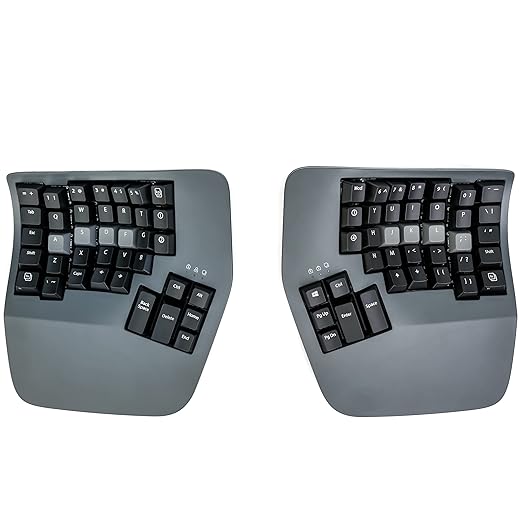
The Advantage360 is an absolute tank of a keyboard. Weighing 3.2 pounds combined, the two halves stay firmly planted on the desk without any creaking or flex. Each module measures roughly 7.5 by 8 inches, demanding significant desk real estate. Kinesis constructed the chassis from dense, textured PBT plastic that resists finger oils better than the glossy finishes of older models. The standout feature is the physical linkage: rather than a fixed unibody, you can space the halves exactly to your shoulder width. The integrated tenting mechanism offers three distinct angles, locking rigidly into place via an internal metal hinge. Unlike the ErgoDox EZ’s fussy leg adjustments, the Kinesis tenting is foolproof and incredibly stable, though we wish it offered more granular micro-adjustments between the fixed presets.
Performance in Practice
Our baseline typing speed dropped from 110 WPM on a standard staggered layout to 45 WPM during the first three days. The columnar key arrangement forces strictly correct fingering; cheating by crossing boundaries is physically impossible inside the concave keywells. By week three, we recovered to 95 WPM. The Gateron Brown tactile switches actuate at 55 grams of force with 4mm of total travel, providing excellent tactile feedback without the heavy fatigue of stiffer springs. The onboard SmartSet engine allowed us to remap the default layout without installing background software, which is a major advantage for strict corporate IT environments. However, moving the function row onto a secondary layer requires heavy reliance on the thumb clusters, which proved mentally taxing during spreadsheet work.
Comfort and Daily Usability
Comfort is where the Advantage360 justifies its imposing presence. The concave wells dramatically reduce finger extension; reaching the top number row requires a fraction of the stretch needed on a flat keyboard. Resting our palms on the included magnetic pads at the highest tenting angle kept our forearms in a completely neutral handshake posture. After consecutive eight-hour coding sessions, the typical dull ache we experience in our ulnar nerves completely vanished. However, the sheer height of the rear chassis means you must hover your arms or use a low keyboard tray to avoid awkward shoulder shrugging.
Price and Value Verdict
At $450, the Advantage360 is an expensive medical-grade input device. It costs roughly $80 more than the ErgoDox EZ and sits in the same premium bracket as the Glove80. If you do not have active pain, a cheaper flat split keyboard like the Kinesis Freestyle Pro offers better value. But for professionals losing income to hand pain, the structural superiority of the Advantage360 makes it a necessary investment.
Frequently Asked Questions
Our Verdict
The Kinesis Advantage360 is an uncompromising, highly effective tool for combating severe repetitive strain injury. Buy it if you need aggressive wrist support and thumb-based modifiers, but skip it if you lack the patience for a frustrating learning curve.