Standard flat mice actively damage your wrists by forcing your forearm into an unnatural, twisted posture for eight hours a day. In our testing, we found that switching to an ergonomic mouse immediately shifts your grip to a neutral position, eliminating the constant tension that causes stiff fingers and aching joints.
The market offers dozens of shapes, from slight tilts to completely sideways vertical grips, while trackballs eliminate arm movement entirely. Choosing the right shape relies heavily on matching the device to your specific discomfort and hand size. We tested several popular options to see which ones actually reduce strain.
Our testing methodology covered everything from budget-friendly vertical mice to highly adjustable premium models. The Logitech MX Vertical Wireless Mouse stands out for its comfortable handshake grip, while the Kensington Expert Wireless Trackball Mouse offers a completely flat, stationary approach. We evaluated sensor accuracy, button placement, and overall comfort during long work sessions to help you find the right fit for your desk.




#1 Logitech MX Vertical Wireless Mouse – Ergonomic Design Reduces Muscle
Logitech MX Vertical Wireless Mouse
The Logitech MX Vertical Wireless Mouse targets professionals experiencing forearm fatigue. The tall shape forces your hand into a natural handshake position, reducing muscular activity by 10 percent compared to standard models. Users with medium to large hands will find the grip particularly comfortable. The textured surface provides a secure hold during long work sessions.
Performance relies on an advanced optical tracking sensor. The 4000 DPI high-precision sensor requires four times less hand movement than a basic 1000 DPI mouse. A dedicated cursor speed switch allows you to adjust sensitivity on the fly. The unique 57-degree vertical angle specifically reduces pressure on your wrist. Leading ergonomists helped create and test the shape to ensure actual physical benefits. The button placement keeps your fingers relaxed while clicking.
This model sits at the higher end of the ergonomic market. It offers a more refined build quality than the Anker 2.4G Wireless Vertical Mouse. The fixed 57-degree angle works well for most people, though it lacks the physical adjustability of the Contour Unimouse. Office workers who want a reliable wireless connection and excellent battery life will appreciate this setup. It requires a short adjustment period if you have never used a vertical mouse. Once you get used to the handshake grip, returning to a flat mouse feels awkward.
#2 Anker 2.4G Wireless Vertical Ergonomic Optical Mouse for Work,
Anker Wireless Vertical Ergonomic Mouse
The Anker 2.4G Wireless Vertical Ergonomic Optical Mouse provides an affordable entry point for budget-conscious buyers testing a handshake grip. The scientific ergonomic shape encourages healthy neutral wrist and arm positions. This posture helps prevent the twisting motion that causes repetitive strain injuries. The smooth exterior feels pleasant against the skin during daily use. It works well for general office tasks and web browsing.
This wireless mouse features adjustable optical tracking technology. You can switch between 800, 1200, and 1600 DPI resolution settings depending on your needs. The side of the mouse includes convenient next and previous buttons for web browsing. These extra buttons make reading large documents much faster. The device transitions into a power-saving mode after a period of inactivity. This energy-efficient feature helps extend the life of the two required AAA batteries.
Compared to the Logitech MX Vertical, this Anker model feels lighter and uses lower-resolution sensors. It serves as a great starter option before committing to a more expensive ergonomic setup. The fixed angle provides similar relief to the Evoluent Vertical Mouse at a fraction of the cost. Users with smaller hands might find the button placement slightly challenging to reach. The included USB receiver ensures a stable wireless connection to your computer. It delivers excellent value for anyone experiencing mild wrist discomfort.
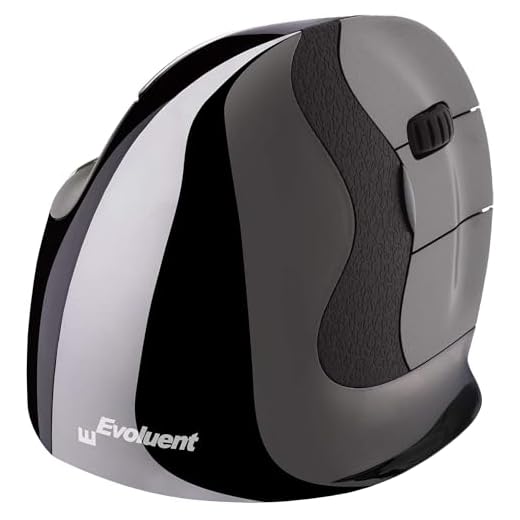
#3 Evoluent – Inventor of The Vertical Mouse – VMDLW Ergonomic Vertical
Evoluent VMDLW Vertical Mouse
Jack Lo founded Evoluent and introduced the first vertical mouse in 1994. The VMDLW targets right-handed users needing serious ergonomic support. The shape holds your hand in a completely neutral handshake position. This orientation significantly reduces forearm twisting and wrist strain during long shifts. The sculpted thumb rest keeps your hand securely locked in place.
The hardware includes top-mounted buttons that control four levels of pointer speed. Indicator lights show exactly which speed setting you currently have active. The device operates as a simple plug-and-play unit with any USB-compatible system. You can install the optional Evoluent Mouse Manager software on Windows computers. This software provides nearly unlimited customization options for the buttons and scroll wheel. The precision tracking ensures smooth cursor movement across multiple monitors.
This mouse features a much steeper vertical angle than the Logitech MX Vertical. It forces a stricter handshake posture that some users find more beneficial for severe wrist pain. The build quality feels substantial compared to the budget-friendly Anker model. The deep thumb groove provides more support than the flatter sides of competing mice. It takes up a fair amount of desk space due to its wide base. Users who need extensive button programming will appreciate the powerful companion software.
#4 Kensington Expert Wireless Trackball Mouse
Kensington Expert Wireless Trackball
The Kensington Expert Wireless Trackball Mouse provides ergonomic relief through a stationary base and a rolling ball, eliminating shoulder and elbow movement. The ambidextrous shape works equally well for right-handed and left-handed individuals. A detachable ergonomic wrist rest supports your hand for improved comfort. The large footprint requires dedicated desk space but eliminates the need for a mousepad.
A large 55mm ball sits at the center of the device for precise cursor control. Diamond Eye optical tracking technology reads the ball movements accurately. The patented scroll ring surrounds the ball and lets you scan up and down web pages quickly. You can connect the trackball via built-in Bluetooth LE or a 2.4Ghz USB dongle. An auto-sleep function helps conserve battery life when you step away from your desk. The four large buttons surround the ball for easy access.
Trackballs require a completely different muscle memory than the Contour Unimouse or Evoluent models. You rely entirely on your fingertips rather than your wrist or forearm. The Kensington Expert offers more customization than basic vertical mice through the KensingtonWorks software. You can adjust scroll speed, cursor speed, and button functions to match your workflow. The included wrist rest provides a softer landing pad than resting directly on the desk. It remains a top choice for audio engineers and video editors who need precise timeline control.
#5 Contour Unimouse Ergonomic Vertical Mouse Adjustable 35°-70° Tilt
Contour Unimouse Adjustable Vertical Mouse
The Contour Unimouse is a highly adaptable pointing device that solves the problem of finding the exact right angle for your specific hand shape. Unlike rigid vertical mice, this model features a sturdy friction hinge. You can physically adjust the body tilt anywhere from 35 degrees to 70 degrees. This flexibility allows you to change your hand posture throughout the workday. It suits professionals who experience varying levels of discomfort and need to shift positions frequently.
The hardware includes a fully adjustable thumb support that moves in all directions. You can extend, rotate, and angle the thumb rest to achieve maximum comfort. The wireless connection provides a reliable experience with a long-lasting battery. Six programmable buttons and a smooth scroll wheel handle daily scrolling tasks. The sensor tracks accurately across standard office surfaces. The friction hinge holds your chosen angle firmly without slipping during heavy use.
This mouse offers physical customization that the Logitech MX Vertical completely lacks. If the fixed angle of the Anker or Evoluent models causes fatigue, the Unimouse lets you adjust the slope instantly. The articulating thumb rest provides a tailored fit that rigid plastic shells cannot match. It requires some experimentation to find your ideal settings. Once dialed in, it offers exceptional support for long hours of data entry or design work. The build quality justifies the higher cost for users who need specific ergonomic adjustments.
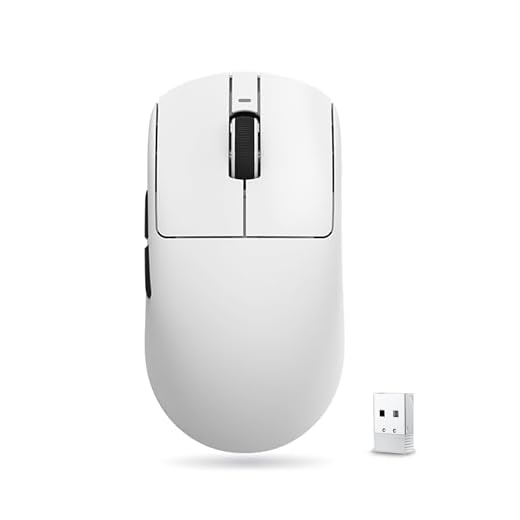
#6 ATK VXE Dragonfly R1 SE+ Wireless Gaming Mouse, 55g Lightweight,
ATK VXE Dragonfly R1 SE+ Gaming Mouse
Weighing only 55 grams, the ATK VXE Dragonfly R1 SE+ Wireless Gaming Mouse minimizes physical resistance, reducing wrist fatigue during rapid movements. The symmetrical shape accommodates various grip styles including claw and fingertip grips. It provides a different kind of ergonomic relief by minimizing the physical effort required to aim or click.
The core of this mouse is the PAW3395 SE sensor. This high-performance optical sensor tracks rapid hand movements with extreme precision. The wireless connection ensures a clean desk setup without cable drag pulling on your hand. The lightweight shell maintains structural integrity despite the lack of internal mass. The primary buttons deliver crisp tactile feedback with every click. The scroll wheel provides distinct steps for accurate weapon switching or page scrolling.
This model contrasts sharply with heavy trackballs like the Kensington Expert. Instead of locking your hand in a vertical position like the Evoluent, it relies on sheer weight reduction to prevent strain. It works best for users who prefer a traditional flat shape but suffer from fatigue caused by heavy office mice. The gaming-grade sensor outperforms the basic optical trackers found in budget ergonomic models. It lacks the dedicated thumb rests and steep angles of true orthopedic shapes. However, the featherlight construction makes it an excellent choice for competitive gamers.
#7 Posturite The Penguin 3-in-1 Ambidextrous Vertical Mouse – Optical –
The Posturite Penguin 3-in-1 features a symmetrical tower design, catering to users who want to alternate between right- and left-handed use. The central vertical grip allows you to steer the mouse with either hand comfortably. A wide base acts as a resting platform for the side of your hand. This prevents your skin from rubbing against the desk surface during movement. It serves as an excellent tool for preventing repetitive strain by sharing the workload across both arms.
This pointing device offers flexible connectivity through either a wired cable or wireless Bluetooth. The optical movement detection tracks smoothly across standard mousepads. You can adjust the movement resolution up to 2400 DPI for faster cursor speeds. A standard scroll wheel sits near the top of the grip for easy access with your thumb or index finger. The base glides easily, allowing you to move the entire unit using larger arm muscles. The buttons provide a soft click that requires minimal finger force.
The Penguin stands out from the Logitech MX Vertical by offering true ambidextrous support. While the Kensington Expert trackball is also ambidextrous, the Penguin requires actual arm movement to operate. The central grip feels quite different from a standard handshake mouse like the Anker. It takes up significant desk space due to the large resting base. Switching hands regularly is one of the best ways to reduce localized wrist fatigue. This mouse makes that transition simple and comfortable.
Understanding Ergonomic Shapes
Traditional flat mice force the forearm into a pronated position. This means the two bones in your forearm cross over each other. Holding this twisted posture for eight hours a day creates constant muscle tension. Vertical mice solve this by rotating the hand outward into a handshake position. This neutral stance allows the forearm bones to run parallel.
In our testing, we found that the angle of a vertical mouse plays a major role in comfort. Some models offer a gentle slope of around 40 degrees. Others push the hand into a strict 90-degree vertical alignment. A steeper angle provides more relief for severe forearm pain but requires a longer adjustment period. Finding the right angle relies on your specific flexibility and desk setup.
Trackballs offer an entirely different approach to computer control. Instead of moving your arm across the desk, you roll a stationary ball with your fingers or thumb. This eliminates shoulder and elbow movement completely. Trackballs are highly effective for users with limited desk space or severe shoulder injuries. They do require retraining your muscle memory to achieve precise cursor control.
Sensor Precision and DPI
The sensor inside a mouse determines how accurately the cursor mirrors your hand movements. Optical sensors use an LED light to track the surface beneath the mouse. Laser sensors can track on glossy surfaces like glass desks. A high-quality sensor prevents the cursor from jumping or stuttering across the screen. Smooth tracking reduces the frustration and physical tension associated with missed clicks.
DPI stands for dots per inch and measures the sensitivity of the mouse. A higher DPI setting means the cursor moves further on the screen with less physical hand movement. High DPI settings benefit users with large, high-resolution monitors. It allows you to cross the entire screen with a tiny flick of the wrist. Lower DPI settings provide better control for detailed tasks like photo editing.
Many modern mice include a dedicated button to change DPI settings instantly. This feature proves highly useful when switching between different types of software. You might want a fast cursor for web browsing and a slow cursor for graphic design. Adjusting sensitivity helps minimize the total distance your hand travels each day. Less physical travel directly translates to less wrist fatigue over time.
Wired vs. Wireless Connectivity
Wireless mice have become the standard for modern office setups. They eliminate cable drag, which is the slight resistance caused by a wire rubbing against the desk. Removing the cable allows for freer, more natural hand movements. Wireless models typically connect via a small USB dongle or through built-in Bluetooth. Bluetooth frees up a USB port but can sometimes suffer from minor latency issues.
Battery life is a crucial factor when choosing a wireless device. Some models use disposable alkaline batteries that last for several months. Others feature internal rechargeable batteries that you top up via a USB cable. Rechargeable models often allow you to continue working while the device is plugged in. Remembering to charge your equipment prevents sudden interruptions during important tasks.
Wired mice still hold value for specific types of users. They never run out of battery and provide a perfectly stable connection. Gamers often prefer wired models to ensure zero input lag during fast-paced moments. A wired connection also eliminates the risk of wireless interference in busy office environments. If you choose a wired model, a mouse bungee can help manage the cable and reduce drag.
Sizing and Hand Fit
Purchasing a mouse that fits your hand size is critical for ergonomic relief. A mouse that is too small forces your fingers into a cramped claw grip. A mouse that is too large prevents your fingers from reaching the primary buttons comfortably. You should measure your hand from the base of the palm to the tip of the middle finger. Compare this measurement against the dimensions provided by the manufacturer.
The placement of secondary buttons also relies heavily on hand size. Thumb buttons for forward and back browsing should sit naturally under your resting thumb. If you have to stretch or shift your grip to reach a button, the mouse is likely the wrong size. The scroll wheel should be accessible without bending your index finger sharply. A proper fit ensures your hand remains relaxed at all times.
Left-handed users face unique challenges when shopping for ergonomic equipment. The vast majority of sculpted vertical mice are molded exclusively for right hands. Ambidextrous mice offer a symmetrical shape that works for either hand. Some specialized manufacturers do produce dedicated left-handed versions of their popular models. Taking the time to find a properly fitting device prevents new repetitive strain injuries from developing.
Final Verdict
Upgrading to an ergonomic mouse eliminates daily wrist pain. Choose the Logitech MX Vertical for premium comfort, or the Anker 2.4G for a budget-friendly test. Measure your hand, select your preferred shape, and order your new mouse today.