Excessive blue light exposure from digital devices actively degrades your sleep quality and causes severe eye strain. Reducing blue light on your iPhone, Android, and computer is a mandatory step for protecting your long-term vision and daily comfort. We will walk through the exact steps to adjust your device settings and safeguard your eyes.
Most modern smartphones and computers come with built-in tools to warm up your display colors. These settings shift the screen away from cool blue tones toward warmer amber hues. You can usually set these features to turn on automatically when the sun goes down. Sometimes software adjustments are not enough for people who spend long hours working at a desk. In those cases, hardware solutions like specialized monitors or glasses offer an extra layer of defense against eye strain.
Adjusting Blue Light on Your iPhone
Apple includes a feature called Night Shift on all modern iOS devices to help manage screen temperature. This tool automatically adjusts the colors of your display to the warmer end of the spectrum. You can find this option by opening your Settings app and tapping on Display and Brightness. From there, select Night Shift to see your scheduling options. Many users prefer to set it from sunset to sunrise so they never have to think about it.
You can also manually adjust the color temperature slider to find a warmth level that feels comfortable. A warmer setting will block more blue light but will also change how photos and videos look. If you do color-sensitive work on your phone, you might want to toggle this feature off temporarily. You can easily add a Night Shift shortcut to your Control Center for quick access. This makes it simple to turn the filter on or off without digging through menus every time.
Managing Blue Light on Android Devices
Android phones offer similar built-in protection, though the exact name of the feature varies by manufacturer. Samsung calls it Eye Comfort Shield, while Google Pixel devices refer to it as Night Light. You can typically locate this setting by swiping down from the top of your screen to access the quick settings panel. If it is not there, open your main Settings app and look under the Display menu. Tapping on the feature will open up a menu where you can customize the intensity.
Just like on an iPhone, you can schedule your Android blue light filter to activate automatically. The custom schedule option lets you pick specific hours that match your daily routine. Some Android devices even offer an adaptive mode that slowly adjusts the screen colors based on the time of day. This gradual shift is much easier on your eyes than a sudden change in color temperature. Experiment with the intensity slider until you find a balance between eye comfort and screen readability.
Upgrading Your Computer Monitor
Desktop and laptop computers also have software filters like Night Light on Windows or Night Shift on Mac. However, relying solely on software might not be enough if you stare at a monitor for eight hours a day. Upgrading to a display built specifically for eye comfort can significantly reduce daily fatigue. Some monitors feature proprietary technology that actively filters out harmful blue light at the hardware level. This means you get a clearer image without the heavy yellow tint caused by software filters.
The BenQ GW2780 Computer Monitor is a great example of hardware built with vision protection in mind. It features exclusive Eye-Care technology that reduces eye fatigue for optimal comfort and productivity. The monitor also includes Brightness Intelligence technology that automatically optimizes display performance based on your ambient lighting. Its 27-inch IPS 1080P FHD edge-to-edge display provides a stunning image while keeping your eyes safe. The ultra-slim bezel and space-saving base make it an elegant addition to any home office setup.
BenQ GW2780 27-inch Eye-Care Monitor

Wearing Blue Light Blocking Glasses
Another highly effective way to block blue light is by wearing specialized eyewear. These glasses feature specially coated lenses that reflect or absorb blue light before it reaches your eyes. They are incredibly convenient because they protect your vision regardless of which screen you are looking at. You do not have to worry about adjusting settings on every new device you purchase. You can simply put them on when you start your workday and take them off when you finish.
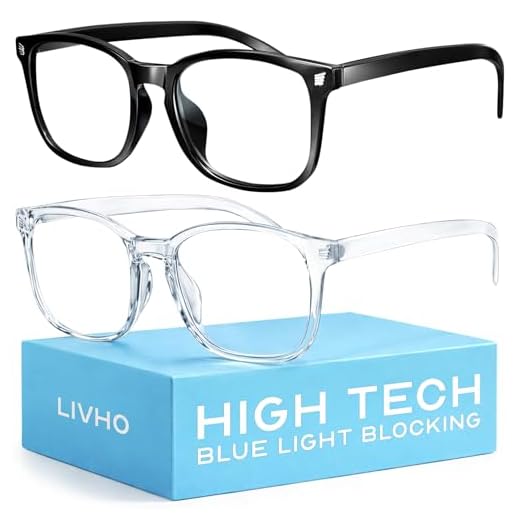
The livho High Tech Blue Light Glasses offer a stylish and practical solution for daily screen use. These non-prescription anti-blue light glasses enhance visual clarity and reduce eye fatigue during long work sessions. They feature an ultra-lightweight and flexible nylon frame material that ensures durability and comfortable long-term wearing. The transparent lenses protect your eyes from blue light and glare without severely distorting colors. Keeping a pair of these chic glasses at your desk is an easy way to upgrade your digital experience.
livho Blue Light Blocking Glasses
Final Thoughts
Reducing blue light exposure protects your long-term eye health. Start right now by enabling Night Shift or Night Light on your smartphone. Next, invest in blue light blocking glasses or an eye-care monitor for your workstation.
Frequently Asked Questions
Does reducing blue light actually help you sleep?
Yes, exposure to blue light in the evening can suppress your body’s production of melatonin. Melatonin is the hormone responsible for regulating your sleep cycle. Blocking blue light helps signal to your brain that it is time to rest.
Can I leave my blue light filter on all day?
You can safely leave your blue light filter on at all times if you prefer the warmer screen tone. Many people find that a constant low-level filter reduces general eye strain during daytime hours. It will only be an issue if you need perfect color accuracy for photo or video editing.
Do blue light glasses work if I already wear contacts?
Non-prescription blue light glasses are perfectly safe to wear over your contact lenses. They simply act as a physical barrier between the screen and your eyes. This combination allows you to maintain your corrected vision while blocking harsh glare.