PC gaming demands thousands of repetitive wrist movements that directly cause tendon inflammation and carpal tunnel syndrome if left unaddressed. Upgrading your surface area provides a necessary cushion between your joints and the hard desk edge. In our testing, we found that matching your specific grip and desk space to the right pad makes a massive difference in daily comfort.
This guide covers several different styles of mousepads that keep your arm in a neutral position. You will learn how gel rests, memory foam, and specific surface textures change your daily experience, and how different sizes accommodate high and low sensitivity aiming styles. Read on to find the exact setup that fits your gaming habits.
Gel Support for Neutral Wrist Alignment
Maintaining a neutral wrist angle is the most effective way to prevent joint pain during long matches. A dedicated gel bump physically lifts your lower palm to match the height of your mouse. The MROCO Ergonomic Mouse Pad features a built-in gel wrist rest built specifically for this purpose. It provides a smooth surface that allows your mouse to glide without catching. This physical lift stops you from bending your hand backward while clicking.
Stability is just as important as the cushion itself when you are in the middle of a tense game. This pad includes a non-slip base that grips the desk surface firmly. You do not have to worry about the entire mat sliding away when you make a sudden flick. The gel material holds its shape well over time and bounces back after heavy use. It is a simple addition to your desk that immediately corrects poor hand posture.
MROCO Ergonomic Gel Mouse Pad

Ultra-Thin Portability and Micro-Textures
Gamers who travel frequently often struggle to maintain good ergonomics on the road. Thick pads take up too much space in a backpack and can be annoying to unroll. The Razer Goliathus Speed Gaming Mousepad solves this with an ultra slim 1.5mm thickness. You can actually fit this mouse mat right between your laptop screen and keyboard before closing the lid. It also rolls up tightly without holding a permanent crease when you lay it flat again.
A thin profile does not mean you have to sacrifice tracking quality or control. This pad features super fine micro-textures engineered specifically to work with all mice. The surface provides the exact precision needed to focus on fine details during gameplay. Even the smallest movements register accurately across the anti-slip rubber base. You can even use Razer Synapse to calibrate your mouse to recognize this specific mat for optimal tracking.
Large Surfaces for Arm Aiming
Lowering your in-game sensitivity is a proven method to reduce wrist strain. This forces you to aim with your entire arm instead of making tiny, stressful flicks with your wrist. The Artisan Ninja FX Zero Mid X-Large Black Gaming Mouse Pad provides the massive space required for this playstyle. It measures 490 millimeters wide by 420 millimeters long to accommodate huge sweeping motions. You will never run off the edge of the mat during a crucial moment.
The materials used in a premium pad dictate how much friction your arm experiences. This specific model features a knitted polyester cloth surface that feels smooth against the skin. The middle layer consists of a 3mm single foamed foam built with a special structure. This provides a mid-level hardness that stops your mouse feet from sinking into the pad. A consistent glide reduces the physical effort needed to start and stop your mouse movements.
Massage Textures and Soft Cushioning
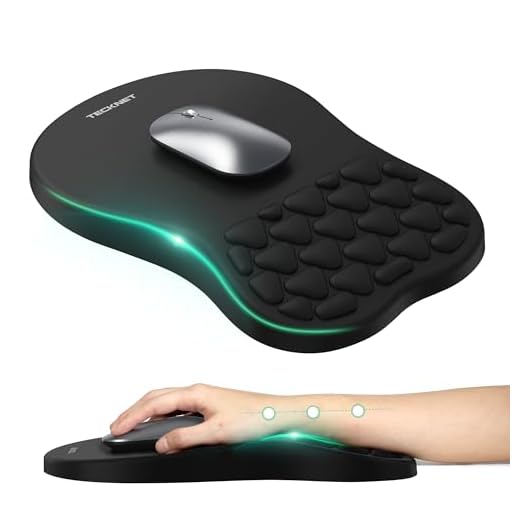
Standard flat wrist rests work well, but some gamers prefer a textured approach for added comfort. Small ridges and bumps can help stimulate the skin and relieve tension during long sessions. The TECKNET Ergonomic Mouse Pad with Wrist Rest incorporates a unique massage design into its cushion. This soft mousepad supports the natural curve of your hand while you play. The textured bumps press gently into the lower palm to reduce stiffness.
Heat buildup is a common complaint with solid gel or memory foam rests. The massage grooves on this pad actually allow a small amount of air to circulate under your wrist. This keeps your skin cooler and prevents annoying sweat buildup during intense summer gaming sessions. The soft material gives way just enough to eliminate hard pressure points on your bones. It is a highly comfortable option for players who spend all day at their computer.
TECKNET Ergonomic Massage Mouse Pad
Final Thoughts
Protect your joints from long-term damage by upgrading your desk setup today. Measure your available desk space, identify your aiming style, and purchase the ergonomic mousepad that best supports your daily gaming habits.
Frequently Asked Questions
Do wrist rests actually help with gaming?
Wrist rests keep your hand lifted and aligned with your forearm. This prevents the awkward upward bending that causes tendon strain over time.
Should I use a hard or soft mousepad for ergonomics?
Soft cloth pads provide a slight cushion for your palm and wrist. Hard pads offer less friction for faster movements, but they can feel harsh against your skin during long sessions.
How do I clean an ergonomic mousepad with a gel rest?
You can wipe down the gel portion with a damp cloth and mild soap. Avoid putting pads with attached wrist rests in the washing machine, as the agitation can tear the gel casing.