
Best Remote Work Tools – Top 8 Picks to Boost Your WFH

Our remote setups usually start as a laptop on a dining table and end up as a chaotic web of cables and eye strain. Building a workspace that actually serves you isn’t about buying every gadget you see on your feed; it is about eliminating the specific friction points that drain your focus by 2 PM.
After testing dozens of peripherals—from keyboards that claim to speed up typing to desk lamps promising to save your retinas—we found the tools that actually deliver. Here are the items that moved the needle on our daily productivity, backed by the specs that actually matter.
Top Picks
Skip the trial and error with these eight essentials that transformed our daily workflow from exhausting to effortless.




Sony WH-1000XM5 Premium Noise Canceling Headphones
You don’t realize how exhausting background noise is until you put these on and the room goes dead silent. The dual-processor, eight-microphone noise cancellation actually eliminates the hum of HVAC systems and distant traffic, letting you hit deep focus in minutes.
Priced at $278.00. Features an eight-microphone array driven by two processors for active noise cancellation. The battery provides 30 hours of playback, and a fast-charge USB-C capability yields three full hours of use from just a 3-minute charge.
Wearing these for an entire eight-hour workday is shockingly comfortable thanks to the lightweight frame. However, the sensitive touch controls on the right earcup are a liability—you will accidentally pause your music just by brushing your hand against it to adjust the fit.
Verdict
Best Overall for Deep Focus. Buy this if you work in a noisy environment and need immediate, drop-of-a-hat silence to hit your daily deadlines.
Logitech MX Vertical Wireless Ergonomic Mouse
Swapping to a vertical mouse feels bizarre for the first day, but your wrist will thank you by day three. Logitech nailed the geometry here; the 57-degree tilt forces your arm into a natural handshake position, eliminating the forearm tension that standard flat mice cause.
Costs $74.99. Designed with a strict 57° vertical angle that reduces muscular activity by 10 percent. Equipped with a 4000 DPI high-precision optical sensor that requires four times less physical hand movement compared to standard 1000 DPI mice.
The reduction in wrist fatigue is undeniable after a forty-hour week. Your forearm rests completely neutral. The specific flaw? It takes about a week to retrain your muscle memory, and you will knock it over reaching for your keyboard because it stands much taller.
Verdict
Best Ergonomic Mouse for All-Day Comfort. Buy this if you experience nagging wrist pain by mid-afternoon and need an ergonomist-approved intervention.
BenQ ScreenBar Halo 2 LED Monitor Light Bar
Overhead lighting is a primary culprit for digital eye strain, but this monitor bar fixes the issue without cluttering your desk. By throwing an asymmetrical beam downward at an 18-degree angle, it illuminates your keyboard without casting a single blinding glare on your screen.
Retails for $199.00. Fits monitor thicknesses from 0.17 to 2.36 inches and curved screens from 1000R to 1800R. Features an 18° anti-glare front light, rear ambient backlight, and a stepless wireless dial controlling color temperatures from 2700K to 6500K.
The dual-lighting system severely reduces eye fatigue when working late in a dark room. The wireless dial is visually stunning and responsive, but it goes to sleep to save battery—meaning you have to tap it once to wake it before you can adjust brightness.
Verdict
Best for Reducing Digital Eye Strain. Buy this if you frequently work past sunset and suffer from headaches caused by the harsh contrast of your monitor.
Keychron K3 Version 2 Ultra-Slim Wireless Mechanical Keyboard
Mechanical keyboards usually mean bulky profiles and loud clacking, but the K3 delivers tactile feedback in a sleek footprint. The 75-percent layout saves crucial desk space, while the shortened travel distance of the keys noticeably speeds up your typing rate once you adjust.
Priced at $63.00. Features a 75-percent compact layout with Mac and Windows keycaps included. Uses Broadcom Bluetooth 5.1 to connect up to three devices. The low-profile mechanical switches are 40 percent slimmer than standard switches inside an aluminum body.
Typing on this is lightning fast. Switching between a MacBook and a PC takes about two seconds via the Bluetooth toggle. The main drawback is the slim switch design; the shorter pre-travel distance means you will accidentally double-tap keys if you rest heavy fingers on the board.
Verdict
Best Low-Profile Keyboard for Faster Typing. Buy this if you want the tactile speed of a mechanical keyboard without the wrist-breaking height of traditional models.
Time Tracker Log Timesheet Spiral Notebook Two-Pack
Apps block out time, but physically writing down your hours forces you to confront exactly how you spend your day. The two-page spread isolates your hourly schedule on the left while leaving the right entirely open for granular client and task breakdowns.
Costs $9.99 for a two-pack. Each 9 x 6.1-inch spiral notebook contains 50 sheets, totaling 100 pages. Features a dedicated two-page spread: an hourly log on the left side and a detailed task and client breakdown on the right.
Having this open on the desk stops you from falling down a digital rabbit hole. The spiral binding lets it sit completely flat. The limitation? The left-side hourly grid is rigidly spaced, making it highly frustrating to log micro-tasks that take less than fifteen minutes.
Verdict
Best Tool for Mastering Time Blocking. Buy this if you struggle with digital distractions and need a hardcopy method to track your billable hours accurately.
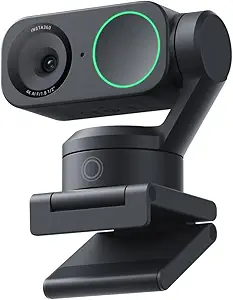
Insta360 Link 2 PTZ 4K Webcam
Looking washed out on video calls undermines your professional presence. The Link 2 solves this with a massive sensor that pulls in enough light to make you look crisp in a dim room, while the physical gimbal ensures you stay framed when shifting in your chair.
Costs $199.99. Features a large half-inch sensor shooting in 4K with HDR support. Uses Phase Detection Auto Focus and a physical two-axis gimbal for AI panning and tilting. Includes advanced AI noise-canceling audio algorithms to filter background noise.
The image quality is a staggering leap over built-in laptop cameras, rendering natural skin tones and a DSLR-like background blur. However, because the lens physically pans and tilts on a gimbal, it requires physical clearance above the camera; you cannot mount this flush underneath a monitor shelf.
Verdict
Best Premium Webcam for Professional Presence. Buy this if you present to clients frequently and need broadcast-quality video without setting up a full mirrorless camera.
ARZOPA 15.6-Inch Ultra-Slim Portable Laptop Monitor
Working from a single laptop screen severely bottlenecks your workflow when you travel. This ultra-slim ARZOPA panel gives you an instant second monitor that slips right into your laptop bag. It entirely eliminates the frustration of constantly alt-tabbing between a spreadsheet and a video call.
Priced at $75.99. This 15.6-inch IPS screen delivers a 1920 x 1080 Full HD resolution with a 178° viewing angle. It weighs just 1.6 lbs, measures 0.35 inches thick, and connects via plug-and-play USB-C with a built-in metal kickstand.
It deploys in five seconds—just plug in one USB-C cable for both power and video. The kickstand is surprisingly sturdy. The reality check? It is only 1080p, so if you are used to a 4K or Retina display, the text clarity will look noticeably softer side-by-side.
Verdict
Best Budget Portable Second Screen. Buy this if you travel frequently and desperately need dual screens to maintain your productivity on the road.
Ember Temperature Control Smart Mug 2
There is a unique psychological defeat in taking a sip of coffee you thought was hot, only to find it lukewarm. The Ember 2 prevents this by actively heating your brew. Having your coffee perfectly hot for hours feels entirely essential once you try it.
Costs $139.99. Holds internal temperatures between 120°F and 145°F for up to 80 minutes off the base. Features auto-sleep motion sensors, an IPX7 waterproof rating allowing submersion up to 1 meter, and a smart LED temperature indicator.
Dialing your coffee into exactly 135°F via the app and having it stay there through a 90-minute meeting is pure luxury. The fatal flaw is maintenance: it is strictly hand wash only. Accidentally run this mug through a dishwasher cycle, and the internal electronics are totally ruined.
Verdict
Best Luxury Gadget for Uninterrupted Workflow. Buy this if you are a slow coffee drinker who constantly throws half-finished, cold cups into the microwave.
Buying Guide
Ergonomics Over Aesthetics
When upgrading your workspace, prioritize the physical touchpoints that directly impact your body alignment before worrying about desk aesthetics. A vertical mouse with a 57-degree tilt might look odd, but it actively reduces the muscular strain that causes carpal tunnel syndrome. Keyboards with low-profile switches shorten the travel distance your fingers must endure, shaving off micro-seconds of fatigue per keystroke. If a product forces you to adapt to a painful posture just to look minimal, it is working against your productivity.
Managing Cognitive Load
Digital wellness isn’t just about eye strain; it is about protecting your attention span. Active noise cancellation with dedicated microphone arrays physically blocks the chaotic audio frequencies that shatter your deep work states. You need tools that shield your senses. Even analog solutions like a physical time-tracking notebook reduce cognitive load by removing the temptation to open another browser tab just to log your billable hours, stopping digital rabbit holes before they even start.
Lighting and Visual Health
Your eyes are the most overworked asset in a remote environment. Overhead room lighting creates intense screen glare, forcing you to squint and lean forward, which subsequently ruins your posture. A dedicated monitor light bar with a precise 18-degree asymmetrical angle solves this by illuminating your physical desktop without casting a single photon directly onto the glass of your monitor. Balancing the contrast between your screen and the surrounding room is critical for preventing late-day migraines.
Frictionless Peripherals
The best tools are the ones that require zero troubleshooting when you are five minutes late to a meeting. If a secondary portable monitor demands a driver installation or external power bricks, you will eventually stop using it. Look for plug-and-play USB-C compatibility that handles both power and video delivery in a single cord. The same applies to webcams; phase detection autofocus and hardware tracking mean you never have to open a software suite just to fix a blurry image before a call.
Evaluating Smart Features
Do not pay a premium for smart features unless they solve a specific, recurring annoyance. A temperature-controlled mug sounds like an extravagance, but if you routinely microwave cold coffee three times a day, the 80-minute battery life actually saves you time and mental friction. However, always check the maintenance reality. Devices with internal batteries or heating elements often require strict hand-washing or delicate handling. If the maintenance of a smart gadget takes longer than the problem it solves, skip it.
Frequently Asked Questions
Conclusion
Stop letting poor ergonomics and digital friction drain your energy before lunch. Pick the one bottleneck that frustrates you the most—whether it is wrist pain, chaotic background noise, or a cluttered single screen—and upgrade that specific tool today. Your workspace should adapt to your body, not the other way around.


Evernote for Everyone has been a game changer for my organization skills! I used to forget tasks all the time, but now I have everything in one place. That said, I’m curious, how do others use Evernote? Any tips for maximizing its features?
I use templates for recurring tasks, which saves me a lot of time. Have you tried that yet?
Evernote is a fantastic tool! Try using tags and notebooks for better categorization. It helps keep everything organized!
Yes! Also, the web clipper extension is a lifesaver. It’s perfect for saving articles and notes directly from your browser!
I’ve been using IPVanish VPN for a while now, and I love it! It’s super fast and reliable. But I read that some VPNs slow down the connection. Is that true? How does IPVanish compare?
I switched to IPVanish after trying another VPN that was super slow. The difference was night and day!
I totally agree! I was surprised by how fast it was, especially when streaming. Highly recommend it.
IPVanish is known for its speed, and most users report little to no slowdown. It’s one of the best options for maintaining a fast connection!
I recently purchased the All-in-One Conference Room Video Camera System, and wow! The video quality is phenomenal, and the audio is crystal clear. It’s made our virtual meetings so much more professional. I highly recommend it for anyone looking to upgrade their conferencing setup! Has anyone else tried this? What do you think? ????